
Introduction
This manual provides essential information for the safe and effective use of your JLL E110 Smart 2-in-1 Elliptical and Bike Cross Trainer. The E110 is a compact, low-impact cardio machine designed for home use, offering both elliptical and seated bike functionalities. It features a quiet belt drive, an 11 lb flywheel, and 8 magnetic resistance levels for smooth, controlled motion. Please read this manual thoroughly before assembly and operation.

Image: The JLL E110 Smart 2-in-1 Elliptical and Bike Cross Trainer in use, demonstrating its upright elliptical mode.
Safety Information
- Consult a physician before starting any exercise program.
- Ensure all bolts and nuts are securely tightened before each use.
- Place the machine on a flat, stable surface with adequate clearance around it.
- Keep children and pets away from the equipment during operation.
- Wear appropriate exercise clothing and footwear.
- Stop exercising immediately if you feel faint, dizzy, or experience pain.
- The maximum user weight for this machine is 220 pounds (approximately 100 kg).
Package Contents
Upon opening the package, verify that all components are present and undamaged. The package should include:
- Main Frame Assembly
- Handlebars (Fixed and Moving)
- Pedal Arms and Pedals
- Seat Post and Seat
- Console/Monitor
- Stabilizers (Front and Rear)
- Hardware Kit (bolts, washers, nuts, tools)
- User Manual (this document)
- Fitness APP information
Setup and Assembly
Assembly typically requires two people and can take approximately one hour. Follow the detailed instructions provided in the included assembly guide. Key steps include:
- Attach Stabilizers: Secure the front and rear stabilizers to the main frame using the provided hardware.
- Install Pedal Arms and Pedals: Connect the pedal arms to the flywheel mechanism and then attach the pedals. Ensure left and right pedals are correctly oriented.
- Mount Handlebars: Attach both the fixed and moving handlebars to their respective posts.
- Assemble Seat: Insert the seat post into the main frame and attach the seat. Adjust the seat height and position for comfort (refer to "Adjustable Comfort" section below).
- Connect Console: Attach the console to the handlebar post and connect all necessary sensor cables.
- Final Check: Double-check all connections and ensure all bolts are tightened.
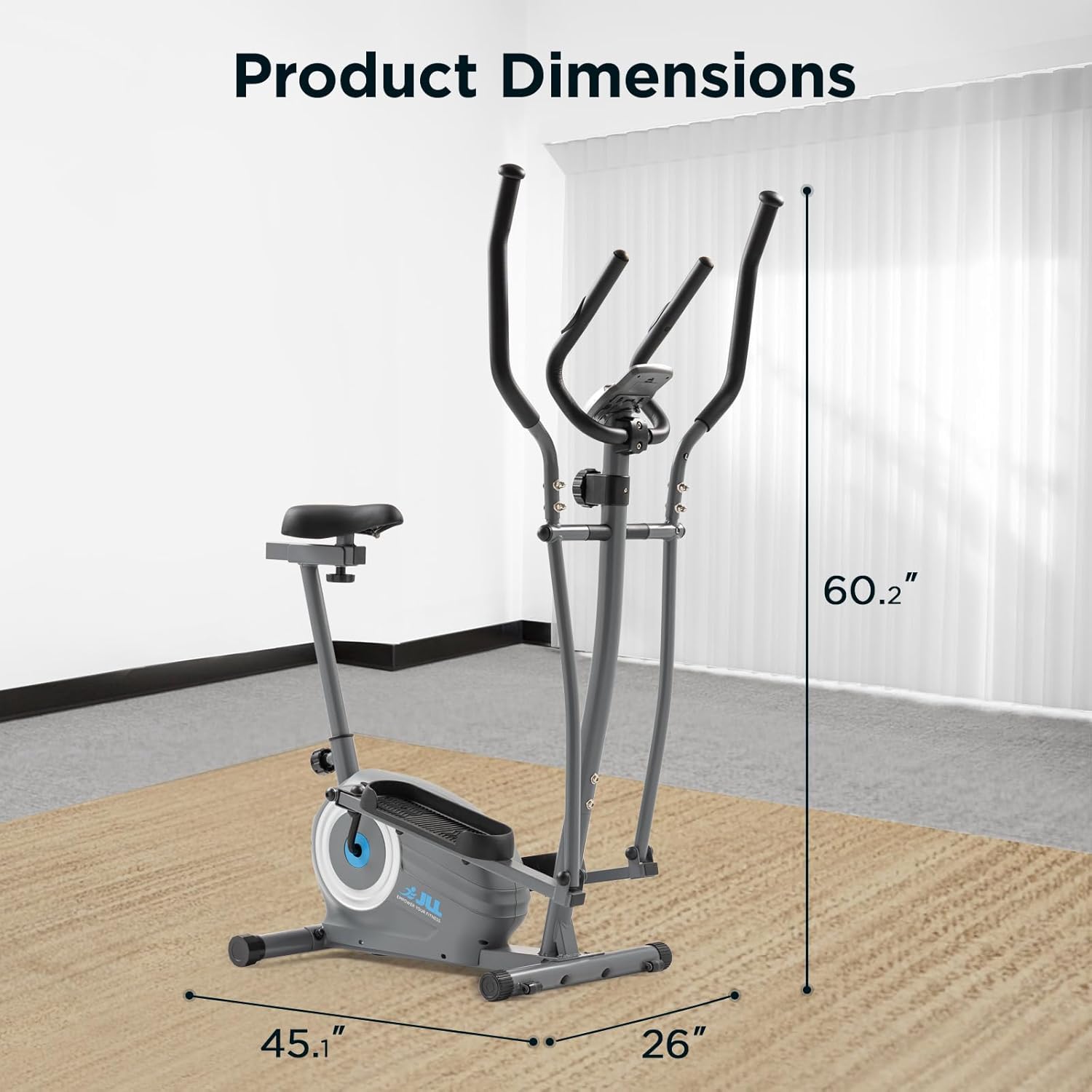
Image: Diagram illustrating the dimensions of the JLL E110, showing its compact footprint of 45.1 inches (depth) x 26 inches (width) x 60.2 inches (height).
Operating Instructions
1. 2-in-1 Functionality: Elliptical and Bike Modes
The JLL E110 offers versatile workout options as both an elliptical and a seated exercise bike.
- Elliptical Mode: Stand on the pedals and grasp the moving handlebars. Perform a natural elliptical motion, engaging both upper and lower body muscles.
- Seated Bike Mode: Adjust the seat to a comfortable height and position. Sit on the seat, place your feet on the pedals, and grasp either the fixed or moving handlebars. Pedal as you would on a stationary bike.

Image: Visual representation of the JLL E110 in both elliptical (standing) and seated bike modes, highlighting its versatile 2-in-1 design.
2. Resistance Adjustment
The E110 features 8 levels of magnetic resistance. To adjust the resistance, turn the resistance knob located on the main frame. Turn clockwise for higher resistance (more challenging workout) and counter-clockwise for lower resistance (easier workout).
3. Console and Tracking Display
The LCD console displays key workout metrics. Use the "MODE" button to cycle through different display functions:
- Time: Duration of your workout.
- Speed: Current speed.
- Distance: Distance covered during the current workout.
- Odometer: Total accumulated distance.
- SPM (Strides Per Minute) / RPM (Revolutions Per Minute): Rate of pedaling/striding.
- Pulse: Heart rate detected by hand-grip sensors.
- Calories: Estimated calories burned.
For heart rate monitoring, grip the pulse sensors on the fixed handlebars firmly. The console will display your heart rate after a few seconds.

Image: Close-up of the JLL E110 console, showing the LCD display, device holder, and integrated hand-grip pulse sensors for heart rate monitoring. Icons for Time, Speed, Calories, RPM, Odometer, and Distance are also visible.
4. Smart App Connectivity (SunnyFit App)
The JLL E110 features Bluetooth LE with FTMS compatibility, allowing it to sync with the SunnyFit app (no subscription required).
- Download the SunnyFit app from your device's app store.
- Enable Bluetooth on your smartphone or tablet.
- Open the SunnyFit app and follow the on-screen instructions to pair with your E110 machine.
- Once connected, the app can display real-time metrics, offer guided workouts, AI-powered plans, and access to scenic routes.

Image: A user exercising on the JLL E110 while viewing the SunnyFit app interface mirrored on a large screen, demonstrating smart app connectivity and real-time metric tracking.
Video: An official product video from JLL Fitness Ltd showcasing the features and 2-in-1 functionality of the JLL E110 Seated Elliptical Bike. It demonstrates the elliptical and bike modes, adjustable resistance, and real-time metric tracking.
Maintenance
Regular maintenance ensures the longevity and optimal performance of your JLL E110.
- Cleaning: Wipe down the machine with a damp cloth after each use to remove sweat and dust. Avoid abrasive cleaners.
- Check Connections: Periodically inspect all bolts, nuts, and moving parts for tightness. Tighten any loose components.
- Lubrication: The internal mechanisms are generally maintenance-free. If you notice any squeaking or unusual noises, consult customer support.
- Storage: When not in use, store the machine in a dry, cool place. The transport wheels allow for easy repositioning.

Image: A user tilting the JLL E110 to engage its front transport wheels, demonstrating the ease of moving the machine for storage or repositioning within a home.
Troubleshooting
If you encounter issues with your JLL E110, refer to the following common problems and solutions:
| Problem | Possible Cause | Solution |
|---|---|---|
| Console not displaying data | Loose sensor cable, dead batteries | Check all cable connections to the console. Replace console batteries. |
| Squeaking or grinding noise | Loose bolts, friction between parts | Inspect and tighten all visible bolts and connections. If noise persists, contact customer support. |
| Resistance not changing | Resistance cable disconnected or damaged | Ensure the resistance cable is properly connected to the knob and the flywheel mechanism. Contact support if damaged. |
| Inaccurate heart rate reading | Improper hand placement, dry hands | Ensure hands are firmly and fully gripping the sensors. Lightly moisten hands if they are too dry. Note that hand-grip sensors can sometimes be less accurate than chest straps. |
For issues not listed here or if solutions do not resolve the problem, please contact JLL Fitness customer support.
Specifications
| Feature | Detail |
|---|---|
| Model Name | E110 |
| Brand | JLL Fitness |
| Product Dimensions (LxWxH) | 45.1"D x 26"W x 60.2"H |
| Material | Alloy Steel |
| Resistance Mechanism | Magnetic |
| Number of Resistance Levels | 8 |
| Maximum Weight Recommendation | 220 Pounds |
| Maximum Stride Length | 10.6 Inches |
| Item Weight | 69 Pounds |
| Screen Size | 2.1 Inches |
| Included Components | Fitness APP, User Manual |
Warranty and Support
The JLL E110 comes with a warranty to ensure your peace of mind:
- Structural Frame: 3 Year Warranty
- Other Parts and Components: 180 Days Warranty
For warranty claims, technical assistance, or any questions regarding your JLL E110, please contact JLL Fitness Ltd customer support. You can find their contact information on their official website or through your purchase platform.
JLL Fitness is a UK-based supplier dedicated to quality and customer satisfaction, offering U.S.-based support.


