Introduction
The Infinity X1 7000 L Dual Power Flashlight is a versatile illumination tool designed for various applications. It features a powerful 7000 lumen output, a focusing beam for adjustable light spread, and dual power options, allowing operation with either a rechargeable battery or 9 Duracell AA batteries. Constructed from aircraft-grade aluminum, this flashlight is built for durability. It includes multiple brightness levels (High, Medium, Low), a power lock to prevent accidental activation, and heat lock protection for safe operation. Additionally, it is equipped with two USB ports (In/Out) for charging and power bank functionality.

Image: The Infinity X1 7000 L Dual Power Flashlight, showcasing its design and size when held in a hand.
Setup
1. Battery Installation
The Infinity X1 flashlight offers dual power options: a rechargeable battery or 9 AA batteries. Ensure the flashlight is powered off before installing or replacing batteries.
- Unscrew the tail cap of the flashlight by turning it counter-clockwise.
- For Rechargeable Battery: Insert the included rechargeable battery into the battery compartment with the positive (+) end facing towards the flashlight head.
- For AA Batteries: If using AA batteries, insert 9 Duracell AA batteries into the provided battery cartridge, ensuring correct polarity (+/-) for each battery. Then, insert the loaded cartridge into the flashlight.
- Screw the tail cap back on clockwise until securely tightened.

Image: The flashlight disassembled, illustrating the separate compartments for the rechargeable battery and the AA battery cartridge.
2. Charging the Rechargeable Battery
Before first use, fully charge the rechargeable battery. The flashlight features a USB-C input port for convenient charging.
- Locate the USB-C input port on the flashlight body.
- Connect the included USB-C cable to the flashlight's input port.
- Connect the other end of the USB-C cable to a compatible USB power source (e.g., wall adapter, computer USB port).
- An indicator light will show the charging status. Once fully charged, disconnect the cable.

Image: The flashlight with a USB-C cable connected to its charging port, demonstrating the charging setup.
Operating Instructions
1. Power On/Off and Brightness Levels
The flashlight is operated via a single power button located on the body.
- To Power On: Press the power button once. The flashlight will turn on in the last used brightness mode.
- To Cycle Brightness: While the flashlight is on, press the power button repeatedly to cycle through High, Medium, and Low brightness levels.
- To Power Off: Press and hold the power button for approximately 2 seconds.
2. Focusing Beam
The Infinity X1 features a focusing beam mechanism, allowing you to adjust the light from a narrow spot to a wide flood.
- Gently push or pull the head of the flashlight forward or backward to adjust the beam focus.
- Pushing the head forward typically narrows the beam for long-distance illumination.
- Pulling the head backward typically widens the beam for broad area lighting.

Image: A top-down view of the flashlight's head, illustrating the lens and the mechanism for adjusting the focusing beam.
Image: A front view of the flashlight with its beam illuminated, demonstrating the light output.
3. Power Lock
To prevent accidental activation and conserve battery life, the flashlight is equipped with a power lock feature.
- To Activate Power Lock: While the flashlight is off, press and hold the power button until the indicator light flashes (refer to product packaging for specific indicator behavior).
- To Deactivate Power Lock: Press and hold the power button again until the indicator light confirms deactivation.
4. Heat Lock Protection
The flashlight incorporates heat lock protection to prevent overheating during prolonged use, especially at high brightness levels. If the flashlight becomes excessively hot, the system may automatically reduce the brightness output to a safer level. This is a normal function designed to protect the internal components and ensure user safety.
5. USB Ports (In/Out)
The flashlight features two USB ports: a USB-C input for charging the flashlight's internal battery, and a USB-A output port, allowing the flashlight to function as a power bank to charge other small electronic devices.
- USB-C Input: Use this port to charge the flashlight's internal rechargeable battery.
- USB-A Output: Connect your device's charging cable to this port to use the flashlight as a portable power source.
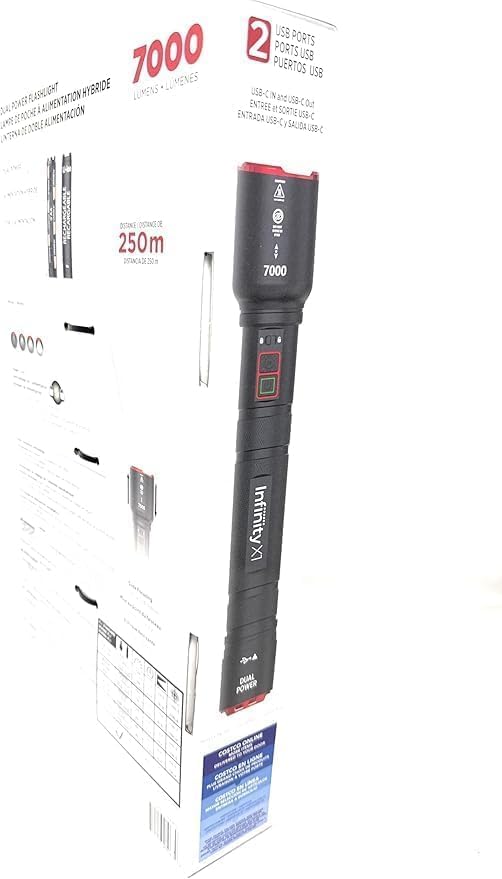
Image: A section of the product packaging, clearly indicating the presence of USB ports (In/Out) and the 7000 lumen output.
Maintenance
1. Cleaning
- Wipe the flashlight body with a soft, damp cloth. Do not use abrasive cleaners or solvents.
- Keep the lens clean for optimal light output. Use a lens cleaning cloth if necessary.
2. Battery Care
- For the rechargeable battery, avoid fully discharging it frequently to prolong its lifespan. Recharge it regularly.
- If using AA batteries, remove them if the flashlight will not be used for an extended period to prevent leakage.
3. Storage
- Store the flashlight in a cool, dry place away from direct sunlight and extreme temperatures.
Troubleshooting
| Problem | Possible Cause | Solution |
|---|---|---|
| Flashlight does not turn on. | Low or depleted battery. Power lock activated. Incorrect battery installation. | Charge the rechargeable battery or replace AA batteries. Deactivate power lock. Ensure batteries are installed with correct polarity. |
| Light is dim or flickers. | Low battery. Loose connections. | Recharge or replace batteries. Ensure tail cap and head are securely tightened. |
| Flashlight gets hot during use. | Normal operation at high brightness. Heat lock protection engaged. | This is normal. The heat lock protection will automatically adjust brightness if necessary. Reduce brightness level if discomfort occurs. |
| Cannot charge external devices via USB-A port. | Flashlight battery is low. Device not compatible. | Ensure flashlight battery is sufficiently charged. Verify device compatibility and cable connection. |
Specifications
| Feature | Detail |
|---|---|
| Model Number | 1806323 |
| Light Output | 7000 Lumens |
| Power Source | Rechargeable Battery or 9 AA Duracell Batteries |
| Brightness Levels | High, Medium, Low |
| Beam Type | Focusing Beam (Narrow to Wide) |
| Body Material | Aircraft Grade Aluminum |
| Special Features | Power Lock, Heat Lock Protection, 2 USB Ports (In/Out) |
| Included Components | 1 Flashlight, 1 USB Cable, 9 AA Duracell Batteries |
| Color | Black |
| Light Source Type | LED |

Image: A section of the product packaging displaying detailed specifications and important warnings regarding product use.
Warranty Information
Specific warranty details for the Infinity X1 7000 L Dual Power Flashlight are typically provided at the point of purchase or within the product packaging. Please refer to any included warranty cards or contact the retailer/manufacturer for precise terms and conditions regarding coverage and duration.
Support
For technical assistance, troubleshooting beyond this manual, or inquiries regarding your Infinity X1 7000 L Dual Power Flashlight, please contact the manufacturer or the retailer from whom the product was purchased. Have your model number (1806323) and purchase information ready when seeking support.
