
1. Introduction
This manual provides detailed instructions for the safe and effective operation of the Skyking MetroQ MTQ 4045 Portable Benchtop Digital Multimeter. This device is a high-precision, 30000-count, True RMS multimeter designed for various electrical measurements, featuring a PC interface and a clear 3.5-inch TFT display. Please read this manual thoroughly before using the instrument and keep it for future reference.
2. Safety Information
Always observe the following safety precautions to prevent personal injury and damage to the instrument:
- Do not exceed the maximum input limits for any function.
- Use caution when working with voltages above 30V AC RMS, 42V peak, or 60V DC. These voltages pose a shock hazard.
- Ensure the test leads are in good condition and properly connected before making any measurements.
- Do not operate the multimeter if it appears damaged or if the case is open.
- Replace the battery and fuses only with the specified type and rating.
- Avoid using the device in wet environments or in the presence of explosive gases or dust.
- Always disconnect power to the circuit and discharge high-voltage capacitors before measuring resistance, continuity, or diodes.
3. Product Overview
The MetroQ MTQ 4045 is a versatile benchtop digital multimeter offering a wide range of measurement capabilities and advanced features. Its compact design makes it portable, while the 3.5-inch TFT display provides clear, high-resolution readings.
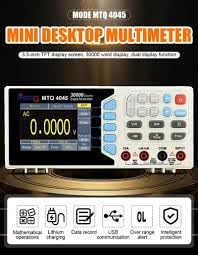
Figure 3.1: Front view of the MetroQ MTQ 4045 Digital Multimeter. The display shows a voltage reading, and the control panel includes various function buttons and input terminals. Key features highlighted are mathematical operations, lithium charging, data recording, USB communication, over-range indication, and intelligent protection.
Key Features:
- Display: 3.5-inch TFT screen with 480x320 resolution, 4 3/5 Digits (30000 Counts) HD Dual Display.
- Measurement Capabilities: 1000 V DC, 750 V AC, 300µA ~ 10 A AC/DC, 300 MΩ Resistance, Capacitance, Frequency (up to 30MHz), Duty Cycle, Temperature, dBm.
- Advanced Functions: True RMS, Auto Ranging, Mathematical Operations, Data Hold, Relative Measurements, Max/Min Recording, Continuity & Diode Test.
- Connectivity: PC Interface via Type-C USB for data communication and external power adapter connection.
- Power: Rechargeable battery with Type-C USB charging.
- Safety: Built-in current fuses (600mA 250V/10A 250V).
- Convenience: Timer Shutdown Function, Auto Power Off, User-friendly Interface.
4. Setup
4.1 Unpacking and Inspection
Carefully unpack the multimeter and all included accessories. Inspect the device for any signs of damage. If any damage is found, contact your supplier immediately.
Included Components:
- MetroQ MTQ 4045 Digital Multimeter
- Test Leads
- Temperature Probe
- Rechargeable Battery (pre-installed or separate)
- User Manual (this document)
- Software CD (for PC interface)
4.2 Powering the Device
The MTQ 4045 operates on a rechargeable battery. Before first use, ensure the battery is fully charged. Connect the multimeter to a standard USB power adapter using a Type-C USB cable. The charging indicator will show the charging status.
The device can also be powered directly via an external Type-C power adapter for continuous benchtop operation.
4.3 PC Interface Setup
To utilize the PC interface functionality, install the provided software from the included CD onto your computer. Connect the multimeter to your PC using a Type-C USB cable. Follow the software instructions for driver installation and data communication setup.
5. Operating Instructions
5.1 Basic Measurements
To perform a measurement:
- Turn on the multimeter using the power button.
- Select the desired measurement function (e.g., VDC, VAC, Resistance, Current) using the function buttons on the control panel. The display will show the selected mode.
- Connect the test leads to the appropriate input jacks on the multimeter. Typically, the black lead connects to the "COM" jack, and the red lead connects to the jack corresponding to the measurement type (e.g., "VΩHz" for voltage/resistance/frequency, "mA" or "A" for current).
- Connect the test leads to the circuit or component under test.
- Read the measurement value on the 3.5-inch TFT display. The multimeter features auto-ranging, which automatically selects the appropriate range for the measurement.
5.2 Specific Measurement Functions
- Voltage (DC/AC): Connect leads to VΩHz and COM. Select DCV or ACV. Max input 1000V DC / 750V AC.
- Current (DC/AC): Connect leads to mA/A and COM. Select DCA or ACA. Ensure correct fuse rating for current range. Max input 10A.
- Resistance: Connect leads to VΩHz and COM. Select Ω. Disconnect power from the circuit before measuring.
- Capacitance: Connect leads to VΩHz and COM. Select Capacitance. Ensure capacitor is discharged before measuring.
- Frequency/Duty Cycle: Connect leads to VΩHz and COM. Select Hz/%.
- Diode Test: Connect leads to VΩHz and COM. Select Diode.
- Continuity Test: Connect leads to VΩHz and COM. Select Continuity. An audible tone indicates continuity.
- Temperature: Connect the temperature probe to the designated input jacks. Select Temperature function.
5.3 Advanced Features
- True RMS: Provides accurate measurements for non-sinusoidal AC waveforms.
- Dual Display: Allows simultaneous display of two related measurements.
- Data Hold: Freezes the current reading on the display.
- Relative Measurement: Measures the difference between a stored reference value and the current reading.
- Max/Min Recording: Records the maximum and minimum values over a measurement period.
- Mathematical Operations: Perform calculations directly on the device. Refer to the software manual for detailed functions.
- Timer Shutdown: Configurable timer for automatic power off to conserve battery.
- Auto Power Off: The device will automatically power off after a period of inactivity to save battery life. This feature can usually be disabled or adjusted in settings.
6. Maintenance
6.1 Cleaning
Wipe the case with a damp cloth and mild detergent. Do not use abrasives or solvents. Ensure the device is powered off and disconnected from any power source before cleaning.
6.2 Battery Charging and Replacement
Charge the internal rechargeable battery using a Type-C USB cable connected to a suitable power source. If the battery performance degrades significantly, it may need replacement. Refer to the service manual or contact customer support for battery replacement procedures.
6.3 Fuse Replacement
The multimeter contains built-in current fuses (600mA 250V and 10A 250V) to protect against overcurrent. If the current measurement function fails, the fuse may need replacement. Fuse replacement should only be performed by qualified personnel. Use only fuses of the specified type and rating to maintain safety and performance.
- 600mA Fuse: For mA range.
- 10A Fuse: For 10A range.
7. Troubleshooting
| Problem | Possible Cause | Solution |
|---|---|---|
| Multimeter does not power on. | Low or discharged battery. | Charge the battery using the Type-C USB cable. |
| No reading or "OL" (Overload) displayed. | Incorrect function selected, range exceeded, or open circuit. | Verify function selection, check test lead connections, ensure circuit is closed, or select a higher range if available (though auto-ranging should handle this). |
| Inaccurate readings. | Poor test lead contact, external interference, or uncalibrated device. | Ensure good contact, move away from strong electromagnetic fields, or consider professional calibration if issues persist. |
| Current measurement not working. | Blown current fuse. | Replace the appropriate current fuse (600mA or 10A) with the specified type and rating. This should be done by qualified personnel. |
| PC software not connecting. | Driver not installed, incorrect cable, or software issue. | Ensure drivers are installed from the CD, use the correct Type-C USB cable, and check software settings. |
8. Specifications
| Parameter | Value |
|---|---|
| Brand | Skyking |
| Model Number | MTQ 4045 |
| Display | 3.5-inch TFT, 480*320 resolution, 30000 Counts, HD Dual Display |
| DC Voltage | Up to 1000 V |
| AC Voltage | Up to 750 V |
| DC/AC Current | 300µA ~ 10 A |
| Resistance | Up to 300 MΩ |
| Capacitance | Yes (Range not specified, but implied by feature list) |
| Frequency | Up to 30 MHz |
| Temperature | Yes (with included probe) |
| Special Features | True RMS, Auto Ranging, Mathematical Operations, PC Interface, Dual Display, Timer Shutdown, Auto Power Off, Data Hold, Relative Measurements, Max/Min Recording, Continuity & Diode Test |
| Fuses | 600mA 250V, 10A 250V |
| Connectivity | Type-C USB (for PC and charging) |
| Power Source | Rechargeable Battery, External Type-C Power Adapter |
| Item Weight | 825 Grams |
| Dimensions (L x W x H) | 20 x 9 x 7 Centimeters |
| Manufacturer | METRO Q |
| Country of Origin | India |
9. Warranty and Support
For warranty information, please refer to the warranty card included with your product or contact your point of purchase. For technical support, service, or inquiries regarding replacement parts, please contact Skyking Instruments directly.
Skyking Instruments Contact Information:
- Refer to the contact details provided in the product packaging or on the official Skyking website.
- Packer Contact Information: Skyking Instruments, Mumbai, INDIA
Please have your model number (MTQ 4045) and purchase date available when contacting support.