
1. Overview
The SORDA Karaoke Machine Model 218 is a portable 80W Bluetooth speaker designed for both adults and children. It features dual 4-inch subwoofer speakers for powerful, balanced sound, two wireless microphones with echo adjustment, and versatile connectivity options including Bluetooth 5.3, USB, TF Card, and AUX. The machine also includes vibrant LED lights that pulse to the music, enhancing the atmosphere for any gathering.
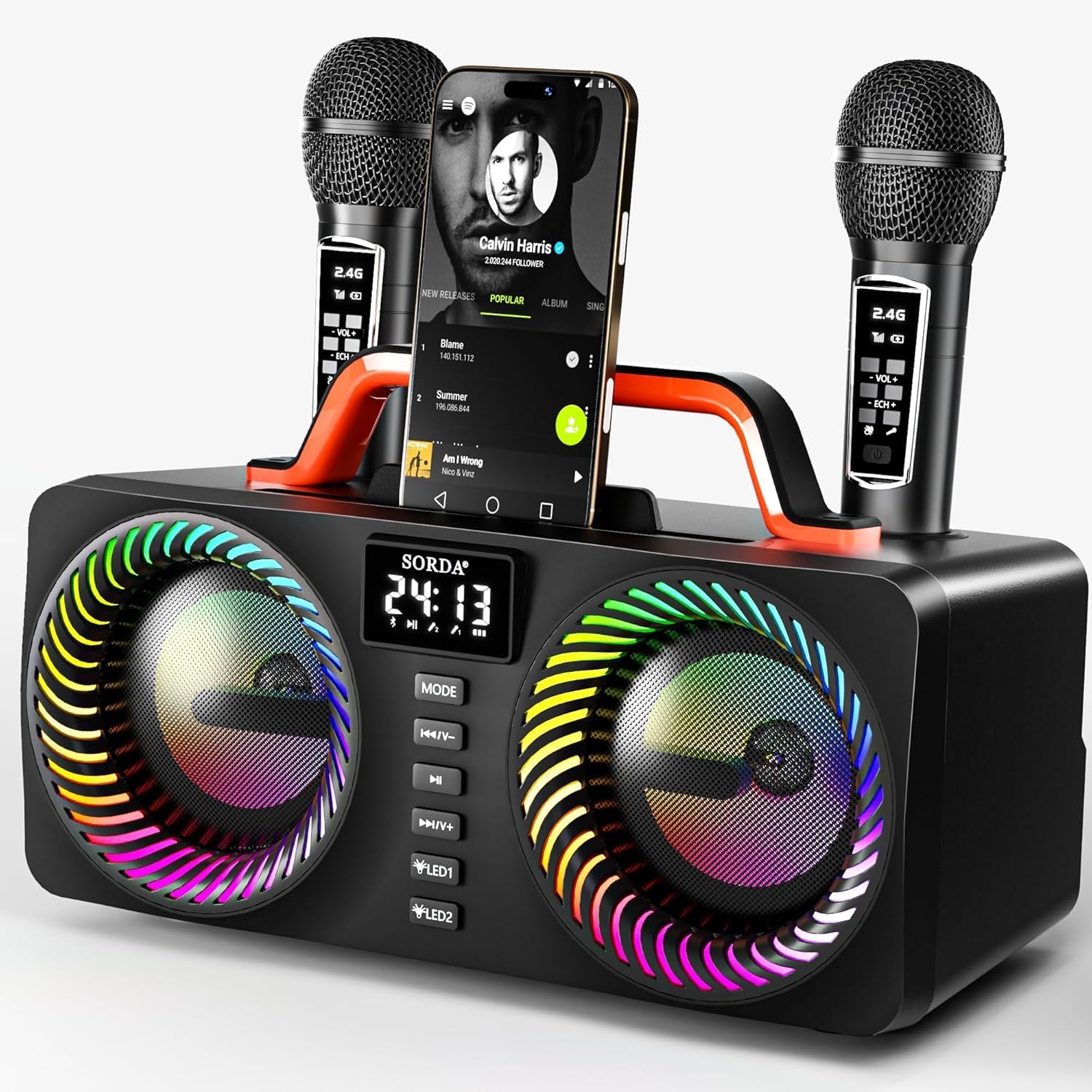
Figure 1: SORDA Karaoke Machine Model 218 with two wireless microphones.
2. What's in the Box
- 1 x Bluetooth Speaker (Karaoke Machine)
- 2 x Wireless Microphones
- 1 x AUX Cable
- 1 x USB-C Charging Cable
- 1 x User Manual

Figure 2: Package contents of the SORDA Karaoke Machine.
3. Product Features
- Powerful Sound: Dual 4-inch subwoofer speakers deliver 80W peak balanced, surround sound.
- Microphone Controls: Accompaniment and echo adjustment, independent mic and music volume controls.
- Multiple Connections: Bluetooth 5.3 for stable audio, supports USB, TF Card, and AUX playback.
- Long-Lasting Battery: 4000mAh battery provides 12 hours of playtime on a 2-3 hour charge. Microphones recharge in the speaker or via USB-C.
- Vibrant LED Lights: Two rings of LED lights pulse to music, with customizable modes.

Figure 3: High-quality sound and power output of the karaoke machine.
4. Setup
- Charge the Speaker: Connect the provided USB-C cable to the speaker's Type-C port (DC 5V) and a compatible power adapter (not included). The 4000mAh battery provides 12 hours of playtime after a 2-3 hour charge.
- Charge Microphones: Place the wireless microphones into the designated charging slots on top of the speaker, or charge them individually using a USB-C cable.
- Power On: Flip the 'POWER' switch on the back of the speaker to 'ON'. The LED display will light up.
- Microphone Activation: Press the power button on each microphone to turn them on. They will automatically connect to the speaker.

Figure 4: Microphone charging methods.
5. Operating Instructions
Speaker Controls:
- MODE Button: Press to switch between input modes (Bluetooth, USB, TF Card, AUX).
- Previous/Volume Down (K/V-): Short press for previous track, long press to decrease volume.
- Play/Pause (||): Press to play or pause audio.
- Next/Volume Up (I/V+): Short press for next track, long press to increase volume.
- LED1 Button: Controls the inner ring LED lights. Press to cycle through modes or long press to turn off.
- LED2 Button: Controls the outer ring LED lights. Press to cycle through modes or long press to turn off.
Microphone Controls:
- Power Button: Press to turn the microphone on/off.
- Volume (+/-): Adjusts microphone volume.
- Echo (+/-): Adjusts the echo effect level.
- Sound Effects: Buttons for applause, laughter, and other fun sound effects.

Figure 5: Speaker control panel overview.
6. Connectivity
- Bluetooth Connection: Turn on the karaoke machine and switch to Bluetooth mode. Open Bluetooth settings on your device (phone, TV, tablet, PC) and select "SORDA" to pair.
- AUX Input: Connect your device using the provided AUX cable. If both Bluetooth and AUX are connected, press the MODE button to switch.
- USB/TF Card: Insert a USB drive or TF card into the respective port for direct audio playback.

Figure 6: Multi-connection options.
7. LED Lighting
The SORDA Karaoke Machine features dynamic LED lights to enhance your experience. There are two rings of LED lights: an inner ring and an outer ring, each with multiple modes. Use the LED1 and LED2 buttons on the speaker's control panel to cycle through different lighting combinations or long-press to turn them off. The lights pulse to the rhythm of the music, creating a party atmosphere.

Figure 7: Dynamic LED light show in action.
8. Maintenance
- Keep the device away from water and excessive moisture.
- Clean the surface with a soft, dry cloth. Do not use abrasive cleaners.
- Store in a cool, dry place when not in use for extended periods.
- Ensure microphones are fully charged before use to maximize performance.
9. Troubleshooting
| Problem | Solution |
|---|---|
| No sound from speaker | Check volume levels on both speaker and connected device. Ensure correct input mode is selected. |
| Microphone feedback (sharp sounds) | Avoid holding the microphone too close to the speaker. Reduce microphone volume or echo level. |
| Bluetooth not connecting | Ensure the speaker is in Bluetooth mode and your device's Bluetooth is on and discoverable. Try restarting both devices. |
| LED lights not working | Press the LED1/LED2 buttons to cycle through modes. Long-press to ensure they are not turned off. |
10. Specifications
- Brand: SORDA
- Model Name: SD-218-BMA
- Model Number: 218
- Color: Black
- Power Output: 15W+15W (80W Peak)
- Power Source: Battery Powered (4000mAh)
- Connectivity Technology: Auxiliary, Bluetooth, USB
- Bluetooth Version: 5.3
- Microphones: 2 Wireless Microphones
- Item Weight: 5.25 Pounds
- Item Dimensions (D x W x H): 6.06"D x 12.64"W x 5.91"H
- Compatible Devices: Laptop, Smartphone, Tablet, Television, Computer
11. Warranty and Support
SORDA offers a 12-month warranty for this product. For any issues or professional customer service, please contact us via Amazon. We are committed to ensuring your satisfaction with the SORDA Karaoke Machine.