
1. Product Overview
The QFUN SL389 A4 Laminator is designed for protecting various documents, photos, and papers with a durable, smooth finish. It supports both hot and cold lamination modes and is suitable for A4 size documents up to 23cm wide. This compact and versatile machine is ideal for home, school, and small office use.
Key features include quick heating, an anti-jam ABS button, and integrated accessories for enhanced functionality.
Package Contents and Dimensions
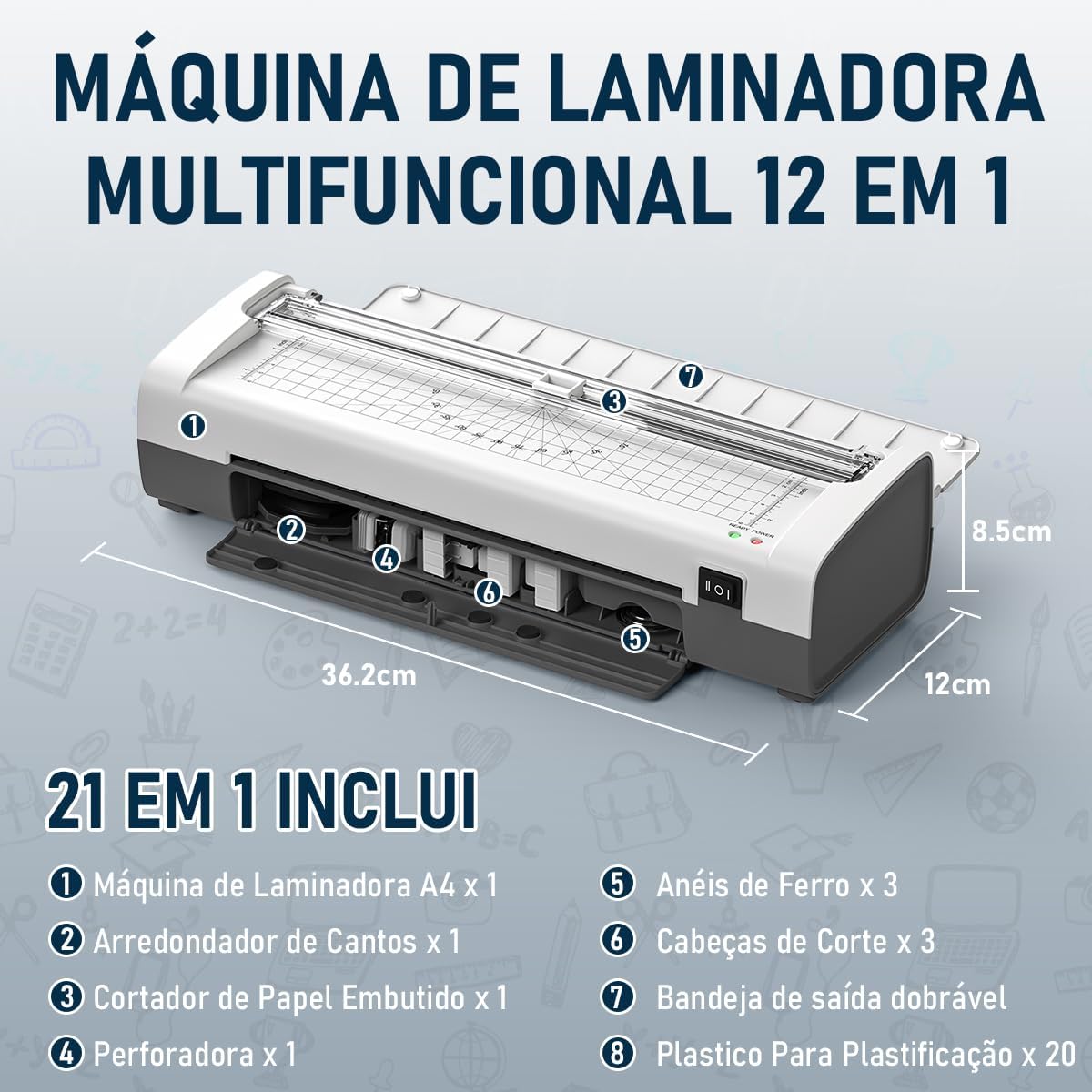
The package typically includes the QFUN SL389 Laminator unit, a corner rounder, a built-in paper cutter, a hole punch, and a starter set of laminating pouches. The machine's compact design ensures it fits easily into various workspaces.
2. Setup
- Unpack the Laminator: Carefully remove the laminator and all accessories from the packaging.
- Place on a Stable Surface: Position the laminator on a flat, stable, and heat-resistant surface. Ensure there is enough space behind the machine for laminated documents to exit freely.
- Connect Power: Plug the power cord into a suitable 127V electrical outlet.
- Prepare the Output Tray: Extend the foldable output tray at the rear of the machine to support laminated documents as they exit.

3. Operating Instructions
Power On and Mode Selection
- Turn On: Locate the HOT/OFF/COLD switch on the side of the laminator.
- Select Mode:
- For Hot Lamination: Switch to "HOT". The red "POWER" indicator light will illuminate. Wait for the green "READY" light to turn on (approximately 3-4 minutes) before laminating.
- For Cold Lamination: Switch to "COLD". No warm-up time is required for cold lamination.

Laminating Documents
- Prepare Document: Place your document or photo inside a laminating pouch, ensuring it is centered and there is an even border around the edges.
- Insert Pouch: Once the laminator is ready (green light on for hot mode), insert the sealed edge of the laminating pouch into the machine's entry slot.
- Guide the Pouch: The machine will automatically feed the pouch through. Do not pull or push the pouch.
- Retrieve Laminated Document: Once the pouch exits completely from the rear output tray, carefully remove it. Allow it to cool on a flat surface for a few moments.

Using Integrated Accessories
The QFUN SL389 includes several integrated tools for finishing your documents:
- Paper Cutter: The built-in paper cutter allows for precise trimming of documents. It offers three cutting styles: straight, perforated, and wavy. Always use the cutter on a flat, stable surface and ensure fingers are clear of the blade.
- Corner Rounder: Use the corner rounder to give your laminated documents a professional, smooth, rounded edge, preventing sharp corners.
- Hole Punch: The hole punch can be used to create holes in your documents for binding or filing, often used with the included metal rings.


Video Demonstration: Lamination Process
Video: A demonstration of the QFUN SL389 A4 Laminator in action, showing a certificate being fed through the machine for lamination. This video illustrates the smooth feeding and output of the laminated document.
4. Maintenance
- Cleaning: Ensure the laminator is unplugged and completely cool before cleaning. Use a soft, dry cloth to wipe the exterior. For stubborn marks, a slightly damp cloth can be used, but avoid getting moisture into any openings.
- Roller Cleaning: Periodically run a cleaning sheet (available separately) through the laminator to remove any adhesive residue from the rollers. This helps maintain lamination quality and prevents jams.
- Storage: When not in use, store the laminator in a clean, dry place away from direct sunlight and extreme temperatures. Ensure the output tray is folded back into its compact position.
5. Troubleshooting
If you encounter issues with your QFUN SL389 Laminator, refer to the following common problems and solutions:
| Problem | Possible Cause | Solution |
|---|---|---|
| Document Jammed | Pouch inserted incorrectly, too thick, or misaligned. | Press and hold the ABS button to release the rollers and gently pull the pouch out. Ensure the pouch is inserted straight and is within the recommended thickness. |
| Poor Lamination Quality (Bubbles/Wrinkles) | Laminator not fully heated (hot mode), incorrect pouch thickness, or old pouches. | For hot lamination, wait for the green "READY" light. Use appropriate pouch thickness (80-125 microns). Ensure pouches are fresh and stored correctly. |
| Laminator Not Heating | Not plugged in, power switch off, or internal fault. | Check power connection. Ensure the switch is set to "HOT". If the problem persists, contact customer support. |
| Laminator Not Feeding | Pouch not inserted correctly, rollers dirty, or motor issue. | Ensure the pouch is inserted straight. Clean the rollers with a cleaning sheet. If the issue continues, contact support. |

6. Specifications
| Feature | Detail |
|---|---|
| Brand | QFUN |
| Model Number | SL389 |
| Manufacturer | Huizhou Sunrise Technology Co., LTD |
| Sheet Size Compatibility | Up to A4 (23cm width) |
| Lamination Modes | Hot and Cold |
| Pouch Thickness | 80 to 125 microns (up to 0.5mm) |
| Warm-up Time (Hot Mode) | 3-4 minutes |
| Lamination Speed | 340mm/min |
| Product Dimensions (L x W x H) | 36.3 x 13.3 x 8.7 cm |
| Product Weight | 1.07 kg |
| Voltage | 127V |
| Integrated Features | Paper Cutter (3 styles), Corner Rounder, Hole Punch |
7. Warranty and Support
For warranty information, technical support, or service inquiries, please refer to the contact details provided with your purchase documentation or visit the official QFUN website. Keep your proof of purchase for warranty claims.