1. Product Overview
The JUN-ELECTRON 5m Neon LED Strip is a flexible, waterproof lighting solution designed for both indoor and outdoor decorative applications. It offers a wide range of colors and dynamic lighting effects, controllable via a dedicated mobile application or an included remote control.

This image displays the complete product package, including the 5-meter neon LED strip, a remote control for basic functions, and a smartphone screen illustrating the mobile application interface for advanced control.
Key Features:
- Vibrant Illumination: Offers 16 million colors with adjustable brightness and color settings to suit various environments and moods.
- Music Synchronization: Features a built-in microphone that allows the light strip to synchronize with music or other ambient sounds, creating dynamic lighting effects.
- Flexible Design: The strip is highly flexible, allowing it to be bent into various patterns and cut to specific lengths for customized installations.
- IP67 Waterproof Rating: The LED strip itself is IP67 waterproof, making it suitable for outdoor use. Note: The controller unit is not waterproof and must be protected from moisture.
- Energy Efficient: Utilizes low-voltage technology for reduced energy consumption compared to traditional neon lighting.
- Versatile Application: Ideal for decorating living rooms, bedrooms, gaming setups, walls, outdoor bars, windows, and for creating festive atmospheres for holidays.
2. Setup Instructions
Follow these steps to properly install your neon LED strip:
- Prepare the Surface: Ensure the installation surface is clean, dry, and smooth for optimal adhesion and clip stability.
- Install Mounting Clips: Use the provided screws to securely fasten the mounting buckles to your desired surface. Space the clips evenly to support the strip's shape.
- Measure and Cut (Optional): If a shorter length is required, carefully cut the LED strip only at the designated cutting marks. Refer to the product markings for safe cutting points.
- Secure the LED Strip: Gently press the neon LED strip into the installed mounting buckles, ensuring it is held firmly in place.
- Connect Power: Plug the USB connector of the LED strip into a compatible USB power source (e.g., a USB wall adapter, power bank, or computer USB port).
- Download App (Optional): For advanced control features, download the recommended mobile application from the App Store or Google Play. Search for the app name provided in the product packaging.
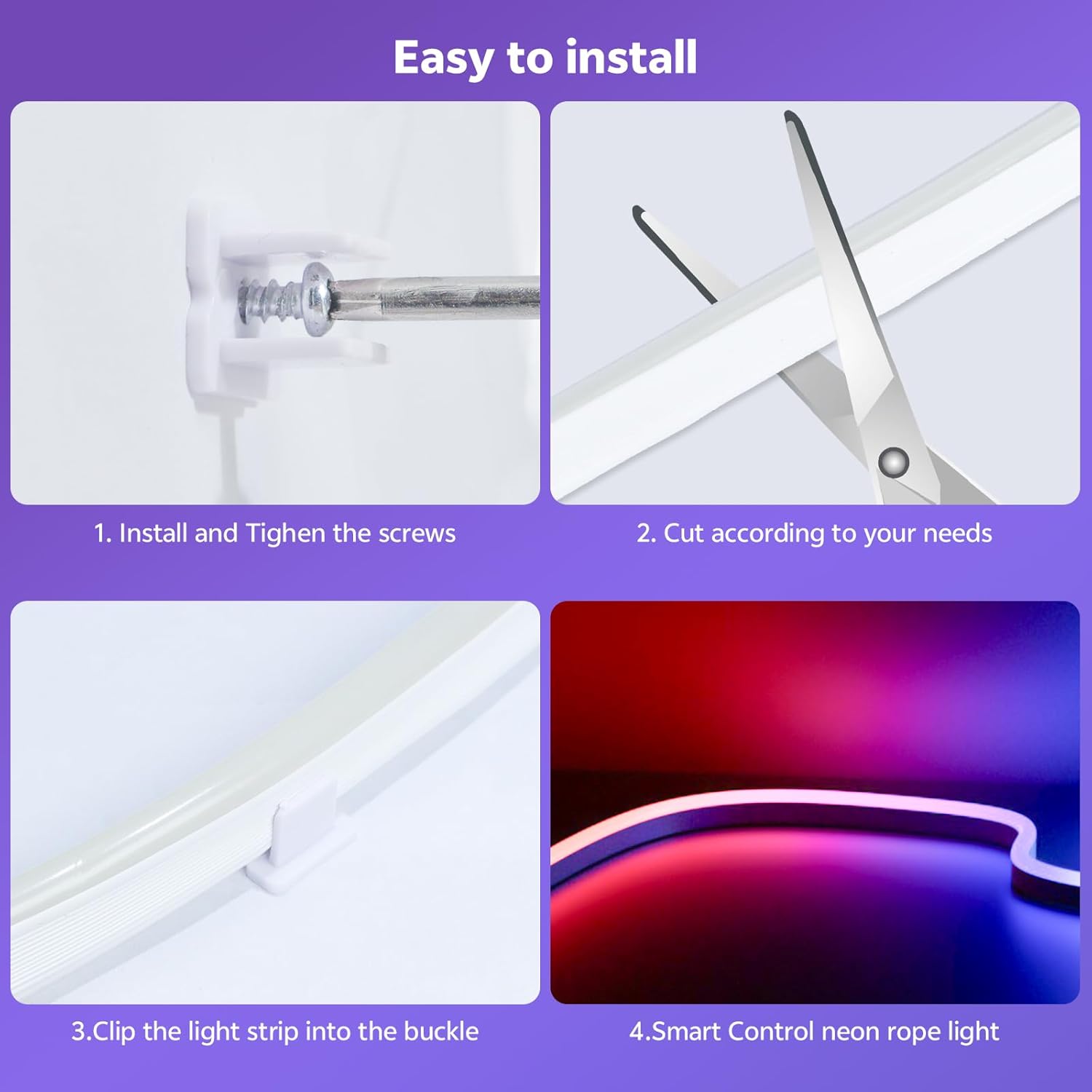
This image illustrates the four-step installation process: 1. Install and tighten screws for the mounting clips. 2. Cut the light strip to the desired length. 3. Clip the light strip into the installed buckles. 4. Connect for smart control.
3. Operating Instructions
Your neon LED strip can be controlled using the included remote or a smartphone application.
3.1 Remote Control
The remote control provides basic functions such as power on/off, color selection, brightness adjustment, and mode changes. Refer to the remote's button layout for specific functions.
3.2 Mobile Application Control
For full functionality, including 16 million color options, custom DIY patterns, music synchronization, voice control, and timing functions, use the dedicated mobile application.
- Pairing: Follow the in-app instructions to pair your LED strip with your smartphone via Bluetooth.
- Color Selection: Use the color wheel or preset options in the app to choose your desired light color.
- Brightness Adjustment: Adjust the brightness slider within the app to achieve the desired light intensity.
- Music Sync Mode: Activate the music sync feature. The built-in microphone will detect ambient sounds, and the lights will change in rhythm.
- Voice Control: Utilize the voice control feature through the app for hands-free operation (if supported by the app).
- Timing Function: Set schedules for the lights to turn on or off automatically at specific times.
- DIY Customization: Explore options to create and save your own unique lighting patterns and effects.

This image highlights the smart features of the neon LED strip, including 16 million colors, app control, music synchronization, voice control, and timing functions, demonstrated in a living room setting with the strip illuminating a TV area.

This image demonstrates the music synchronization and voice control features of the neon LED strip, showing the lights reacting to music in a social setting, with the strip shaped as musical notes and a guitar.
4. Maintenance
To ensure the longevity and optimal performance of your neon LED strip, follow these maintenance guidelines:
- Cleaning: Gently wipe the LED strip with a soft, dry cloth to remove dust. For stubborn dirt, a slightly damp cloth can be used. Ensure the strip is unplugged before cleaning.
- Water Protection: While the LED strip is IP67 waterproof, the controller and power adapter are not. Always ensure these components are protected from water and moisture, especially during outdoor use.
- Avoid Harsh Chemicals: Do not use abrasive cleaners, solvents, or harsh chemicals on the LED strip or its components, as this can damage the material and electronic parts.
- Storage: If storing the LED strip for an extended period, coil it loosely and store it in a cool, dry place away from direct sunlight.
5. Troubleshooting
If you encounter issues with your neon LED strip, refer to the following common troubleshooting steps:
- Lights Not Turning On:
- Check if the USB power source is functioning correctly and providing adequate power.
- Ensure all connections are secure between the strip and the power adapter.
- Verify the remote control battery (if applicable) and ensure it's pointed directly at the receiver.
- Remote Control Not Responding:
- Replace the remote control battery.
- Ensure there are no obstructions between the remote and the receiver.
- App Connection Issues:
- Ensure Bluetooth is enabled on your smartphone.
- Restart the mobile application and try pairing again.
- Ensure the LED strip is powered on and within Bluetooth range.
- Music Sync Not Working Effectively:
- Increase the volume of the music source.
- Ensure the microphone on the controller is not obstructed.
- Adjust the sensitivity settings within the mobile application, if available.
- Inconsistent Brightness or Color:
- Check for any physical damage or kinks in the LED strip.
- Ensure the power supply is stable and sufficient.
6. Specifications
| Feature | Detail |
|---|---|
| Brand | JUN-ELECTRON |
| Model Number | JUN-5M-NHD-US |
| Item Length | 5 Meters (16.4 FT) |
| Color | Multicolor (RGB) |
| Light Source Type | Neon LED |
| Power Source | Corded Electric (USB powered) |
| Indoor/Outdoor Usage | Indoor, Outdoor |
| Special Feature | IP67 Waterproof (strip only), App Control, Music Sync |
| Material | Neon LED Strip |
| Item Weight | 1.23 pounds |
| Included Components | 5m Neon LED strip, Remote Control, Mounting Buckles, Screws |
7. Warranty and Support
Specific warranty information for the JUN-ELECTRON 5m Neon LED Strip is not provided in the product details. For warranty claims, technical support, or further assistance, please contact JUN-ELECTRON customer service directly through their official channels or the retailer where the product was purchased.
You may find additional support and product information by visiting the JUN-ELECTRON Store on Amazon.


