1. Introduction
This manual provides detailed instructions for the setup, operation, and maintenance of your SUOGOEST Portapack H4M+ HackRF Kit. This device is a portable Software Defined Radio (SDR) with the Mayhem firmware, designed for a wide range of RF signal analysis and experimentation from 1 MHz to 6 GHz.
2. Package Contents
Please verify that all items listed below are included in your package:
- Portapack H4M+ Unit with Transparent Shell
- Speaker and Battery (integrated)
- Antennas (various types)
- Amplifier
- USB-C Cable

Figure 2.1: The Portapack H4M+ unit alongside its various antennas, amplifier, and USB-C cable.
3. Product Overview
The Portapack H4M+ is a compact, portable Software Defined Radio (SDR) system. It features a clear transparent shell, a touch screen display, and intuitive controls for various RF applications.
3.1. Front Panel

Figure 3.1: Front view of the Portapack H4M+ showing the 3.2-inch LCD touch screen and the rotary wheel control.
The front panel includes a 3.2-inch 240x320 matte LCD touch screen for user interaction. Below the screen is a 360-degree rotating wheel with a selection button, providing a simple and flexible control interface.
3.2. Top and Bottom Panels
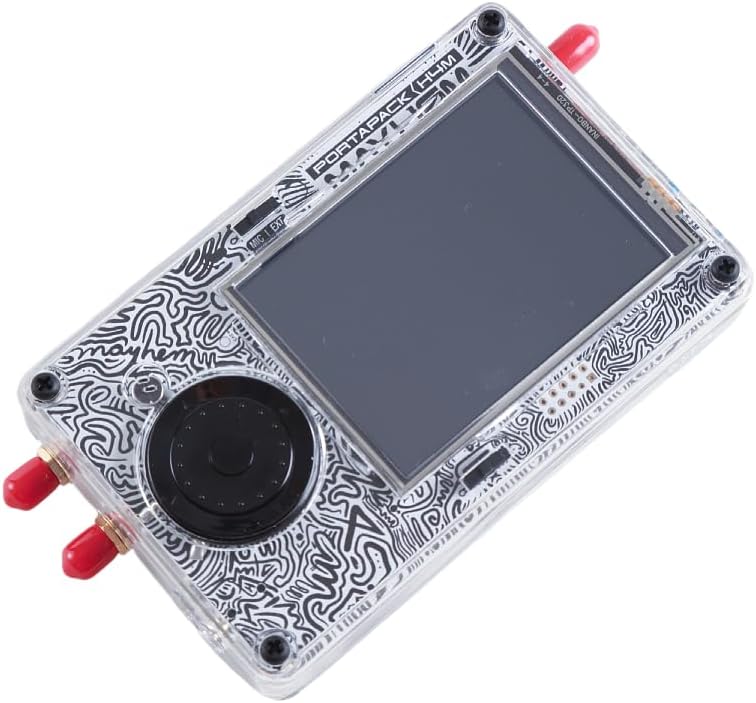
Figure 3.2: Angled view of the Portapack H4M+ highlighting the top-mounted antenna connector and side switches.
The device features SMA antenna connectors, a USB-C port for charging and data, a headphone jack, and a microphone input/external switch. Direction keys are also present for navigation.
3.3. Internal Components
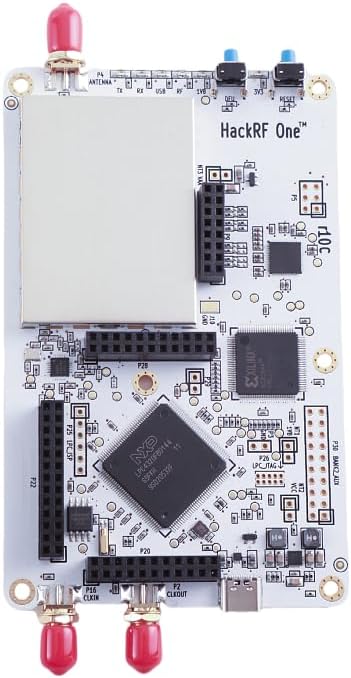
Figure 3.3: The HackRF One R10C circuit board, the core component of the Portapack H4M+.
The transparent shell allows visibility of the internal HackRF One R10C circuit board, which is the foundation for the SDR capabilities.
4. Setup
4.1. Initial Charging
Before first use, fully charge the device. Connect the supplied USB-C cable to the Portapack H4M+ and a compatible USB power source. Ensure the power switch on the device is in the 'On' position for charging to occur. The unit must be powered on to charge the internal battery.
4.2. Antenna Connection
Select the appropriate antenna for your desired frequency range and application. Carefully screw the antenna onto the SMA connector(s) on the device. Do not overtighten.
4.3. MicroSD Card Installation
A MicroSD card (not included) is required for many functions, including signal capture and storage of applications. Insert a formatted MicroSD card into the designated slot on the device. A 32GB or larger high-quality card is recommended.
5. Operating Instructions
5.1. Power On/Off
To power on the device, slide the power switch to the 'On' position. To power off, slide the switch to 'Off'.
5.2. Navigation
The device features a touch screen for direct interaction and a rotary wheel with a central selection button for menu navigation. Use the rotary wheel to scroll through options and press the central button to select. Direction keys provide additional navigation control.
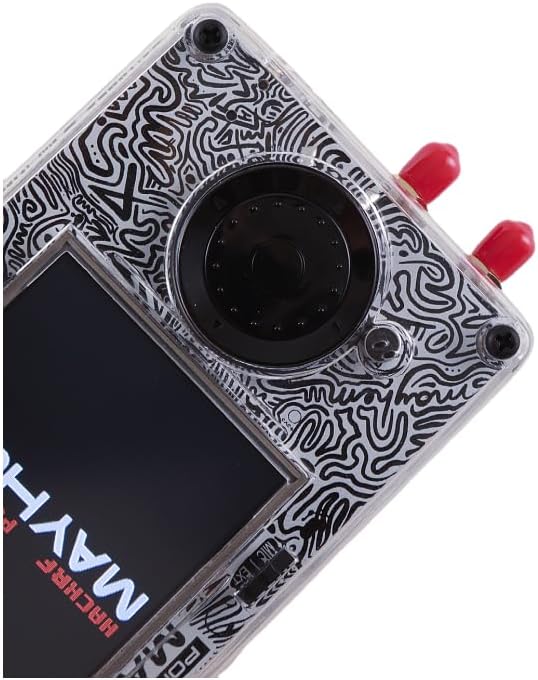
Figure 5.1: The device screen displaying the Mayhem firmware logo during startup.
5.3. Basic Functions
The Mayhem firmware provides a suite of applications accessible from the main menu:
- Receive: For listening to radio signals.
- Transmit: For broadcasting signals (ensure compliance with local regulations).
- Capture: Records raw RF signals to the MicroSD card for later analysis.
- Replay: Plays back previously captured RF signals.
- Scanner: Detects and identifies frequencies of nearby transmissions.
- Utilities: Access to various tools and system functions.
- Settings: Configure device parameters and preferences.
- Debug: Advanced diagnostic tools.
6. Key Features
- Wide Frequency Range: Operates across 1 MHz to 6 GHz, supporting a broad spectrum of RF applications.
- Adjustable Sample Rates: Supports sample rates from 2 Msps to 20 Msps (quadrature) for flexible signal processing.
- High-Quality Display: Features a 3.2-inch 240x320 matte LCD touch screen, offering clear visuals and responsive interaction.
- Intuitive Controls: Equipped with direction keys, a 360-degree rotating wheel, and a selection button for easy navigation and control.
- Signal Capture and Analysis: Enables raw signal capture for immediate replay or in-depth offline analysis, ideal for studying RF environments.
- Signal Detection Capabilities: Detects and identifies frequencies of nearby transmission sources, useful for RF reconnaissance.
- Integrated Applications: Includes a variety of built-in applications such as real-time ADS-B scanner, GPS-Simulator, and TPMS decoders for specialized tasks.
7. Maintenance
7.1. Cleaning
Use a soft, dry cloth to clean the device. For the screen, a microfiber cloth is recommended. Avoid using harsh chemicals or abrasive materials.
7.2. Software Updates
The Mayhem firmware is actively developed. Periodically check for updates to enhance functionality and performance. Instructions for updating the firmware can typically be found on the official Mayhem firmware project page or related community forums.
7.3. Storage
Store the device in a cool, dry place away from direct sunlight and extreme temperatures. When storing for extended periods, ensure the battery is partially charged (around 50%) to prolong its lifespan. The power switch can be left in the 'Off' position to prevent battery drain.
8. Troubleshooting
- Device not powering on: Ensure the battery is charged. Connect the USB-C cable and confirm the power switch is in the 'On' position.
- Charging issues: Verify the USB-C cable is properly connected and the power switch is 'On'. The device must be powered on to charge.
- No signal reception/transmission: Check that antennas are securely connected and are appropriate for the frequency range you are operating in. Verify software settings for correct frequency and mode.
- Screen unresponsive: Attempt a soft reset by powering the device off and then on again. If the issue persists, ensure the firmware is up to date.
- MicroSD card not recognized: Ensure the card is properly inserted and formatted correctly. Try a different MicroSD card to rule out card issues.
9. Specifications
| Feature | Detail |
|---|---|
| Brand | SUOGOEST |
| Model Name | H4M+ |
| Operating System | Linux (Mayhem Firmware) |
| Frequency Range | 1 MHz to 6 GHz |
| Sample Rates | 2 Msps to 20 Msps (quadrature) |
| Display | 3.2-inch 240x320 matte LCD touch screen |
| Processor Brand | ARM |
| Number of Processors | 1 |
| RAM | LPDDR4 |
| Connectivity Technology | Bluetooth, Ethernet, USB, Wi-Fi (via expansion) |
| Included Components | Amplifier, Antennas, Cable, Transparent Shell, Speaker, Battery |
10. Product Demonstration Video
Video 10.1: An overview of the Portapack H4M+ HackRF Kit, demonstrating its physical appearance, included accessories, and basic user interface navigation.
11. Warranty and Support
For warranty information and technical support, please refer to the documentation provided with your purchase or contact SUOGOEST customer service directly. Contact details can typically be found on the product packaging or the official SUOGOEST website.


