
1. Introduction
Thank you for choosing the VallisCo Bathroom Exhaust Fan Pro. This advanced ceiling-mounted ventilation system integrates an exhaust fan, LED lighting with customizable RGB options, a Bluetooth speaker, and smart sensors for humidity and odor detection. Designed for optimal air quality and comfort, this manual provides essential information for safe installation, operation, and maintenance of your new fan.
2. Important Safety Instructions
Please read all instructions carefully before installation and use. Failure to follow these instructions may result in electric shock, fire, or serious injury.
- Electrical Safety: All wiring must be performed by a qualified electrician in accordance with all applicable electrical codes and standards. Disconnect power at the service panel before wiring or servicing the unit. Ensure the power source matches the fan's voltage requirements (110 Volts).
- Installation: This fan is designed for indoor, ceiling-mounted installation only. Do not install in a wall. Ensure the ceiling structure can support the fan's weight (approximately 10 pounds). A minimum ceiling clearance of 11 inches is required.
- Ventilation: Do not use this fan in conjunction with a solid-state speed control device. This fan is intended for general ventilating use only. Do not use to exhaust hazardous or explosive materials and vapors.
- Maintenance: Always disconnect power before cleaning or performing any maintenance.
- Children: Keep packaging materials away from children.
3. Package Contents
Verify that all components are present before beginning installation:
- VallisCo Bathroom Exhaust Fan Pro Unit
- Remote Control
- Mounting Hardware (screws, wire connectors)
- User Manual (this document)
4. Product Overview
The VallisCo Bathroom Exhaust Fan Pro combines powerful ventilation with smart features and customizable lighting to enhance your bathroom environment.

Image: The VallisCo Bathroom Exhaust Fan Pro, showcasing its integrated RGB lighting, digital display, remote control, and smartphone app interface.
Key Features:
- High Airflow & Quiet Operation: Delivers 230 CFM airflow at 1.0 Sone noise level, suitable for rooms up to 200 sq. ft.
- Smart Sensing: Integrated humidity and odor sensors automatically activate the fan as needed.
- Bluetooth Speaker: Connect your device to stream audio directly through the fan.
- Customizable LED Lighting: 3 Color Temperatures (3000K/4000K/6500K) and 6 brightness levels.
- Dynamic RGB Lighting: 7 fixed RGB colors and 3 dynamic modes (Ripple, Rhythm, Breath) with music sync capability.
- Triple Control Options: Operate via remote control, smartphone app (Tuya, Google Home, Alexa compatible), or voice commands.
- Removable & Washable Dust Filter: For easy maintenance and prolonged performance.
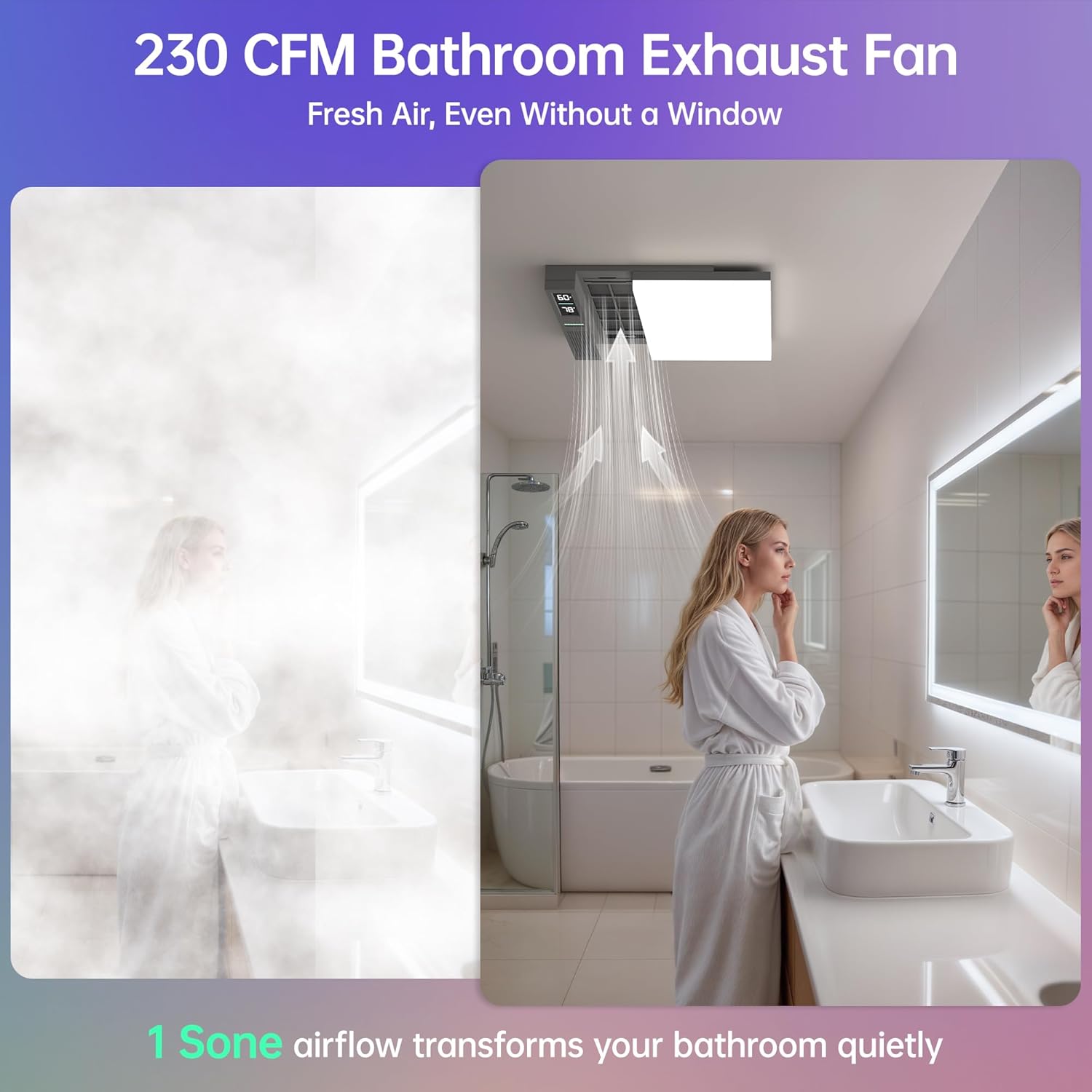
Image: Illustration demonstrating the 230 CFM airflow effectively clearing steam and maintaining fresh air in a bathroom.

Image: Visual representation of the smart humidity and odor sensing feature, showing automatic activation when thresholds are exceeded.

Image: A person enjoying wireless Bluetooth music in a bathroom, with vibrant RGB lighting dynamically syncing to the rhythm of the music.
5. Installation Guide
Proper installation is crucial for the performance and safety of your exhaust fan. If you are unsure about any step, consult a qualified electrician.
Pre-Installation Checklist:
- Ensure power is disconnected at the circuit breaker.
- Confirm a ceiling cutout of 11.2 x 11.2 inches is available or can be created.
- Verify at least 11 inches of vertical clearance above the ceiling is available.
- Gather necessary tools: screwdriver, wire stripper, measuring tape, utility knife, safety glasses.
Step-by-Step Installation:
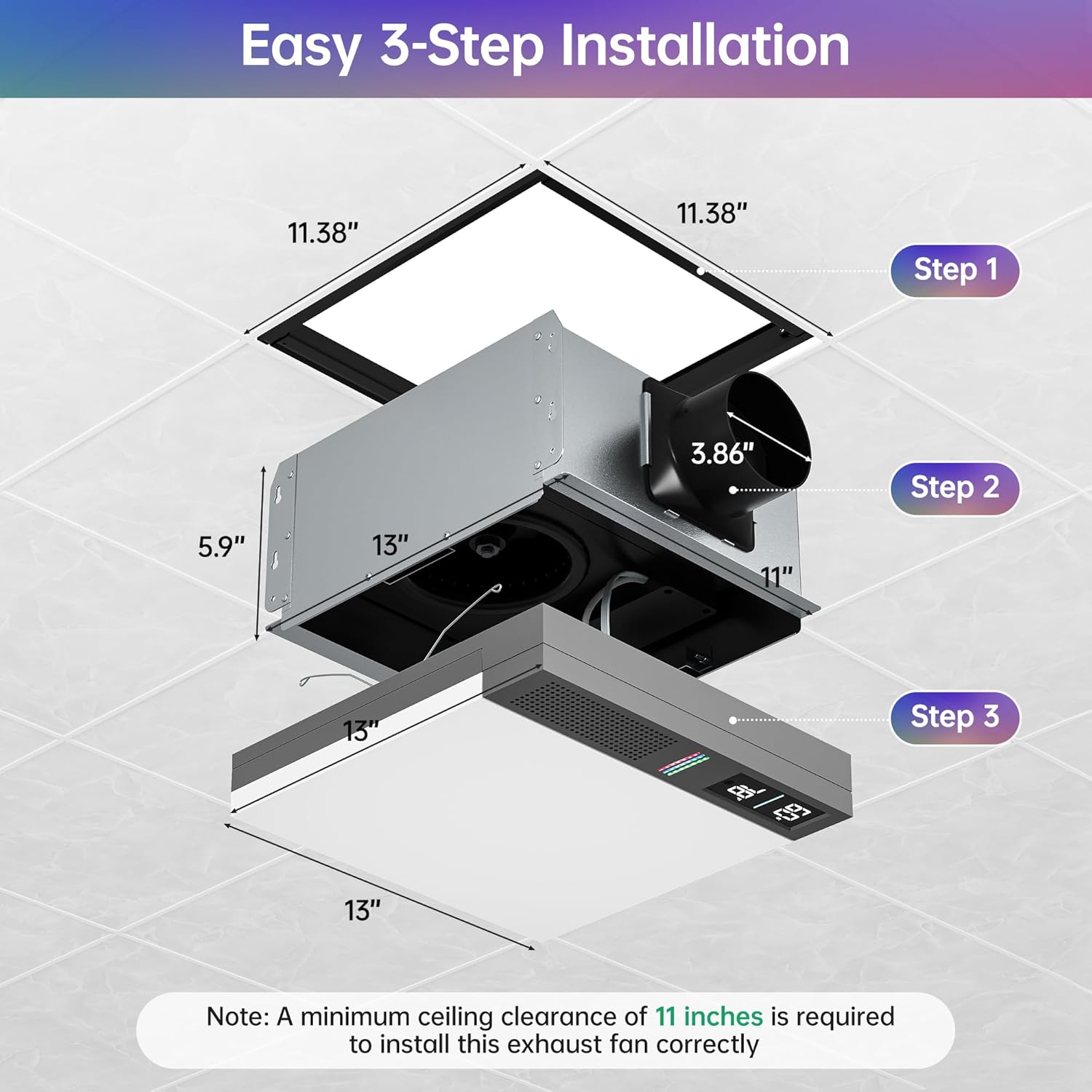
Image: A detailed 3-step diagram illustrating the installation process: preparing the ceiling opening, installing the mounting frame, and attaching the main unit and front panel.
- Prepare the Ceiling Opening: Cut an opening measuring approximately 11.38 x 11.38 inches in your ceiling. Ensure there is at least 11 inches of vertical clearance above the ceiling.
- Install the Mounting Frame: Secure the mounting frame firmly into the ceiling joists or suitable support structure. This provides stable support for the unit.
- Mount the Main Unit: Insert the exhaust fan body into the frame and fix it securely. Connect the ductwork to the detachable air vent. Complete all electrical wiring connections according to local codes.
- Attach the Front Panel: Connect and snap the decorative front panel into position to complete the installation. Ensure it is flush with the ceiling.
6. Operating Instructions
Your VallisCo Bathroom Exhaust Fan Pro offers multiple control methods for convenience.
Power On/Off:
After installation, restore power at the circuit breaker. The fan will typically power on in its last-used setting or a default mode.
Fan Operation Modes:

Image: A comparison of the two smart ventilation modes: Auto Sensing Mode, which activates automatically based on humidity or odor, and Manual Mode for continuous ventilation.
- Auto Sensing Mode: The fan automatically turns on when humidity or odors are detected, maintaining optimal air quality without manual intervention. You can typically set humidity thresholds (e.g., 30%, 60%, 80%) via the app.
- Manual Mode: Use the remote, app, or voice control to turn the fan on or off for continuous ventilation as desired.
Lighting Control:
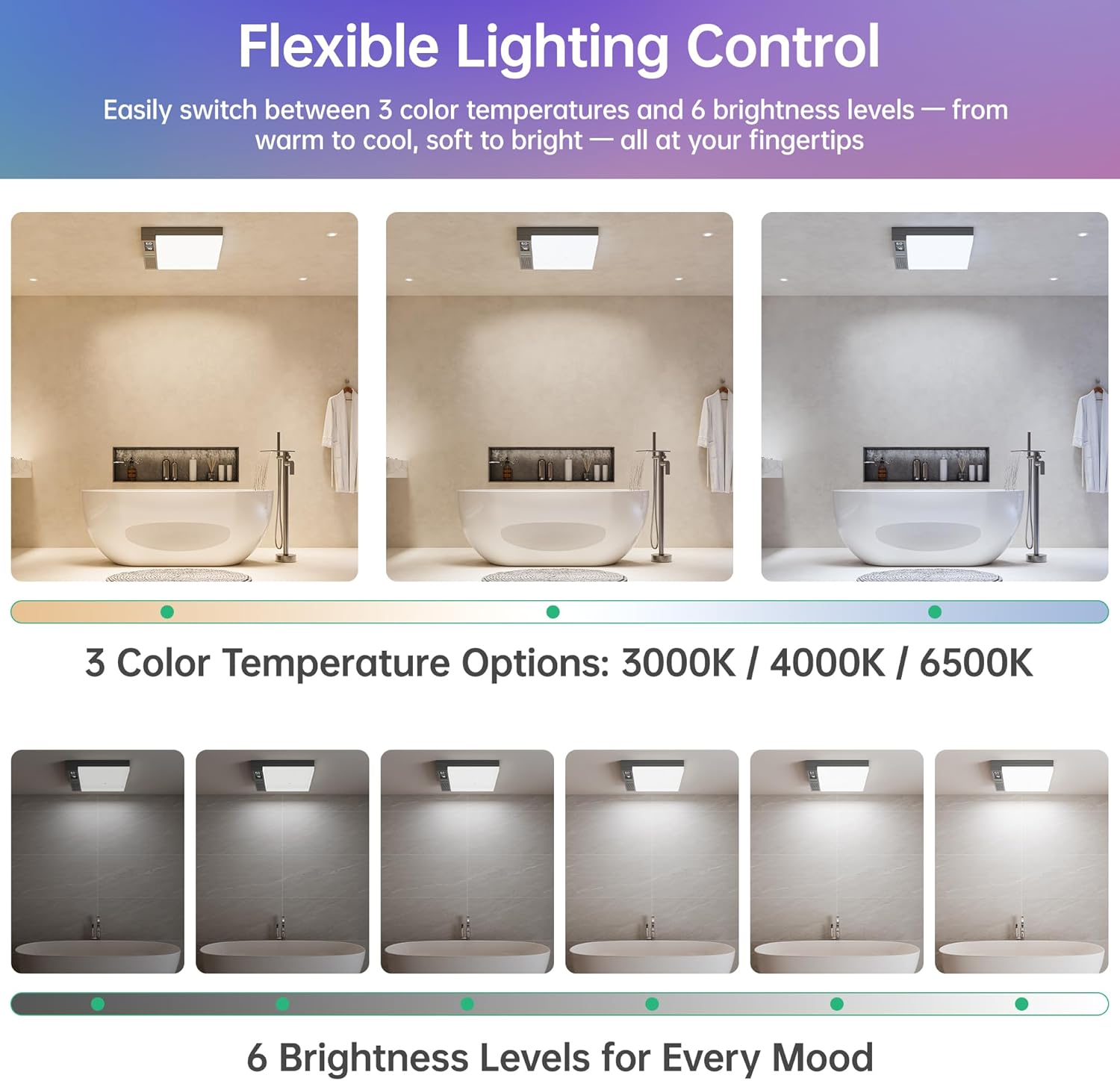
Image: Visual examples of the flexible lighting control, showcasing three color temperature options (3000K, 4000K, 6500K) and six distinct brightness levels.
- Color Temperature (CCT): Switch between Warm (3000K), Neutral (4000K), and Cool (6500K) tones using the remote or app.
- Brightness Levels: Adjust the light intensity through 6 available brightness levels.
- RGB Lighting: Select from 7 fixed RGB colors or choose from 3 dynamic modes: Ripple (smooth color flow), Rhythm (music-reactive lighting), or Breath (gentle fade effect).
Bluetooth Speaker Pairing:
To pair your device:
- Ensure the fan is powered on.
- Activate Bluetooth on your smartphone or audio device.
- Search for available devices and select "VallisCo Fan" (or similar name).
- Once connected, you can stream audio. The RGB lighting can sync to the music rhythm if the Rhythm mode is selected.
Remote and App Control:

Image: The three primary control methods: a dedicated remote control, a smartphone application interface, and voice control compatibility with smart speakers like Amazon Alexa.
- Remote Control: Use the included remote to adjust fan speed, light settings, and Bluetooth functions. Refer to the remote's diagram for specific button functions.
- Smartphone App: Download the compatible app (e.g., Tuya Smart) from your device's app store. Follow the in-app instructions to connect your fan. The app provides comprehensive control over all features.
- Voice Control: Integrate with smart home systems like Amazon Alexa or Google Home. Enable the VallisCo skill/action in your smart home app and follow the setup prompts to control the fan with voice commands.
7. Maintenance
Regular maintenance ensures optimal performance and longevity of your exhaust fan.
Cleaning the Fan:
- Always disconnect power at the circuit breaker before cleaning.
- Wipe the exterior surfaces of the fan and light panel with a soft, damp cloth. Do not use abrasive cleaners or solvents.
- Ensure the fan is completely dry before restoring power.
Filter Maintenance:

Image: A close-up view of the exhaust fan's removable and washable dust filter, highlighting its accessibility for maintenance.
The fan is equipped with a removable and washable dust filter to maintain airflow efficiency.
- Disconnect power to the fan.
- Carefully remove the front panel to access the filter.
- Remove the dust filter.
- Wash the filter with mild soap and water. Rinse thoroughly and allow it to air dry completely before reinstallation.
- Reinstall the dry filter and reattach the front panel. Restore power.
8. Troubleshooting
If you encounter issues with your VallisCo Bathroom Exhaust Fan Pro, refer to the table below for common problems and solutions.
| Problem | Possible Cause | Solution |
|---|---|---|
| Fan does not turn on. | No power, loose wiring, circuit breaker tripped. | Check power supply, ensure connections are secure, reset circuit breaker. |
| Fan is noisy. | Obstruction in fan blades, loose mounting, dirty filter. | Disconnect power and check for obstructions. Ensure mounting is secure. Clean or replace filter. |
| Light does not work. | No power, loose connection, light setting. | Check power, ensure connections are secure. Verify light settings via remote or app. |
| Bluetooth speaker not pairing. | Bluetooth not enabled on device, fan not in pairing mode, too far from device. | Ensure Bluetooth is on. Restart fan. Move device closer. Check if another device is already connected. |
| Sensors not activating fan. | Sensor settings incorrect, sensor blocked, environmental conditions not met. | Check sensor sensitivity settings in the app. Ensure sensors are clean and unobstructed. |
9. Specifications
Detailed technical specifications for the VallisCo Bathroom Exhaust Fan Pro.
| Feature | Specification |
|---|---|
| Brand | VallisCo |
| Model | B0FJDNSKXM |
| Air Flow Capacity | 230 Cubic Feet Per Minute (CFM) |
| Noise Level | 1 Sone |
| Recommended Room Size | Up to 200 sq. ft. |
| Power Source | AC/DC |
| Voltage | 110 Volts |
| Wattage | 1800 watts (Note: This wattage seems high for a fan and light, typically refers to a heater. Please verify with product packaging if a heater is included or if this is a general power rating.) |
| Product Dimensions | 9"D x 14"W x 14"H |
| Ceiling Cutout Requirement | 11.2" x 11.2" |
| Vertical Clearance Required | 11 inches |
| Item Weight | 10 pounds |
| Material | Acrylic, Cast Iron, Polypropylene |
| Control Method | Remote, App, Voice (Alexa, Google Home) |
| Special Features | Bluetooth Speaker, Odor & Humidity Sensors, RGB Lighting, 3CCT LED, Removable Filter |
| Certifications | ETL, UL |
10. Warranty and Support
VallisCo products are manufactured to high-quality standards. For specific warranty details, please refer to the warranty card included with your product or contact VallisCo customer support.
Customer Support:
If you have any questions, require technical assistance, or need to report an issue, please contact VallisCo customer support through the retailer's platform or the official VallisCo website. Please have your model number (B0FJDNSKXM) and purchase date ready when contacting support.