
ODEJOI X50
ODEJOI 64GB Clip-on MP3 Player (Model X50) User Manual
Detailed instructions for your ODEJOI X50 Clip-on MP3 Player with Bluetooth 5.3, Built-in Speaker, 2" HD Touchscreen, FM Radio, and Voice Recorder.
What's in the Box
Verify that all items are present in the package:
- 1 x ODEJOI Portable MP3 Player with Bluetooth & Clip
- 1 x USB-C Cable for Charging & Data Transfer
- 1 x 3.5mm Wired Stereo Headphones
- 1 x Waterproof & Protective Pouch
- 1 x User Manual (English & Japanese)
Product Overview
Familiarize yourself with the physical components and controls of your MP3 player.


Controls and Ports:
- 2-inch IPS HD Touchscreen: For navigation and interaction with the user interface.
- Physical Buttons: Located below the screen for blind operation (play/pause, skip tracks, volume control).
- Power Button: Typically on the side, used for power on/off and screen lock.
- Volume Buttons: Dedicated buttons for adjusting audio volume.
- USB-C Port: For charging the device and transferring data (music, videos, photos).
- 3.5mm Headphone Jack: For connecting wired headphones.
- MicroSD Card Slot: Supports up to 128GB MicroSD cards for expanded storage.
- Built-in Speaker: For audio playback without headphones.
- Built-in Clip: For attaching the player to clothing or bags.
Setup
1. Charging the Device:
Before first use, fully charge the MP3 player. Connect the provided USB-C cable to the player's USB-C port and the other end to a USB power adapter (not included) or a computer's USB port. A full charge typically takes approximately 2.5 hours.
2. Adding Music and Other Files:
You can transfer files to the MP3 player using two methods:
- Method 1: From a Computer (PC/Mac)
- Connect the MP3 player to your computer using the included USB-C cable.
- The player will appear as a removable disk drive.
- Drag and drop your music, video, or photo files into the appropriate folders on the MP3 player (e.g., "Music", "Video", "Pictures").
- Once transfer is complete, safely eject the device from your computer before unplugging the USB-C cable.
- Method 2: From an OTG-compatible Phone (OTG adapter not included)
- Connect the MP3 player to your OTG-compatible phone using an OTG adapter and the USB-C cable.
- Transfer files as you would to any external storage device.
Note on File Organization: For optimal performance and easy navigation, it is recommended to organize your music files into folders. The player supports various audio formats including MP3, APE, AAC, FLAC, and WAV.
MicroSD Card: Insert a MicroSD card (up to 128GB) into the dedicated slot for additional storage. Files can be transferred directly to the MicroSD card via a computer or OTG connection.
Operating Instructions
Power On/Off and Screen Lock:
- Power On: Press and hold the power button until the screen illuminates.
- Power Off: Press and hold the power button, then confirm shutdown on the screen.
- Screen Lock/Unlock: Briefly press the power button to lock or unlock the screen. Swipe up on the touchscreen to unlock. Physical buttons allow for blind operation even when the screen is off.
1. Music Playback:
From the home screen, tap the "Music" icon to access your music library.
- Navigation: Browse music by "All songs", "Artists", "Albums", "Genres", or "Folders".
- Playback Controls: Use the physical buttons or touchscreen controls for Play/Pause, Next Track, Previous Track, and Volume adjustment.
- Playback Modes: Supports shuffle, repeat one, repeat all, sequential, and folder loop. Access these options from the music playback screen.
- Equalizer: Customize your sound experience with preset equalizers or create a custom equalizer setting.
- Lyrics Display: If lyrics are embedded in the music file, they will be displayed on the screen during playback.


2. Bluetooth Connectivity:
The MP3 player features Bluetooth 5.3 for wireless audio streaming to headphones or speakers.
- Pairing: From the home screen, tap the "Bluetooth" icon. Turn on Bluetooth, then select "Search for device" to find nearby Bluetooth headphones or speakers. Select your device from the list to pair.
- Auto-Reconnect: The player will automatically reconnect to previously paired devices when in range.
- Note: The MP3 player only connects to Bluetooth headphones and speakers, not to smartphones or other MP3 players.

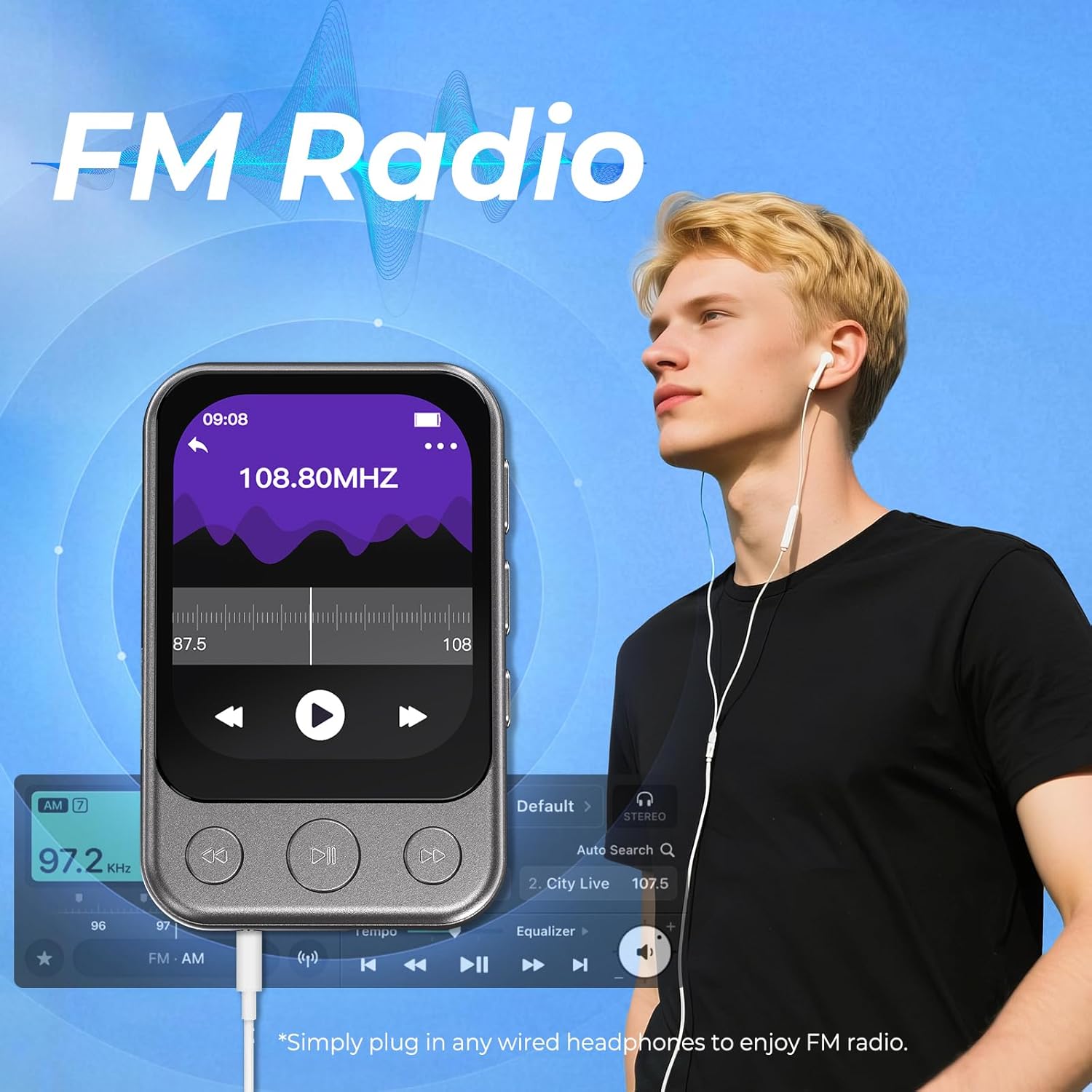
3. FM Radio:
To use the FM radio, you must connect wired headphones (included) as they act as the antenna.
- Accessing FM Radio: From the home screen, tap the "FM Radio" icon.
- Auto Tune: Select "Auto Tune" to scan and save available stations.
- Manual Tune: Adjust the frequency manually to find stations.
- Preset Stations: Navigate through saved stations.
4. Voice Recorder:
The device includes a built-in voice recorder.
- Starting a Recording: Tap the "Recordings" icon from the home screen, then select "Start Recording".
- Saving Recordings: After stopping, you will be prompted to save or discard the recording.
- Recording Format: Supports MP3 and WAV formats.
5. Video and Photo Browsing:
The MP3 player can display videos and photos.
- Video Playback: Tap the "Video" icon. Note that videos must be in AMV format (240x176 resolution) for optimal playback. A conversion tool may be required on your computer.
- Photo Viewing: Tap the "Pictures" icon to browse your stored images.
6. Other Functions:
The player includes additional utility functions:
- Alarm Clock: Set alarms for reminders.
- Stopwatch: Use for timing activities.
- Calendar: View the current date.
- Wallpaper: Personalize the device background.

Maintenance
- Cleaning: Use a soft, dry cloth to clean the device. Avoid liquid cleaners or abrasive materials.
- Storage: Store the MP3 player in a cool, dry place away from direct sunlight and extreme temperatures. Use the provided protective pouch when not in use.
- Battery Care: To prolong battery life, avoid fully discharging the battery frequently. Charge the device regularly, even if not in constant use.
- Software Updates: Check the manufacturer's website periodically for firmware updates to ensure optimal performance.
Troubleshooting
| Problem | Possible Cause / Solution |
|---|---|
| Device won't turn on / Screen is blank. |
|
| MP3 not recognized by PC. |
|
| Songs not showing / Format Error / Not Supported. |
|
| Headphone has a lot of noise / No sound. |
|
| Bluetooth connection issues. |
|
Specifications
| Feature | Detail |
|---|---|
| Model Number | X50 |
| Memory Storage Capacity | 64 GB (expandable up to 128GB via MicroSD card) |
| Screen Size | 2 Inches |
| Display Technology | LCD (IPS HD) |
| Connectivity Technology | Bluetooth 5.3, Aux (3.5mm), USB-C |
| Special Features | Built-In Clip, Built-In Speaker, Equalizer, FM Radio, Touch Screen, Voice Recorder |
| Supported Audio Formats | MP3, APE, AAC, FLAC, WAV |
| Supported Video Formats | AMV/AVI (converted 240x176) |
| Supported Image Formats | JPEG, BMP |
| Battery | 1 Lithium Polymer battery (included) |
| Item Weight | 4.2 ounces |
| Package Dimensions | 4.92 x 3.46 x 1.46 inches |
| Manufacturer | ODEJOI |
Warranty and Support
For warranty information, technical support, or customer service inquiries, please refer to the contact information provided in your product packaging or on the official ODEJOI website.
Keep your purchase receipt as proof of purchase for any warranty claims.
Official Product Video
Watch this official product video for a visual overview of the ODEJOI MP3 Player's features and operation.
Official video demonstrating the ODEJOI MP3 Player with Clip, Bluetooth, FM Radio, and Speaker functionalities.
Related Documents - X50
 |
Oilsky X50 Clip MP3 Player User Manual Comprehensive user manual for the Oilsky X50 Clip MP3 Player, covering features, operations, specifications, and troubleshooting. Learn how to use music playback, FM radio, voice recording, and more. |
 |
Oilsky X50 Clip MP3 Player User Manual This user manual provides comprehensive instructions and specifications for the Oilsky X50 Clip MP3 Player, covering setup, functions, troubleshooting, and more. |
 |
Korg X50 Music Synthesizer: Operation Guide This operation guide provides detailed instructions and information for the Korg X50 Music Synthesizer, covering setup, features, programming, editing, and troubleshooting. |
 |
4K Ultra-HD Driving Recorder X20/X30/X50 User Manual User manual for the 4K Ultra-HD driving recorder models X20, X30, and X50. Provides detailed instructions on button functions, menu settings, app connection, installation, and specifications. |
 |
X50 Helmet Bluetooth Headset User Manual Explore the MOTO X50 Helmet Bluetooth Headset with this comprehensive user manual. Learn about installation, features, specifications, and usage for optimal performance. |
 |
Hxmelody X Serial Digital Stream Player User Manual User manual for the Hxmelody X Serial Digital Stream Player (Model X50), detailing its features, specifications, safety precautions, warranty terms, operational instructions, and settings. |
Ask a question about this manual
Ask about setup, troubleshooting, compatibility, parts, safety, or missing instructions. Manuals+ will review the question and use this page’s manual context to help answer it.