
1. Introduction
Thank you for choosing the HelpSet 8V Cordless Drill Driver Set. This manual provides essential information for the safe operation, maintenance, and troubleshooting of your new tool. Please read it thoroughly before first use and keep it for future reference.
This 8V cordless drill driver is designed for various household tasks, including drilling into wood, plastic, and light metals, as well as driving and removing screws. Its compact design and integrated features make it suitable for both beginners and experienced users.
2. Safety Instructions
Always follow basic safety precautions to reduce the risk of fire, electric shock, and personal injury.
- Wear Eye Protection: Always wear safety goggles or safety glasses with side shields when operating the drill.
- Secure Workpiece: Always clamp or otherwise secure the workpiece. Do not hold the workpiece by hand.
- Keep Work Area Clean: Cluttered areas and benches invite injuries.
- Avoid Dangerous Environment: Do not use power tools in damp or wet locations, or expose them to rain. Keep work area well lit.
- Stay Alert: Watch what you are doing, use common sense. Do not operate tool when you are tired.
- Remove Adjusting Keys and Wrenches: Always check that adjusting keys and wrenches are removed from the tool before turning it on.
- Do Not Overreach: Keep proper footing and balance at all times.
- Disconnect Tools: Disconnect the battery pack from the tool before making any adjustments, changing accessories, or storing the tool.
- Store Idle Tools: When not in use, tools should be stored in a dry, high, or locked-up place, out of reach of children.
3. Package Contents
Verify that all items listed below are included in your package. If any items are missing or damaged, please contact HelpSet customer support.
- HelpSet 8V Cordless Drill Driver
- Storage Tool Box
- Screwdriver Bits (10 pieces, 25mm: 1/8, 5/32, 3/16, 1/4, PH1, PH2, PH3, T10, T15, T20)
- Extension Bar
- USB Charging Cable
- Drill Bits (4 pieces)
- User Manual

Figure 3.1: Included components of the HelpSet 8V Cordless Drill Driver Set.
4. Product Features
The HelpSet 8V Cordless Drill Driver is equipped with several features for efficient and comfortable use:
- 3/8-inch Keyless Chuck: Allows for quick and tool-free bit changes, securely holding various drill bits and screwdriver heads.
- Forward/Reverse Switch: Easily switch between drilling/driving and screw removal.
- Variable Speed Switch: Provides precise control over drilling and driving speed, adapting to different materials and tasks.
- Integrated LED Light: Illuminates the work area when the trigger is pressed, improving visibility in dark or confined spaces.
- 2000mAh Lithium-ion Battery: Built-in high-capacity battery for extended operation without frequent recharging.
- 20 N·m Max Torque: Delivers robust power for drilling into wood, plastic, and light metals, and for handling tough screwing applications.
- Compact and Lightweight Design: Weighing only 1.8 pounds, it offers a comfortable grip and easy portability, reducing hand and arm fatigue during prolonged use.
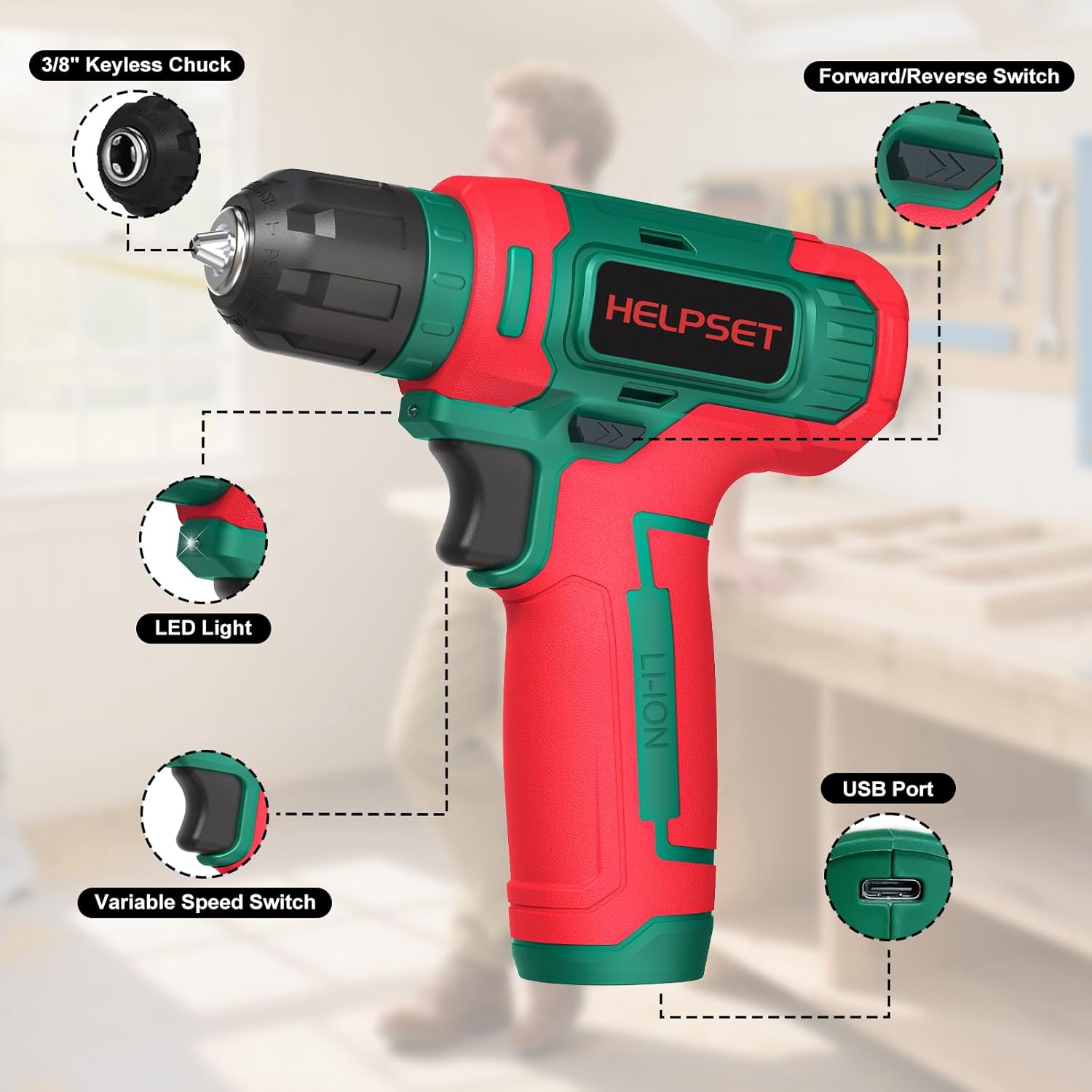
Figure 4.1: Key components of the HelpSet 8V Cordless Drill Driver.

Figure 4.2: High-performance 8V motor with 20 N·m max torque.
5. Setup
5.1 Charging the Battery
- Locate the USB charging port on the drill driver.
- Connect the provided USB charging cable to the drill driver and a compatible USB power adapter (not included).
- Allow the battery to fully charge before first use. The charging indicator (if present) will show the charging status.
- A full charge typically takes approximately 2-3 hours.
5.2 Installing/Changing Drill Bits
- Ensure the drill driver is turned off and the forward/reverse switch is in the neutral (locked) position to prevent accidental startup.
- Grip the rear collar of the 3/8-inch keyless chuck with one hand.
- Rotate the front collar of the chuck counter-clockwise to open the chuck jaws.
- Insert the desired drill bit or screwdriver bit into the chuck, ensuring it is seated as deeply as possible.
- Rotate the front collar clockwise to tighten the chuck jaws firmly around the bit. Ensure the bit is securely held before operation.
6. Operating Instructions
6.1 Powering On/Off and Speed Control
- To turn on the drill, press the variable speed trigger switch. The speed increases as you press the trigger further.
- To turn off the drill, release the trigger switch.
- The integrated LED light will illuminate automatically when the trigger is pressed, providing visibility to your work area.

Figure 6.1: Using the LED light for improved visibility.
6.2 Forward/Reverse Operation
- The forward/reverse switch is located above the trigger.
- Push the switch to the left for forward rotation (drilling/driving screws).
- Push the switch to the right for reverse rotation (removing screws).
- When the switch is in the center position, the trigger is locked, preventing accidental operation. Always set the switch to the center position when changing bits or storing the tool.
6.3 Drilling and Screwdriving Tips
- Starting a Hole: Use a center punch to mark the drilling spot to prevent the drill bit from wandering.
- Applying Pressure: Apply steady, even pressure directly in line with the drill bit. Avoid excessive force, which can cause the drill to stall or the bit to break.
- Material Considerations: For harder materials, use slower speeds. For softer materials, higher speeds can be used.
- Screwdriving: Match the screwdriver bit to the screw head type and size. Start at a low speed to engage the screw, then increase speed as needed.

Figure 6.2: Proper technique for drilling into wood.

Figure 6.3: Versatile applications for the drill driver.
7. Maintenance
7.1 Cleaning
- Always disconnect the drill from any power source before cleaning.
- Use a clean, damp cloth to wipe down the exterior of the tool. Do not use harsh chemicals or abrasive cleaners.
- Clear any dust or debris from the ventilation openings to prevent overheating.
- Clean the chuck jaws regularly to ensure proper grip on bits.
7.2 Storage
- Store the drill driver and its accessories in the provided storage tool box.
- Store in a dry place, away from direct sunlight and extreme temperatures.
- Keep out of reach of children.
- For long-term storage, ensure the battery is partially charged (around 50%) to prolong its lifespan. Recharge every 3-6 months if not in use.
8. Troubleshooting
| Problem | Possible Cause | Solution |
|---|---|---|
| Drill does not start | Battery is depleted Forward/Reverse switch is in neutral (locked) position | Charge the battery Move the switch to forward or reverse position |
| Reduced power or speed | Low battery charge Overloading the tool | Recharge the battery Reduce pressure or use a sharper bit |
| Bit slips in chuck | Chuck not tightened sufficiently Chuck jaws are dirty or worn | Retighten the chuck firmly Clean chuck jaws; if worn, contact support |
| LED light not working | Faulty LED Battery completely depleted | Contact customer support Charge the battery |
9. Specifications
| Feature | Specification |
|---|---|
| Brand | HelpSet |
| Model Number | DL-8V-01 |
| Power Source | Battery Powered |
| Voltage | 8 Volts |
| Battery Capacity | 2000 mAh (Ampere-hours) |
| Max Torque | 20 Newton Meters (N·m) |
| Max Rotational Speed | 1000 RPM |
| Max Chuck Size | 0.38 Inch |
| Material | Plastic |
| Product Dimensions (L x W x H) | 16 x 6.1 x 17.5 cm |
| Item Weight | 1.28 Kilograms |
| Included Components | Battery Charger (USB Cable) |
10. Warranty and Support
HelpSet products are manufactured to high-quality standards. For warranty information, technical support, or service inquiries, please refer to the warranty card included with your purchase or contact HelpSet customer service directly through the retailer where you purchased the product. Please have your model number (DL-8V-01) and purchase date available when contacting support.