
1. Introduction
Thank you for choosing the OYUMOENTS Full Size Corner Daybed. This manual provides detailed instructions for the safe assembly, operation, and maintenance of your new daybed. Please read all instructions carefully before beginning assembly and retain this manual for future reference.
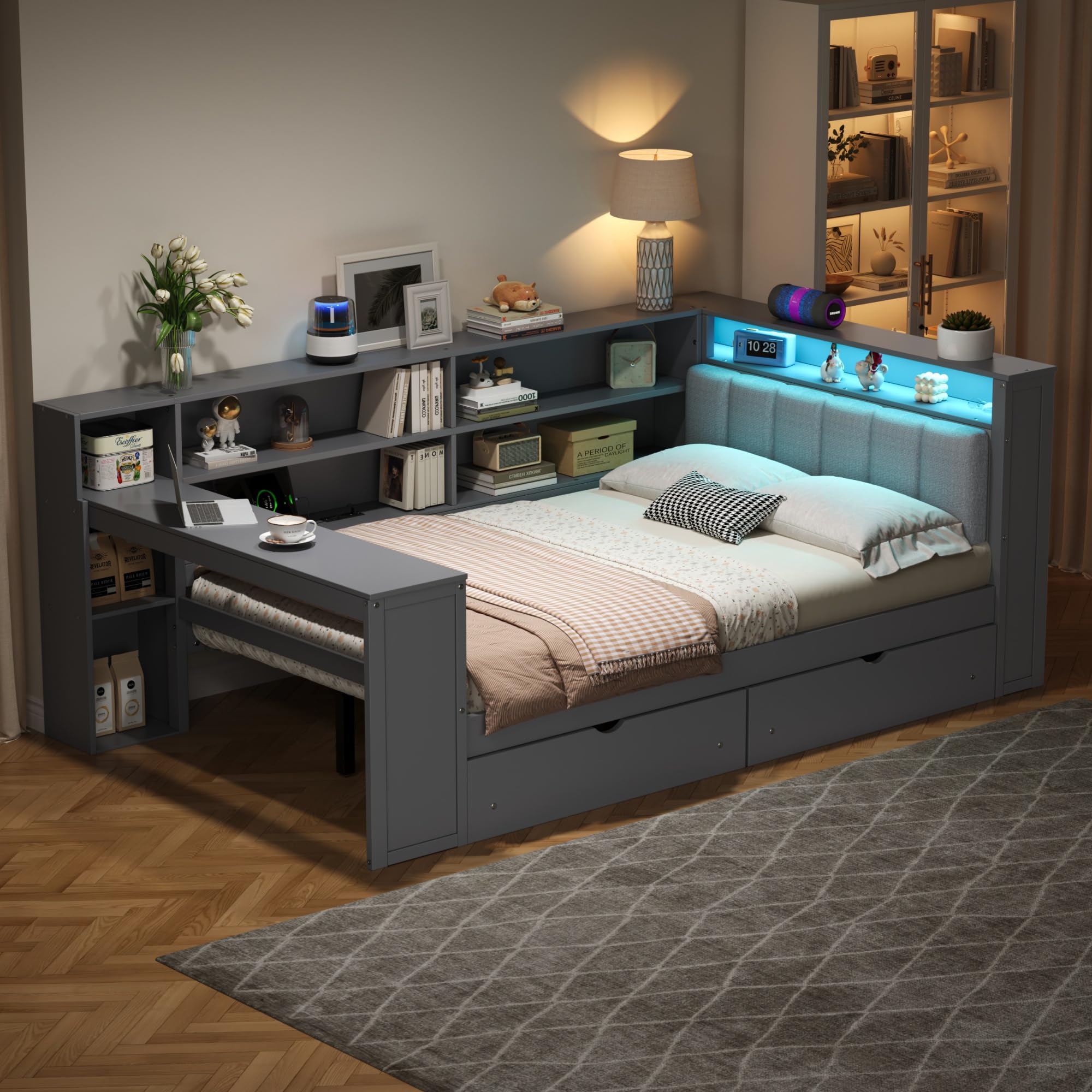
Image 1.1: Fully assembled OYUMOENTS Full Size Corner Daybed in grey, showcasing its storage shelves, desk, and upholstered headboard with LED lighting.
2. Safety Information
To ensure safe use of this product, please adhere to the following safety guidelines:
- Always follow the assembly instructions carefully to prevent injury.
- Be cautious of sharp edges during assembly and use.
- Do not exceed the weight capacity of 550 pounds.
- Keep the charging station dry and do not insert any foreign objects into the ports.
- Unplug the charging station when not in use or during cleaning.
- Ensure all connections are secure after assembly and periodically check for tightness.
- This product is designed for indoor use only.

Image 2.1: Visual representation highlighting CPC Safety Inspection, built-in storage, non-toxic varnish, and ease of assembly.
3. Package Contents
Before assembly, verify that all components are present. The package includes:
- Hardware kit (screws, bolts, connectors) x 1
- Assembly Manual x 1
- All necessary bed frame components (wood panels, slats, upholstered headboard, drawers, desk, shelves)
Note: The item will be delivered in two packages.

Image 3.1: Diagram illustrating the overall dimensions of the daybed and indicating delivery in two packages.
4. Setup and Assembly Instructions
Assembly is required for this daybed. It is recommended to have two people for easier and safer assembly, although it can be completed by one person. Follow the detailed step-by-step guide included in your package.
4.1 Pre-Assembly Checklist
- Unpack all components and lay them out on a clean, soft surface (e.g., a rug or blanket) to prevent scratches.
- Identify all parts using the provided parts list in the included manual.
- Ensure you have the necessary tools (usually an Allen wrench is provided, but a screwdriver might be needed).
4.2 Assembly Steps (General Overview)
Refer to the dedicated assembly manual for precise, illustrated instructions. The general sequence involves:
- Assemble the main bed frame structure.
- Attach the upholstered headboard and integrate the LED lighting system.
- Install the corner desk and storage shelves.
- Assemble and insert the under-bed drawers.
- Place the bed slats onto the frame.
- Connect the charging station power supply.

Image 4.1: Close-up views highlighting the built-in storage cabinet, integrated desk, and under-bed storage drawers, indicating their assembly points.
5. Operating Instructions
5.1 LED Lighting
The daybed features integrated LED lighting in the headboard. To operate, connect the power cord to a standard electrical outlet. A switch, typically located on the headboard or near the charging station, controls the light. Refer to the specific assembly manual for exact switch location and any potential light mode adjustments.
5.2 Charging Station
The built-in charging station includes 2 standard outlets and 2 USB ports. To use, ensure the daybed's power cord is plugged into a wall outlet. You can then plug in your electronic devices for charging. Always ensure devices are compatible with the power output and avoid overloading the station.
- Power Outlets: For standard electrical devices.
- USB Ports: For charging smartphones, tablets, and other USB-powered devices.
Important: Unplug the charging station when not in use to conserve energy and for safety.

Image 5.1: A detailed view of the upholstered headboard, showing the LED lighting and the integrated charging station with power outlets and USB ports.
5.3 Storage Drawers and Shelves
The daybed features two under-bed storage drawers and multiple open shelves. These are designed for organizing bedding, books, small electronics, and other personal items. Ensure drawers are not overloaded to allow for smooth operation.

Image 5.2: The daybed with its under-bed storage drawers pulled out and items placed on the integrated shelves, demonstrating storage capacity.
6. Maintenance
Proper maintenance will extend the life of your daybed:
- Cleaning: Wipe the wooden and upholstered surfaces with a dry, soft cloth. For stubborn spots on wood, a slightly damp cloth followed by immediate drying can be used. For upholstered areas, spot clean with a mild fabric cleaner if necessary, testing on an inconspicuous area first.
- Hardware: Periodically check all bolts and screws to ensure they remain tight. Re-tighten as needed to maintain stability.
- Charging Station: Keep the charging ports free of dust and debris. Do not use liquid cleaners directly on the charging station.
- LED Lights: The LED lights are designed for long-term use. If a light issue occurs, check the power connection.
7. Troubleshooting
If you encounter any issues with your daybed, refer to the following common problems and solutions:
| Problem | Possible Cause | Solution |
|---|---|---|
| Bed feels wobbly or unstable. | Loose hardware connections. | Check and re-tighten all bolts and screws. Ensure all components are correctly aligned. |
| LED lights are not working. | Power cord unplugged; faulty connection; switch off. | Ensure the power cord is securely plugged into a working outlet. Check the light switch. Verify all internal connections for the LED strip. |
| Charging station not providing power. | Daybed power cord unplugged; device not properly connected; overloaded circuit. | Confirm the daybed's main power cord is plugged in. Ensure devices are correctly inserted into the outlets/USB ports. Avoid plugging in too many high-power devices simultaneously. |
| Drawers are difficult to open/close. | Overloaded drawer; debris in tracks; misaligned tracks. | Reduce the weight in the drawer. Clean the drawer tracks. Check if the drawer slides are correctly installed and aligned. |
If the problem persists after attempting these solutions, please contact OYUMOENTS customer support.
8. Specifications
| Feature | Detail |
|---|---|
| Model Number | N7090001047E |
| Size | Full |
| Product Dimensions (L x W x H) | 98.4" x 65.3" x 40.4" |
| Compatible Mattress Size | Full (74" x 54" recommended) |
| Recommended Mattress Thickness | 6 inches or less |
| Color | Grey |
| Material | Engineered Wood, Linen, Pine Wood |
| Weight Capacity | 550 lbs |
| Special Features | Integrated Charging Station (2 outlets, 2 USB ports), LED Lighting, Corner Desk, Upholstered Headboard, 8 Storage Shelves, 2 Under-bed Drawers, No Box Spring Needed |
| Assembly Required | Yes |
| Item Weight | 202 pounds |
| UPC | 716597581456 |
Image 8.1: A visual summary of product specifications, including color, material, bed slats, recommended mattress, product weight, and weight capacity.

Image 8.2: Detail showing the solid wood construction and a note that the mattress is not included, with a recommendation for mattress thickness.
9. Warranty and Support
For warranty information or technical support, please contact OYUMOENTS customer service directly. Details for contacting support are typically provided with your purchase documentation or can be found on the official OYUMOENTS website.
Contact Information: Refer to your purchase receipt or the OYUMOENTS official website for the most current contact details.