
1. Introduction
This manual provides essential instructions for the safe and efficient operation, maintenance, and troubleshooting of your CAARLA Push Sweeper MS50W. Please read this manual thoroughly before operating the machine and retain it for future reference.
The CAARLA MS50W is a hand-propelled mini street and road sweeper designed for effective cleaning of various surfaces. It features a water system for dust suppression and an integrated dust filter for enhanced cleaning performance.
2. Safety Instructions
Always prioritize safety when operating any machinery. Adhere to the following guidelines:
- Read and understand all instructions before use.
- Ensure the sweeper is on a stable, level surface before performing any adjustments or maintenance.
- Keep hands, feet, and loose clothing away from moving parts.
- Do not operate the sweeper in wet conditions unless specifically designed for it, and exercise extreme caution.
- Store the sweeper in a dry, secure location, out of reach of children.
- Wear appropriate personal protective equipment (PPE) such as gloves and safety glasses if necessary.
- Disconnect power (if applicable for electric components) before cleaning or maintenance.
3. Product Overview
The CAARLA MS50W sweeper is designed for efficient debris collection. Key components include the main sweeping brushes, side brushes, debris hopper, water tank, and dust filter system.

Figure 3.1: Overall view of the CAARLA Push Sweeper MS50W. This image displays the sweeper from a front-side angle, showing the main body, handle, and both the main and side brushes.

Figure 3.2: Top-down view of the sweeper's main body. This image highlights the central cover, likely for the debris hopper or water system, and the robust wheel design.
4. Setup and Assembly
The CAARLA MS50W sweeper is designed for minimal assembly. According to product specifications, assembly is not required. However, ensure the following before first use:
- Handle Adjustment: Adjust the handle to a comfortable height for operation. The handle is designed to collapse for storage.
- Water Tank Fill: Locate the water tank (capacity 5L) and fill it with clean water if using the water spray system for dust suppression.
- Dust Filter Check: Ensure the dust filter is correctly installed.

Figure 4.1: Components of the dust filter system. This image shows the filter housing, the pleated filter element, and a foam pre-filter, indicating a multi-stage filtration system.
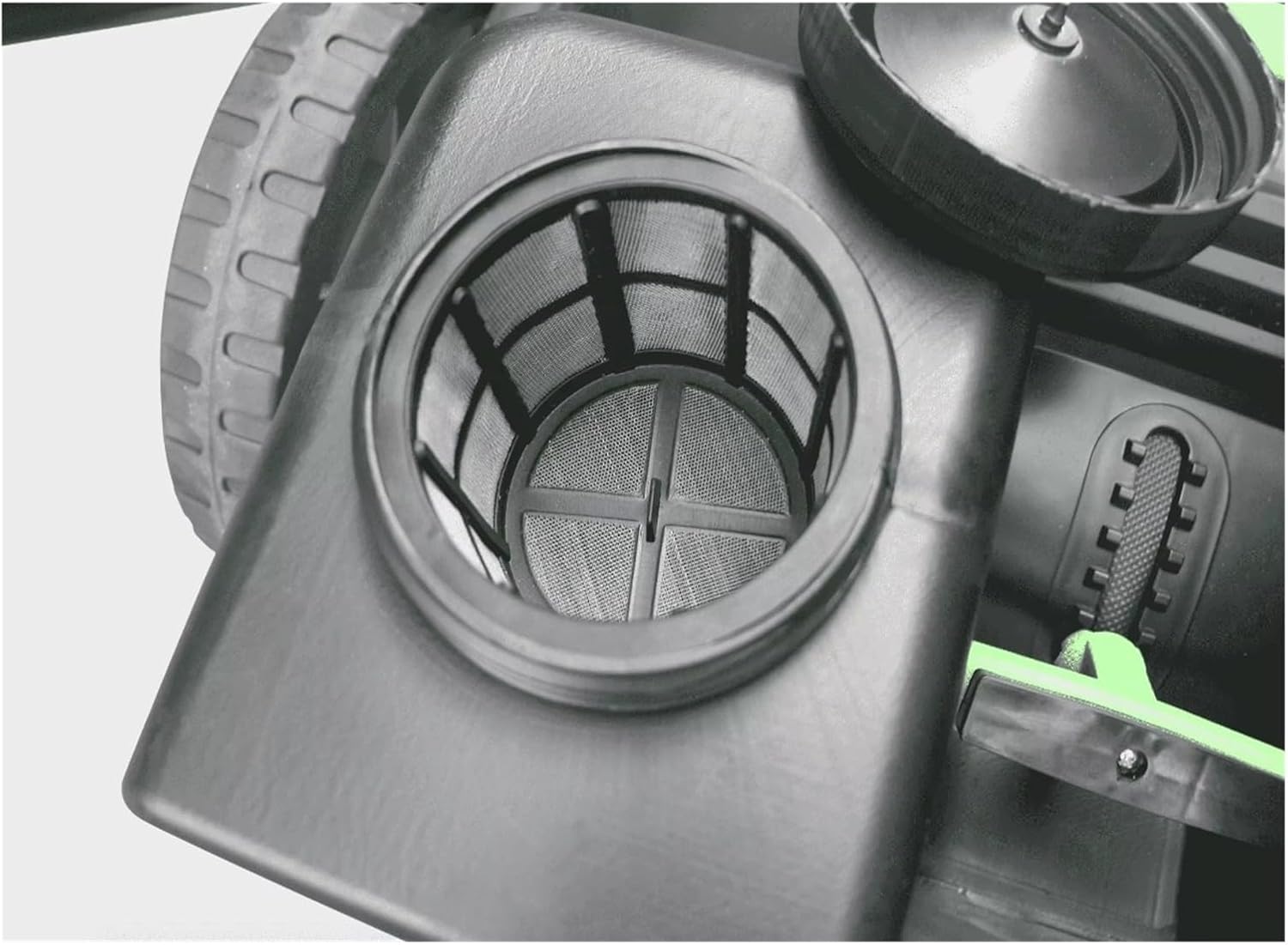
Figure 4.2: Internal view of the water tank inlet with a mesh filter. This filter prevents larger particles from entering the water system, protecting the spray nozzles.
5. Operating Instructions
- Preparation: Ensure the debris hopper is empty and the water tank (if used) is filled.
- Starting Operation: Push the sweeper forward at a steady, comfortable pace. The main and side brushes will rotate, collecting debris into the hopper.
- Water System (if applicable): If your model includes an electric water spray system, ensure it is charged and activated to suppress dust during sweeping.
- Sweeping Technique: Overlap sweeping paths slightly to ensure complete coverage. For corners and edges, utilize the side brushes effectively.
- Emptying the Hopper: Periodically check the debris hopper. When full, disengage it from the sweeper and empty its contents into a waste receptacle.

Figure 5.1: Charging port and battery voltage indicator. This panel shows the power input for charging the electric components (e.g., water pump) and a visual gauge for battery status.
6. Maintenance
Regular maintenance ensures optimal performance and extends the lifespan of your sweeper.
- After Each Use:
- Empty the debris hopper.
- Clean the brushes of any tangled debris (strings, hair, etc.).
- Wipe down the exterior of the sweeper with a damp cloth.
- Periodically:
- Dust Filter Cleaning/Replacement: Remove and clean the dust filter (refer to Figure 4.1). Tap out loose dust or wash if washable. Replace if damaged or excessively clogged.
- Water Tank Filter Cleaning: Clean the mesh filter in the water tank inlet (refer to Figure 4.2) to prevent blockages.
- Brush Inspection: Check brushes for wear and tear. Replace worn brushes to maintain sweeping efficiency.
- Battery Charging (if electric): Ensure the battery for the water system (if present) is charged as needed.
- Storage: Store the sweeper in a dry, protected area. Collapse the handle for compact storage.
7. Troubleshooting
| Problem | Possible Cause | Solution |
|---|---|---|
| Poor sweeping performance | Worn brushes; Hopper full; Debris tangled in brushes; Sweeping too fast. | Replace brushes; Empty hopper; Clean brushes; Reduce sweeping speed. |
| Water spray not working | Empty water tank; Clogged water filter; Discharged battery (if electric pump). | Refill tank; Clean water filter; Charge battery. |
| Difficulty pushing | Overfilled hopper; Obstruction in wheels/brushes. | Empty hopper; Remove obstruction. |
8. Specifications
| Feature | Detail |
|---|---|
| Model | MS50W |
| Sweeping Path | 980 mm |
| Hopper Volume | 70 L |
| Water Tank Capacity | 5 L |
| Weight (Machine) | 24 kg (52.9 lbs) |
| Dimensions (L*W*H) | 1300 x 980 x 1035 mm |
| Power Source | Manual (with electric components for water system) |
| Assembly Required | No |
9. Warranty and Support
Specific warranty information is not provided in this manual. For details regarding warranty coverage, technical support, or replacement parts, please contact your retailer or the manufacturer, CAARLA, directly. Retain your proof of purchase for warranty claims.
For further assistance, please refer to the contact information provided at the point of purchase or on the official CAARLA website.