
Fieryzeal ZQ01670
Fieryzeal COB LED Par Stage Light 400W (Model ZQ01670) User Manual
Comprehensive instructions for setup, operation, and maintenance.
1. Introduction
Thank you for choosing the Fieryzeal COB LED Par Stage Light 400W. This manual provides essential information for the safe and efficient operation of your device. Please read it thoroughly before use and retain it for future reference.

Image 1.1: Fieryzeal COB LED Par Stage Light 400W. This image shows the front view of the stage light, featuring four individual COB LED light sources, two emitting warm white light and two emitting cool white light, arranged in a rectangular panel with a sturdy bracket.
2. Safety Information
Always observe the following safety precautions to prevent electric shock, fire, or injury:
- Ensure the power supply voltage matches the device's requirements (240V AC).
- Do not open the housing; there are no user-serviceable parts inside. Refer all servicing to qualified personnel.
- Avoid direct eye exposure to the light source, as it can cause eye damage.
- Keep the device away from water, moisture, and extreme temperatures.
- Ensure proper ventilation to prevent overheating. Do not block ventilation openings.
- Mount the fixture securely using appropriate hardware for ceiling or pole installation.
- Disconnect power before cleaning or maintenance.
3. Package Contents
Verify that all items are present in the package:
- 1 x Fieryzeal COB LED Par Stage Light 400W
- 1 x Power Cord
- 1 x Signal Cable (DMX cable)
- 1 x Instruction Manual

Image 3.1: Package Contents. This image displays the Fieryzeal COB LED Par Stage Light along with its included accessories: a power cord, a DMX signal cable, and the user manual.
4. Product Overview
4.1 Key Features
- High-Performance COB Light Source: Features 4x 100W 2-in-1 COB bulbs, providing both cold white (5600K) and warm white (3200K) light for versatile color temperature mixing.
- Uniform Light Distribution: Optical reflective shell design ensures a 60° uniform light output, ideal for illuminating large areas from 3-6 meters.
- Multiple Control Modes: Supports DMX512, Automatic, Sound-activated, and Master-Slave control modes.
- Dynamic Effects: Includes 25 static effects and 30 automatic light effects, with adjustable speed and sound sensitivity.
- Linear Dimming & Strobe: 0-100% linear dimmer function and strobe effect for creating various visual atmospheres.
- Daisy-Chain Capability: Signal and power input/output ports allow for easy daisy-chaining of up to 6 units for simplified lighting arrangements.
- Compact and Durable Design: Small, lightweight, and portable housing made of iron, designed for easy transport and installation.
4.2 Components

Image 4.2.1: Rear Panel and Dimensions. This image illustrates the rear panel of the light, showing the DMX IN/OUT ports, the 4-digit display with MENU, UP, DOWN, ENTER buttons, and POWER IN/OUT ports. It also indicates the product dimensions: 34.3cm (13.5in) height and width, and 21.5cm (8.5in) depth, with a weight of 4.55kg (10lb).
- COB LED Modules: Four 100W 2-in-1 (cold/warm white) COB LEDs.
- Reflector Bowls: Designed for uniform light output.
- Control Panel: 4-digit LED display with Menu, Up, Down, and Enter buttons for mode selection and parameter adjustment.
- DMX IN/OUT: XLR 3-pin connectors for DMX512 control signal.
- POWER IN/OUT: PowerCON compatible connectors for power input and daisy-chaining.
- Mounting Bracket: Adjustable bracket for various installation options.
- Cooling System: Integrated fans for efficient heat dissipation.
5. Setup
5.1 Mounting the Fixture
The fixture can be mounted on a truss, ceiling, or placed on the floor. Ensure the mounting surface or structure can support the weight of the fixture (5.5 kg) and any additional equipment. Use appropriate clamps and safety cables (not included) for overhead installations.
- Attach the mounting bracket to a secure structure using suitable hardware.
- Adjust the angle of the light as needed and tighten the locking knobs on the bracket.
5.2 Power Connection
Connect the provided power cord to the POWER IN port on the rear of the fixture and then to a suitable power outlet (240V AC). For daisy-chaining multiple units:
- Connect the POWER OUT port of the first fixture to the POWER IN port of the next fixture using a PowerCON compatible cable.
- Up to 6 units can be daisy-chained, depending on the total power consumption and circuit capacity.

Image 5.2.1: Daisy-Chaining for Stage Lights. This image demonstrates how multiple Fieryzeal COB LED Par Stage Lights can be connected in series (daisy-chained) using standard Ohm-style sockets for power and DMX512 cables for signal, allowing up to 6 units to be linked.
5.3 DMX Connection (Optional)
For DMX512 control, connect a DMX controller to the DMX IN port of the first fixture using the provided signal cable. For multiple fixtures:
- Connect the DMX OUT port of the first fixture to the DMX IN port of the next fixture.
- Ensure the last fixture in the chain has a DMX terminator (not included) connected to its DMX OUT port for stable signal transmission.
6. Operating Modes
Use the 4-digit display and buttons (MENU, UP, DOWN, ENTER) on the rear panel to navigate and select operating modes and parameters.
6.1 DMX512 Control Mode
This mode allows professional control over various light functions using a DMX controller. The fixture supports 6 or 12 DMX channels.
- Set the DMX address for each fixture using the control panel. Ensure each fixture has a unique starting address.
- Refer to the DMX Channel Chart in the appendix (if available in the physical manual) for specific channel functions (e.g., dimmer, strobe, color temperature, individual COB control).
6.2 Automatic Mode
The fixture cycles through pre-programmed light effects automatically. You can adjust the speed of these effects.
- Select "Auto" mode from the menu.
- Use the UP/DOWN buttons to adjust the effect speed.
6.3 Sound-Activated Mode
The light effects respond to ambient sound or music detected by the built-in microphone.
- Select "Sound" mode from the menu.
- Adjust the sound sensitivity using the UP/DOWN buttons.
6.4 Master-Slave Mode
In a multi-fixture setup without a DMX controller, one fixture can act as a "Master" to control other "Slave" fixtures.
- Connect all fixtures via DMX cables (DMX OUT to DMX IN).
- Set the first fixture to "Master" mode and select the desired automatic or sound-activated effect.
- Set all other connected fixtures to "Slave" mode. They will synchronize with the Master unit.
6.5 Dimming and Color Temperature Adjustment
The fixture offers 0-100% linear dimming and adjustable color temperature from 3200K (warm white) to 5600K (cold white).

Image 6.5.1: Linear Dimming. This image illustrates the 0-100% linear dimming capability of the light, showing the visual difference between 10%, 50%, and 100% brightness levels.

Image 6.5.2: Color Temperature Options. This image displays the three primary light output options: warm white, natural white (a mix of warm and cool), and cool white, demonstrating the fixture's ability to adjust color temperature.
- In DMX mode, these parameters are controlled via specific DMX channels.
- In standalone modes (Auto, Sound, Master), some fixtures may offer direct adjustment via the menu or pre-programmed effects.
7. Maintenance
Regular maintenance ensures optimal performance and extends the lifespan of your fixture.
- Cleaning: Periodically clean the lens and housing with a soft, lint-free cloth. Do not use abrasive cleaners or solvents. Ensure the fixture is powered off and cool before cleaning.
- Fan Cleaning: Ensure the cooling fans and vents are free from dust and debris to maintain efficient heat dissipation. Use compressed air if necessary.
- Inspection: Regularly check power cables, DMX cables, and mounting hardware for any signs of damage or wear. Replace damaged components immediately.
- Storage: When not in use, store the fixture in a dry, dust-free environment.
8. Troubleshooting
If you encounter issues, refer to the following common problems and solutions:
| Problem | Possible Cause | Solution |
|---|---|---|
| No power | Power cable disconnected; no power from outlet; faulty fuse. | Check power cable connection; test outlet with another device; replace fuse if accessible and faulty. |
| No DMX control | Incorrect DMX address; faulty DMX cable; no DMX signal from controller; missing DMX terminator. | Verify DMX address setting; test DMX cable; check DMX controller output; add DMX terminator to the last fixture. |
| Light flickers or behaves erratically | Unstable DMX signal; power fluctuations; overheating. | Check DMX connections and termination; ensure stable power supply; allow fixture to cool down, ensure proper ventilation. |
| Fixture overheats | Blocked ventilation; operating in high ambient temperature. | Clear all ventilation openings; ensure adequate airflow around the fixture; operate within specified temperature ranges. |
If the problem persists after trying these solutions, contact customer support.
9. Specifications
| Brand | Fieryzeal |
| Model Number | ZQ01670 |
| Light Source | 4 x 100W COB LED (2-in-1 Cold White/Warm White) |
| Total Power | 400 Watts |
| Voltage | 240 Volts (AC) |
| Luminous Flux | 1500 lux |
| Color Temperature | 3200K - 5600K |
| Beam Angle | 60 Degrees |
| Control Modes | DMX512, Automatic, Sound-activated, Master-Slave |
| DMX Channels | 6 or 12 Channels |
| Dimming | 0-100% Linear Dimmer |
| Strobe Function | Yes |
| Material | Iron |
| Dimensions (L x W x H) | 40 x 15 x 40 cm (15.7 x 5.9 x 15.7 inches) |
| Weight | 5.5 kg (12.1 lbs) |
| Energy Efficiency Rating | E (View EPREL details) |
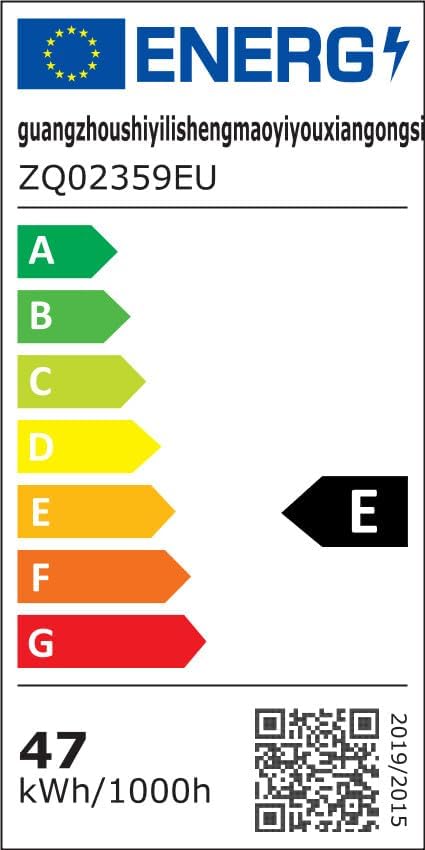
Image 9.1: Energy Efficiency Label. This label indicates the product's energy efficiency class as 'E' and its energy consumption of 47 kWh/1000h. A QR code is also visible for further details.
10. Warranty and Support
For warranty information and technical support, please refer to the documentation included with your purchase or contact your retailer. Keep your proof of purchase for any warranty claims.
Ask a question about this manual
Ask about setup, troubleshooting, compatibility, parts, safety, or missing instructions. Manuals+ will review the question and use this page’s manual context to help answer it.