
1. Introduction
This manual provides comprehensive instructions for the installation, operation, and maintenance of your ANJIELO SMART Tuya Wired Visual Doorbell Intercom System. This system is designed for multi-unit family residences, featuring a 10-inch touch monitor and a 3-in-1 locking mechanism for enhanced security and convenience.
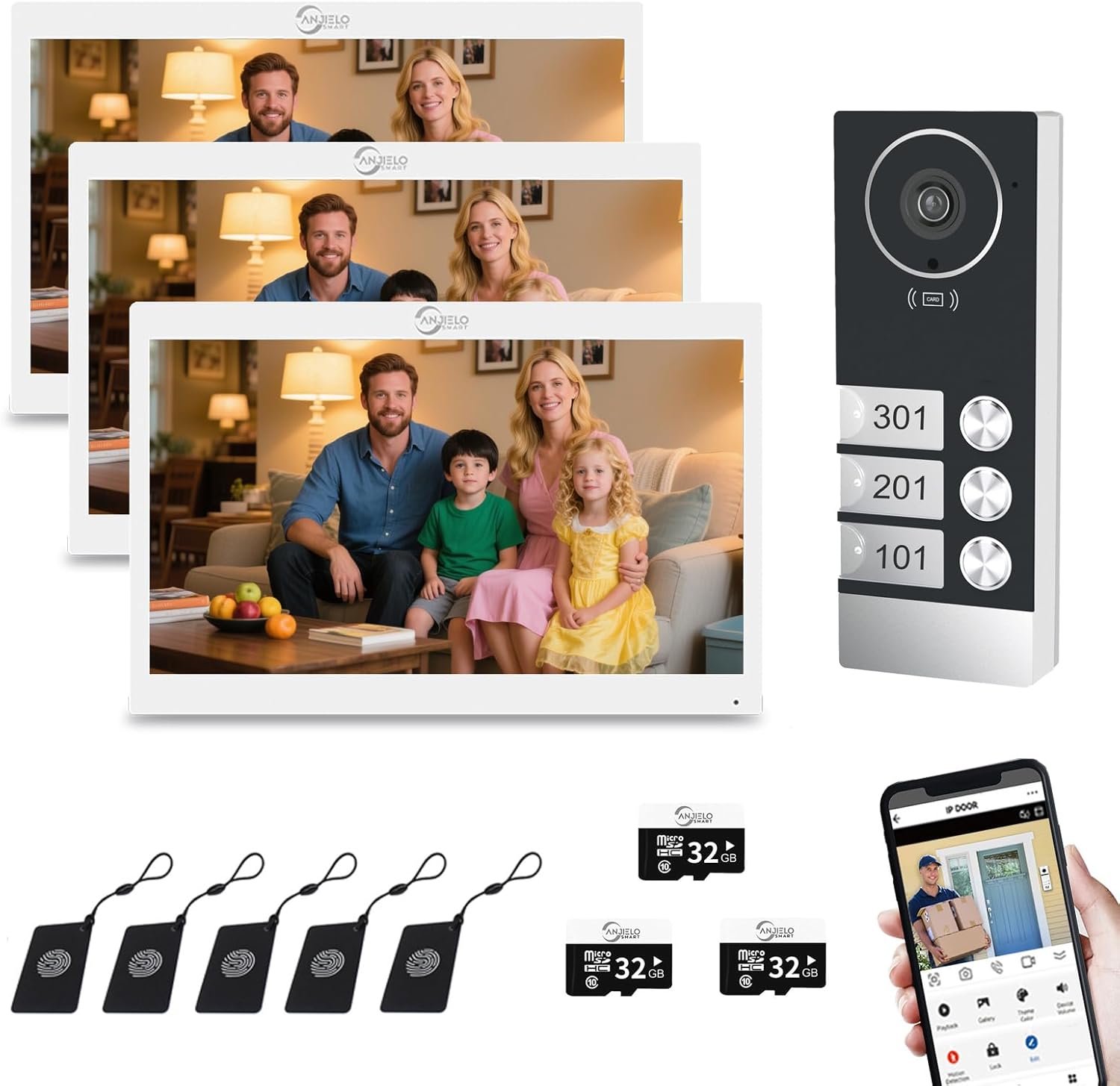
Figure 1.1: Overview of the ANJIELO SMART Tuya Wired Visual Doorbell Intercom System, showing the outdoor doorbell unit, three indoor 10-inch monitors, included micro SD cards, and a smartphone displaying the Tuya app interface.
2. Product Features
- 3-Unit Family Design: One outdoor camera unit connects to three independent indoor 10-inch monitors, supporting up to four occupants in a single building without interference between units.
- 10-Inch Touch Monitor: Features a responsive touch screen for door answering, monitoring, and unlocking. The ultra-slim design supports Smart Tuya APP Wireless WiFi for remote access. Note: While the monitor supports wireless connection to your home network, the connection between the indoor monitor and the outdoor doorbell is wired.
- 3-in-1 Unlocking and Automatic Video Recording: Offers multiple unlocking methods including ID card, mobile application, and directly from the screen monitor. The system automatically captures or records video upon motion detection, storing footage on the included 32GB micro SD card for later review via your smartphone.
- 1080P HD IR Night Vision: Equipped with a high-resolution 1080P camera with IR night vision for clear images day or night. The 140-degree wide-angle lens and rain cover ensure reliable performance in various conditions. Built-in speaker and microphone facilitate two-way audio.
- Wired Setup: The connection between the monitor and doorbell requires a 4-wire setup. A 3-meter 4-core cable is provided for each doorbell for basic installation, along with a 1.2-meter external power supply for each monitor. The distance can be extended with additional 4-core wire. The main monitor connects to your home Wi-Fi network for remote functionality.
- Real-Time Monitoring & Remote Access: Utilizing IP technology, the system sends real-time notifications to your mobile phone via the Tuya APP when a visitor presses the doorbell. This allows you to see, hear, and speak to visitors, and even remotely unlock the door from any location using your smartphone.
3. What's in the Box
Upon unboxing, please verify that all components are present:
- 1 x Outdoor Doorbell Unit
- 3 x Indoor 10-Inch Touch Monitors
- Necessary wiring (3m 4-core cable for doorbell, 1.2m external power supply for monitors)
- Mounting screws and accessories
- User Manual (this document)
4. Specifications
| Feature | Detail |
|---|---|
| Brand | ANJIELO SMART |
| Model Name | 60083F-B+61010W |
| Color | White |
| Power Source | Corded Electric |
| Connectivity Technology | Wired (Monitor to Doorbell), Wi-Fi (Monitor to Home Network) |
| Video Capture Resolution | 1080p |
| Outdoor Doorbell Sensor | Colorful CMOS sensor, 1/3" size, 160 degrees visual angle |
| Night Vision | IR Cut, B/W Night Vision |
| Outdoor Doorbell Material | Aluminum Alloy/ABS |
| Outdoor Doorbell Size | 145x45x30 mm |
| Indoor Monitor Screen | 10 inch TFT-LCD touch screen |
| Indoor Monitor Resolution | 1024 x 680 |
| Indoor Monitor Rings | 7-chord melody rings |
| Indoor Monitor Material | Acrylic/ABS cover |
| Indoor Monitor Input Voltage | AC 100-240V 50/60Hz |
| Indoor Monitor Working Voltage | DC 12V, 2A |
| Indoor Monitor Size | 272x190x21 mm |
| Installation Type | Surface mounting (Screw In) |
| Alert Type | Audio and Motion |
| Control Method | App, Touch |
| Recommended Uses | Indoor/Outdoor |
| Compatible Devices | Personal Computer, Smartphone |
5. Setup and Installation
The ANJIELO SMART intercom system requires a wired connection between the outdoor doorbell unit and the indoor monitors. The indoor monitors then connect to your home Wi-Fi network for smart features.
5.1. Wiring Diagram (Conceptual)
The system uses a simple 4-wire connection between the outdoor doorbell and each indoor monitor. Ensure proper polarity when connecting wires.

Figure 5.1: Conceptual diagram illustrating the connection of one outdoor camera to three indoor monitors for a multi-unit family setup, ensuring separate monitoring without interference.
5.2. Outdoor Doorbell Installation
- Choose a suitable location near your main entrance, ensuring it is within reach of the wiring and provides a clear view of visitors. The unit is IP65 weatherproof, suitable for outdoor use.
- Mount the outdoor doorbell unit using the provided screws. Ensure it is securely fastened to a stable surface.
- Connect the 4-core cable from the doorbell to the designated wiring point for the indoor monitors.

Figure 5.2: The outdoor doorbell unit, designed with IP65 weatherproofing, capable of withstanding temperatures from -40°C to +50°C, ensuring durability in various climates.
5.3. Indoor Monitor Installation
- Select a convenient indoor location for each monitor, such as a wall in a common area or near the entrance of each unit.
- Mount each monitor securely using the provided hardware.
- Connect the 4-core cable from the outdoor doorbell to each indoor monitor.
- Connect the 1.2m external power supply to each monitor and plug it into a power outlet.
- Once powered on, follow the on-screen prompts to connect the main monitor to your home Wi-Fi network. This enables Tuya APP functionality.
6. Operating Instructions
6.1. Basic Intercom Functionality
When a visitor presses the doorbell button on the outdoor unit, all connected indoor monitors will ring. You can answer the call from any monitor by touching the screen.
6.2. Two-Way Audio Communication
The system supports two-way audio, allowing you to speak with visitors through the indoor monitor or via the Tuya APP on your smartphone or computer.

Figure 6.1: Illustration of the 2-way audio feature, enabling communication with visitors through the outdoor doorbell, indoor monitor, or remotely via the Tuya Smart app on a mobile phone or computer.
6.3. Unlocking Methods
The system offers three convenient ways to unlock your door:
- ID Card Unlock: Use a pre-programmed ID card by swiping it near the outdoor doorbell unit.
- Monitor Unlock: Tap the unlock icon on the indoor monitor's touch screen during an active call or monitoring session.
- APP Remote Unlock: Use the Tuya APP on your smartphone to remotely unlock the door from anywhere with an internet connection.

Figure 6.2: The outdoor doorbell unit highlighting the three unlocking methods: ID card, monitor, and remote unlocking via the mobile application.
6.4. Tuya APP Remote Control
Download the Tuya Smart app from your smartphone's app store (available on iOS and Android). Register an account and add your ANJIELO SMART intercom system. This allows for:
- Receiving real-time calls and notifications from the doorbell.
- Viewing live video feed from the outdoor camera.
- Engaging in two-way audio communication with visitors.
- Remotely unlocking the door.
- Accessing recorded video footage.

Figure 6.3: The Tuya app interface on a smartphone, demonstrating the remote unlock feature, allowing users to control access from anywhere.
7. Motion Detection and Recording
The system is equipped with smart PIR motion detection. When movement is detected near the outdoor doorbell, the camera will automatically capture images or record video.
- Recorded footage is stored on the micro SD card inserted into the indoor monitor (a 32GB card is included).
- You can review these recordings directly from the monitor or remotely via the Tuya APP.
- The system also provides anti-theft alerts, pushing notifications to your monitor and smartphone when suspicious activity is detected.

Figure 7.1: A smartphone displaying a push notification from the Tuya Smart app, indicating detected motion by the doorbell camera, with a visual of the event.

Figure 7.2: The indoor monitor and a smartphone screen both displaying an anti-theft alert, showing a suspicious individual, demonstrating the system's security capabilities.
8. Maintenance
- Cleaning: Regularly wipe the outdoor doorbell camera lens and the indoor monitor screen with a soft, dry cloth to ensure clear visibility. Avoid abrasive cleaners.
- Connection Check: Periodically inspect all wired connections to ensure they are secure and free from damage.
- Software Updates: Check the Tuya APP or the monitor settings for available firmware updates to ensure optimal performance and security.
- SD Card Management: If the SD card becomes full, the system may overwrite older recordings. Regularly back up important footage and consider formatting the SD card periodically to maintain performance.
9. Troubleshooting
| Problem | Possible Cause | Solution |
|---|---|---|
| No image on indoor monitor. | Power issue, loose wiring, faulty camera. | Check power supply to monitor. Verify all 4-wire connections between doorbell and monitor are secure. Restart the system. |
| No audio during intercom. | Microphone/speaker issues, volume settings. | Check volume settings on the monitor. Ensure no obstructions are blocking the microphone or speaker on either unit. |
| Cannot connect monitor to Wi-Fi. | Incorrect Wi-Fi password, weak signal, router issues. | Double-check Wi-Fi password. Move monitor closer to router or use a Wi-Fi extender. Restart router. Ensure Wi-Fi is 2.4GHz. |
| Tuya APP not receiving notifications. | App permissions, network issues, notification settings. | Ensure Tuya APP has notification permissions enabled on your phone. Check phone's internet connection. Verify notification settings within the Tuya APP. |
| Motion detection not working. | Sensitivity settings, obstructions, software glitch. | Adjust motion detection sensitivity in monitor settings or Tuya APP. Ensure camera lens is clean and unobstructed. Restart the system. |
10. Warranty and Support
For warranty information and technical support, please refer to the documentation provided with your purchase or contact ANJIELO SMART customer service directly. Keep your purchase receipt as proof of purchase.
For further assistance, you may visit the official ANJIELO SMART store on Amazon: ANJIELO SMART Store