
Important Safety Instructions
Please read all instructions carefully before using the GROBELL GB-SC70 Steam Cleaner. Failure to follow these instructions may result in electric shock, fire, or serious injury.
- Always ensure the appliance is unplugged from the power outlet before filling with water, cleaning, or performing maintenance.
- Do not leave the appliance unattended when plugged in.
- Use only clean tap water. Distilled water is recommended to prevent mineral buildup.
- Never direct steam at people, animals, or electrical appliances. Steam is extremely hot and can cause burns.
- ALWAYS WEAR HEAT-RESISTANT GLOVES when operating the steam cleaner to protect your hands from hot steam and surfaces.
- Keep the appliance out of reach of children and pets.
- Do not immerse the appliance in water or any other liquid.
- Do not use the appliance if the cord or plug is damaged. Contact customer service for repair.
- To ensure dry steam, press the steam trigger to expel any condensed water from the hose before use.
Package Contents
Your GROBELL GB-SC70 Steam Cleaner comes with a comprehensive 21-piece accessory kit to tackle various cleaning tasks.

Image: All 21 accessories included with the GROBELL GB-SC70 Steam Cleaner, neatly arranged.
- GROBELL GB-SC70 Main Unit
- Detachable Hose
- Extension Tube (x2)
- Mop Head
- Microfiber Pad (x3)
- Triangular Brush
- Microfiber Bonnet (for Triangular Brush)
- Nozzle
- Round Brush (x8 - includes Nylon and Brass brushes)
- Squeegee (for windows and glass)
- Microfiber Cloth (x1)
- Heat-Resistant Glove (x1)
- Storage Bag (for accessories)
- Power Cord (11.5-ft / 3.5-m)
Setup
- Fill Water Tank: Unscrew the water tank cap on the main unit. Using a funnel (not included, but recommended) or a pitcher, carefully fill the 0.66-gallon (2.5L) tank with clean tap water. Distilled water is recommended to prevent mineral buildup. Do not overfill. Securely replace the water tank cap.

Image: Water being poured into the 0.66-gallon (2.5L) water tank of the GROBELL Steam Cleaner.
- Attach Hose: Connect the detachable hose to the main unit by twisting it securely into place.
- Select and Attach Accessory: Choose the appropriate cleaning attachment for your task. For floor cleaning, connect the extension tubes to the hose, then attach the mop head with a microfiber pad. For detailed cleaning, attach the nozzle directly to the hose or use a triangular brush with a microfiber bonnet. Ensure all connections are firm.

Image: Various attachments for the GROBELL Steam Cleaner, including the mop head, extension tubes, and different brushes.
- Power On: Plug the power cord into a grounded electrical outlet. The unit will begin to heat up. The display will show the temperature.
- Heating Time: The GROBELL GB-SC70 heats up in approximately 40 seconds, reaching temperatures between 230–260°F (110–126°C). The display will indicate when it's ready.
Operating Instructions
The GROBELL GB-SC70 offers both dry and wet steam modes for versatile cleaning.
- Expel Condensed Water: Before applying steam to your cleaning surface, point the attachment away from yourself and others, and press the steam trigger to release any condensed water from the hose. This ensures you get dry, high-temperature steam.
- Select Steam Mode: Use the "DRY" or "WET" button on the main unit to select your desired steam mode. Dry mode is ideal for fabrics and upholstery where minimal moisture is preferred. Wet mode provides more moisture for tougher stains and hard surfaces.
- Apply Steam: Direct the chosen attachment towards the surface to be cleaned. Press and hold the steam trigger on the handle to release steam. Move the attachment slowly over the surface to allow the steam to penetrate and loosen dirt.
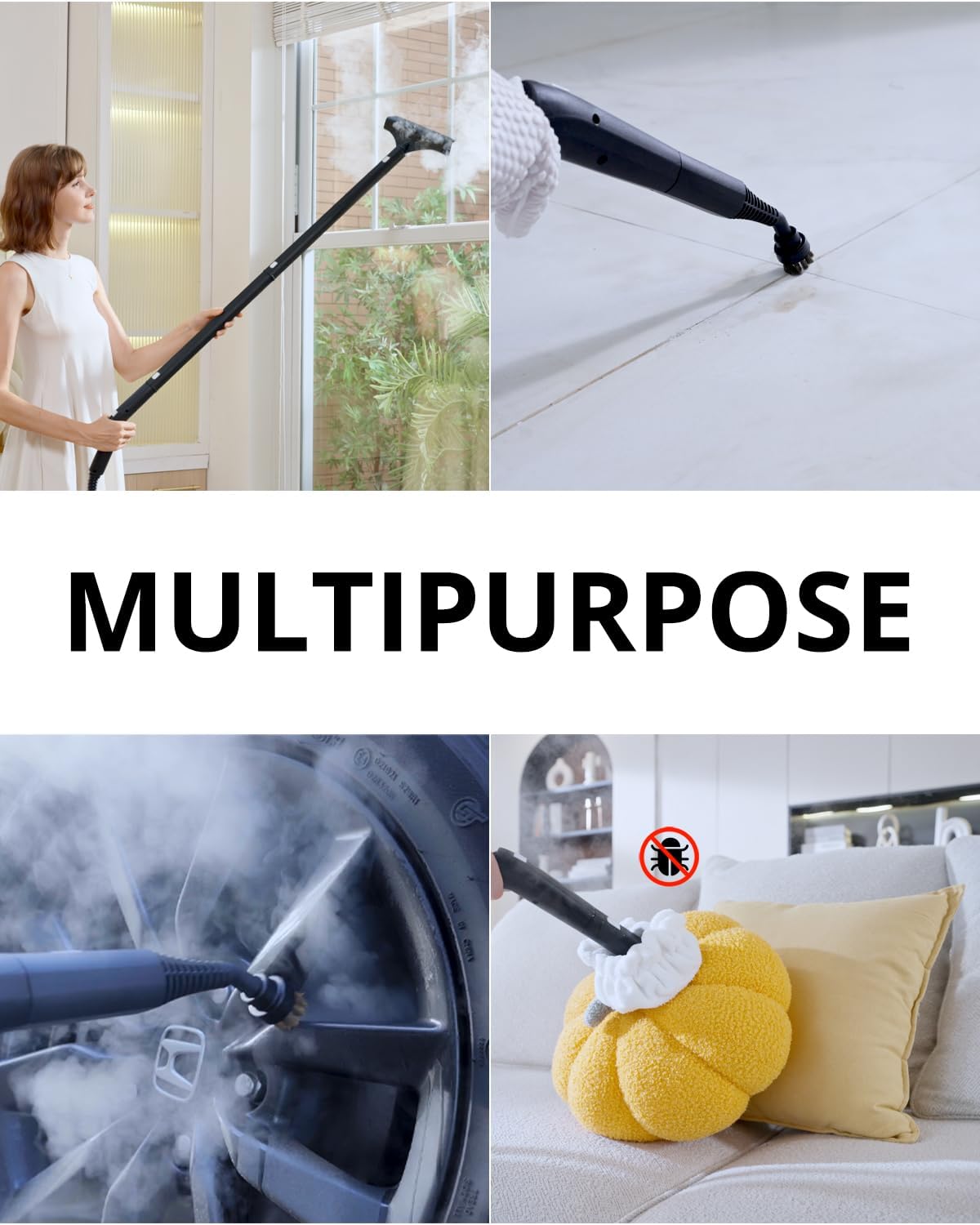
Image: Demonstrates the steam cleaner's effectiveness on a stained countertop, highlighting the dry/wet switch for chemical-free cleaning.
- Floor Cleaning: For laminate, hardwood, or tile floors, attach the mop head with a microfiber pad to the extension tubes. Glide the mop head across the floor while releasing steam.

Image: A user cleaning a wooden floor with the detachable hose and mop head attachment, illustrating ease of use and large water tank capacity.
- Detail Cleaning: Use the nozzle with round brushes (nylon for general cleaning, brass for tough grime like tile grout or oven racks) for targeted cleaning. For fabric surfaces, car seats, or wooden furniture, always use the fiber cap over the triangular brush to prevent damage.
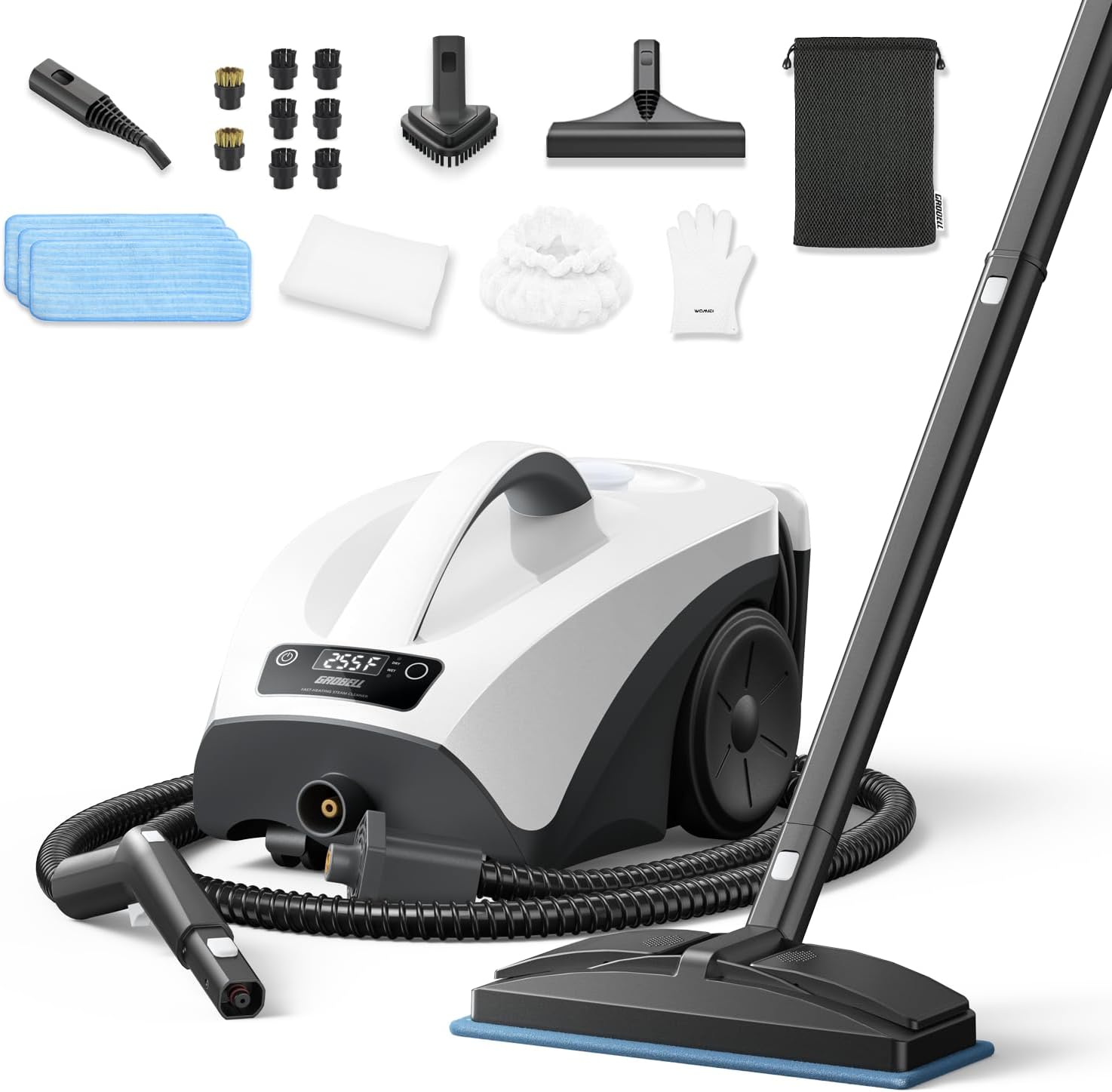
Image: The GROBELL Steam Cleaner demonstrating its multipurpose capabilities on windows, car interiors, and upholstery.
- Refilling During Operation: The GROBELL GB-SC70 allows for continuous refilling without powering off or waiting for cooling. Simply unscrew the water tank cap and add more water as needed.
Official Product Videos:
Video: "Your Cleaning Pal" - A seller-created video demonstrating the GROBELL Steam Cleaner's features and ease of use for various household tasks.
Video: "GROBELL Steam Cleaner" - A seller-created video showcasing the steam cleaner's versatility and effectiveness on different surfaces.
Maintenance
- Cleaning the Unit: After each use, ensure the unit is unplugged and cooled down. Empty any remaining water from the tank. Wipe down the exterior of the unit with a damp cloth.
- Accessory Care: Microfiber pads and bonnets are washable. Hand wash or machine wash them with mild detergent and air dry. Clean brushes and nozzles with water and mild soap if necessary.
- Descaling: If using tap water, mineral deposits may build up over time. Periodically descale the unit by filling the tank with a solution of equal parts water and white vinegar. Run the unit until steam is produced, then turn it off and let it sit for 30 minutes. Empty the tank and rinse thoroughly with clean water.
- Storage: Store the steam cleaner and its accessories in a cool, dry place. The detachable hose and rear cord organizer make storage easy and compact. Use the provided storage bag for smaller accessories.
Troubleshooting
| Problem | Possible Cause | Solution |
|---|---|---|
| No steam or low steam output | Water tank is empty; Unit not heated; Blocked nozzle/attachment. | Refill water tank; Allow 40 seconds for heating; Clean or replace attachment. |
| Water leaking from attachment | Attachment not securely connected; Condensed water in hose. | Ensure attachment is firmly twisted on; Expel condensed water before use. |
| Unit not turning on | Not plugged in; Power outlet issue. | Check power cord connection; Try a different outlet. |
| Mineral buildup affecting performance | Hard water usage. | Descale the unit as per maintenance instructions. Use distilled water for future use. |
Specifications
| Feature | Detail |
|---|---|
| Brand | GROBELL |
| Model Name | GB-SC70 |
| Water Tank Capacity | 0.66 Gallons (2.5 Liters) |
| Heat Time | 40 Seconds |
| Maximum Temperature | 230–260°F (110–126°C) |
| Wattage | 1650 watts |
| Voltage | 110 Volts |
| Power Cord Length | 11.5-ft (3.5-m) |
| Extension Hose Length | 7.2-ft (2.2-m) |
| Modes | Dry and Wet Steam |
| Included Accessories | 21-Piece Kit (Mop head, Nylon & Brass Brushes, Squeegee, Triangular Brush, Microfiber Pads, etc.) |
Warranty and Support
GROBELL offers a 12-month warranty for this product. For any questions or support, please contact our customer service team at info@grobell.com. We aim to reply within 12 hours.