
Introduction
This manual provides detailed instructions for the GUGUMO GPS Digital Speedometer, designed to offer accurate, real-time speed readings for a wide range of vehicles. This device utilizes advanced GPS satellite technology for precise measurement, operating independently of your vehicle's internal systems. It features a clear LED display, smart power management, and a universal plug-and-play installation.

Image: The GUGUMO GPS Digital Speedometer unit, accompanied by a USB car charger, a USB cable, and adhesive pads for mounting.
Product Overview
The GUGUMO GPS Digital Speedometer is a compact and versatile device. It displays speed in large, easy-to-read digits and includes a compass and time display. Its design ensures compatibility with various vehicles and ease of use.
Key Features:
- Advanced GPS Technology: Utilizes high-precision GPS satellite technology for accurate, real-time speed readings.
- Universal Compatibility: Works with all vehicle types, including cars, trucks, motorcycles, SUVs, and golf carts.
- Smart Power Management: Automatic activation upon movement and shutdown after 3 minutes of inactivity to conserve power.
- Enhanced Visibility: Large LED display with adjustable brightness for optimal viewing in various lighting conditions.
- Plug-and-Play Installation: Simple setup via USB connectivity.
- Dual-Mode Chip: GPS+BEIDOU dual-mode chip for guaranteed high precision and refresh rate.

Image: A detailed diagram illustrating the components of the speedometer, including color switching buttons, speedometer display (MPH/KM/H), and power connector.

Image: Illustration highlighting the GPS+BEIDOU dual-mode chip, emphasizing its global satellite positioning system for high precision and refresh rate, shown with day and evening driving scenarios.
Setup and Installation
The GUGUMO GPS Digital Speedometer is designed for simple plug-and-play installation. Follow these steps to set up your device:
- Prepare the Device: Peel off the protective film from the bottom adhesive pads.
- Connect Power: Plug the USB cable into the Type-C port on the speedometer unit.
- Power Source: Connect the other end of the USB cable into a standard USB port in your vehicle or use the provided USB car adapter (cigarette lighter adapter).
- Mounting: Adhere the bottom adhesive pads to the product, then find a suitable, stable spot on your dashboard or desired location in the vehicle to stick the device. Ensure the device has a clear view of the sky for optimal GPS signal reception.
- Initial Satellite Positioning: After powering on, wait approximately 10-30 seconds for the device to acquire a GPS satellite signal. The display will show "0" or a similar indicator until positioning is successful. Once connected, it will display your current speed.

Image: A six-step visual guide demonstrating the installation process, from peeling adhesive to plugging in the USB cable and mounting the device on the dashboard.
Operating Instructions
Once installed and powered on, the speedometer will automatically display your speed. Here's how to interact with its features:
- Speed Display: The large left display shows your current speed.
- Unit Switching (MPH/KM/H): The device supports both Miles Per Hour (MPH) and Kilometers Per Hour (KM/H). Refer to the product's physical buttons (often located on the side or back) to switch between these units. Typically, a short press of a specific button will toggle the display unit.
- Time and Compass Display: The right display shows the current time and a compass indicating your driving direction (N, S, E, W).
- Color Modes: The display offers multiple color modes for personalization and visibility. Use the designated button (often labeled "Color switching" as shown in product diagrams) to cycle through available display colors (e.g., Red, Green, Blue, Yellow, Pink, White).
- Brightness Adjustment: The display brightness can be adjusted to suit day or night driving conditions. This feature helps ensure clear visibility without causing distraction. Consult the device's physical buttons for brightness control.
- Automatic Power On/Off: The intelligent motion sensor will automatically turn the device on when it detects vehicle movement and power it off after 3 minutes of inactivity.

Image: A visual representation of the speedometer's ability to switch between MPH and KM/H speed functions, shown in a driving environment.

Image: A collage showing the speedometer display in various color modes including Red, Green, Blue, Yellow, Pink, and White, demonstrating customization options.
Maintenance
To ensure the longevity and optimal performance of your GUGUMO GPS Digital Speedometer, follow these simple maintenance guidelines:
- Cleaning: Use a soft, dry cloth to clean the display and exterior of the device. Avoid using abrasive cleaners or solvents, which can damage the surface.
- Environmental Conditions: Avoid exposing the device to extreme temperatures, direct sunlight for prolonged periods when not in use, or excessive moisture.
- Cable Care: Ensure the USB cable is not kinked, pinched, or subjected to excessive strain, as this can damage the cable or the device's port.
- Storage: If storing the device for an extended period, disconnect it from the power source and keep it in a cool, dry place.
Troubleshooting
If you encounter issues with your GUGUMO GPS Digital Speedometer, refer to the following common problems and solutions:
| Problem | Possible Cause | Solution |
|---|---|---|
| Device does not power on. | No power supply or faulty connection. |
|
| No speed display / Display shows "0". | No GPS signal or device not moving. |
|
| Inaccurate speed reading. | Weak GPS signal or environmental interference. |
|
| Display is too dim or too bright. | Brightness settings need adjustment. |
|
Specifications
Technical specifications for the GUGUMO GPS Digital Speedometer:
- Model: B0FJ86L4ZC (Colorful MPH KM/H Speedometer)
- Brand: GUGUMO
- Display Type: LED Digital
- Speed Units: MPH, KM/H (Switchable)
- Positioning System: GPS+BEIDOU Dual-Mode Chip
- Power Input: USB (5V)
- Automatic Features: Motion-activated power on/off
- Dimensions (Approximate): 3.03 x 1.97 x 0.94 inches (7.7 x 5.0 x 2.4 cm)
- Item Weight (Approximate): 1.6 ounces (45 grams)
- Package Contents: 1x GUGUMO GPS Digital Speedometer, 1x USB Cable, 1x USB Car Charger (if included in specific package), Adhesive Pads.
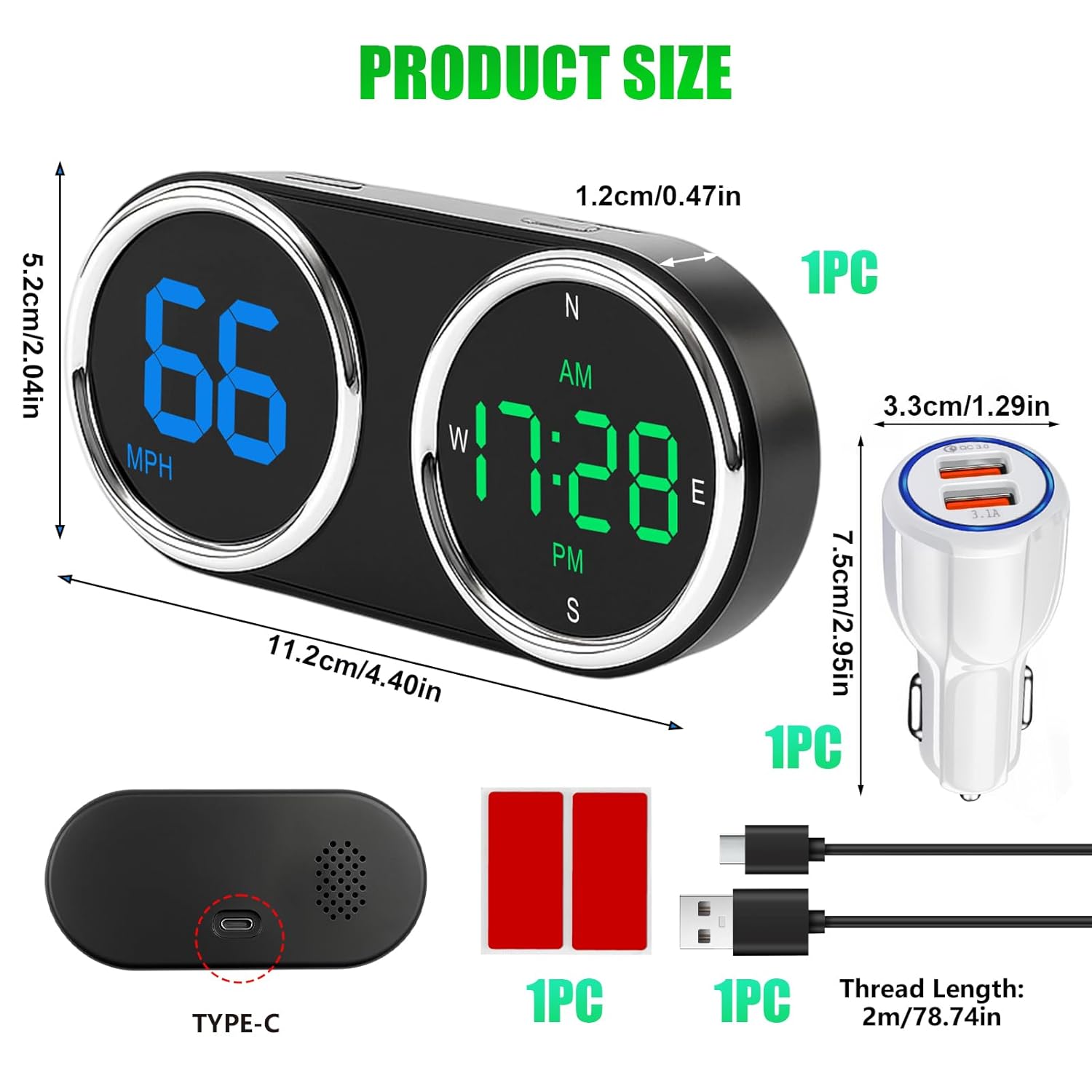
Image: A diagram detailing the product's dimensions (length, width, height) and illustrating the included accessories such as the Type-C USB cable and USB car charger.
Safety Information
Please read and follow these safety guidelines to ensure safe operation and prevent damage to the device or vehicle:
- Driving Safety: Always prioritize safe driving. Do not attempt to adjust settings or interact with the device in a way that distracts you from the road.
- Placement: Mount the device in a location that does not obstruct your view of the road or interfere with airbags or other safety features.
- Power Source: Use only the provided USB cable and car charger, or a compatible 5V USB power source. Using incompatible power adapters may damage the device.
- Temperature: Avoid leaving the device in direct sunlight for extended periods in a parked vehicle, especially in hot climates, as high temperatures can affect its performance and lifespan.
- Disassembly: Do not attempt to disassemble or modify the device. This will void any warranty and may cause damage or injury.