
1. Introduction
This manual provides essential information for setting up, operating, and maintaining your Sunorshop H69 Smart Fitness Tracker. Please read it thoroughly before using the device to ensure proper function and longevity.
2. Package Contents
Verify that all items are present in your package:
- Sunorshop H69 Smart Watch x1
- Charging Cable x1
- Black Replacement Band x1
- User Manual x1

Image: The package contents of the Sunorshop H69 Smart Fitness Tracker, showing the watch, two black bands, a charging cable, and the user manual.
3. Setup Guide
3.1 Charging the Device
Before first use, fully charge your smart fitness tracker. Connect the magnetic charging cable to the charging contacts on the back of the watch and plug the USB end into a power adapter (not included) or a computer's USB port. A full charge typically takes approximately 2 hours.

Image: The Sunorshop H69 Smart Fitness Tracker being charged with its magnetic cable, showing a 'Fully charged' indicator on the screen.
3.2 App Installation and Pairing
To unlock all features and synchronize data, download the official companion app on your smartphone. The app is compatible with Android 10.0 / iOS 10.0 or above and requires Bluetooth 5.0.
- Scan the QR code in the manual or search for the app name (usually mentioned in the included manual or on the product packaging) in your phone's app store.
- Install the app and create an account.
- Ensure Bluetooth is enabled on your smartphone.
- Open the app and follow the on-screen instructions to add your device. Important: Connect the device from within the app, not directly through your phone's Bluetooth settings.
- Once paired, set up your personal profile, including age, height, weight, and gender, for accurate health and activity tracking.
4. Operating Instructions
4.1 Basic Navigation
The Sunorshop H69 features a 1.47" HD color display with touch functionality. Swipe left, right, up, or down to navigate through menus and functions. Press the side button to return to the home screen or wake the device.
4.2 Health Monitoring
The device continuously monitors various health metrics:
- Heart Rate: Provides 24/7 uninterrupted heart rate monitoring, displaying real-time changes directly on the watch.
- Blood Oxygen: Automatically tracks blood oxygen levels throughout the day. Detailed charts and trends are available in the companion app.
- Sleep Tracking: Automatically monitors awake, light, and deep sleep stages to help evaluate and improve sleep quality.
- Breathing Training: Guided breathing exercises to help manage stress and improve relaxation.

Image: The Sunorshop H69 Smart Fitness Tracker showing health tracking data for heart rate, blood oxygen, and breath training.

Image: The Sunorshop H69 Smart Fitness Tracker displaying sleep status, including total sleep duration and time spent in deep, light, and awake stages.
4.3 Activity Tracking
The smart watch supports over 24 sports modes, providing scientific monitoring and guidance for various activities. It tracks real-time steps, distance, calories burned, and heart rate during workouts.
- Pedometer: Counts your daily steps.
- Distance: Calculates distance covered based on steps and stride length.
- Calories: Estimates calories burned during activities.
- IP68 Waterproof: The device is resistant to dust and can withstand immersion in water up to 1.5 meters for 30 minutes. Suitable for daily use, rain, and sweat during exercise. Note: Not suitable for hot water, saunas, or diving.
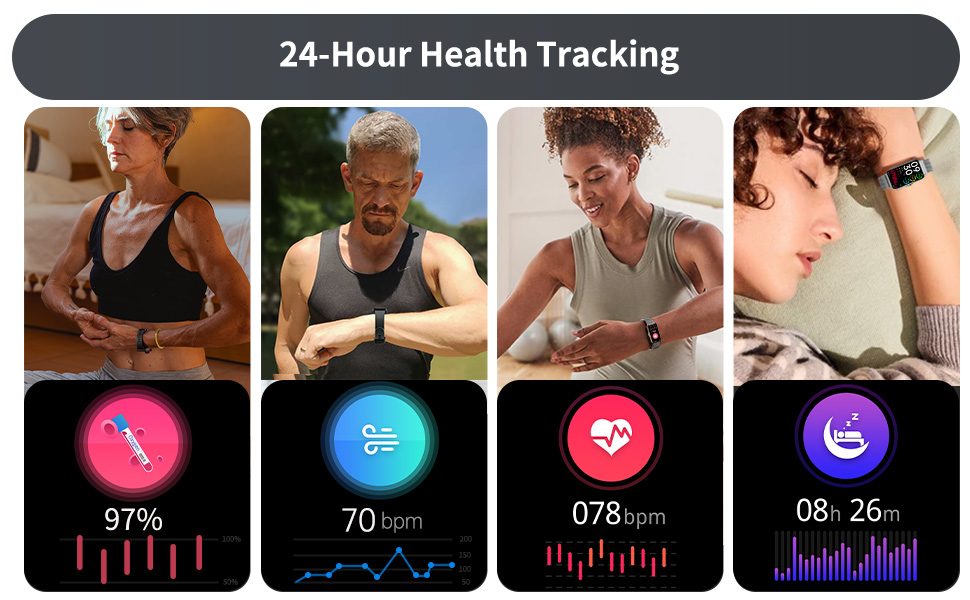
Image: The Sunorshop H69 Smart Fitness Tracker displaying activity data like steps, distance, and calories during an outdoor workout.
4.4 Smart Features
Enhance your daily life with these convenient smart functions:
- Message & Call Notifications: Receive alerts for incoming calls and messages directly on your wrist.
- Weather Forecasts: Get real-time weather updates.
- Music Control: Control music playback on your smartphone.
- Female Physiological Cycle Reminder: Track and predict menstrual cycles.
- Alarm Clock: Set silent vibrating alarms.
- Shutter Control: Use your watch as a remote shutter for your phone's camera.
- Find Phone: Locate your misplaced smartphone.
- Stopwatch & Timer: Essential tools for timing activities.
- Sedentary Alert: Reminds you to move after periods of inactivity.

Image: The Sunorshop H69 Smart Fitness Tracker showing various smart functions like message notifications, music control, and weather display.
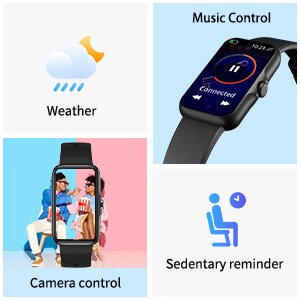
Image: Icons illustrating smart features such as weather, music control, camera control, and sedentary reminders.

Image: The smart watch displaying a calendar, highlighting the female physiological cycle reminder feature.
4.5 Customization
Personalize your watch with over 100 customizable watch faces available through the companion app.

Image: A selection of over 100 customizable watch faces for the Sunorshop H69 Smart Fitness Tracker.
5. Maintenance
5.1 Cleaning
Regularly clean your watch and strap to prevent skin irritation and maintain device functionality. Use a soft, damp cloth to wipe the screen and strap. Avoid harsh chemicals or abrasive materials.
5.2 Charging Practices
To prolong battery life, avoid fully discharging the battery frequently. Charge the device when the battery level is low. Disconnect the charger once the device is fully charged.
5.3 Water Resistance
While the device is IP68 waterproof, it is not suitable for hot water, saunas, or diving. Exposure to hot water or steam may damage the device's seals and compromise its water resistance.
5.4 Storage
Store the device in a cool, dry place when not in use. Avoid extreme temperatures and direct sunlight.
6. Troubleshooting
- Device not turning on: Ensure the device is fully charged. Connect it to the charger for at least 10 minutes.
- Cannot pair with phone: Make sure Bluetooth is enabled on your phone and the watch. Ensure you are attempting to pair through the companion app, not directly via phone settings. Restart both the watch and your phone.
- Inaccurate readings (Heart Rate/Blood Oxygen/Steps): Ensure the watch is worn snugly on your wrist, about one finger's width above the wrist bone. Clean the sensor on the back of the watch. Ensure your personal information (height, weight, age) is correctly entered in the app.
- Short battery life: Reduce screen brightness, disable unnecessary notifications, and limit continuous heart rate monitoring if not required. Ensure the device is fully charged.
- Notifications not appearing: Check app permissions on your phone to ensure the companion app has access to notifications. Verify that notifications are enabled within the app settings.
- App data not syncing: Ensure the watch is connected to the app via Bluetooth. Open the app to initiate manual synchronization if automatic sync is not occurring.
For further assistance, refer to the FAQ section within the companion app or contact customer support.
7. Specifications
| Feature | Specification |
|---|---|
| Model Number | H69 |
| Display Size | 1.47 Inches |
| Item Weight | 3.2 ounces |
| Battery Type | 1 AAAA (included) |
| Battery Capacity | 170 Milliamp Hours |
| Operating System | Android Wear 2.6 |
| Connectivity Technology | Bluetooth 5.0 |
| Waterproof Rating | IP68 |
| Compatibility | Android 10.0 / iOS 10.0 or above |
| Memory Storage Capacity | 169 MB |
| Package Dimensions | 10.55 x 2.99 x 0.75 inches |
| Manufacturer | Sunorshop |
8. Warranty and Support
8.1 Warranty Information
For detailed warranty information, please refer to the warranty card included with your product or visit the official Sunorshop website. Keep your proof of purchase for warranty claims.
8.2 Customer Support
If you encounter any issues or have questions not covered in this manual, please contact Sunorshop customer service through their official website or the contact information provided in your product packaging.