
Introduction
The TDTOD LocaTag is a smart Bluetooth tracker designed to help you locate your valuable items. It integrates seamlessly with the Google Find My app on Android devices (Android 9 or later with Google Play Services). This manual provides detailed instructions for setup, operation, maintenance, and troubleshooting to ensure optimal use of your LocaTag.
Setup Instructions
- Compatibility Check: Ensure your smartphone or tablet runs Android 9 or later and has Google Play Services installed. Note: iPhone and Huawei devices are not supported.

This image illustrates the broad compatibility of the TDTOD LocaTag with a range of Android smartphones. It explicitly states that iPhone and Huawei devices are not supported.
- Power On: The LocaTag comes with a pre-installed CR2032 battery. It should be ready to power on.
- Pairing with Google Find My:
- Ensure Bluetooth is enabled on your Android device.
- Open the official Google Find My app on your smartphone.
- Place the LocaTag near your Android device. A pop-up should appear in the Google Find My app, prompting you to add the device.
- Follow the on-screen instructions to complete the pairing process. You can rename your LocaTag (e.g., "Car Keys," "Backpack") for easy identification.

A user's hand holds a white TDTOD LocaTag while another hand displays a smartphone running the Google Find My app. The app screen shows a map and a 'Playing sound...' interface, indicating the tracker's sound feature for easy location.
Operating Instructions
Locating Items
- Map Location: Open the Google Find My app to view the last known location of your LocaTag on a map. The network of millions of Android devices provides continuous position updates.
- Proximity Alert & Sound: When within Bluetooth range (up to 100 meters), you can use the app to make the LocaTag emit a loud sound (90-100dB) to pinpoint its exact location.
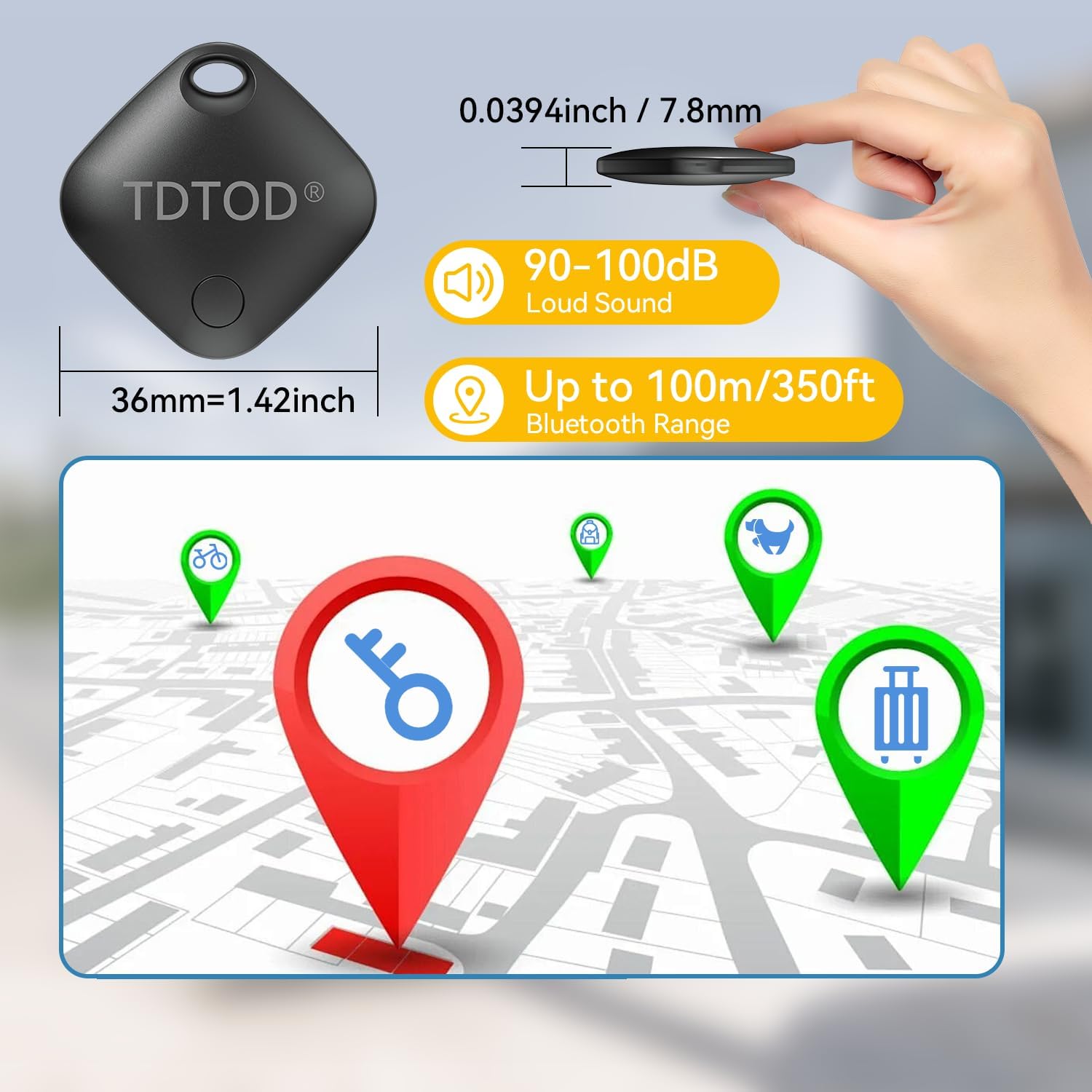
This graphic provides key specifications of the TDTOD LocaTag, including its compact dimensions (36mm or 1.42 inches), a loud sound output of 90-100dB for easy location, and a Bluetooth range of up to 100 meters (350 feet).
Anti-Loss Reminder
- The LocaTag can notify you if you leave an item behind. If the item exceeds a set distance from your phone, a message will pop up to remind you.

This image demonstrates the anti-loss reminder function. A TDTOD LocaTag is attached to a set of keys on the ground, and a smartphone displays a notification: 'Keys left behind. This item is no longer detected near you, it was last seen near...'.
Device Sharing
- You can share your LocaTag's location with other users, allowing multiple Android devices to track the same tag. This is useful for family members or shared items.

Two hands hold smartphones displaying map applications, with a TDTOD LocaTag positioned between them. This illustrates the device sharing capability, enabling multiple users to track the same LocaTag.
Versatile Use
- The compact design with an integrated hole allows the LocaTag to be easily attached to keys, luggage, backpacks, wallets, or even pet collars.

A collage of images showing the TDTOD LocaTag attached to different personal items, including car keys, a pet's collar, luggage, a handbag, a wallet, and a backpack, highlighting its versatility for protecting important belongings.
Maintenance
Battery Replacement
- The LocaTag uses a replaceable CR2032 coin cell battery, which typically lasts for 8-12 months.
- To replace the battery, carefully open the device casing. Remove the old CR2032 battery and insert a new one, ensuring correct polarity. Close the casing securely.

An exploded view of the TDTOD LocaTag reveals its internal components, specifically highlighting the easily replaceable CR2032 coin cell battery, which provides extended battery life.
Water and Dust Resistance
- The LocaTag features an IP66 rating, meaning it is protected against dust ingress and powerful water jets. While it can withstand splashes and rain, it is not designed for submersion in water.
Troubleshooting
- Device Not Pairing:
- Ensure your Android device meets the compatibility requirements (Android 9+ with Google Play Services).
- Check if Bluetooth is enabled on your phone.
- Make sure the LocaTag has a fresh battery and is powered on.
- Bring the LocaTag very close to your phone during the pairing process.
- Restart your phone and try pairing again.
- Sound Not Working:
- Ensure the LocaTag is within Bluetooth range of your phone.
- Check the battery level of the LocaTag in the Google Find My app. A low battery might affect sound output.
- Verify that your phone's volume is up and not muted.
- Inaccurate Location:
- The accuracy of the location depends on the density of Android devices in the vicinity. In areas with fewer Android devices, location updates might be less frequent or precise.
- Ensure your phone has a stable internet connection for map updates.
- Frequent Disconnections:
- Keep the LocaTag within the optimal Bluetooth range (up to 100 meters) of your phone or other Android devices.
- Obstacles like thick walls or metal objects can interfere with the Bluetooth signal.
- Check for potential interference from other wireless devices.
- Unexpected Beeping:
- This might be due to the anti-loss reminder feature if the tag moves out of range. Adjust the reminder settings in the Google Find My app if necessary.
- A low battery can sometimes cause erratic behavior, including unexpected sounds. Replace the battery if it's low.
Specifications
| Brand | TDTOD |
| Model Number | LocaTag |
| Material | Plastic |
| Connectivity Technology | Bluetooth |
| Compatible Devices | Android Smartphones, Tablets (Android 9+ with Google Play Services) |
| Control Method | Application (Google Find My) |
| Battery Type | CR2032 (2 included) |
| Battery Life | Up to 12 months (replaceable) |
| Water Resistance | IP66 (Dust tight, protected against powerful water jets) |
| Bluetooth Range | Up to 100 meters (350 feet) |
| Sound Level | 90-100dB |
| Item Weight | 14.99 Grams |
| Number of Units | 2 |
Warranty and Support
The product comes with a limited warranty. For specific details regarding warranty coverage and duration, please refer to the packaging or contact TDTOD customer support directly. For technical assistance or further inquiries, please visit the official TDTOD website or contact their support channels.