1. Introduction
This manual provides detailed instructions for the setup, operation, maintenance, and troubleshooting of your YZ LED Electronic Scoreboard. Please read this manual thoroughly before using the product to ensure proper function and longevity.

Image 1.1: The YZ LED Electronic Scoreboard with its adjustable tripod stand and two watch-style remote controls.
2. Package Contents
Verify that all components are present in the package:
- Scoreboard x1
- Remote Control x1
- Watch Control x1 (Note: The product image shows two watch controls, but specifications list one. Please verify your package contents.)
- Tripod x1
- User Manual x1
- Power Adapter x1
- Mounting Hooks (for net/wall hanging)
- Screws and Wall Anchors
3. Setup
3.1 Powering the Scoreboard
The scoreboard can be powered in two ways:
- Battery Power: The scoreboard requires 3x18650 batteries (not included). Insert the batteries into the compartment on the back of the scoreboard, ensuring correct polarity.
- AC Power: Connect the provided power adapter to the scoreboard's power input port and then to a standard electrical outlet. The scoreboard can be used directly while plugged in.
The remote control requires 2xAAA batteries (not included).

Image 3.1: Illustration of battery installation for the scoreboard (3x18650) and the remote control (2xAAA). Batteries are not included.
3.2 Mounting Options
The scoreboard offers versatile mounting options:
- Tabletop Stand: A small stand is integrated into the scoreboard, allowing it to stand firmly on a flat surface.
- Tripod Mounting: Attach the scoreboard to the included adjustable tripod. Ensure the scoreboard is securely fastened to the tripod mount. The tripod allows for height adjustment from approximately 15.4 to 58 inches.
- Wall Mounting: Use the provided screws and wall anchors to securely mount the scoreboard on a wall.
- Net Hanging: Utilize the included hooks to hang the scoreboard on a tennis net or similar structure.

Image 3.2: Various methods for positioning the scoreboard, including tabletop, wall-mounted, tripod, and net-hanging configurations.
4. Operating Instructions
4.1 Remote Control and Watch Control
The scoreboard can be controlled using the included handheld remote control or the watch-style controllers. The control range is up to 100 feet, allowing for operation across a game court.
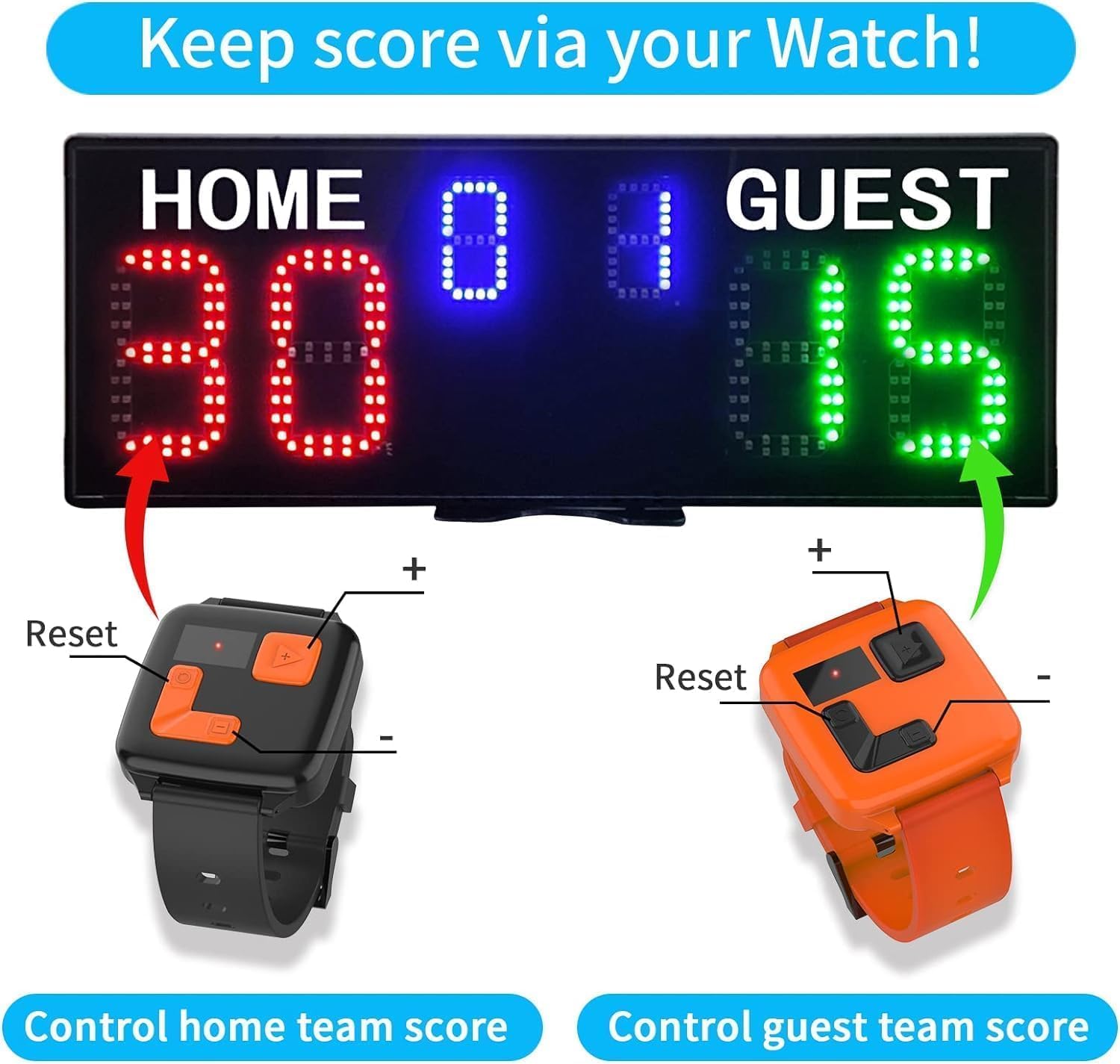
Image 4.1: The watch controls, one for the home team (red) and one for the guest team (green), each with '+' and '-' buttons for score adjustment and a 'Reset' button.
4.2 Scoring Modes
The scoreboard features two primary scoring modes:
- Normal Mode: Scores can be adjusted from 1 to 99. The match score (sets/games won) changes from 0-9. This mode is suitable for sports like basketball, cornhole, or general game scoring.
- Tennis Mode: Specifically designed for tennis scoring, where scores progress as 15, 30, 40. The match score automatically increments by 1 when a game is won.

Image 4.2: A visual comparison showing the score progression in Tennis Mode (15 > 30 > 40) and Normal Mode (01 > 02 > ... > 99).
4.3 Adjusting Scores
Use the '+' and '-' buttons on the remote control or watch controls to adjust the scores for the Home and Guest teams. Refer to the specific buttons on your remote for score increment, decrement, and reset functions.
5. Maintenance
5.1 Cleaning
To clean the scoreboard, gently wipe the display and casing with a soft, dry, or slightly damp cloth. Avoid using abrasive cleaners, solvents, or excessive moisture, as these can damage the electronic components and display surface.
5.2 Storage
When not in use, store the scoreboard in a cool, dry place away from direct sunlight and extreme temperatures. If storing for an extended period, remove all batteries from the scoreboard and remote controls to prevent leakage and corrosion.
6. Troubleshooting
- Scoreboard does not power on:
- Ensure batteries are correctly inserted and charged, or replace them.
- If using AC power, verify the power adapter is securely connected and the outlet is functional.
- Check the power switch on the back of the scoreboard.
- Remote control or watch control not responding:
- Replace batteries in the remote/watch control.
- Ensure there are no obstructions between the controller and the scoreboard.
- Confirm you are within the 100ft operating range.
- Display is dim or unclear:
- The scoreboard features super bright LEDs (3000CD) for outdoor visibility. If the display appears dim, ensure the scoreboard is adequately powered.
- Clean the display surface if dust or smudges are present.
7. Specifications
| Feature | Detail |
|---|---|
| Model Name | YZ-A30B6D+WB+TR |
| Brand | YZ |
| Item Package Dimensions (L x W x H) | 20 x 9 x 4 inches |
| Product Dimensions (L x W x H) | 18.9 x 7 x 0.9 inches |
| Package Weight | 3.5 Pounds |
| Product Weight | 2 lbs |
| Material | Plastic |
| Color | Black (red&green&blue display) |
| Display Brightness | 3000CD (super bright LED lights) |
| Visual Range | 70ft |
| Control Range | 100ft (remote control) |
| Power Source | 3x18650 batteries (not included) or AC power |
| Remote Battery | 2xAAA batteries (not included) |
| Included Components | Scoreboard, Remote Control, Watch Control, Tripod, User Manual |

Image 7.1: Detailed dimensions of the scoreboard (18.9in x 7in x 0.9in) and the adjustable height range of the tripod (15.4-58in).
8. Warranty Information
The YZ LED Electronic Scoreboard comes with a 1 Year Warranty from the date of purchase. This warranty covers manufacturing defects and malfunctions under normal use. Please retain your proof of purchase for warranty claims. The warranty does not cover damage caused by misuse, accidents, unauthorized modifications, or improper maintenance.
9. Customer Support
For any questions, technical assistance, or warranty claims, please contact YZ customer support. Refer to the contact information provided with your purchase documentation or visit the official YZ website for support resources.