
Product Overview
The SMLIGHT SLZB-MRW10 is a compact and powerful multiprotocol adapter designed for smart home integration. It supports multiple wireless communication standards, making it a versatile solution for modern smart home ecosystems. This device is engineered to provide reliable and stable connectivity for various smart home platforms.
- Multiradio Compatibility: Supports Zigbee 3.0 (Zigbee2MQTT, ZHA), Thread (Matter-over-Thread), and Z-Wave (for evaluation only), ideal for multi-protocol smart home systems and mesh networks.
- Advanced Radio Chips: Equipped with Texas Instruments CC2674P10 and Silicon Labs EFR32ZG23 chips, delivering +20 dBm TX power, extended range, and stable connectivity for Zigbee, Thread, and Z-Wave networks.
- PoE & USB-C Power Options: Flexible power supply via PoE (48V) or USB-C (5V DC), with ultra-low power consumption up to 1.5W, ensuring reliable performance in any installation environment.
- Dual Antenna Design: Includes dual external SMA antennas (2.4 GHz for Zigbee/Thread and 900 MHz for Z-Wave), plus built-in PCB antennas for Wi-Fi and Bluetooth, enhancing signal strength and coverage.
- Compact & Mountable Design: Durable ABS enclosure with ventilation, compatible with DIN rail and wall mounting. Includes mounting accessories and double-sided adhesive tape for easy setup in any space.
Package Contents
Verify that all items are present in the package:
- SMLIGHT SLZB-MRW10 Multiradio PoE Adapter
- 2.4 GHz SMA Antenna
- 900 MHz SMA Antenna
- USB-C Cable
- Mounting Accessories (e.g., DIN rail clip, screws, double-sided adhesive tape)
- Quick Start Guide
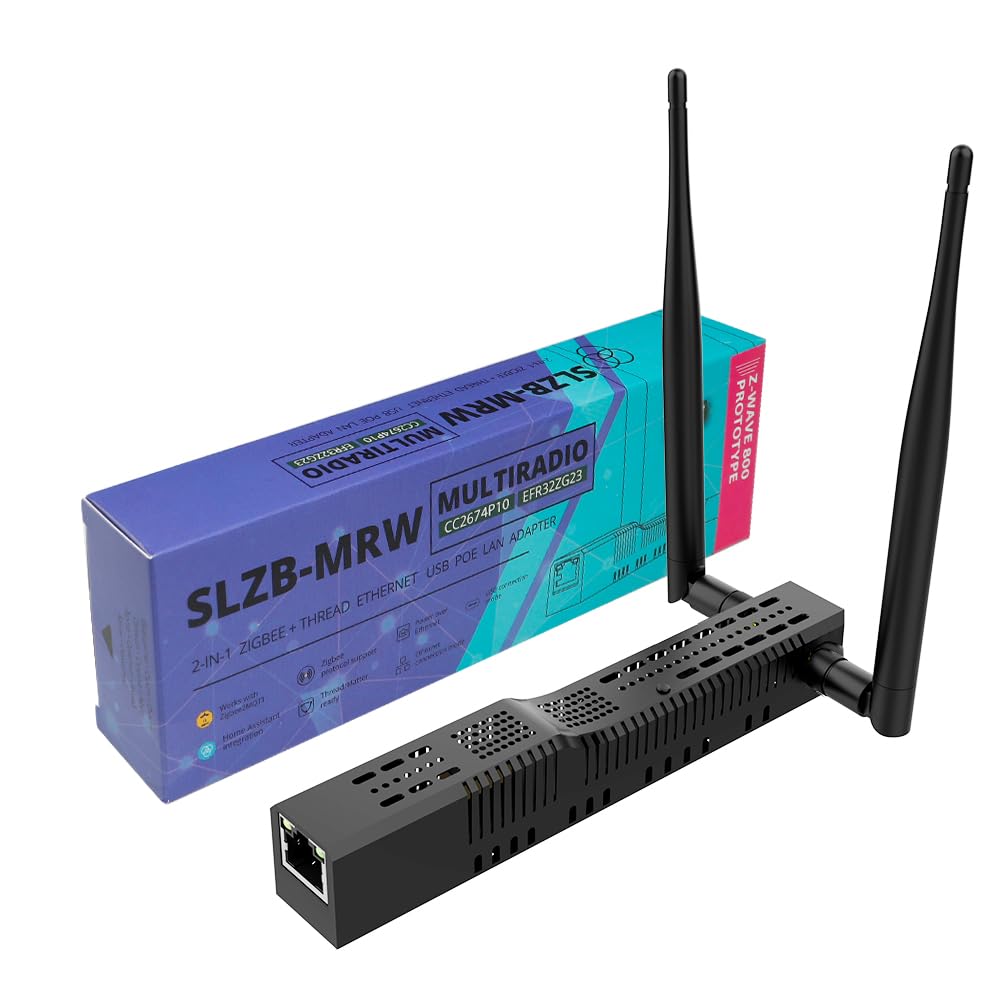
Image: The SMLIGHT SLZB-MRW10 Multiradio PoE Adapter shown with its two external antennas attached, highlighting its compact design and connectivity options.
Setup Instructions
1. Attaching Antennas
- Carefully screw the 2.4 GHz SMA antenna into the corresponding port on the adapter.
- Carefully screw the 900 MHz SMA antenna into its corresponding port on the adapter.
- Ensure both antennas are securely fastened but do not overtighten.
2. Powering the Adapter
The SLZB-MRW10 offers flexible power options:
- Power over Ethernet (PoE): Connect an Ethernet cable from a PoE-enabled switch or injector to the adapter's Ethernet port. The device will draw power directly from the Ethernet connection.
- USB-C Power: Connect the provided USB-C cable to the adapter's USB-C port and plug the other end into a 5V DC USB power adapter (not included).
Note: Only one power source is required. Do not connect both PoE and USB-C power simultaneously unless specified by advanced configuration.
3. Network Connection
For network connectivity, choose one of the following:
- Ethernet: If using PoE, the Ethernet connection will also provide network access.
- Wi-Fi: The adapter supports Wi-Fi connectivity. Refer to the device's web interface for Wi-Fi setup instructions.
- USB: The adapter can also function as a USB network adapter when connected to a host device.
4. Mounting the Adapter
The SLZB-MRW10 can be mounted using the included accessories:
- DIN Rail Mounting: Attach the DIN rail clip to the adapter using the provided screws, then snap it onto a standard DIN rail.
- Wall Mounting: Use the provided screws to secure the adapter to a wall surface.
- Adhesive Mounting: For temporary or non-invasive mounting, use the double-sided adhesive tape.
Operating Modes
The SMLIGHT SLZB-MRW10 supports multiple operating modes for diverse smart home protocols:
- Zigbee 3.0: Compatible with popular platforms like Zigbee2MQTT and ZHA (Zigbee Home Automation) for seamless integration of Zigbee devices.
- Thread (Matter-over-Thread): Enables connectivity for Thread-based devices, supporting the Matter standard for broader interoperability.
- Z-Wave: Includes support for Z-Wave (800 series) for evaluation and testing purposes. Important Notice: Z-Wave support in this device is non-certified and is included strictly for evaluation and testing purposes. These are not certified, not for commercial deployment, and are clearly labeled as non-Z-Wave certified samples.
- Bluetooth LE: Integrated for various low-energy Bluetooth applications.
Configuration of these modes is typically done through the device's web interface or the smart home hub's integration settings.
Maintenance
To ensure optimal performance and longevity of your SMLIGHT SLZB-MRW10 adapter, follow these general maintenance guidelines:
- Keep the device clean and free from dust. Use a soft, dry cloth for cleaning.
- Avoid exposing the device to extreme temperatures, high humidity, or direct sunlight.
- Ensure proper ventilation around the device to prevent overheating.
- Regularly check for firmware updates through your smart home hub or the SMLIGHT website to benefit from the latest features and improvements.
Troubleshooting
If you encounter issues with your SLZB-MRW10 adapter, consider the following troubleshooting steps:
- No Power: Ensure the power source (PoE or USB-C) is correctly connected and providing power. Check the power indicator LED on the device.
- No Network Connectivity: Verify Ethernet cable connection or Wi-Fi settings. Ensure your router/network is functioning correctly.
- Device Not Detected by Hub: Confirm the adapter's firmware is up-to-date and compatible with your smart home hub. Try restarting both the adapter and your hub.
- Poor Signal/Range: Check that antennas are securely attached and positioned optimally. Avoid placing the adapter near metal objects or other sources of interference. Consider using a USB extension cable if connecting via USB to move the adapter away from the host device.
- Protocol-Specific Issues: For Zigbee, Thread, or Z-Wave issues, consult the specific documentation for your smart home hub (e.g., Home Assistant, Zigbee2MQTT) regarding device pairing and network management.
Specifications
| Feature | Detail |
|---|---|
| Brand | LOAMLIN |
| Model | SLZB-MRW10 |
| Hardware Interface | Bluetooth, USB |
| Color | Black |
| Compatible Devices | Smart Bridge, Smart Home Device, Smart Hub |
| Item Weight | 90 Grams |
| UPC | 762849499130 |
| Manufacturer | SMLIGHT |
Warranty and Support
For warranty information and technical support, please contact LOAMLIN directly. Refer to your purchase documentation for specific warranty terms and conditions.
Online resources and community forums for Home Assistant, Zigbee2MQTT, and ZHA can also provide valuable assistance for integration and troubleshooting.