
Helixsun RX12
Helixsun ZD Racing RX12 1/12 4WD Brushless Rally Car User Manual
Model: RX12 | Brand: Helixsun
Introduction
This manual provides comprehensive instructions for the setup, operation, maintenance, and troubleshooting of your Helixsun ZD Racing RX12 1/12 4WD Brushless Rally Car. Please read this manual thoroughly before operating the vehicle to ensure safe and optimal performance.
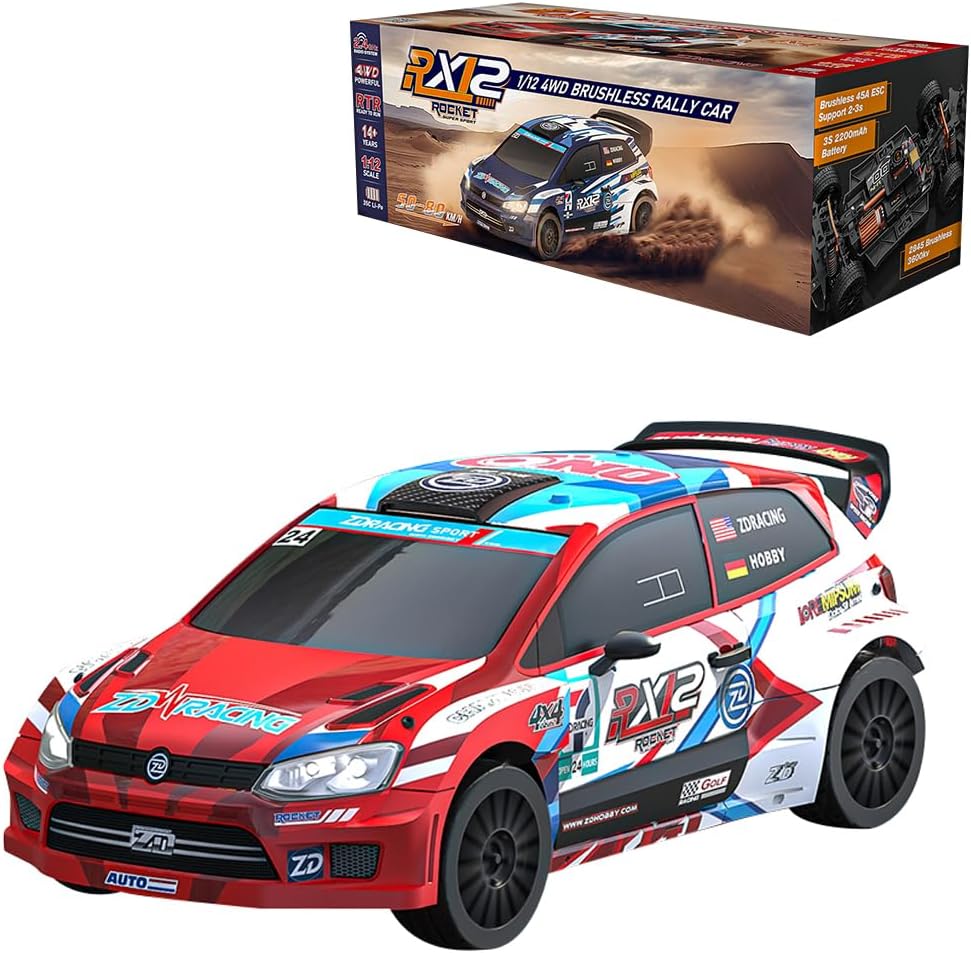
Image: The Helixsun ZD Racing RX12 1/12 4WD Brushless Rally Car, showcasing its design and the product packaging.
What's in the Box
Upon unboxing, please verify that all components listed below are present:
- RC Car x 1
- Remote Controller x 1
- Charger x 1
- Instruction Manual x 1
Setup
1. Battery Charging
The RX12 uses a 3S 35C Polymer Lithium Battery (2200mAh). Before first use, fully charge the battery using the provided USB fast charger. The charging time is approximately 3 hours.
- Connect the battery to the charger.
- Plug the charger into a suitable USB power source.
- Monitor the charging indicator (refer to charger instructions for specific light patterns).
- Disconnect the battery once fully charged. Do not overcharge.
2. Battery Installation
Carefully install the charged battery into the designated battery compartment of the RC car. Ensure the connectors are securely fastened and the battery is properly seated to prevent movement during operation.
3. Remote Controller Setup
Install the required batteries (not included) into the remote controller. The remote operates on a 2.4GHz frequency, providing a stable connection up to 350 meters.
- Insert batteries into the remote controller's battery compartment.
- Turn on the remote controller.
- Turn on the RC car. The car and remote should automatically pair. If not, refer to the remote controller's specific pairing instructions (usually involves holding a button on the remote while powering on the car).
Operating Instructions
The Helixsun ZD Racing RX12 is designed for high-speed performance and agile handling. It features a powerful 2845 brushless motor (3600KV) and a 4WD system, allowing speeds of 55-60km/h with approximately 20 minutes of use time per charge.

Image: The RX12 rally car in motion, demonstrating its speed and agility on a scenic road.

Image: The RX12 navigating challenging rocky terrain, highlighting its 4WD capability and robust design.
Basic Controls
- Throttle Trigger: Pull the trigger to accelerate forward. Push the trigger to brake or reverse.
- Steering Wheel: Turn the wheel left or right to steer the car.
- Trim Adjustments: Use the trim dials on the remote to fine-tune steering and throttle for straight tracking and neutral throttle.
Driving Tips
- Start Slowly: Familiarize yourself with the controls in an open, safe area before attempting high speeds.
- Terrain: The car is equipped with natural rubber all-terrain tires and advanced suspension with alloy shocks, making it suitable for various surfaces including dirt, gravel, and asphalt.
- Drifting: With its proportional control system and powerful motor, the RX12 is capable of high-speed drifts. Practice throttle and steering control to master this technique.
- LED Lights: The car features front and rear simulation light groups for enhanced visibility and realism, allowing for operation in varying light conditions.

Image: The RX12 performing a jump, showcasing its robust suspension system.
Maintenance
Regular maintenance ensures the longevity and performance of your RX12 rally car.
- Cleaning: After each use, especially on dusty or dirty terrain, clean the car with a soft brush or compressed air to remove debris. Avoid using water directly on electronic components.
- Tire Inspection: Check tires for wear, tears, or punctures. Ensure they are securely mounted.
- Suspension: Inspect the metal large diameter long stroke hydraulic dampers for leaks or damage. Ensure smooth operation.
- Gears and Drivetrain: Periodically check the 2W silicone damping planetary gear differential and 59T CNC high carbon steel deceleration gear for debris or signs of wear.
- Battery Care: Store batteries in a cool, dry place. Do not leave batteries fully charged or fully discharged for extended periods.
- Motor: The Rocket 2845 brushless motor is designed for durability, but ensure it remains free of obstructions.
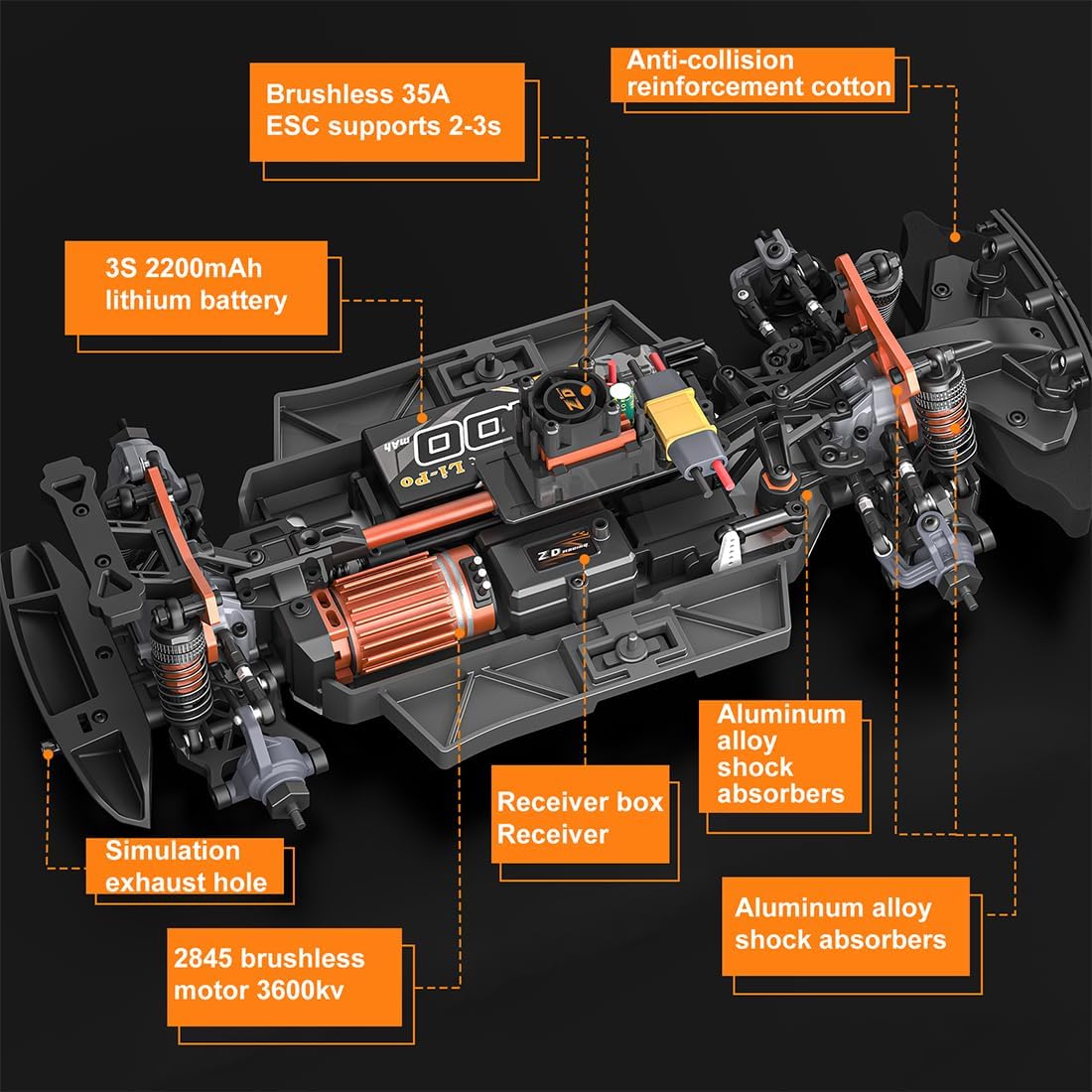
Image: An exploded view diagram of the RX12's internal components, including the motor, ESC, battery, and shock absorbers, useful for maintenance and understanding the car's structure.
Troubleshooting
| Problem | Possible Cause | Solution |
|---|---|---|
| Car does not respond to remote. | Low battery in car or remote; Not paired; Power switch off. | Charge car battery; Replace remote batteries; Ensure both are powered on and paired. |
| Reduced speed or power. | Low car battery; Motor/ESC overheating; Debris in drivetrain. | Recharge battery; Allow components to cool; Clean drivetrain. |
| Car pulls to one side. | Steering trim incorrect; Damaged steering linkage. | Adjust steering trim on remote; Inspect and repair steering components. |
| Short run time. | Battery not fully charged; Old/damaged battery. | Ensure full charge; Consider replacing battery if performance degrades. |
Specifications
Detailed specifications for the Helixsun ZD Racing RX12 1/12 4WD Brushless Rally Car:
- Model: RX12
- Material: Aluminum + Metal + PC
- Color: Red (This specific model)
- Battery: 3S 35C Polymer Lithium Battery 2200mAh
- Remote Mode: 2.4G
- Use Time: Approx. 20 minutes
- Charging Time: 3 hours
- Speed: 55-60km/h
- Remote Distance: 350 meters
- Motor Type: Rocket 2845 brushless motor 3600KV
- Charging Method: USB fast charging
- Drive: 4WD
- Servo: 2.2KG fully waterproof metal gear servo
- Damper Mount: 3mm thick T6061 aluminum alloy
- Damper: Metal large diameter long stroke hydraulic
- Tire: Natural rubber material, all-terrain tire Φ60*24mm, 12mm adapter
- Car Shell: PC car shell, front and rear simulation light group (with integrated light control)
- Motor Seat: All-metal adjustable motor seat
- Front and Rear Differential: 2W silicone damping planetary gear differential
- Deceleration Gear: 59T CNC high carbon steel gear with overload limited slip group
- Upper Tie Rod: Adjustable steel tie rod
- Product Weight: 1330g (2.93 pounds)
- Product Dimensions: 36.1 x 16.9 x 13cm (14.21 x 6.65 x 5.12 inches)
- Manufacturer Recommended Age: 16 years and up

Image: A detailed view of the 35A Brushless ESC, highlighting its cooling fan and XT60 connector for stable operation.

Image: A display of the car's highly simulated physical details, including functional headlights, taillights, simulated exhaust, and rearview mirrors, enhancing realism.
Safety Information
Adhere to the following safety guidelines to prevent injury or damage:
- Age Recommendation: This product is recommended for ages 16 years and up.
- Operating Environment: Operate the RC car in open areas, away from people, pets, vehicles, and obstacles. Avoid public roads.
- Battery Safety:
- Use only the specified charger and battery type.
- Do not puncture, disassemble, or expose batteries to extreme temperatures.
- Never leave charging batteries unattended.
- If a battery becomes swollen or damaged, discontinue use immediately and dispose of it properly.
- Water Exposure: While the servo is fully waterproof, the car's other electronic components are not. Avoid operating in wet conditions to prevent damage.
- Moving Parts: Keep fingers, hair, and loose clothing away from moving parts like wheels and gears.
- Adult Supervision: Younger users should always be supervised by an adult.
Warranty and Support
For product support, technical assistance, or inquiries regarding your Helixsun ZD Racing RX12, please contact the manufacturer, Helixsun. Information regarding specific warranty terms and conditions may be provided with your purchase documentation.
Please note that protection plans are available for purchase separately and are not included with the standard product. For details on these plans, refer to the retailer's offerings.
This product is subject to a 30-day return policy from the retailer for refund or replacement, as per standard terms.
Related Documents - RX12
 |
Tenda Wi-Fi 6/6E Router Quick Installation Guide Get started quickly with your Tenda Wi-Fi 6/6E Router. This guide provides step-by-step instructions for setup, connectivity, and basic troubleshooting. Learn how to connect your router as a primary device or an add-on node for enhanced network coverage. |
 |
Tenda Wi-Fi 6/6E Router Quick Installation Guide: RX12, TX12, RX27 Pro Models Get started quickly with the Tenda Wi-Fi 6/6E Router. This guide provides step-by-step instructions for setting up your RX12, TX12, RX12 Pro, TX12 Pro, RX27 Pro, or TX27 router, including package contents, connection scenarios, LED indicators, and troubleshooting. |
 |
Tenda RX12 Pro/TX12 Pro AX3000 Wi-Fi 6 Router: Quick Installation Guide Step-by-step guide to setting up your Tenda RX12 Pro or TX12 Pro AX3000 Dual Band Gigabit Wi-Fi 6 Router. Learn how to connect as a router or an add-on node, configure settings via the Tenda WiFi app or web UI, and understand LED indicators and ports. |
 |
Tenda AX3000 Dual Band Gigabit Wi-Fi 6 Router RX12 Pro/TX12 Pro Quick Installation Guide This guide provides instructions for setting up the Tenda AX3000 Dual Band Gigabit Wi-Fi 6 Router RX12 Pro and TX12 Pro. It covers initial connection, configuration via Tenda WiFi app or web UI, setting up as a router or add-on node, LED indicator meanings, port descriptions, troubleshooting FAQs, and safety precautions. |
 |
BOYA Microphone Catalog 2019 - Professional Audio Solutions Explore the BOYA Microphone Catalog 2019, featuring a comprehensive range of professional audio solutions. This catalog showcases wired and wireless microphones, lavalier microphones, digital and USB microphones, shotgun microphones, audio adapters, boompoles, windshields, and shock mounts designed for videographers, broadcasters, filmmakers, and content creators. Discover high-quality audio equipment available in over 150 countries. |
 |
Daikin Single & Multi-Zone HVAC Systems: Reference Guide, Specs, and Installation Comprehensive reference guide for Daikin's Single and Multi-Zone HVAC systems. Details product specifications, features, installation, selling tips, and troubleshooting for residential and commercial applications. Includes information on inverter technology, zone control, and energy efficiency. |
Ask a question about this manual
Ask about setup, troubleshooting, compatibility, parts, safety, or missing instructions. Manuals+ will review the question and use this page’s manual context to help answer it.