
1. Introduction
Thank you for choosing the Vexnara Magnetic Portable Charger. This 10000mAh power bank is designed to provide versatile and efficient charging for your devices, including iPhones (MagSafe compatible), Apple Watches, and other USB-powered devices. Its compact design, built-in cables, and integrated kickstand make it an ideal companion for daily use and travel.
2. Key Features
- Magnetic Wireless Charging: Compatible with MagSafe for iPhone Air/17/16/15/14/13/12 Series and Apple Watch 11-1/SE 3-1/Ultra 3-1 Series.
- High Capacity: 10000mAh battery provides up to 2 full charges for iPhone 17/16/15 or 20 charges for Apple Watch 11/10.
- Versatile Charging Options: Features 2 magnetic wireless charging areas (for iPhone and Apple Watch), built-in USB-C and Lightning cables, and USB-C In/Out ports supporting 20W PD wired fast charging. Capable of charging up to 6 devices simultaneously.
- Pass-Through Charging: Charge your iPhone and Apple Watch while recharging the power bank itself.
- Integrated Kickstand: Built-in foldable kickstand allows for hands-free viewing in an upright position.
- Digital Display: Accurate LED display for real-time power monitoring.
- Superior Safety: Equipped with 8 low-temperature ice cores and a multi-protect safety system including temperature control, overcharge protection, and short circuit protection.
3. Product Overview

Figure 3.1: Multiple Device Charging Capacity. This image illustrates the power bank's 10000mAh capacity and its ability to provide multiple charges for different devices, such as tablets, iPhones, Apple Watches, and AirPods.

Figure 3.2: 6-in-1 Wireless Portable Charger. This image highlights the power bank's capability to charge up to six devices simultaneously using its various ports and wireless charging areas.
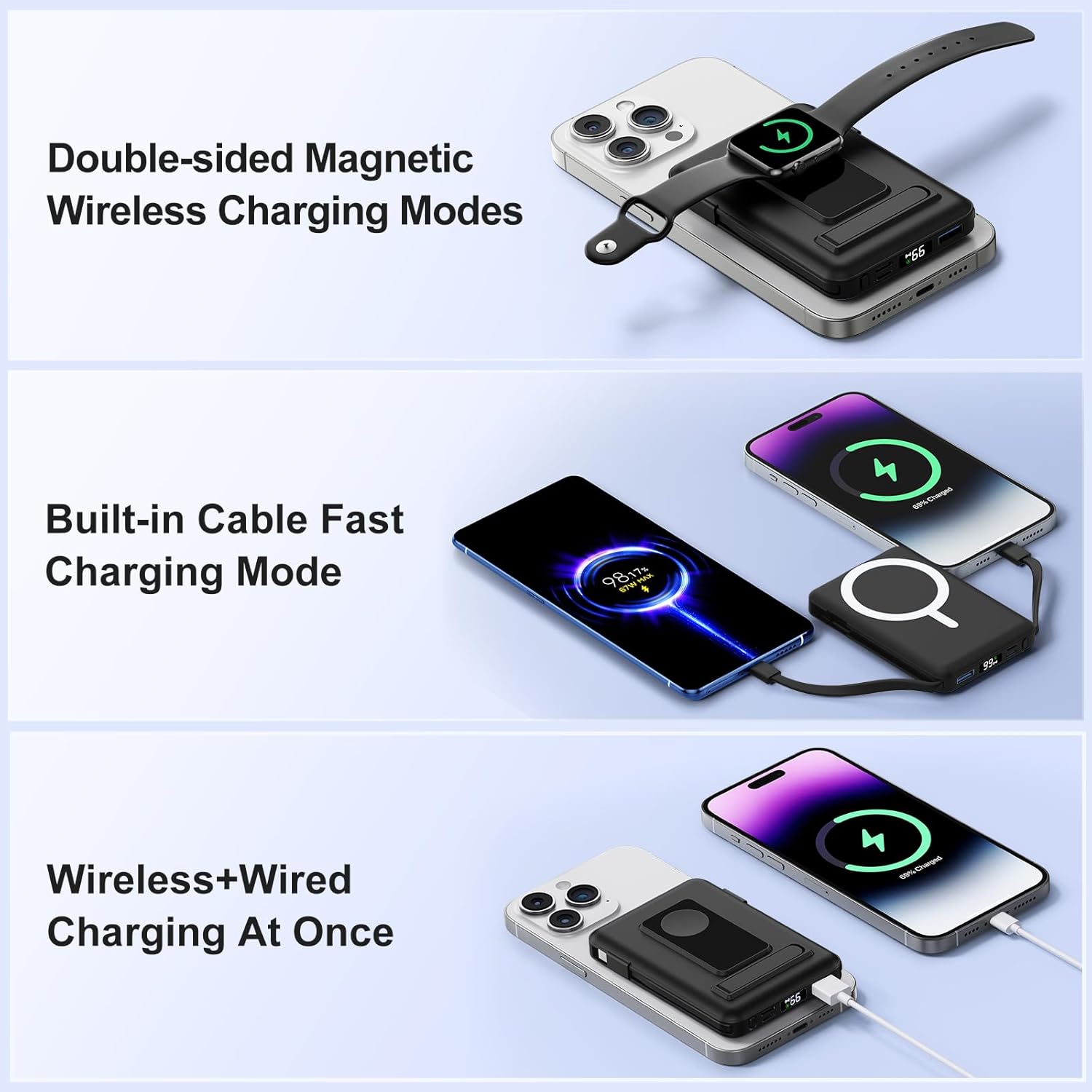
Figure 3.3: Flexible Charging Modes. This image shows the different charging modes: double-sided magnetic wireless charging, built-in cable fast charging, and simultaneous wireless and wired charging.

Figure 3.4: Three Ways to Recharge. This image illustrates the various input options for recharging the power bank: using the built-in USB-C cable, the dedicated USB-C input port, or the Lightning input port.
Components:
- Magnetic Charging Surface: For MagSafe-compatible iPhones.
- Apple Watch Charging Area: Dedicated magnetic area for Apple Watch.
- Built-in USB-C Cable: For charging devices or recharging the power bank.
- Built-in Lightning Cable: For charging Apple devices.
- USB-C Input/Output Port: Supports 20W PD fast charging.
- USB-A Output Port: For charging other USB devices.
- Digital LED Display: Shows remaining battery percentage.
- Foldable Kickstand: For hands-free device support.
- Power Button: To activate charging and check battery level.
4. Setup
Initial Charging of the Power Bank:
Before first use, fully charge your Vexnara Magnetic Portable Charger. You can do this using one of the following methods:
- Using the Built-in USB-C Cable: Connect the built-in USB-C cable to a compatible USB-C power adapter (not included).
- Using the USB-C Input Port: Connect a USB-C to USB-C cable (not included) to the power bank's USB-C port and a compatible power adapter.
- Using the Lightning Input Port: Connect a Lightning cable (not included) to the power bank's Lightning input port and a compatible power adapter.
The digital LED display will show the charging progress. The power bank is fully charged when the display shows 100%.
5. Operating Instructions
Checking Battery Level:
Press the power button once to view the current battery percentage on the digital LED display.
Charging an iPhone (MagSafe Compatible):
- Ensure your iPhone is MagSafe compatible (iPhone 12 series or newer) and either has no case or a MagSafe-compatible case.
- Align the back of your iPhone with the magnetic charging surface of the power bank. The magnets will snap into place, and charging will begin automatically.
- The digital display on the power bank will illuminate, and your iPhone will indicate that it is charging.

Figure 5.1: Super Strong Magnetic Wireless Charger. This image demonstrates the secure magnetic attachment of the power bank to an iPhone, ensuring stable wireless charging.
Charging an Apple Watch:
- Place your Apple Watch flat on the dedicated Apple Watch wireless charging area on the power bank.
- Press the power button to activate charging. Your Apple Watch will indicate that it is charging.

Figure 5.2: Designed for Apple Watch. This image shows an Apple Watch being charged wirelessly on the power bank's integrated charging pad.
Charging Devices with Built-in Cables:
- Gently pull out the built-in USB-C or Lightning cable from its storage slot.
- Connect the appropriate cable to your device. Charging will begin automatically.
Charging Devices with USB Ports:
- Connect your device's charging cable to the USB-C or USB-A output port on the power bank.
- Press the power button to initiate charging if it doesn't start automatically.
Using the Kickstand:
Pull out the foldable kickstand from the back of the power bank to prop up your iPhone for hands-free viewing while charging.

Figure 5.3: Foldable Stand. The integrated kickstand provides convenient hands-free viewing while your device charges.
6. Safety Information
- Temperature Control: The power bank features 8 built-in low-temperature ice cores to manage heat during charging. It is normal for the power bank to become slightly warm.
- Overheating Precautions: If your phone overheats during wireless charging, especially with magnetic cases over 2mm thick, remove the case or pause charging until the device cools down.
- Multi-Protect Safety System: The device includes comprehensive protection against overcharge, short circuit, overvoltage, overcurrent, and overload.
- Apple Watch Placement: For stable Apple Watch charging, ensure it is placed flat on the wireless charging area.
- Do not expose the power bank to extreme temperatures, direct sunlight, or liquids.
- Do not disassemble, modify, or attempt to repair the device.
- Keep out of reach of children.
7. Specifications
| Model Number | 2C-S5 |
| Battery Capacity | 10000 Milliamp Hours |
| Product Dimensions | 4.13 x 2.83 x 0.87 inches |
| Item Weight | 7.2 ounces |
| Connector Type | USB Type C, Lightning |
| Special Features | Built-in Cables, Digital Display, Fast Charging, Pocket Size, Wireless Charging |
| Manufacturer | Shenzhen Gewu Zhixin Technology Co., Ltd. |
8. Troubleshooting
- Device not charging: Ensure the power bank is sufficiently charged. Press the power button to activate charging. Check cable connections for wired charging. For wireless charging, ensure proper alignment and remove any non-MagSafe compatible cases.
- Slow charging: Verify that your device supports fast charging and that the power bank has enough charge. Ensure cables are fully inserted.
- Overheating: If the power bank or your device becomes excessively hot, disconnect it immediately and allow it to cool down. Avoid charging in direct sunlight or confined spaces.
9. Warranty and Support
For warranty information and customer support, please refer to the contact details provided with your product packaging or visit the official Vexnara website. Keep your purchase receipt for warranty claims.
10. Official Product Video
Video 10.1: Vexnara Magnetic Portable Charger 10000mAh Overview. This video provides a visual demonstration of the Vexnara Magnetic Portable Charger, showcasing its features and functionality.