
Introduction
Thank you for choosing the ThermoMonster HT09 Instant Read Meat Thermometer. This digital thermometer is designed to provide quick and accurate temperature readings for various cooking applications, ensuring your food is cooked to perfection. Its advanced features include a fast response time, high precision, a waterproof design, and an intuitive display.

Image: The ThermoMonster HT09 Instant Read Meat Thermometer with its probe extended, displaying a temperature reading.
Product Features
- Fast & Accurate Readings: Equipped with a professional thermocouple sensor, providing temperature readings in approximately 0.5 seconds with a precision of ±0.5℉.
- Long Probe & Temperature Lock: Features a 4-inch long probe and a temperature lock function for safe and convenient measurement away from heat.
- Auto Flip Large LCD Display: An innovative display that automatically rotates for easy viewing by both left and right-handed users, even in low light conditions.
- 100% Waterproof: Designed for easy cleaning under running water.
- Motion Sensing Sleep/Wake: Automatically turns on when the probe is unfolded and enters sleep mode after 30 seconds of inactivity, waking instantly upon movement.
- Magnetic Back: Allows for convenient storage on metallic surfaces like refrigerators.

Image: Visual representation highlighting the thermometer's 0.5-second instant read capability and ±0.5℉ accuracy.
Setup
1. Battery Installation
The ThermoMonster HT09 requires 1 AAA battery, which is included with your purchase. The battery compartment is located on the back of the device.
- Locate the battery compartment cover on the back of the thermometer.
- Open the cover by sliding or gently prying it open (refer to the diagram on the device if available).
- Insert the AAA battery, ensuring the correct polarity (+/-) as indicated inside the compartment.
- Close the battery compartment cover securely.
2. Initial Power On
To power on the device, simply unfold the probe. The thermometer will automatically activate due to its motion-sensing feature.

Image: Diagram illustrating the motion-sensing ON/OFF, sleep, and wake functions of the thermometer by unfolding and folding the probe.
Operating Instructions
1. Taking a Temperature Reading
- Unfold the stainless steel probe from the thermometer body. The device will automatically power on.
- Insert the tip of the probe into the thickest part of the food, avoiding bone or gristle.
- Hold the probe in place until the temperature reading stabilizes on the LCD display (approximately 0.5 seconds).
- Remove the probe from the food.
2. Using the Temperature Lock Function
The temperature lock function allows you to hold the current reading on the display after removing the probe from the food.
- While the probe is inserted and displaying a temperature, press the 'LOCK' button (located on the side of the device).
- The current temperature will be held on the display.
- Press the 'LOCK' button again to release the hold and return to live temperature reading.
3. Switching Temperature Units (°C/°F)
To switch between Celsius (°C) and Fahrenheit (°F):
- Locate the °C/°F switch button on the back of the thermometer.
- Press this button to toggle between the two temperature units. The display will update accordingly.
4. Auto Flip Display
The display automatically rotates based on the orientation of the thermometer, ensuring readability from any angle.

Image: The thermometer's auto-flip display shown in both dark and bright environments, demonstrating its readability.
5. Power Off
To turn off the thermometer, simply fold the probe back into the body of the device. The motion-sensing feature will automatically put the thermometer into sleep mode, conserving battery life.

Image: Examples of the ThermoMonster HT09 thermometer being used to measure temperatures in various cooking scenarios, including meat, grilling, candy making, and oven dishes.
Maintenance
1. Cleaning
The ThermoMonster HT09 is 100% waterproof, making cleaning simple and hygienic.
- After each use, wash the probe and the body of the thermometer under running water with mild soap.
- Avoid harsh abrasive cleaners or scrubbing pads that could damage the surface.
- Dry thoroughly with a soft cloth before storing.
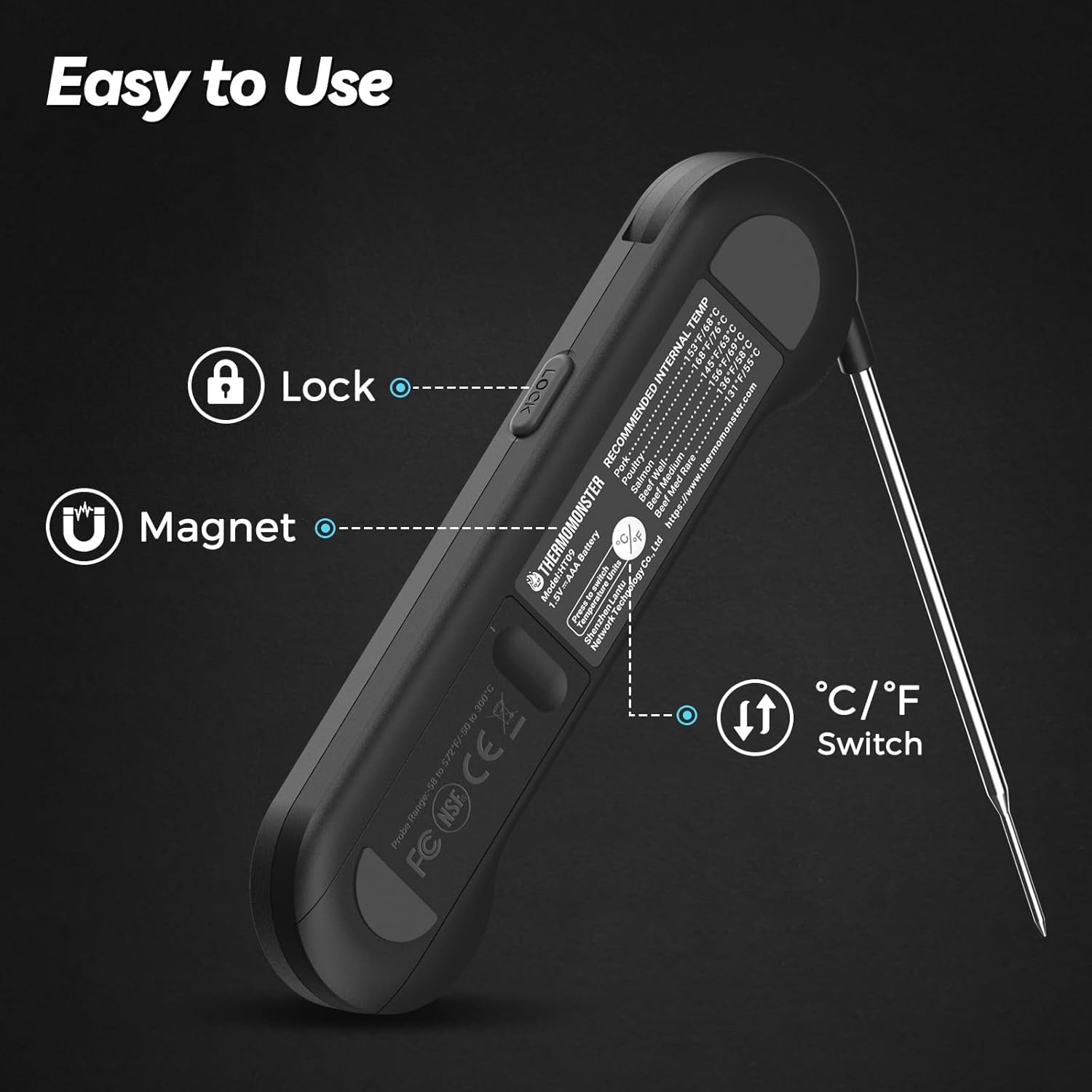
Image: A hand holding the ThermoMonster HT09 thermometer under a running faucet, demonstrating its waterproof feature for easy cleaning.
2. Battery Replacement
When the display becomes dim or the thermometer fails to power on, it is time to replace the AAA battery. Follow the battery installation steps outlined in the Setup section.
3. Storage
Store the thermometer with the probe folded to protect it and conserve battery life. The magnetic back allows for convenient storage on metallic surfaces.
Troubleshooting
- No Display/Dim Display: Check the battery. Replace with a new AAA battery if necessary. Ensure the probe is fully unfolded to activate the motion-sensing wake feature.
- Inaccurate Readings: Ensure the probe is inserted into the thickest part of the food, away from bones or fat, which can affect readings. Allow sufficient time for the reading to stabilize. If issues persist, try replacing the battery.
- Probe Not Folding/Unfolding Smoothly: Ensure no debris is obstructing the hinge mechanism. Clean the area if needed. Do not force the probe.
Specifications
| Feature | Detail |
|---|---|
| Model Number | HT09 |
| Brand | ThermoMonster |
| Measurement Speed | Approx. 0.5 seconds |
| Accuracy | ±0.5℉ |
| Power Source | 1 x AAA Battery (included) |
| Special Features | High Accuracy, Fast Reading System, Waterproof, Large Display, Motion Sensing, Magnetic Back |
| Display Type | Digital, Auto-Flip LCD |
| Outer Material | Plastic |
| Probe Length | 4 inches |
| Dimensions | 6.42 x 1.77 x 0.71 inches (folded) |
| Weight | 3.53 ounces |
| Certifications | NIST, NSF |
Included Components:
- 1 x ThermoMonster HT09 Meat Thermometer
- 1 x AAA Battery
- 1 x User Manual
- 1 x Calibration Certificate
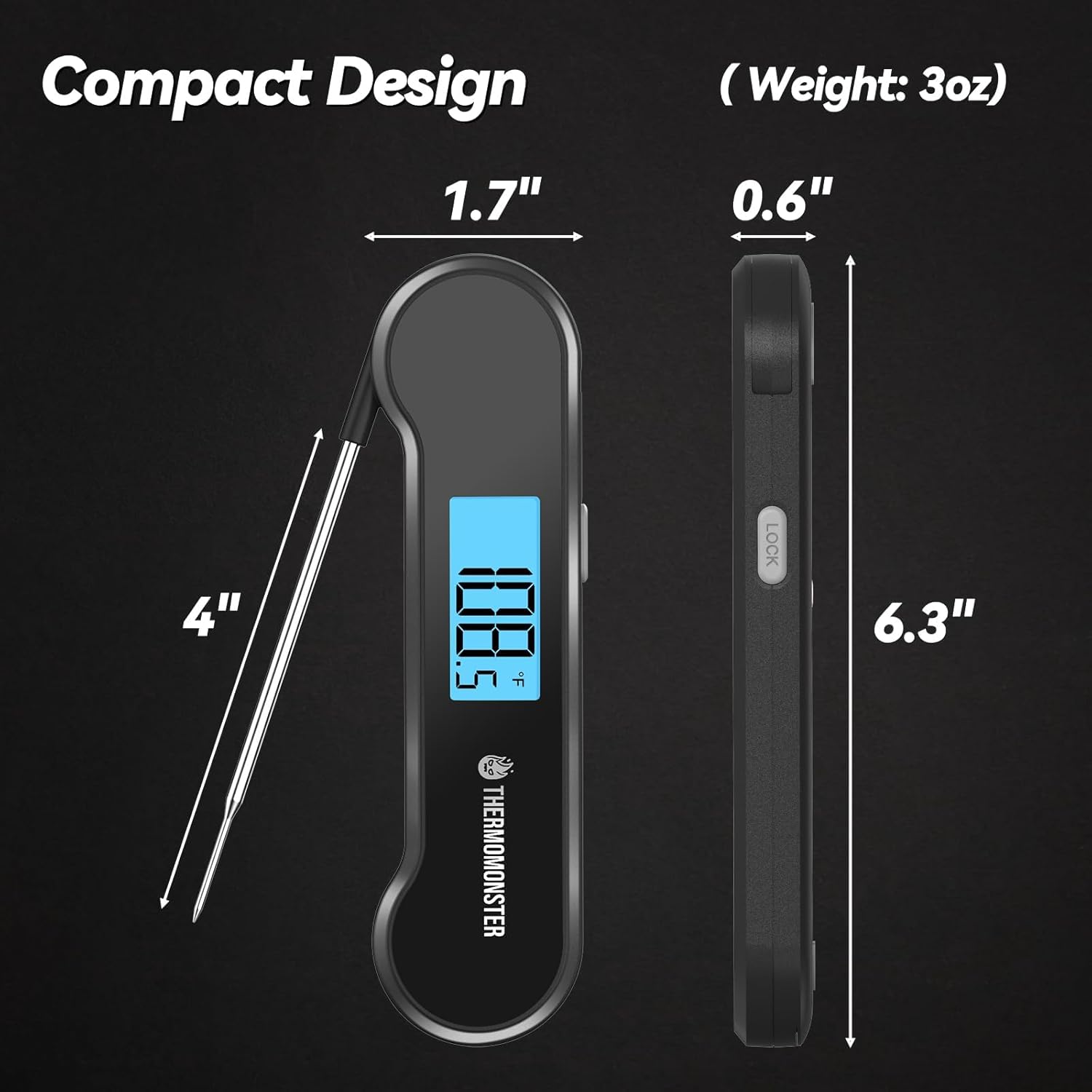
Image: Detailed view of the ThermoMonster HT09 thermometer, highlighting its compact design and key dimensions including the 4-inch probe length.
Warranty and Support
This product is manufactured by ThermoMonster. For any questions, technical support, or warranty claims, please refer to the contact information provided on the product packaging or the official ThermoMonster website. Please retain your proof of purchase for warranty purposes.