
1. Important Safety Instructions
Please read all instructions carefully before using the KZKB Portable Tire Inflator HY04. Retain this manual for future reference.
- This device is designed for inflating car tires, motorcycle tires, bicycle tires, and sports balls. It is not suitable for high-volume inflation tasks such as air mattresses, paddleboards, or heavy-duty truck tires.
- Keep out of reach of children.
- Do not operate the inflator in wet conditions or near flammable liquids or gases.
- Ensure the air hose is securely connected to the tire valve before starting inflation.
- Do not over-inflate. The auto shut-off feature helps prevent this, but always monitor the pressure.
- Allow the device to cool down after prolonged use to prevent overheating.
- Do not disassemble or modify the device. Contact customer support for service.
- Charge the device using the provided USB or Type-C charging cable.
2. Package Contents
Verify that all items are present in the package:
- 1 x KZKB Portable Tire Inflator (Model HY04)
- 1 x 19.5'' Air Hose
- 1 x French Inflatable Nozzle
- 1 x Ball Needle Adapter
- 1 x Long Tapered Nozzle
- 1 x Storage Bag
- 1 x USB Charging Cable
- 1 x Type-C Charging Cable
- 1 x User Manual (this document)
3. Product Overview
Familiarize yourself with the components of your KZKB Portable Tire Inflator.
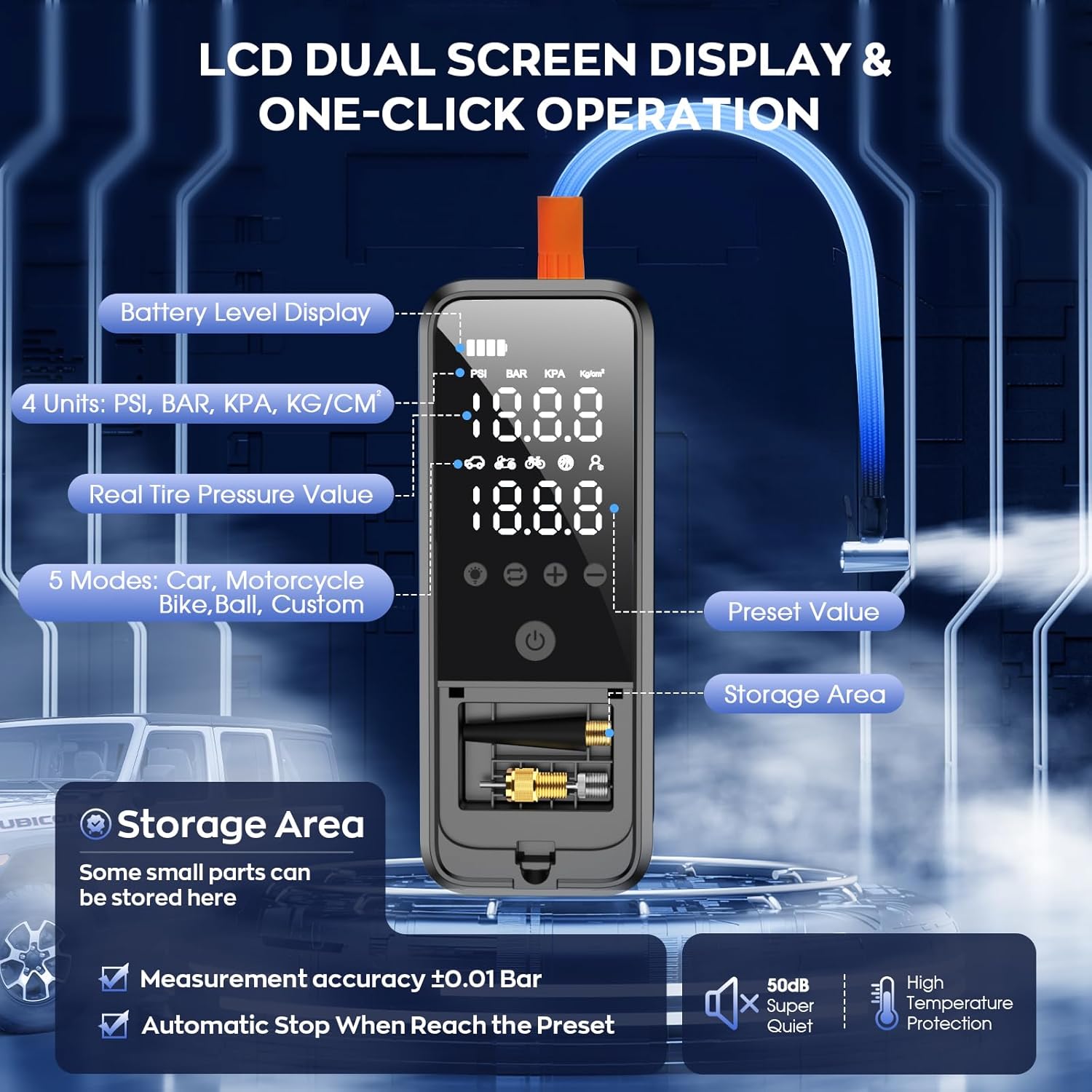
Figure 3.1: Front view of the inflator showing the LCD dual screen display and control buttons. Key features include battery level display, pressure unit display (PSI, BAR, KPA, KG/CM²), real-time tire pressure value, 5 inflation modes (Car, Motorcycle, Bike, Ball, Custom), preset pressure value, and a storage area for nozzles.

Figure 3.2: Detailed breakdown of the inflator's large LED digital display and controls. This includes indicators for battery level, selected pressure unit, real-time pressure, active pressure mode, and the preset target pressure. It also highlights the functions of the LED lighting button, mode/unit reset button, pressure adjustment buttons, and the power on/off key.
Controls and Indicators:
- LCD Dual Screen Display: Shows real-time pressure, preset pressure, battery level, and selected mode/unit.
- Power Button: Long press to turn on/off.
- Mode/Unit Button: Short press to switch between 5 preset modes (Car, Motorcycle, Bike, Ball, Custom). Long press to switch between 4 pressure units (PSI, BAR, KPA, KG/CM²).
- +/- Buttons: Adjust preset pressure values.
- LED Light Button: Activates the built-in LED light (Flashlight, SOS, Strobe modes).
- Inflation Port: Where the air hose connects.
- Charging Port: USB-C for charging the device.
- USB-A Output Port: For power bank functionality.
- Nozzle Storage Compartment: Conveniently stores various inflation nozzles.
4. Setup and Charging
4.1 Initial Charge
Before first use, fully charge the inflator. Connect the provided USB or Type-C charging cable to the device's charging port and a suitable power adapter (not included). The battery level indicator on the LCD screen will show charging progress.
4.2 Attaching the Air Hose and Nozzle
- Screw the 19.5'' air hose securely onto the inflation port of the device.
- Select the appropriate nozzle for the item you wish to inflate (e.g., French inflatable nozzle for certain bike valves, ball needle adapter for sports balls, long tapered nozzle for other inflatables).
- Attach the selected nozzle to the free end of the air hose.
5. Operating Instructions
5.1 Powering On/Off
- To Power On: Long press the Power Button for 2 seconds. The LCD screen will illuminate.
- To Power Off: Long press the Power Button again for 2 seconds. The device will also automatically power off after a period of inactivity.
5.2 Selecting Mode and Pressure Unit
- To Change Mode: Short press the Mode/Unit Button. Cycle through Car, Motorcycle, Bike, Ball, and Custom modes. Each mode has a default preset pressure.
- To Change Pressure Unit: Long press the Mode/Unit Button to switch between PSI, BAR, KPA, and KG/CM².

Figure 5.1: Overview of the 5 versatile inflation modes available on the KZKB Portable Tire Inflator, including default pressure settings for Ball (8 PSI), Motorcycle (29 PSI), Car (36 PSI), Bike (45 PSI), and a Custom mode (3-160 PSI) for specific pressure requirements.
5.3 Setting Target Pressure
- After selecting a mode, the preset pressure will be displayed.
- Use the + and - buttons to adjust the target pressure to your desired value.
5.4 Inflation Process

Figure 5.2: A visual guide demonstrating the four simple steps for inflating tires with the KZKB Portable Tire Inflator. This includes connecting the air hose to the tire and pump, pressing the power button, selecting the appropriate mode and adjusting the target pressure, and finally, waiting for the automatic shut-off before disconnecting.
- Connect the air hose with the appropriate nozzle to the tire valve or inflatable item. Ensure a tight seal.
- Power on the inflator and select the desired mode and target pressure as described above.
- Press the Power Button (short press) to start inflation. The real-time pressure will be displayed and increase as the item inflates.
- The inflator will automatically stop once the preset target pressure is reached.
- Carefully disconnect the air hose from the tire valve. A small amount of air may escape, which is normal.
Note: For car tires, refer to your vehicle's owner's manual or the sticker on the driver's side door jamb for recommended tire pressure.
5.5 Using the LED Light
Short press the LED Light Button to cycle through different light modes: Flashlight, SOS, and Strobe. Long press to turn off the light.
5.6 Power Bank Function
The inflator can also serve as a power bank. Connect your phone, tablet, or other USB-powered devices to the USB-A output port using your device's charging cable.

Figure 5.3: The KZKB Portable Tire Inflator demonstrating its multi-purpose capabilities, including functioning as a power bank to charge electronic devices like smartphones and earbuds, and showcasing its integrated LED light for use as a flashlight or emergency signal.
6. Maintenance
- Cleaning: Wipe the device with a soft, dry cloth. Do not use harsh chemicals or abrasive cleaners.
- Storage: Store the inflator and its accessories in the provided storage bag in a cool, dry place, away from direct sunlight and extreme temperatures.
- Battery: For optimal battery life, charge the device at least once every three months if not in regular use.
- Nozzles: Ensure nozzles are clean and free of debris before and after use. Store them in the integrated storage compartment.
7. Troubleshooting
| Problem | Possible Cause | Solution |
|---|---|---|
| Device does not turn on. | Low battery. | Charge the device fully using the provided cable. |
| Inflation is slow or not working. | Air hose not securely connected. Incorrect nozzle. Low battery. | Ensure air hose and nozzle are tightly connected. Check battery level. Select correct nozzle. |
| Device stops before reaching target pressure. | Low battery. Overheating protection activated. | Recharge the device. Allow the device to cool down for 10-15 minutes before resuming use. |
| Inaccurate pressure reading. | Air hose not properly sealed to valve. | Ensure a tight connection between the air hose and the tire valve. |
8. Specifications
- Model: HY04
- Brand: KZKB
- Maximum Pressure: 160 PSI
- Battery Capacity: 6000mAh
- Pressure Units: PSI, BAR, KPA, KG/CM²
- Accuracy: ±1 PSI
- Input Voltage: 12 Volts
- Item Weight: Approximately 1.41 pounds (0.64 kg)
- Dimensions: Approximately 6.93 x 3.39 x 3.15 inches (17.6 x 8.6 x 8 cm)
- LED Light Modes: Flashlight, SOS, Strobe
9. Warranty and Support
The KZKB Portable Tire Inflator HY04 comes with a standard manufacturer's warranty. For specific warranty details, please refer to the warranty card included in your package or contact KZKB customer support.
If you encounter any issues or have questions regarding your product, please contact KZKB customer support through the retailer where you purchased the item or visit the official KZKB website for assistance.
Please have your model number (HY04) and purchase information ready when contacting support.