
1. Product Overview
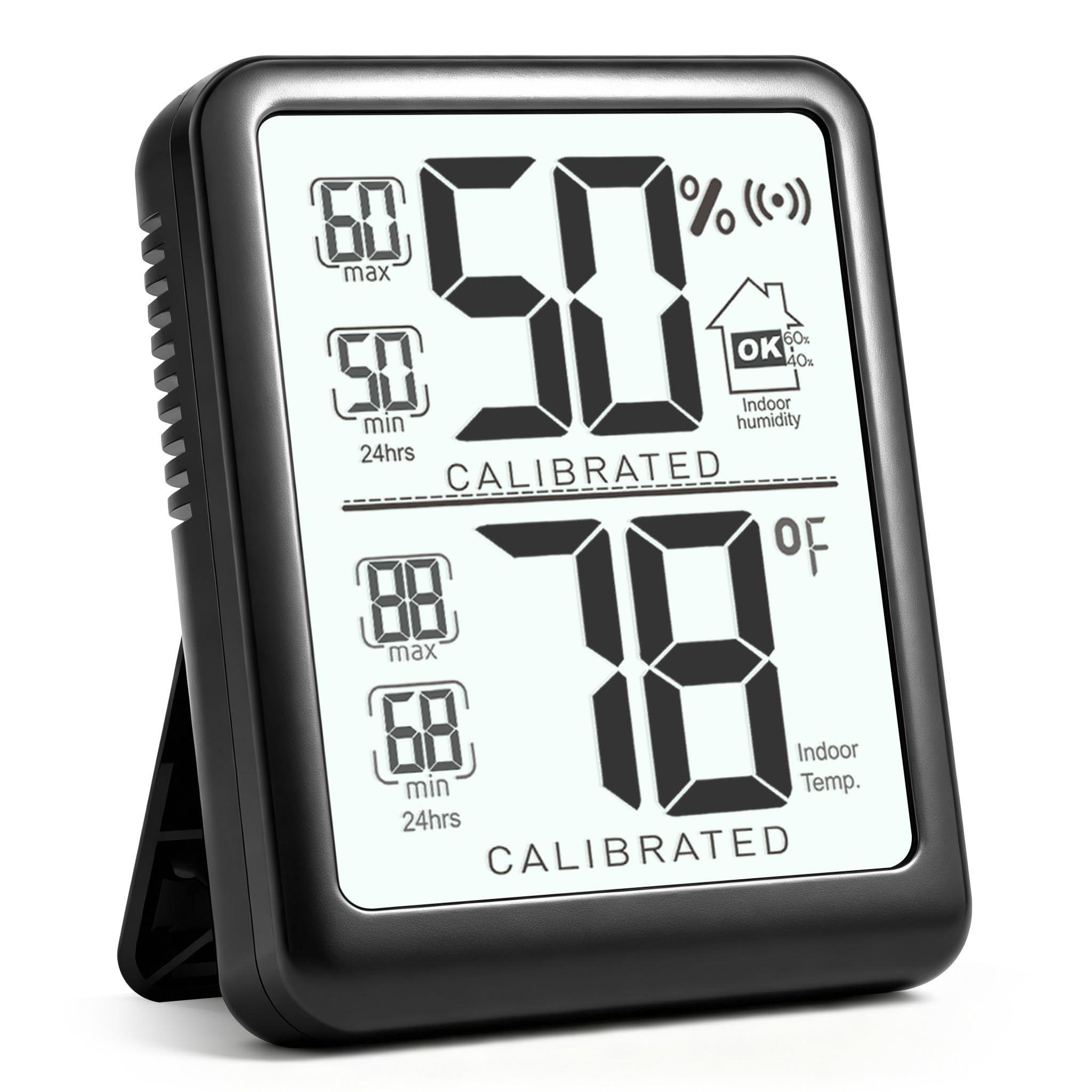
The Antonki Digital Room Thermometer and Hygrometer is designed to monitor the temperature and humidity levels in your indoor environment. It features a clear display, records maximum and minimum values, and includes an auto-calibration function for accurate readings.
- Real-time monitoring of temperature and humidity.
- Humidity level indicator icons for quick assessment.
- Records Max/Min values over 24 hours.
- Auto-calibration for consistent accuracy.
- Compact design with a durable kickstand.
Video: An overview of the Antonki Room Thermometer and Hygrometer, highlighting its features and compact design.
2. What's in the Box
- 1 x Antonki Indoor Hygrometer Thermometer
- 1 x AAA Battery
3. Setup and Initial Use
The Antonki Room Thermometer comes ready to use with an included AAA battery. Follow these steps for initial setup:
- Insert Battery: Open the battery compartment on the back of the device and insert the provided AAA battery, ensuring correct polarity.
- Power On: Press the On/Off button located on the back of the device to turn it on.
- Unit Selection: After powering on, you can choose between Fahrenheit (°F) or Celsius (°C) by pressing the temperature unit switch button (often combined with the power button or a separate small button).
- Auto-Calibration: The device will automatically calibrate for approximately 3 minutes upon first use or after a battery change. During this time, the "CALIBRATED" label may flash. Once stable, it will display accurate readings.
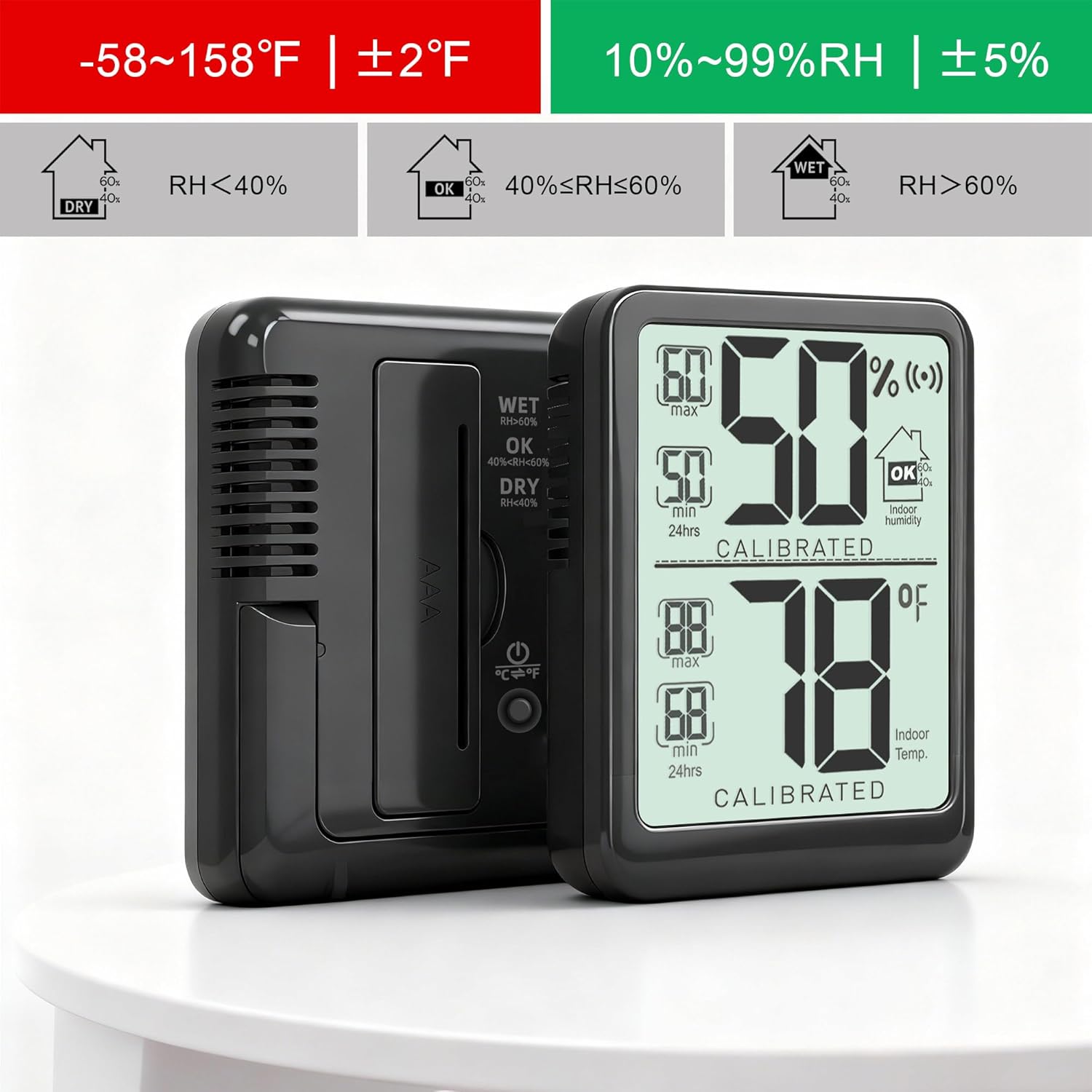
Image: Rear view of the Antonki thermometer, highlighting the battery compartment and the Fahrenheit/Celsius switch button.
Video: Demonstrates turning on the device and switching between Fahrenheit and Celsius temperature units.
4. Operating Instructions
The device continuously monitors and displays current temperature and humidity. It also tracks maximum and minimum values over a 24-hour period.
4.1 Reading the Display
The large digital display shows:
- Top Section: Current humidity percentage (%).
- Middle Section: Current temperature in selected unit (°F or °C).
- Side Indicators: Max/Min records for both temperature and humidity over the last 24 hours.
- Humidity Level Icons: Indicates whether humidity is DRY (<40% RH), OK (40%-60% RH), or WET (>60% RH).

Image: Close-up of the Antonki thermometer display, showing humidity, temperature, and max/min values clearly.
4.2 Placement
The thermometer features a durable kickstand for easy placement on any flat surface. It can be used in various indoor environments such as bedrooms, nurseries, offices, closets, incubators, greenhouses, wine cellars, and reptile terrariums.

Image: The Antonki thermometer demonstrating its integrated kickstand for stable placement.

Image: Multiple examples of the Antonki thermometer placed in different indoor environments, including a bedroom, living room, reptile enclosure, incubator, greenhouse, and wine cellar.
5. Specifications
| Brand | Antonki |
| Model Number | Termómetro interior |
| Special Feature | Fast Reading System, High Accuracy, Large Display, Ultra Clear Screen |
| Color | Black |
| Display Type | Digital |
| Power Source | Battery Powered (1 x AAA battery included) |
| Temperature Range | -58°F ~ 158°F (-50°C ~ 70°C) |
| Humidity Range | 10% ~ 99% RH |
| Temperature Accuracy | ±1.8°F (reading 50-104°F), ±3.6°F (other reading) |
| Humidity Accuracy | ±5% |
| Response Time | 5 seconds |
| Item Weight | 1.06 ounces |
| Dimensions | Approximately 2 inches (Item Length) |
| Indoor/Outdoor Usage | Indoor |
6. Maintenance
To ensure the longevity and accuracy of your Antonki Room Thermometer, follow these maintenance guidelines:
- Cleaning: Wipe the device with a soft, dry cloth. Do not use abrasive cleaners or immerse the device in water.
- Battery Replacement: Replace the AAA battery when the display indicates low power. Ensure correct polarity when inserting a new battery.
- Storage: Store the device in a cool, dry place away from direct sunlight and extreme temperatures when not in use for extended periods.
- Avoid Extreme Conditions: Do not expose the device to excessive moisture, dust, or direct heat sources, as this may affect its performance and lifespan.
7. Troubleshooting
If you encounter any issues with your Antonki Room Thermometer, refer to the following common troubleshooting tips:
- No Display/Faint Display:
- Check if the AAA battery is inserted correctly.
- Replace the AAA battery with a new one.
- Inaccurate Readings:
- Ensure the device has completed its auto-calibration process (approximately 3 minutes).
- Avoid placing the device near direct heat sources (e.g., vents, windows with direct sunlight) or sources of high humidity (e.g., humidifiers, open water).
- Allow the device to stabilize for at least 30 minutes after moving it to a new environment.
- Temperature Unit Not Switching:
- Press the °F/°C button firmly. If the button is combined with the power button, a quick press usually switches units, while a long press turns the device off.
8. Warranty and Support
For warranty information or technical support, please refer to the product packaging or contact Antonki customer service directly. Keep your purchase receipt for warranty claims.
You can visit the official Antonki store for more information: Antonki Store