
1. Introduction
This manual provides detailed instructions for the assembly, operation, maintenance, and troubleshooting of your Mr IRONSTONE LD12 L-Shaped Gaming Desk. Please read this manual thoroughly before assembly and use to ensure proper function and longevity of your product.
2. Product Overview
The Mr IRONSTONE LD12 L-Shaped Gaming Desk is designed for home office and gaming environments, featuring a durable construction, integrated LED lighting, and a Bluetooth speaker system. It offers ample workspace and convenient accessories for an organized setup.
Key Features:
- Durable & Sturdy Construction: Constructed with a thickened metal frame and P2 MDF board, supporting up to 350 lbs.
- L-Shaped Design: Provides a large desktop area (50.8"L x 18.2"W per side) and ample legroom.
- Integrated RGB LED Lights: Customizable lighting effects controllable via a smartphone application.
- Bluetooth Speaker: Portable mech-style speaker with dual drivers and dynamic RGB lighting.
- Convenient Accessories: Includes a cup holder and headphone hook.
- Carbon Fiber Surface: Smooth and exquisite desktop surface, resistant to scratches.
Included Components:
- Desk Frame Components
- Desktop Panels
- Bluetooth Speaker
- RGB LED Light Strips
- Cup Holder
- Headphone Hook
- Assembly Hardware and Tools (some tools may not be included, refer to packaging)
- Assembly Instructions Booklet

An overhead view of the Mr IRONSTONE LD12 L-Shaped Gaming Desk, fully assembled and equipped with two monitors, a keyboard, mouse, a Bluetooth speaker, and a computer tower. The desk features integrated LED lighting along its edges.

The Mr IRONSTONE LD12 L-Shaped Gaming Desk illuminated by its integrated LED lights, showcasing a monitor, keyboard, and the included Bluetooth speaker positioned on the desktop.
3. Setup and Assembly Instructions
The Mr IRONSTONE LD12 L-Shaped Gaming Desk requires assembly. Please follow the step-by-step instructions provided in the included assembly booklet. Ensure all components are present before beginning assembly.
General Assembly Tips:
- Clear a spacious area for assembly.
- Lay out all parts and hardware, comparing them with the parts list in the booklet.
- Do not overtighten screws until all components are loosely assembled.
- Seek assistance for lifting and positioning heavy components.

A diagram illustrating the key dimensions of the Mr IRONSTONE LD12 L-Shaped Gaming Desk, including length, width, and height. A small image of an assembly instruction booklet is also shown, indicating that the desk requires assembly.
4. Operating Instructions
4.1. RGB LED Lights Operation
The integrated RGB LED light strips can be controlled via a dedicated smartphone application. Follow these steps:
- Download the App: Scan the QR code provided in the assembly booklet or search for the recommended app in your device's app store.
- Connect: Ensure Bluetooth is enabled on your smartphone. Open the app and follow the on-screen instructions to connect to the desk's LED controller.
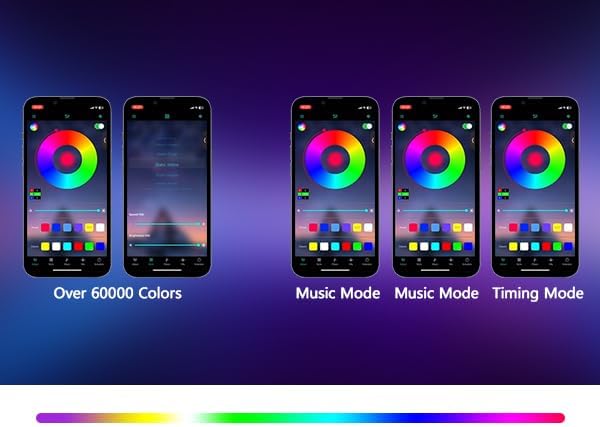
- Control: Use the app to select from over 60,000 colors, various lighting effects, music synchronization modes, and set timers.

The Mr IRONSTONE LD12 L-Shaped Gaming Desk setup, featuring a monitor, keyboard, and speaker. A smartphone in the foreground displays an application for controlling the desk's RGB LED lighting, demonstrating app-based customization.

A screenshot of the smartphone application interface used to control the RGB LED lights of the Mr IRONSTONE LD12 gaming desk. The interface shows options for selecting from over 60,000 colors, music synchronization modes, and timing functions.
4.2. Bluetooth Speaker Operation
The included Bluetooth speaker provides immersive audio and dynamic RGB lighting. It can be used on the desk or as a portable unit.
Speaker Controls:
A close-up image of the control panel on the Bluetooth speaker, detailing the functions of each button.
- 1. Long Press Volume - / Short Press to Switch to Previous Track: Adjust volume down or skip to the previous song.
- 2. Play/Pause: Toggle playback.
- 3. Short Press for TWS Pairing: Initiate True Wireless Stereo pairing with another compatible speaker.
- 4. Long Press Volume + / Short Press to Switch to Next Track: Adjust volume up or skip to the next song.
- 5. Power On/Off Button: Turn the speaker on or off.
- 6. Short Press for Lighting Mode Switch: Cycle through different RGB lighting modes.
- 6. Long Press for Mode Switch: Switch between Bluetooth, AUX, or other input modes.
- Double-Tap to Toggle Light On/Off: Quickly turn the speaker's RGB lights on or off.

A detailed view of the Bluetooth speaker included with the Mr IRONSTONE LD12 gaming desk. The image highlights its dual speaker design, dynamic RGB lighting effects, and transparent housing.
5. Maintenance
To ensure the longevity and appearance of your Mr IRONSTONE LD12 L-Shaped Gaming Desk, follow these maintenance guidelines:
- Cleaning: The desk's carbon fiber surface is easy to clean. Use a soft, damp cloth to wipe away dust, stains, food residues, or watermarks. Avoid abrasive cleaners or harsh chemicals that could damage the finish.
- Spills: Wipe up spills immediately to prevent liquid from seeping into seams or damaging electronic components.
- Weight Distribution: Distribute weight evenly across the desktop. Avoid placing excessively heavy items on one concentrated area.
- Environmental Conditions: Avoid exposing the desk to extreme temperatures or high humidity, which can affect material integrity.
- Hardware Check: Periodically check and tighten all assembly hardware to ensure stability.
6. Troubleshooting
If you encounter issues with your Mr IRONSTONE LD12 L-Shaped Gaming Desk, refer to the following common troubleshooting steps:
Desk Stability:
- Wobbling: Ensure all screws and bolts are securely tightened. Check that the desk is placed on a level surface. Adjust any leveling feet if present.
LED Lights:
- Lights Not Turning On: Verify that the LED strips are properly connected to the power source and controller. Check if the power adapter is plugged into a working outlet.
- App Connection Issues: Ensure Bluetooth is enabled on your device and the app has necessary permissions. Try restarting the app and your device.
- Inconsistent Lighting: Check for any loose connections in the LED strip wiring.
Bluetooth Speaker:
- No Sound: Ensure the speaker is powered on and charged. Check the volume level on both the speaker and your connected device. Verify that the correct input mode is selected.
- Bluetooth Pairing Issues: Make sure the speaker is in pairing mode. Disconnect from any previously paired devices and try pairing again. Ensure your device is within range.
- Speaker Lights Not Working: Check if the speaker's lights have been toggled off (double-tap the mode button).
If problems persist after attempting these steps, please contact customer support for further assistance.
7. Specifications
| Feature | Specification |
|---|---|
| Brand | Mr IRONSTONE |
| Model Number | LD12 |
| Shape | Rectangular (L-Shaped configuration) |
| Product Dimensions (D x W x H) | 18.2"D x 50.8"W x 29.5"H |
| Color | Black |
| Style | Modern |
| Base Material | Iron |
| Top Material Type | P2 MDF Board with Carbon Fiber Surface |
| Finish Type | Laminated |
| Special Features | RGB LED Strips, Rust Resistant, Scratch Resistant, Bluetooth Speaker |
| Included Components | Bluetooth Speaker, Cup Holder, RGB Lights |
| Item Weight | 36.5 Pounds |
| Required Assembly | Yes |
| Maximum Weight Recommendation | 350 Pounds |
| Warranty Type | Limited |
8. Warranty and Support
The Mr IRONSTONE LD12 L-Shaped Gaming Desk comes with a limited warranty. Please refer to the warranty information provided with your purchase for specific terms and conditions.
Your satisfaction is important to us. If you encounter any problems before or after purchase, or require further assistance, please contact Mr IRONSTONE customer support through the retailer where you purchased the product or visit the official Mr IRONSTONE website for contact information.

