
1. Product Overview
The Aecooly Desktop Fan (Model TB01-XING) is a versatile and compact fan designed for personal cooling in various environments, including offices, bedrooms, and small living spaces. It features advanced controls for precise airflow adjustment, wide-area air supply, and quiet operation, ensuring a comfortable experience.

Figure 1.1: Front view of the Aecooly Desktop Fan.
Key Features:
- 100-Level Fine Adjustment: Offers precise control over airflow, from a gentle breeze to a strong wind, with real-time display on a large LED screen.
- Three-dimensional Air Supply: Manual vertical tilt (-10° to +7°) and auto oscillation options (60°, 120°, 180°) ensure even air distribution.
- Low Noise Design: Operates quietly, with noise levels as low as 40dB, suitable for concentration and sleep.
- 8000mAh Large Capacity Battery: Provides up to 23 hours of continuous operation on a single charge, with a smart charging control system.
- USB-C Charging: Conveniently rechargeable via USB-C, compatible with various power sources.
- Safety Certified: Complies with Japanese PSE Electrical Appliance and Material Safety Act, ensuring safe usage.
2. Safety Instructions
Please read all safety instructions carefully before using the product to prevent injury or damage.
- Do not insert fingers or any objects into the fan grille while it is operating.
- Keep the fan away from water or other liquids. Do not use in wet environments.
- Ensure the power source matches the fan's requirements (USB 5V).
- Do not block the air inlets or outlets.
- Children under 14 years old should use the product under adult supervision.
- Unplug the fan before cleaning or performing any maintenance.
- Avoid dropping or subjecting the fan to strong impacts.
- If the fan emits smoke, unusual odors, or makes strange noises, immediately turn it off and unplug it. Contact customer support.
3. Package Contents
Verify that all items are present in the package:
- Aecooly Desktop Fan (Model TB01-XING)
- USB-C Charging Cable
- Japanese Instruction Manual (This document is an English translation/summary)

Figure 3.1: Illustration of package contents and product dimensions.
4. Product Diagram and Parts Identification
Familiarize yourself with the different parts of your Aecooly Desktop Fan.

Figure 4.1: Side view of the Aecooly Desktop Fan.
- Front Grille: Air outlet.
- LED Digital Display: Shows current air volume, oscillation angle, and battery level.
- Control Buttons: Power, oscillation, and air volume adjustment.
- Rear Grille: Air inlet.
- USB-C Charging Port: Located at the back/bottom for power input.
- Anti-slip Base: Ensures stability on surfaces.

Figure 4.2: Key design and safety features.
5. Setup
Follow these steps to set up your Aecooly Desktop Fan for the first time.
5.1 Initial Charging
Before first use, fully charge the fan. The fan comes with a built-in lithium-ion battery.
- Connect the provided USB-C charging cable to the fan's charging port.
- Connect the other end of the USB-C cable to a compatible USB power adapter (e.g., phone charger, computer USB port, power bank).
- The LED display will indicate charging status. Charge until the battery icon shows full.
5.2 Placement
Place the fan on a stable, flat surface. Ensure there is adequate space around the fan for proper airflow.
6. Operation
Learn how to operate your Aecooly Desktop Fan.
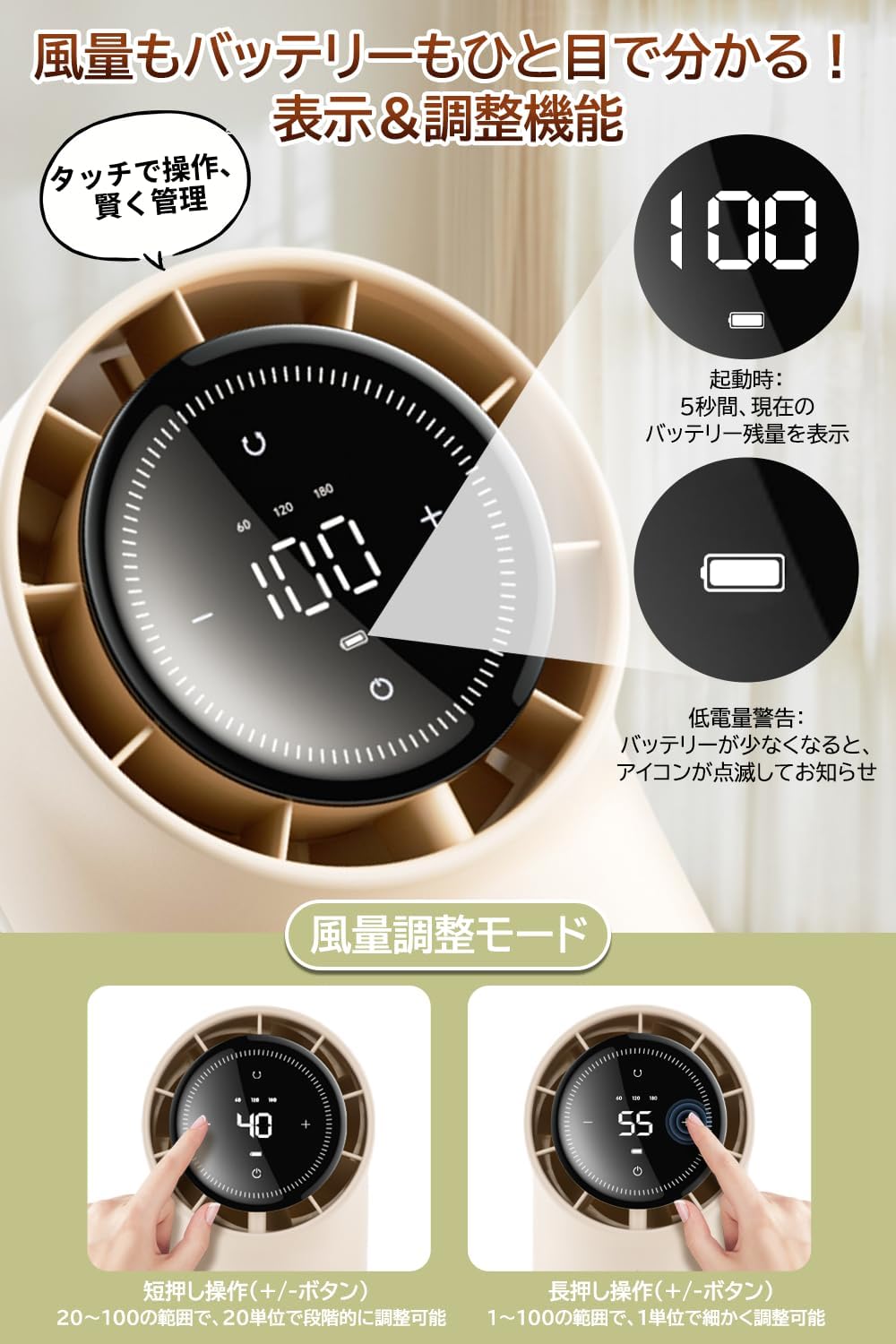
Figure 6.1: LED Display and Control Buttons.
6.1 Power On/Off
- To Power On: Press the power button (⏻) once. The fan will start at a low speed.
- To Power Off: Press and hold the power button (⏻) for a few seconds until the fan stops.
6.2 Air Volume Adjustment
The fan offers 100 levels of air volume adjustment.
- Quick Adjustment (20 Levels): Briefly press the '+' or '-' buttons to adjust the air volume in increments of 5 levels.
- Fine Adjustment (100 Levels): Press and hold the '+' or '-' buttons to adjust the air volume in increments of 1 level. Release the button when the desired level is reached.
- The current air volume (1-100) will be displayed on the LED screen.
6.3 Oscillation Control
The fan supports auto oscillation with three angle options.
- To Activate Oscillation: Press the oscillation button (⟳) once. The fan will cycle through 60°, 120°, and 180° oscillation modes.
- To Select Oscillation Angle: Press the oscillation button repeatedly to choose between 60°, 120°, or 180°. The selected angle will be displayed on the LED screen.
- To Stop Oscillation: Continue pressing the oscillation button until the oscillation function is turned off.
- Note: During oscillation, the fan may briefly pause for 2 seconds at the maximum angle. This is normal operation. When powered off, the fan automatically returns to the front-facing position.
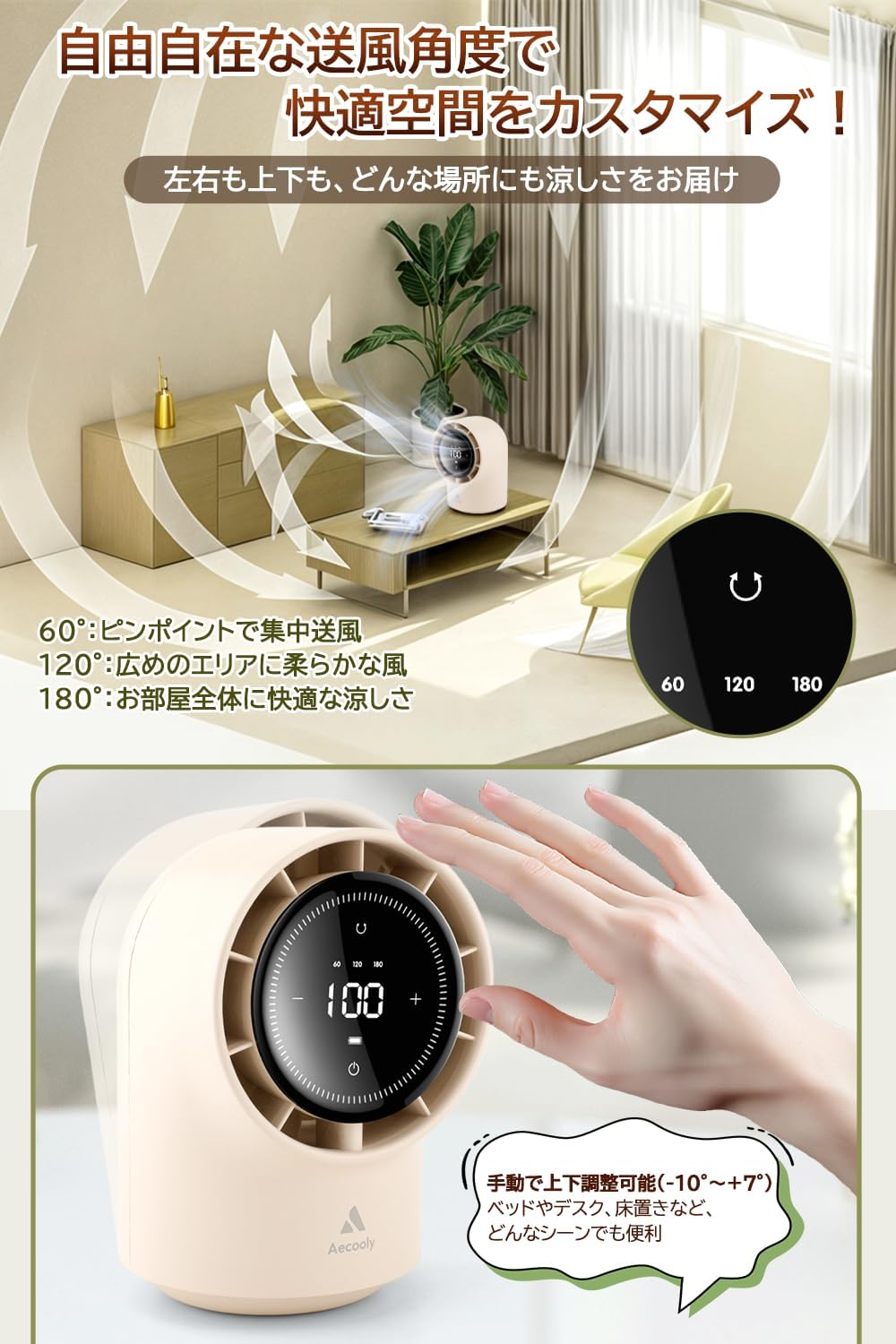
Figure 6.2: Oscillation angles and manual tilt.
6.4 Manual Vertical Tilt
The fan head can be manually tilted to adjust the vertical airflow direction.
- Gently tilt the fan head up or down to your desired angle between -10° and +7°. The head will stay in position once set.
6.5 LED Display Information
The large LED display provides real-time information:
- Air Volume: Displays the current fan speed from 1 to 100.
- Oscillation Angle: Shows the selected oscillation angle (60°, 120°, or 180°).
- Battery Level: Indicates the remaining battery charge. A flashing icon alerts you when the battery is low.
7. Charging
The Aecooly Desktop Fan is equipped with an 8000mAh rechargeable battery.
- Use the provided USB-C cable to charge the fan.
- The fan can be used while charging. However, to prevent overheating, the charging process will temporarily pause if the fan speed is set to level 40 or higher.
- A full charge can provide up to 23 hours of continuous operation at the lowest fan speed (level 20).
8. Maintenance
Regular cleaning ensures optimal performance and longevity of your fan.
8.1 Cleaning
- Always turn off and unplug the fan before cleaning.
- Use a soft, dry cloth to wipe the exterior surfaces of the fan.
- For dust accumulation on the grilles, use a soft brush or a vacuum cleaner with a brush attachment to gently remove dust.
- Do not use abrasive cleaners, solvents, or immerse the fan in water.
8.2 Storage
- Store the fan in a cool, dry place when not in use for extended periods.
- Keep it away from direct sunlight and high humidity.
9. Troubleshooting
If you encounter any issues with your fan, refer to the following common problems and solutions.
| Problem | Possible Cause | Solution |
|---|---|---|
| Fan does not turn on. | Battery is depleted. Power button not pressed correctly. | Charge the fan fully. Press and hold the power button firmly. |
| Fan stops during charging. | Overheat prevention activated. | This is normal. Charging pauses at fan speeds 40 or higher. Reduce fan speed or charge when off. |
| Oscillation is not smooth or stops. | Normal operation at max angle. Obstruction. | The fan briefly pauses at max oscillation angle (2 seconds). Ensure no objects are blocking the fan's movement. |
| Fan is noisy. | High fan speed setting. Dust accumulation. | Reduce the fan speed. The noise level increases with higher speeds (max 57dB). Clean the fan grilles. |
| LED display is dim or off. | Fan is off or battery is very low. | Turn on the fan. Charge the fan. |
10. Specifications
Technical specifications for the Aecooly Desktop Fan.
| Feature | Specification |
|---|---|
| Brand | Aecooly |
| Model Number | TB01-XING |
| Color | Apricot |
| Product Dimensions | 20.9 cm (D) x 13.9 cm (W) x 14.3 cm (H) |
| Power Source | Battery Powered (USB-C) |
| Battery Type | Lithium Ion (Built-in) |
| Battery Capacity | 8000 mAh |
| Noise Level | 40 dB (minimum) - 57 dB (maximum) |
| Oscillation Angles | 60°, 120°, 180° (Auto) |
| Vertical Tilt | -10° to +7° (Manual) |
| Control Type | Digital Buttons, LED Display |
| Safety Certification | PSE Certified |
| Usage Environment | Indoor, Outdoor |
11. Warranty and Support
Aecooly is committed to providing high-quality products and customer satisfaction.
- Usage Guarantee: This product is designed for a long service life, with a 10-year usage guarantee for the main unit under normal operating conditions.
- Safety Compliance: The product is PSE certified, ensuring compliance with electrical appliance safety standards.
- For any questions, concerns, or technical support, please refer to the contact information provided in your original purchase documentation or visit the official Aecooly website.


