
1. Safety Instructions
Please read and understand all safety instructions before operating your EHOM EP350 Portable Power Station. Failure to follow these instructions may result in electric shock, fire, or serious injury.
- Do not expose to water or moisture: This product is not waterproof. Avoid rain, splashes, or immersion in water.
- Avoid extreme temperatures: Do not operate or store the unit in direct sunlight, near heat sources, or in environments exceeding 40°C (104°F) or below -10°C (14°F).
- Ensure proper ventilation: Operate the power station in a well-ventilated area. Do not block ventilation openings.
- Do not disassemble or modify: Unauthorized disassembly or modification can lead to hazards and voids the warranty. Contact customer support for service.
- Keep away from children and pets: Store the unit in a safe place out of reach of children and pets.
- Use approved accessories only: Use only the charging cables and adapters provided or approved by EHOM.
- Handle with care: Avoid dropping or subjecting the unit to strong impacts.
- Proper disposal: Dispose of the unit according to local regulations for lithium-ion batteries. Do not dispose of in household waste.
2. Product Overview
The EHOM EP350 is a compact and powerful portable power station designed to provide reliable electricity for various devices, whether outdoors or during power outages. It features a 299Wh capacity, 350W continuous output (700W peak), and multiple charging and output options.
2.1 Package Contents
- 1 x EHOM EP350 Portable Power Station
- 1 x AC Charging Cable
- 1 x Car Charging Cable
- 1 x User Manual
- 1 x After-Sales Card
2.2 Key Features
- High Capacity: 299Wh lithium-ion battery.
- Powerful Output: 350W continuous, 700W peak AC output with pure sine wave.
- Multiple Output Ports: 1 AC outlet, 2 USB-A ports (18W each, 36W total), 2 USB-C ports (65W and 100W), 1 Car Port (126W max).
- Versatile Recharging: Supports AC wall outlet, solar panel (up to 200W MPPT), and 12V/24V car charging.
- Fast Charging: NitroGo technology recharges to 80% in 55 minutes, and 100% in 1.25 hours via AC.
- Durable Battery: Over 3500 life cycles.
- Advanced Safety: Built-in Battery Management System (BMS) for protection.
- Informative Display: Clear LCD screen shows real-time status.
- Integrated Lighting: LED light with Strong, Warm, and SOS modes.
- Emergency Power Supply (EPS): Switches to battery power in ≤15ms during outages.
- Smart Control: Bluetooth-enabled app for remote monitoring and control.
- Voice Function: Interactive voice commands for convenience.
2.3 Product Diagram

Figure 2.3.1: Front view of the EHOM EP350 Portable Power Station, showing the display, AC outlet, and USB ports.

Figure 2.3.2: Back view of the EHOM EP350 Portable Power Station, showing the AC input and car charging port.
3. Getting Started (Setup)
Follow these steps to prepare your EHOM EP350 for first use.
3.1 Unboxing and Inspection
- Carefully remove all components from the packaging.
- Inspect the power station and accessories for any signs of damage. If any damage is found, do not use the product and contact customer support immediately.
- Retain the packaging for future storage or transport.
3.2 Initial Charging
It is recommended to fully charge the EHOM EP350 before its first use to optimize battery performance and lifespan.
- Connect the provided AC charging cable to the AC input port on the power station.
- Plug the other end of the AC charging cable into a standard wall outlet (100-240V AC).
- The LCD display will show the charging status. The unit will be fully charged in approximately 1.25 hours using NitroGo fast charging technology.

Figure 3.2.1: The EHOM EP350 connected to an AC wall outlet for fast charging.
4. Operation Guide
This section details how to operate your EHOM EP350 Portable Power Station.
4.1 Powering On/Off
- To Power On: Press and hold the main power button for approximately 3 seconds. The LCD display will illuminate.
- To Power Off: Press and hold the main power button for approximately 3 seconds. The LCD display will turn off.
4.2 Charging the Power Station
The EP350 offers three methods for recharging:
- AC Wall Outlet: Use the provided AC charging cable. Full charge in approximately 1.25 hours.
- Solar Panel (Not Included): Connect a compatible solar panel (up to 200W, MPPT controller built-in) to the solar input port. Charging time varies based on sunlight intensity and panel wattage.
- Car Charging: Use the provided car charging cable to connect to your vehicle's 12V/24V cigarette lighter outlet.
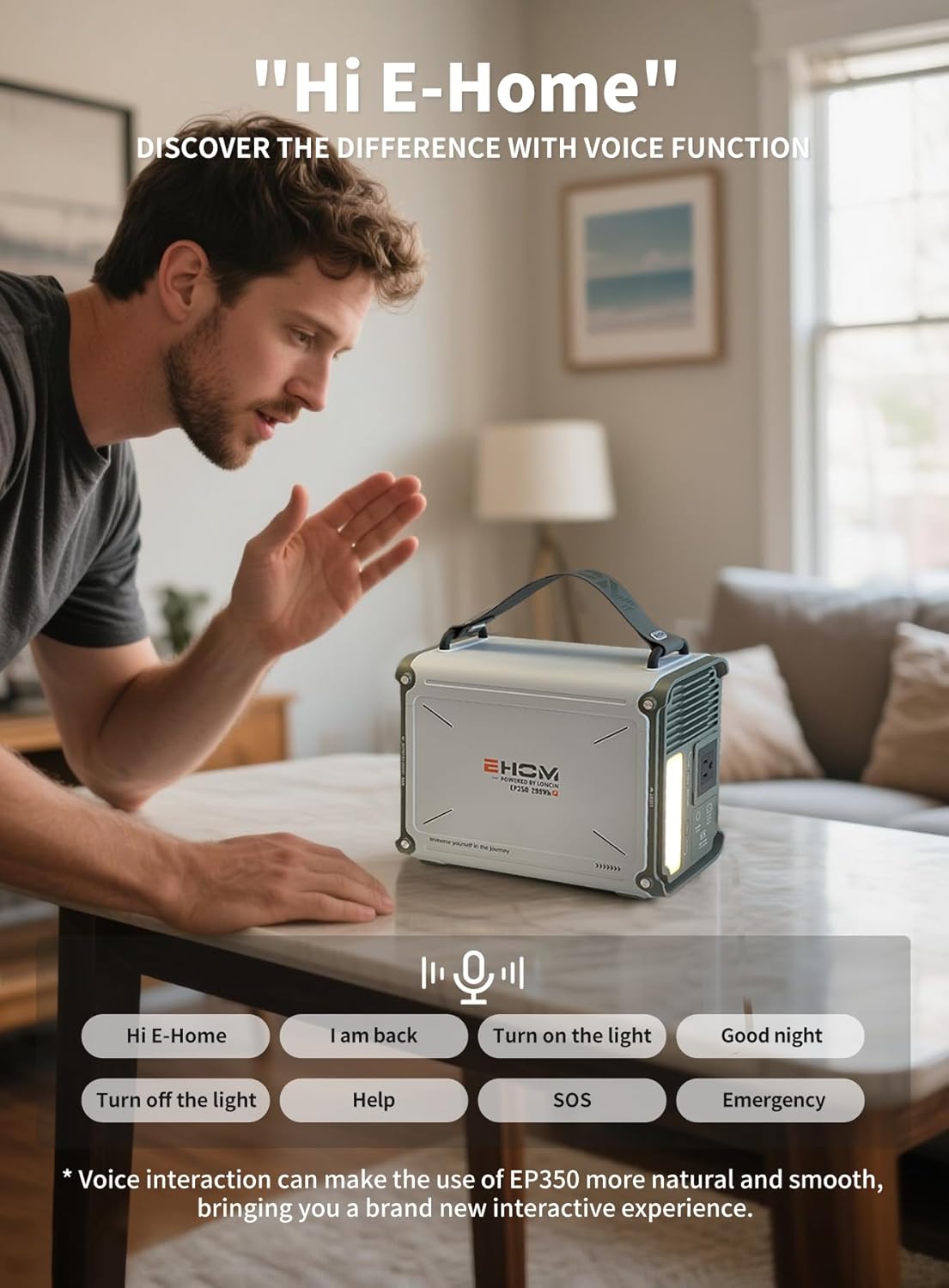
Figure 4.2.1: The EHOM EP350 being charged by a solar panel.

Figure 4.2.2: The EHOM EP350 charging from a vehicle's cigarette lighter outlet.
4.3 Using Output Ports
To use any output port, first ensure the power station is turned on. Then, activate the specific output group (AC, DC, or USB) by pressing its corresponding button.
- AC Output: Press the AC button to enable the 120V AC outlet. This port provides 350W continuous power (700W peak) with a pure sine wave, suitable for sensitive electronics.
- USB Output: Press the USB button to activate the 2 USB-A (18W each) and 2 USB-C (65W and 100W) ports. Ideal for charging smartphones, tablets, laptops, and other USB-powered devices.
- Car Port Output: Press the DC button to enable the 12V/24V car port (126W max). Suitable for car refrigerators, air pumps, and other 12V/24V devices.

Figure 4.3.1: Overview of the EHOM EP350's six output ports.
4.4 LCD Display
The clear LCD display provides real-time information about the power station's status, including:
- Battery level indicator
- Input power (Watts)
- Output power (Watts) for AC, DC, and USB
- Remaining charge/discharge time
- Warning indicators (e.g., overload, temperature)

Figure 4.4.1: The EHOM EP350's clear LCD display, visible even in strong sunlight.
4.5 LED Light Functions
The integrated LED light offers three modes for various situations:
- Strong Light: For maximum illumination.
- Warm Light: For softer, ambient lighting.
- SOS Mode: Flashes an SOS signal for emergencies.

Figure 4.5.1: The EHOM EP350's LED light demonstrating its three modes.
4.6 Emergency Power Supply (EPS) Function
The EP350 features an EPS function that allows it to act as a temporary backup power source. When connected to an AC wall outlet, it can pass through power to connected devices. In the event of a power outage, the unit can switch to battery power within ≤15ms, providing uninterrupted power for critical devices.

Figure 4.6.1: The EHOM EP350 utilizing its EPS function to provide temporary power.
4.7 Voice Control
The EP350 includes a voice interaction function for convenient control. Use simple commands to manage certain features.
- Activation: Say "Hi E-Home" to activate voice control.
- Commands: Examples include "Turn on the light," "Turn off the light," "SOS," "Emergency."

Figure 4.7.1: Demonstrating voice control interaction with the EHOM EP350.
4.8 Smart App Control
Download the EHOM Smart App to control and monitor your power station remotely via Bluetooth. The app allows for personalization, software updates (OTA), and real-time monitoring.
- Download: Search for "LONCIN" on Google Play Store (Android) or "EHOM" on Apple App Store (iOS).
- Connection: Enable Bluetooth on your smartphone and follow the app's instructions to connect to your EP350.
- Features: Monitor battery status, control output ports, adjust settings, and receive firmware updates.

Figure 4.8.1: Controlling the EHOM EP350 via the dedicated smartphone application.
4.9 SpurFlux Technology
The EP350 incorporates SpurFlux technology, which allows it to power high-power resistive devices up to 700W without overloading. This is ideal for appliances like hair dryers, kettles, portable juicers, and small electric drills.

Figure 4.9.1: The EHOM EP350 powering a hair dryer, demonstrating SpurFlux technology.
5. Maintenance and Storage
Proper maintenance and storage will extend the lifespan of your EHOM EP350.
5.1 General Care
- Cleaning: Use a dry, soft cloth to wipe the exterior of the unit. Do not use abrasive cleaners or solvents.
- Ventilation: Ensure the ventilation openings are clear of dust and debris.
- ColdFusion Technology: Thanks to its intelligent temperature control system, the EP350 can be charged immediately after a full discharge without waiting, unlike some other power stations.

Figure 5.1.1: The EHOM EP350's ColdFusion technology allows immediate recharging after discharge.
5.2 Long-Term Storage
- Charge Level: For optimal battery health during long-term storage, charge the unit to approximately 50-80% every 3-6 months.
- Environment: Store the power station in a cool, dry place, away from direct sunlight, heat sources, and moisture.
- Temperature: Ideal storage temperature is between 0°C and 30°C (32°F and 86°F).
6. Troubleshooting
If you encounter issues with your EHOM EP350, refer to the following common problems and solutions.
- Unit Not Turning On:
- Ensure the battery is not completely depleted. Charge the unit.
- Press and hold the main power button for the required 3 seconds.
- No Output from Ports:
- Ensure the power station is turned on.
- Verify that the specific output group (AC, DC, USB) is activated by pressing its respective button.
- Check if the connected device's power consumption exceeds the port's maximum output or the unit's total output (350W continuous, 700W peak). Overload protection may have activated.
- If an overload occurs, disconnect the device, turn off the output, and then reactivate it.
- Unit Not Charging:
- Ensure the charging cable is securely connected to both the power station and the power source.
- Verify the power source is active (e.g., wall outlet has power, solar panel is in direct sunlight, car engine is running).
- Check for any error codes or indicators on the LCD display.
- If using solar, ensure the solar panel's voltage and current are within the EP350's specifications (12-30V, 8A max, 200W max).
- LCD Display Not Working:
- Try turning the unit off and on again.
- Ensure the battery has some charge.
If the problem persists after attempting these solutions, please contact EHOM customer support for further assistance.
7. Technical Specifications
| Feature | Specification |
|---|---|
| Model | EP350 |
| Battery Capacity | 299Wh |
| AC Output (Pure Sine Wave) | 120V, 350W (700W Peak) |
| USB-A Output | 2 x 18W (36W Total) |
| USB-C Output | 1 x 65W, 1 x 100W |
| Car Port Output | 12V/24V, 126W Max |
| AC Input | Up to 300W (NitroGo Fast Charging) |
| Solar Input (MPPT) | 12-30V, 8A Max, 200W Max |
| Car Input | 12V/24V |
| Battery Type | Lithium-ion |
| Cycle Life | 3500+ cycles |
| Dimensions (L x W x H) | 12" x 7" x 12.6" (30.5cm x 17.8cm x 32cm) |
| Weight | 14 lbs (6.35 kg) |
| Operating Temperature | -10°C to 40°C (14°F to 104°F) |
| Special Features | Portable, Super Quiet, USB Port, LCD Display, LED Light, EPS Function, Voice Control, Smart App Control, SpurFlux Technology, ColdFusion Technology |
8. Warranty and Customer Support
8.1 Warranty Information
The EHOM EP350 Portable Power Station comes with a 5-year warranty from the date of purchase. This warranty covers defects in materials and workmanship under normal use. It does not cover damage caused by misuse, accidents, unauthorized modifications, or failure to follow the instructions in this manual.
8.2 Customer Support
For any questions, technical assistance, or warranty claims, please contact EHOM customer service. Refer to the included After-Sales Card for contact details or visit the official EHOM website.
When contacting support, please have your product model (EP350) and purchase information readily available.