
1. Introduction
This manual provides comprehensive instructions for the Generic Xiaomi Focus Pen, designed to enhance your interaction with Xiaomi Pad 7 and 7 Pro 11.2 Inch Tablets. This smart pen offers advanced features for writing, drawing, and navigation, ensuring a seamless and precise user experience.
Key features include:
- Compatibility with Xiaomi Pad 7/7 Pro 11.2 Inch Tablet.
- 8192 levels of pressure sensitivity for nuanced input.
- Ultra-low latency and 0g activation force for immediate response.
- Multi-functional buttons for shorthand, brush selection, and screenshots.
- Focus Button for presentation pointer and screen clearing.
- Remote control shooting functionality.
- Paper-like writing experience on compatible screens.
2. Product Overview

Figure 2.1: Xiaomi Focus Pen in action, providing a natural writing experience.
The Xiaomi Focus Pen is engineered for precision and comfort. Its ergonomic design ensures a natural grip, making it ideal for extended periods of use. The pen's advanced technology allows for highly accurate input, mimicking the feel of traditional writing instruments.

Figure 2.2: Side view of the Xiaomi Focus Pen, highlighting its sleek design.
The stylus is designed to be lightweight and durable, featuring a smooth finish that is pleasant to touch. It integrates seamlessly with compatible Xiaomi tablets, offering a responsive and intuitive interface for all your digital tasks.
3. Setup
3.1 Powering On/Off
To power on the Xiaomi Focus Pen, gently tap the top end of the stylus. The indicator light will illuminate, confirming it is active. To power off, tap the top end again. The indicator light will turn off.
3.2 Charging
The Xiaomi Focus Pen is equipped with a charging port. Connect the provided USB cable to the stylus and a power source to charge. The indicator light will show charging status.
4. Operating Instructions
4.1 Multi-Functional Buttons
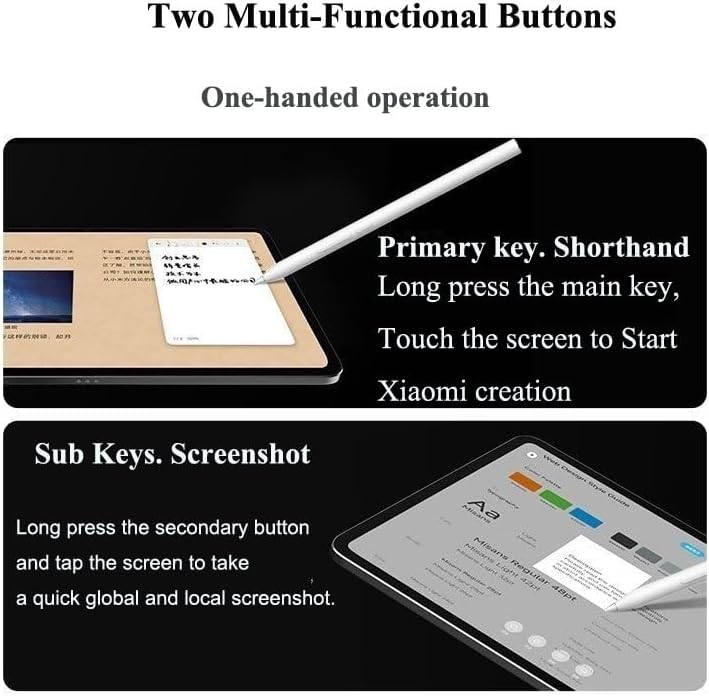
Figure 4.1: The two multi-functional buttons on the stylus.
The stylus features two multi-functional buttons for enhanced control:
- Primary Key (Shorthand): Long press the main key and touch the screen to open the creation interface. While within the canvas, click the main key to switch between various brushes.
- Sub Key (Screenshot): Long press the secondary button and tap the screen to take a quick global or local screenshot. Within the Creative Canvas, click the sub button to easily switch between frequently used colors.
4.2 Focus Button Function

Figure 4.2: Detailed functions of the Focus Button.
The Focus Button provides specialized controls:
- Long press to activate pointer mode, useful for presentations.
- One click for the Brush Icon.
- Long press 'Circle Note' for specific functions.
- Double click to clear the screen instantly.
4.3 Remote Control Shooting
Utilize the stylus for remote control photography. Click the designated button to take a picture or to start/stop video recording on your compatible tablet.
4.4 Paper-like Writing Experience

Figure 4.3: Demonstrating the paper-like writing experience.
The Xiaomi Focus Pen, when used with a Nano Flex Screen (sold separately or integrated into some tablets), provides a frosted texture that simulates the feel of writing on paper. This enhances the natural feel of note-taking and drawing.
5. Specifications
| Feature | Detail |
|---|---|
| Brand | Generic |
| Compatible Model | Xiaomi Pad 7/7 Pro 11.2 Inch Tablet |
| Pressure Sensitivity | 8192 levels |
| Activation Force | 0g |
| Material | Metal, Plastic |
| Color | White |
| Batteries Required | No (Internal rechargeable battery) |
| Minimum Required OS | Android 11.0 |
| Unit Count | 1.0 Count |
6. Maintenance
To ensure the longevity and optimal performance of your Xiaomi Focus Pen, follow these maintenance guidelines:
- Keep the pen clean by wiping it with a soft, dry cloth.
- Avoid exposing the pen to extreme temperatures or direct sunlight.
- Protect the pen tip from damage by storing it in a protective case when not in use.
- Do not attempt to disassemble the pen, as this may void the warranty and cause damage.
7. Troubleshooting
If you encounter issues with your Xiaomi Focus Pen, refer to the following common troubleshooting steps:
- Pen not turning on: Ensure the pen is fully charged. Connect it to a power source and allow it to charge for at least 20 minutes before attempting to power it on again.
- Pen not responding: Verify that the pen is powered on and properly paired with your Xiaomi Pad. Restart both the pen and your tablet.
- Inaccurate input: Check if the pen tip is clean and undamaged. Replace the pen nib if it appears worn or broken. Ensure your tablet screen is also clean.
- Buttons not functioning: Confirm the pen is powered on. If the issue persists, try restarting the pen and tablet.
If these steps do not resolve the issue, please contact customer support for further assistance.
8. Warranty and Support
Information regarding product warranty and customer support details was not provided in the available product data. Please refer to the product packaging or the manufacturer's official website for specific warranty terms and contact information for support.