
1. Welcome & Overview
Thank you for choosing the GOKOCO bettdow AC1071 Full HD 4K Projector. This manual provides essential information for setting up, operating, and maintaining your device. The AC1071 is designed to deliver a high-quality home cinema experience with its advanced features, including Full HD 1080p resolution, 4K decoding, 700 ANSI lumens brightness, automatic focus, and smart Android 13 operating system. Enjoy seamless streaming and versatile connectivity with Wi-Fi 6 and Bluetooth 5.0.
2. Key Features
- Vivid Full HD & Official Netflix: Experience 1920x1080p resolution with 4K decoding and 700 ANSI lumens for bright, detailed images. Official Netflix certification ensures stable access and automatic updates.
- Instant Setup: Automatic focus and 360° omnidirectional keystone correction adjust the image perfectly in seconds, even at challenging angles. Obstacle avoidance and screen adaptation features ensure consistent alignment.
- Android 13 & AI Voice Control: Integrated Android TV 13 system provides access to over 10,000 free apps (YouTube, Disney+, Prime Video, TikTok). The Bluetooth remote control includes AI voice assistant support for easy content search.
- Advanced Connectivity & Integrated Sound: Dual-band Wi-Fi 6 (2.4G/5.8G) for ultra-fast 4K streaming without buffering. Bluetooth 5.0 allows connection to external speakers or headphones with minimal latency. Features built-in 5W stereo speakers for immediate audio.
- Superior Durability & Large Projection: Equipped with a dust-proof sealed optical engine and an LED light source with a lifespan of over 20,000 hours. Projects large screens from 40" to 230" with flexible projection distances (1.2m - 6.3m).

Image 2.1: Visual representation of the projector's key display technologies including 1080P, 700 ANSI lumens, 3000:1 contrast, HDR 10+, and 4K decoding.

Image 2.2: Depiction of the projector's ultra-fast WiFi 6 wireless connectivity, enabling stable and high-speed media streaming.
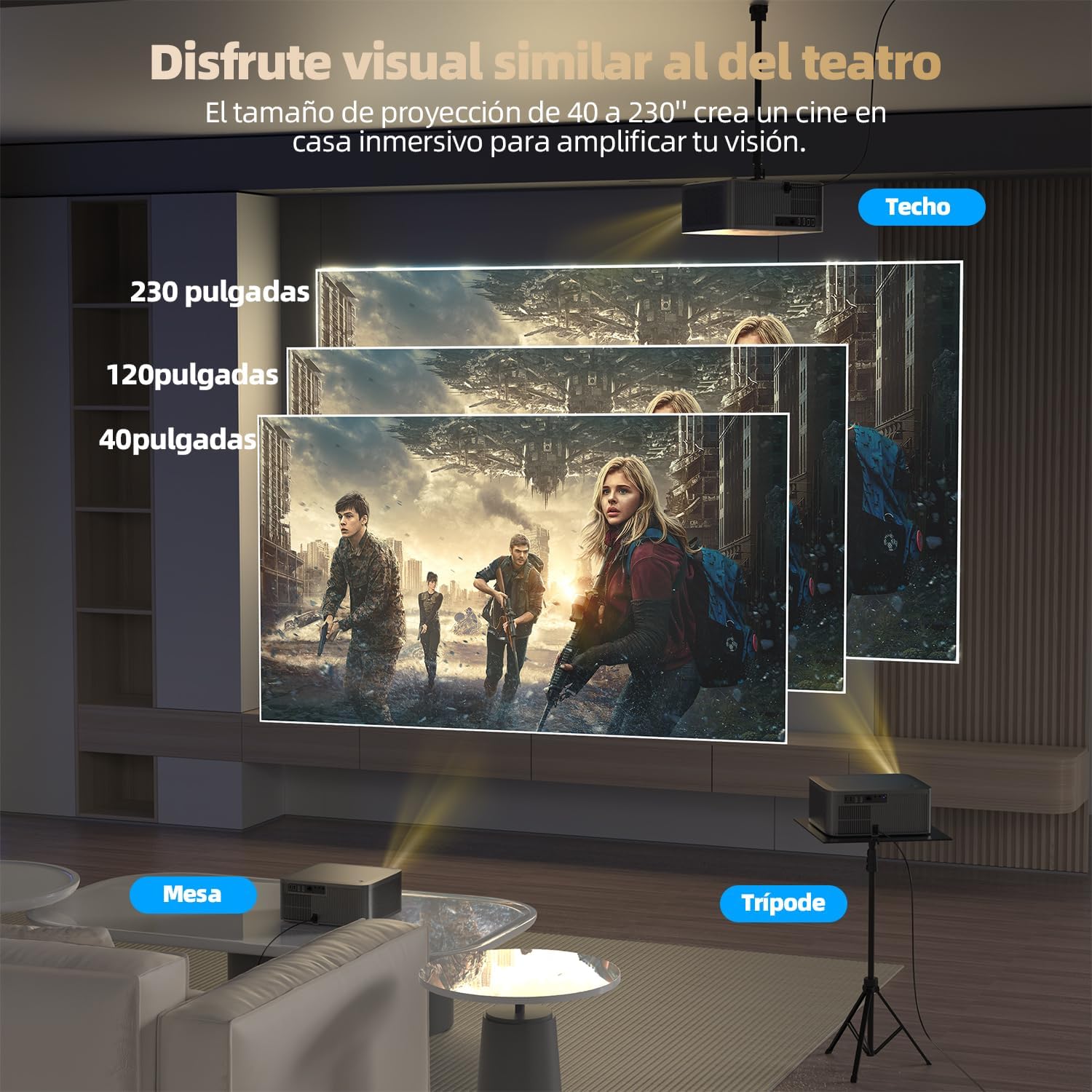
Image 2.3: Illustration of the projector's versatile projection capabilities, showing screen sizes ranging from 40 to 230 inches and different setup positions.

Image 2.4: Visual emphasizing the projector's dual 5W stereo speakers, providing clear and realistic cinematic sound without distortion.
3. Package Contents
Upon unboxing, please ensure all the following components are present:
- GOKOCO bettdow AC1071 Projector
- Remote Control
- Power Cable
- HDMI Cable
- AV Cable
- User Manual
- Adapter
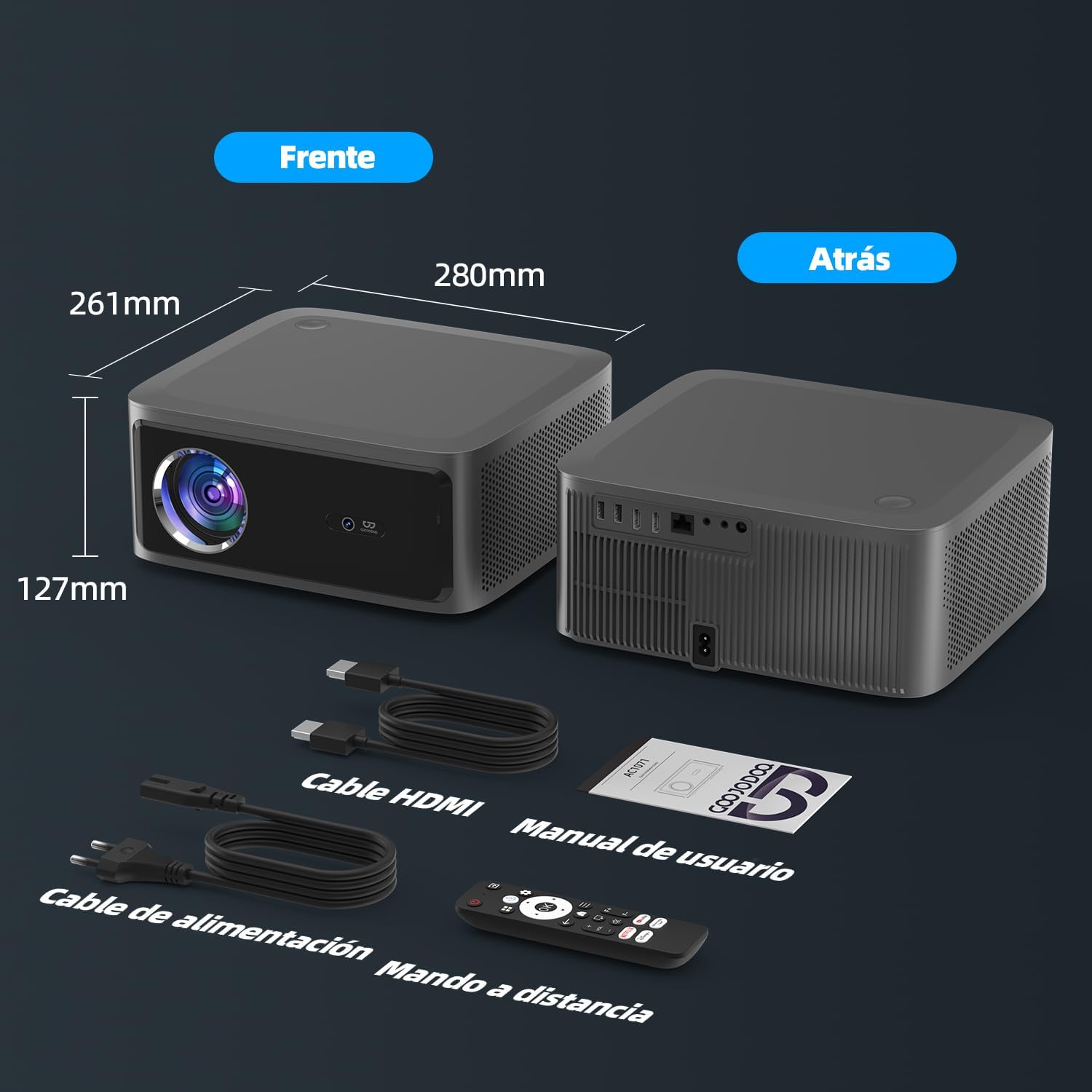
Image 3.1: The projector shown with its physical dimensions and the complete set of accessories included in the package.
4. Product Diagram & Ports
Familiarize yourself with the projector's layout and connectivity options:

Image 4.1: Detailed view of the projector's rear panel, highlighting all available ports for various connections.
- USB Ports (x2): For connecting USB drives or other USB devices.
- HDMI Ports (x2): For connecting external video sources like laptops, gaming consoles, or set-top boxes.
- RJ45 Port: For wired internet connection.
- AV Port: For connecting older audio/video devices.
- 3.5mm Audio Output: For connecting external speakers or headphones.
- Power Port: For connecting the power cable.
5. Setup Guide
5.1. Initial Placement & Power On
- Place the projector on a stable, flat surface or mount it according to your preference (table, tripod, ceiling).
- Connect the power cable to the projector's power port and plug it into an electrical outlet.
- Press the power button on the projector or the remote control to turn on the device.
5.2. Automatic Focus & Keystone Correction
The GOKOCO bettdow AC1071 features intelligent automatic focus and omnidirectional keystone correction. Upon startup or movement, the projector will automatically adjust the image for optimal clarity and shape.
- Automatic Focus: The projector will automatically sharpen the image. If manual adjustment is needed, navigate to Settings > Lens > Autofocus settings.
- Keystone Correction: The projector will automatically correct distorted images to a rectangular shape. For manual adjustments, go to Settings > Lens > Keystone correction.
- Obstacle Avoidance & Screen Adaptation: These features automatically detect and adjust the projection to avoid obstacles and fit the screen surface.
5.3. Adjusting Projection Size & Zoom
The projector can project screen sizes from 40 to 230 inches. To adjust the size:
- Move the projector closer to or further from the projection surface to change the physical screen size.
- Use the digital zoom feature in Settings > Lens > Digital zoom to fine-tune the image size without moving the projector.
6. Connectivity
6.1. Wi-Fi Connection
- From the home screen, navigate to Settings > Wireless and network > Wi-Fi.
- Turn on Wi-Fi and select your desired network from the list.
- Enter the password if prompted and connect.
6.2. Bluetooth Connection
- Go to Settings > Wireless and network > Bluetooth.
- Turn on Bluetooth.
- Select your Bluetooth device (e.g., headphones, external speaker) from the available devices list to pair.
6.3. Wired Connections
Connect external devices using the available ports:
- HDMI: Connect gaming consoles, Blu-ray players, or laptops to the HDMI ports. Select the corresponding HDMI input from the source menu.
- USB: Insert USB drives into the USB ports to access media files.
- RJ45: For a stable internet connection, plug an Ethernet cable into the RJ45 port.
- AV: Use the AV port for devices with composite video and stereo audio outputs.
- Audio Out: Connect external audio systems or headphones to the 3.5mm audio jack.
7. Operating the Android 13 System
7.1. Navigation
Use the provided remote control to navigate the Android 13 interface. The directional pad and 'OK' button are used for selection and movement. Dedicated buttons for Netflix, Prime Video, and other apps provide quick access.
7.2. Voice Control
The remote control features an AI voice assistant. Press the microphone button on the remote and speak your commands to search for content, open apps, or control settings.
7.3. App Management
Access the Google Play Store to download and manage a wide variety of applications. You can install, update, or uninstall apps as needed.
7.4. Language Settings
To change the system language, navigate to Settings > Device Preferences > Language and select your preferred language.
8. Maintenance
- Cleaning: Use a soft, dry cloth to clean the projector's exterior. For the lens, use a specialized lens cleaning cloth and solution.
- Dust Protection: The sealed optical engine is designed to be dust-proof, minimizing internal dust accumulation.
- Lamp Life: The LED light source has an operational life of over 20,000 hours, ensuring long-term use without frequent lamp replacement.
- Ventilation: Ensure the projector's ventilation openings are not blocked to prevent overheating.
9. Troubleshooting
- No Power: Ensure the power cable is securely connected and the power outlet is functional.
- No Image: Check the input source selection (HDMI, AV) and ensure the connected device is powered on. Verify focus and keystone settings.
- Blurred Image: Allow the automatic focus to complete. If still blurry, manually adjust focus via settings. Check for lens obstructions.
- Distorted Image: The automatic keystone correction should resolve this. If not, manually adjust keystone settings.
- No Sound: Check the volume level on both the projector and the source device. Ensure external audio devices are correctly connected and selected.
- Remote Control Not Working: Ensure batteries are correctly inserted and charged. Pair the Bluetooth remote control if it's not responding.
- Wi-Fi/Bluetooth Connectivity Issues: Ensure the projector is within range of the network/device. Restart the projector and your router/Bluetooth device.
10. Technical Specifications
| Feature | Specification |
|---|---|
| Brand | GOKOCO |
| Model | AC1071 |
| Display Resolution | 1920 x 1080 (Full HD) |
| Native Resolution | 1920 x 1080 |
| Max Screen Resolution | 1920 x 1080 |
| Display Type | LED |
| Brightness | 700 ANSI Lumens |
| Color | Gray |
| Power | 135 watts |
| Control Type | Touchpad Control, Remote Control |
| Connectivity Technology | HDMI, Wi-Fi 6, Bluetooth 5.0, USB, RJ45, AV |
| Max Projection Distance | 6.3 Meters |
| Min Projection Distance | 1.2 Meters |
| Light Source Operating Life | 20,000 Hours |
| Max Image Size | 230 Inches |
| Special Features | Automatic Screen Alignment, Built-in Speaker, Automatic Focus, Lightweight, Portable |
| Operating System | Android TV 13 |
| Processor | Arm CA53 Quad-Core 1.4GHz |
| Memory (RAM + ROM) | 1GB RAM + 8GB ROM |
| Audio | Dual 5W Stereo Speakers |
| Dimensions (LxHxW) | 280 x 127 x 261 mm |
| Weight | 3.7 kg |
11. Warranty & Support
The GOKOCO bettdow AC1071 Projector comes with a 60-day seller warranty. For any technical issues, troubleshooting assistance, or warranty claims, please contact your retailer or the GOKOCO customer support team. Refer to the contact information provided with your purchase documentation.
Additional support resources, including FAQs and software updates, may be available on the official GOKOCO website.