
Introduction
Welcome to the user manual for your Generic S13 Vibration Massage Bluetooth Headphones. This guide provides detailed instructions on how to set up, operate, maintain, and troubleshoot your new device. Please read this manual thoroughly before using the headphones to ensure optimal performance and safety.
Safety Information
- Do not expose the headphones or charging case to water or excessive moisture.
- Avoid extreme temperatures (hot or cold) and direct sunlight.
- Keep the device away from children and pets.
- Do not attempt to disassemble, repair, or modify the headphones. This will void the warranty and may cause damage or injury.
- Use only the provided or certified charging cables.
- Dispose of the product responsibly according to local regulations.
Package Contents
Please check the package for the following items:
- Generic S13 Vibration Massage Bluetooth Headphones (Left and Right)
- Charging Case
- USB-C Charging Cable
- User Manual
Product Overview
Familiarize yourself with the components of your S13 headphones.
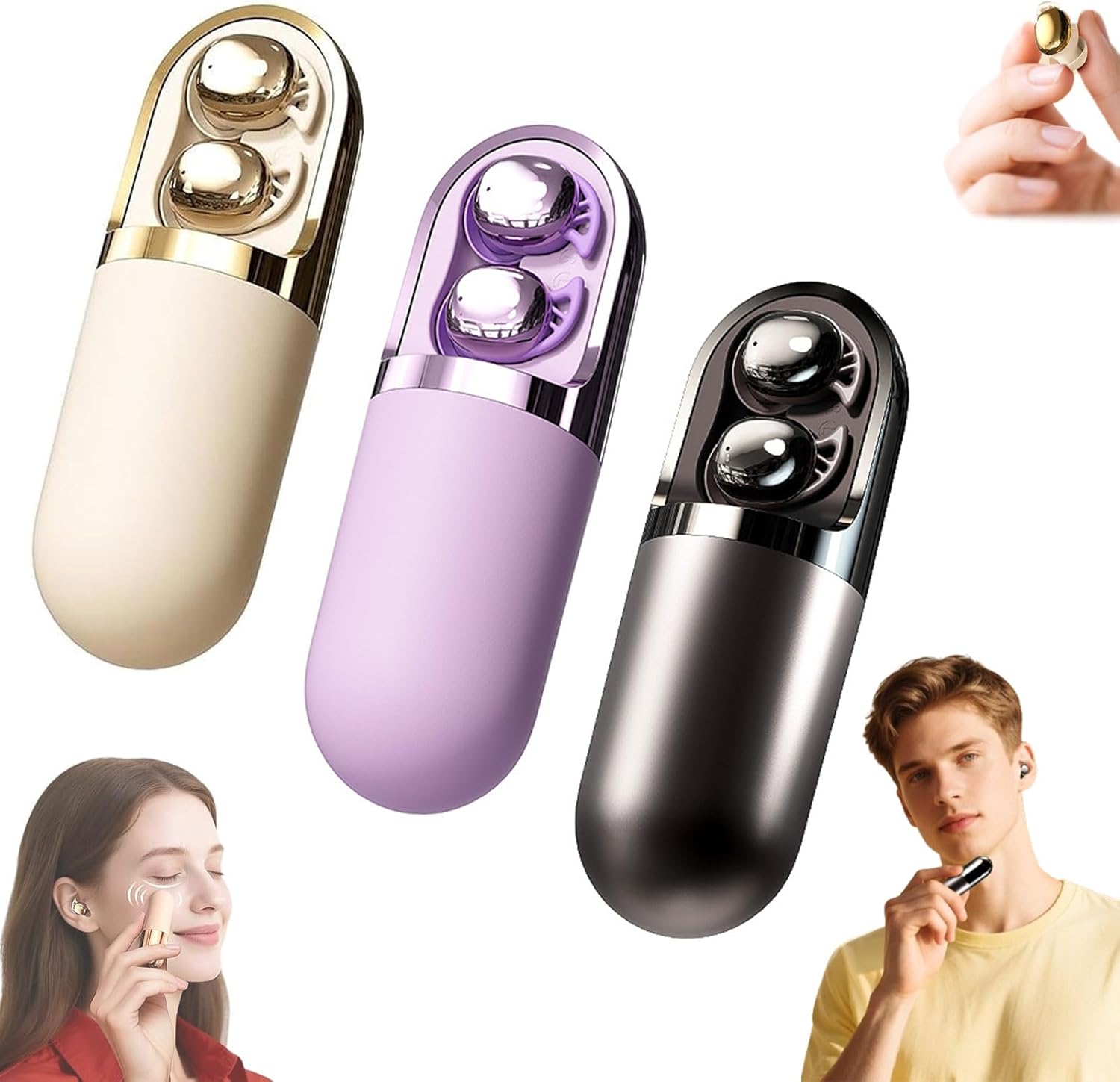
Figure 1: Generic S13 Vibration Massage Bluetooth Headphones and Charging Cases
The S13 headphones feature a compact, in-ear design with integrated touch controls and a portable charging case. The earbuds are designed for stable and comfortable wear, providing both audio and vibration massage functionalities.

Figure 2: Earphone Touch Control Functions and Charging Case Button
Key components include the touch-sensitive area on each earbud for various controls and a button on the charging case for power and mode adjustments.
Setup
1. Charging the Headphones
Before first use, fully charge the headphones and the charging case.
- Place the earbuds into the charging case.
- Connect the USB-C charging cable to the charging port on the case and to a power source.
- The indicator light on the case will show charging status. A full charge provides approximately 30 hours of battery life for the headphones and 100 hours of standby time for the case.

Figure 3: Charging the S13 Headphones Case via USB-C
2. Bluetooth Pairing
To connect your S13 headphones to a device:
- Open the charging case and remove both earbuds. They will automatically enter pairing mode.
- On your smartphone, tablet, or laptop, enable Bluetooth.
- Search for available devices and select "S13" (or similar name) from the list.
- Once connected, you will hear a confirmation tone, and the indicator light on the earbuds will change.

Figure 4: Connecting S13 Headphones via Bluetooth
The headphones are compatible with wireless devices supporting Windows, iOS, and Android operating systems.
Operating Instructions
The S13 headphones feature intuitive touch controls. Refer to Figure 2 for a visual guide.
Power On/Off
- Power On: Remove earbuds from the charging case. They will power on automatically. Alternatively, long press the touch area on either earbud.
- Power Off: Place earbuds back into the charging case. They will power off automatically. Alternatively, long press the touch area on either earbud until powered off.
Music Playback
- Play/Pause: Single click the touch area on either earbud.
- Next Song: Double click the touch area on the right earbud.
- Previous Song: Double click the touch area on the left earbud.
- Volume Adjustment: Three clicks the touch area on the left earbud to decrease volume, three clicks on the right earbud to increase volume.
Call Management
- Answer/Hang Up Call: Single click the touch area on either earbud.
- Reject Call: Double click the touch area on either earbud.
Voice Assistant
- Activate Voice Assistant: Long press the touch area on either earbud.
Vibration Massage Modes
The S13 headphones offer three vibration massage modes: Pulse, Wave, and Zen. These modes are designed to target neck and shoulder tension or provide a relaxing facial massage.
- Cycle Modes: Short press the button on the charging case to cycle through the three massage modes (First Gear, Second Gear, Third Gear). Three short presses will cycle back to the First Gear.

Figure 5: S13 Headphones used for Facial Massage
Active Noise Cancellation
The headphones feature active noise cancellation to help block distractions and enhance focus or relaxation. The activation method for ANC is typically integrated with the touch controls or a dedicated button. Please refer to the specific control diagram (Figure 2) for details on how to toggle this feature, if not explicitly listed above.
Maintenance
Cleaning
- Wipe the earbuds and charging case with a soft, dry, lint-free cloth.
- Do not use abrasive cleaners, alcohol, or chemical solvents.
- Ensure the charging port is free of dust and debris.
Storage
- When not in use, store the headphones in their charging case to protect them and keep them charged.
- Store in a cool, dry place, away from direct sunlight and extreme temperatures.
Troubleshooting
If you encounter issues with your S13 headphones, try the following solutions:
| Problem | Possible Solution |
|---|---|
| Headphones not powering on | Ensure the charging case and earbuds are fully charged. Remove earbuds from the case to activate. |
| Unable to pair with device | Make sure Bluetooth is enabled on your device. Place earbuds back in the case, then remove them to re-enter pairing mode. Try restarting your device. |
| No sound or intermittent sound | Check the volume level on both the headphones and your connected device. Ensure earbuds are properly seated in your ears. Re-pair the headphones. |
| Charging issues | Verify the USB-C cable is securely connected to both the case and the power source. Try a different charging cable or power adapter. Ensure the charging contacts on the earbuds and case are clean. |
| Vibration massage not working | Ensure the headphones are powered on. Short press the button on the charging case to cycle through the massage modes. |
If the problem persists, please refer to the Support section for further assistance.
Specifications
- Brand: Generic
- Model Number: SAD3457
- Connectivity Technology: Wireless (Bluetooth 6.0)
- Ear Placement: In Ear
- Form Factor: In Ear
- Audio Drivers: 40mm dynamic drivers
- Battery Life: Approximately 30 hours (headphones), 100 hours standby (charging case)
- Charging Interface: USB-C
- Features: Deep-Tissue Vibration Massage (Pulse, Wave, Zen modes), Hi-Fi Stereo Sound, Active Noise Cancellation
Warranty Information
Your Generic S13 Vibration Massage Bluetooth Headphones are covered by a manufacturer's warranty. Please refer to the warranty card included in your package or contact the seller for specific details regarding warranty terms and conditions.
Support
For technical assistance, troubleshooting beyond this manual, or warranty claims, please contact the retailer or manufacturer directly. Contact information can typically be found on the product packaging or the seller's website.