
1. Introduction
The ANENG 620A Digital Multimeter is a versatile and precise instrument designed for measuring various electrical parameters. It features a 6000-count True-RMS display and an auto-scan mode for automatic measurement identification. This manual provides essential information for the safe and effective use of your multimeter.
2. Safety Information
Always read and understand all safety warnings and operating instructions before using this instrument. Failure to follow these instructions may result in electric shock, fire, or serious injury.
- Ensure the multimeter is set to the correct function and range before making any measurements.
- Do not attempt to measure voltages or currents exceeding the specified maximum ratings (600V).
- Use caution when working with live circuits. Always assume circuits are live until proven otherwise.
- The non-contact voltage detection (NCV) feature provides an additional safety measure by detecting AC voltage without direct contact, reducing shock risks.
- The multimeter's exterior is made of insulating material to protect against current. Do not use if the casing is damaged.
- Replace batteries promptly when the low-battery indicator appears to ensure accurate readings.
3. Package Contents
Verify that all items listed below are included in your package:
- ANENG 620A Digital Multimeter
- Test Leads (Red and Black)
- 2 x 1.5V AAA Batteries
- Thermocouple (for temperature measurement)
- User Manual (this document)
4. Product Overview
The ANENG 620A features a large LCD screen for clear readings and intuitive controls.
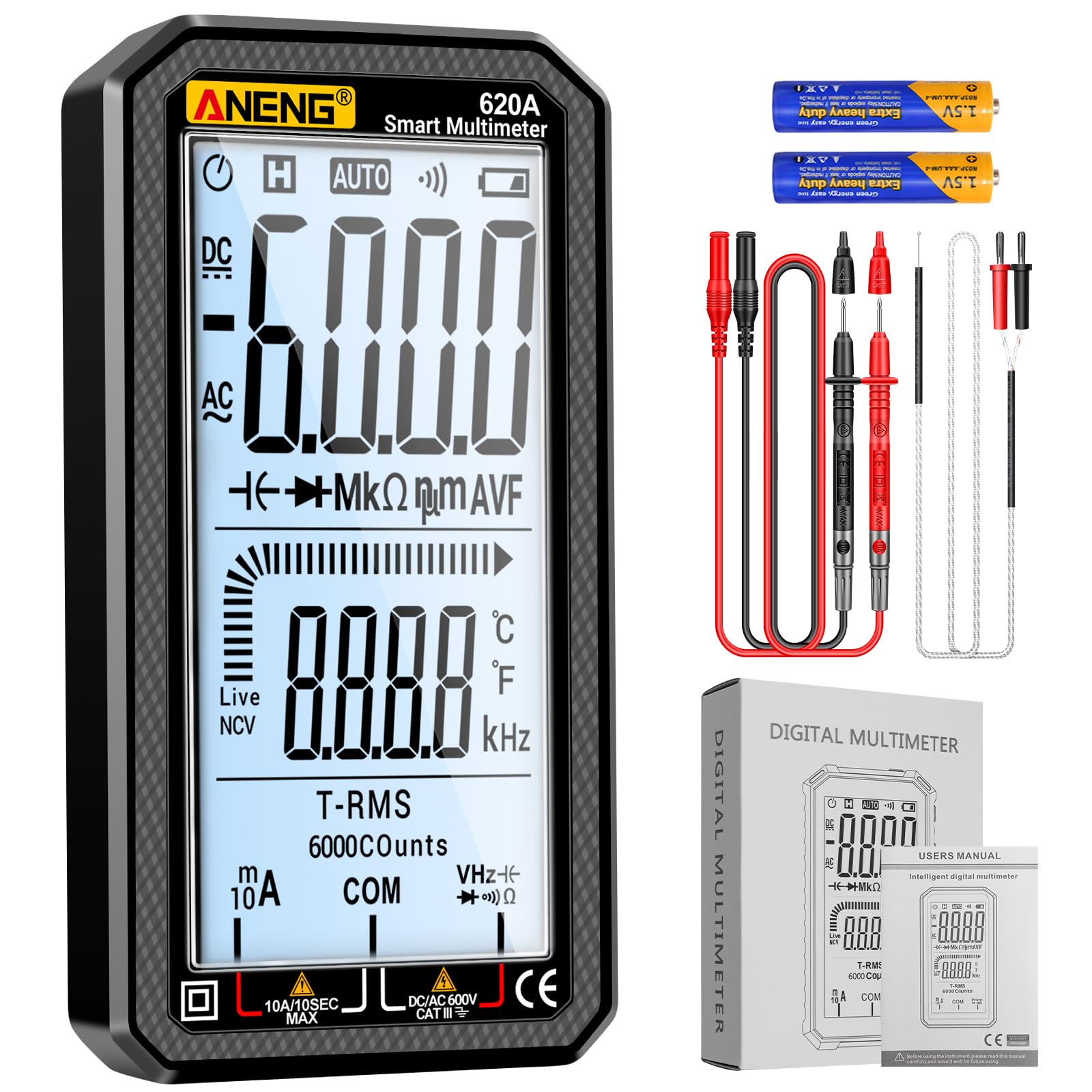
Figure 4.1: ANENG 620A Digital Multimeter

Figure 4.2: Key Features and Display Elements
Display Features:
- 6000-Count True-RMS: Provides accurate readings for non-sinusoidal waveforms.
- Large LCD Screen: Displays measurements, temperature, analog bars, and electrical units.
- Auto-Shutoff: Conserves battery life by automatically turning off after 15 minutes of inactivity.
- Low-Battery Alerts: Indicates when batteries need replacement.

Figure 4.3: ANENG 620A Digital Multimeter Dimensions
5. Setup
Battery Installation:
- Ensure the multimeter is powered off.
- Carefully pry off the protective rubber cover from the back of the multimeter.
- Locate the battery compartment.
- Insert the two 1.5V AAA batteries, observing correct polarity (+/-).
- Replace the battery compartment cover and re-attach the rubber protective cover securely.
6. Operating Instructions
The ANENG 620A features an auto-scan mode for simplified operation, automatically identifying the measurement type. For specific functions, manual selection may be required.
General Operation:
- Turn on the multimeter using the power button.
- Connect the test leads to the appropriate input jacks (COM and VΩmA for most measurements, 10A for high current).
- The multimeter will typically enter auto-scan mode, attempting to detect the measurement type.
- For specific functions, use the 'SEL' button to cycle through modes if auto-scan does not select the desired measurement.
- Apply the test leads to the circuit or component to be measured.
- Read the measurement on the LCD screen.

Figure 6.1: Connecting Test Leads for Measurement
Specific Measurement Functions:
- AC/DC Voltage: Connect test leads in parallel to the circuit.
- AC/DC Current: Connect test leads in series with the circuit. Ensure the correct input jack (mA or 10A) is used.
- Resistance: Connect test leads across the component when the circuit is de-energized.
- Capacitance: Connect test leads across the capacitor. Ensure the capacitor is discharged before testing.
- Frequency: Connect test leads to the signal source.
- Temperature: Connect the thermocouple to the designated input ports.
- Diode Test: Connect test leads across the diode to check forward voltage drop.
- Continuity: Connect test leads across the circuit or component. A buzzer will sound for continuity.
- Non-Contact Voltage (NCV): Hold the top of the multimeter near an AC voltage source. The device will indicate voltage presence with sound and light.
- Live Wire Detection: Use the designated 'Live' function to identify live wires.

Figure 6.2: Non-Contact Voltage (NCV) Detection

Figure 6.3: Temperature Measurement with Thermocouple
Instructional Videos:
Video 6.1: Digital Multimeter Voltmeter Smart Electrical Tester. This video demonstrates the general functions and smart features of the multimeter.
Video 6.2: Digital Multimeter 6000 Counts Auto Ranging. This video provides an overview of the 6000-count auto-ranging capabilities.
7. Maintenance
- Cleaning: Wipe the multimeter with a dry, soft cloth. Do not use abrasive cleaners or solvents.
- Battery Replacement: Replace batteries when the low-battery indicator appears on the display. Refer to Section 5 for battery installation.
- Storage: If the multimeter will not be used for an extended period, remove the batteries to prevent leakage. Store in a cool, dry place away from direct sunlight.
- Test Leads: Inspect test leads for any damage (cracks, frayed insulation) before each use. Replace damaged leads immediately.
8. Troubleshooting
| Problem | Possible Cause | Solution |
|---|---|---|
| Multimeter does not power on. | Dead or incorrectly installed batteries. | Check battery polarity or replace batteries. |
| Inaccurate readings. | Low battery, incorrect function/range, damaged test leads. | Replace batteries, select correct function, inspect/replace test leads. |
| Multimeter automatically shuts off. | Auto-shutoff feature activated. | This is normal behavior after 15 minutes of inactivity to conserve power. Press any button to reactivate. |
| Screen has adhesive residue after removing protective film. | Residue from screen protector. | Gently clean the screen with a soft, lint-free cloth and a small amount of isopropyl alcohol. Avoid harsh chemicals. |
9. Specifications
| Feature | Specification |
|---|---|
| Brand | ANENG |
| Model | 620A |
| Display | 6000 Counts, True-RMS LCD |
| Measurement Type | Multimeter (AC/DC Voltage, AC/DC Current, Resistance, Capacitance, Frequency, Temperature) |
| Special Functions | Diode Test, Continuity, NCV, Live Wire Detection, Auto-Scan Mode |
| Power Source | 2 x 1.5V AAA Batteries |
| Item Weight | 100 g |
| Item Dimensions | 3.94 x 1.97 x 1.97 inches |
| Safety Rating | 600V, CE, RoHS |
10. Warranty and Support
ANENG is committed to customer satisfaction. If you encounter any issues with your ANENG 620A Digital Multimeter that cannot be resolved through this manual or standard customer support channels, please contact the ANENG seller team directly. We are dedicated to assisting you and ensuring your complete satisfaction.


