
1. Product Overview
This manual provides detailed instructions for the installation, operation, and maintenance of your CHENJE 9-inch Android Car Stereo Head Unit. This unit is designed for specific integration with Volkswagen Multivan T5 models manufactured between 2003 and 2015, offering advanced features such as Android 15 operating system, Bluetooth connectivity, GPS navigation, and multimedia capabilities.

Figure 1.1: Front view of the CHENJE 9-inch Android Car Stereo Head Unit, displaying its touch screen interface with various application icons and widgets.

Figure 1.2: Diagram highlighting the main features of the head unit, including FM radio, HD 1280*720 resolution, capacitive screen, GPS, Bluetooth, steering wheel control, 2 USB ports, built-in WiFi, HD video player, and optional DVR/reversing camera support.
2. Setup and Installation
Proper installation is crucial for optimal performance and safety. It is recommended that installation be performed by a qualified professional. Ensure the vehicle's power is disconnected before beginning installation.
2.1 Package Contents
- 1 x Android host screen and frame
- 1 x Power cord adapter
- 1 x GPS Antenna
- 1 x Camera Input cable
- 1 x 4G Antenna (for 8 Core Series only)
- 1 x RCA Input and Output cable
- 1 x Reversing Camera (gift)
- 2 x USB Cables
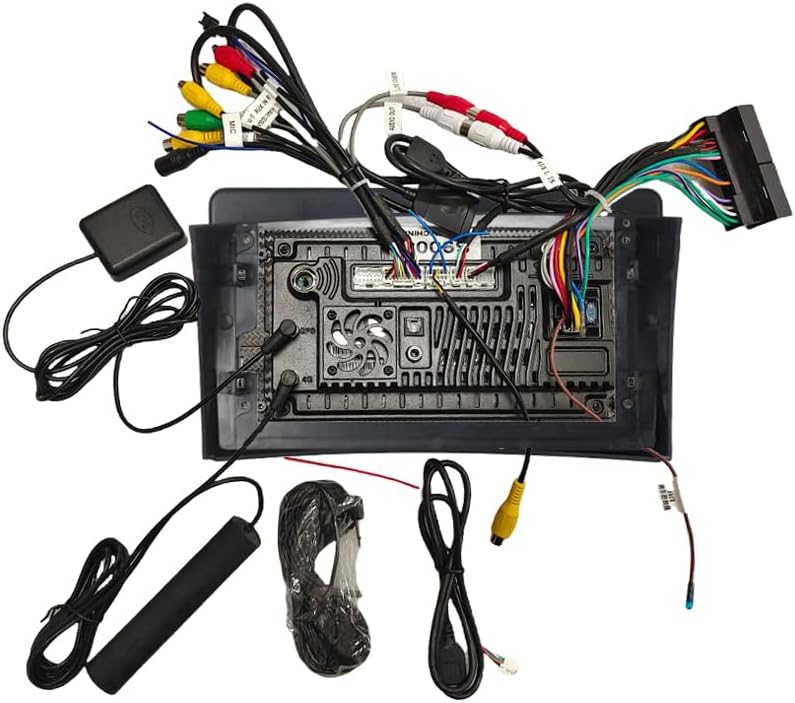
Figure 2.1: View of the main unit's rear panel showing various ports and the included wiring harness, GPS antenna, USB cables, and camera input cable.
2.2 Installation Steps
- Carefully remove the original car radio unit from the dashboard.
- Connect the provided power cord adapter to the vehicle's wiring harness and the head unit.
- Connect the GPS antenna to the designated port on the head unit and position it for optimal signal reception.
- If installing a reversing camera, connect its video input cable to the 'Camera Input' port on the head unit.
- Connect any additional accessories such as USB devices or external amplifiers using the appropriate RCA and USB cables.
- Carefully slide the new head unit into the dashboard opening, ensuring all cables are clear and not pinched.
- Secure the head unit in place using the vehicle's mounting brackets.
- Reconnect the vehicle's power and test all functions before fully reassembling the dashboard.

Figure 2.2: A visual comparison showing the dashboard of a Volkswagen Multivan T5 before and after the installation of the 9-inch Android Car Stereo Head Unit, demonstrating the integrated fit.
3. Operating Instructions
3.1 User Interface (UI)
The head unit operates on Android 15.0, providing a user-friendly interface. It features a 9-inch HD touch screen with customizable themes. Navigate by tapping icons, swiping, and using gestures similar to a smartphone.
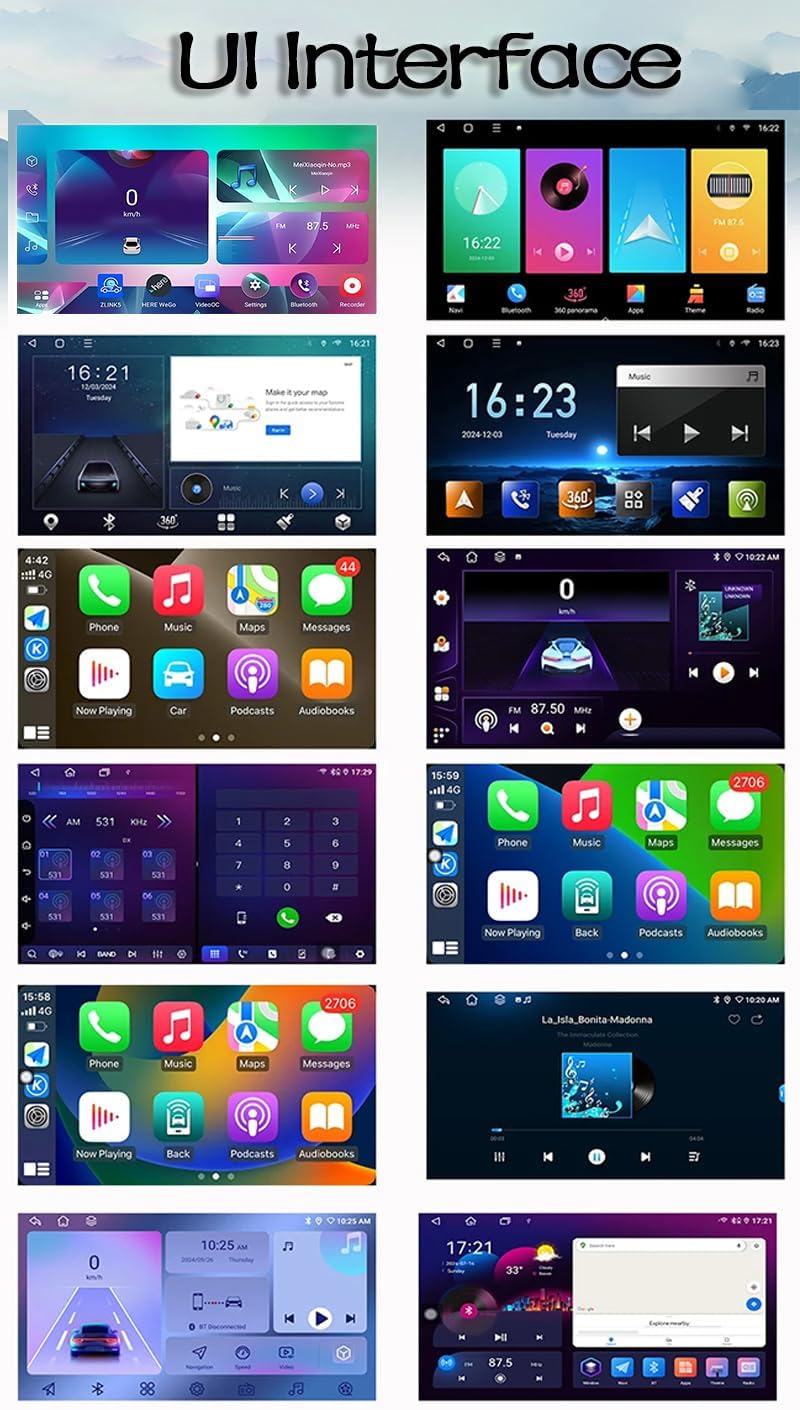
Figure 3.1: Examples of different user interface layouts and application screens available on the Android car stereo, showcasing various themes and functionalities like navigation, music, and phone calls.
3.2 Wireless CarPlay and Android Auto
The 8 Core Series models support wireless Apple CarPlay and Android Auto. Connect your smartphone via Bluetooth and WiFi to access compatible apps, navigation, calls, and messages directly on the head unit's screen.

Figure 3.2: Visual representation of how Apple CarPlay, Android Auto, and MirrorLink function wirelessly via Bluetooth and WiFi, or wired via USB for MirrorLink.
3.3 GPS Navigation and WiFi Connectivity
The unit includes built-in GPS for online and offline navigation. Support for 3D maps and voice guidance is provided. The integrated WiFi module allows you to connect to a hotspot, download navigation apps, and access online content.
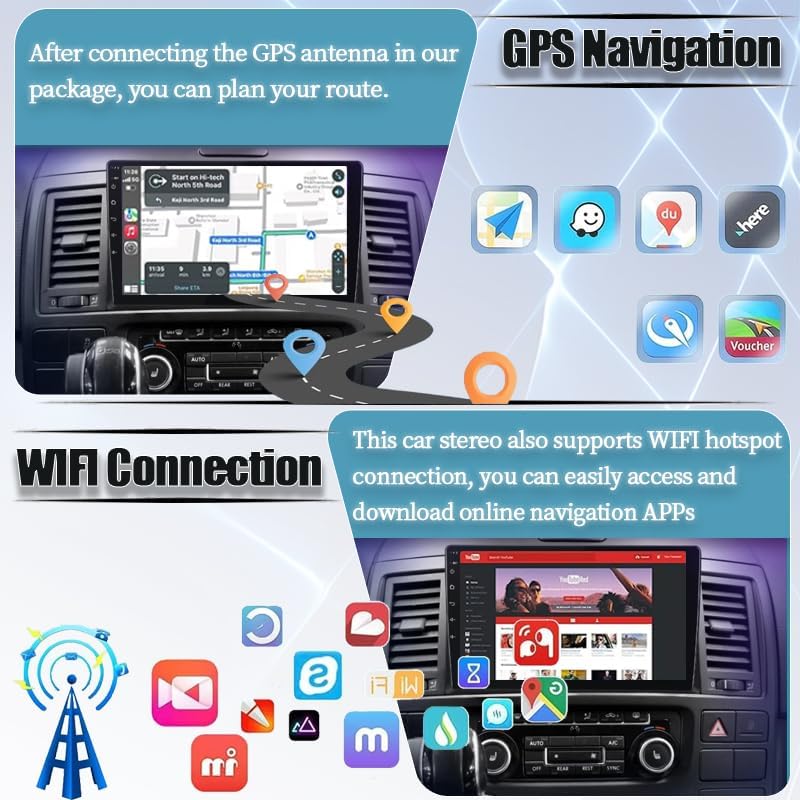
Figure 3.3: Illustrations showing the GPS navigation interface with route planning and various navigation app icons, alongside a depiction of WiFi hotspot connection for downloading online applications.
3.4 Bluetooth and FM/RDS Radio
Utilize Bluetooth for hands-free calling and audio streaming from your mobile device. The built-in FM tuner (with RDS for 8 Core Series) allows you to listen to your favorite radio stations.
3.5 AHD Reversing Camera and Steering Wheel Controls
The unit supports an AHD reversing camera, which automatically displays the rear view when the vehicle is in reverse, assisting in eliminating blind spots. Steering wheel controls can be configured to manage various functions of the head unit, such as volume, track skipping, and mode selection.
3.6 Split Screen Functionality
Certain models support split-screen mode, allowing you to run two applications simultaneously on the display, such as navigation and music playback.

Figure 3.4: Visual examples of the Bluetooth interface for music playback, the view from an AHD backup camera, the menu for configuring steering wheel controls, and the display in split-screen mode showing two applications concurrently.
4. Maintenance
To ensure the longevity and optimal performance of your head unit, follow these maintenance guidelines:
- Cleaning: Use a soft, dry cloth to clean the screen and exterior. For stubborn smudges, slightly dampen the cloth with water. Avoid abrasive cleaners or solvents.
- Software Updates: Periodically check for software updates through the unit's settings menu or the manufacturer's website to ensure you have the latest features and bug fixes.
- Environmental Conditions: Avoid exposing the unit to extreme temperatures, direct sunlight for prolonged periods, or excessive moisture.
5. Troubleshooting
If you encounter issues with your head unit, refer to the following common problems and solutions:
| Problem | Possible Cause | Solution |
|---|---|---|
| Unit does not power on. | Loose power connection, blown fuse, vehicle battery issue. | Check all power connections. Inspect vehicle fuses. Verify vehicle battery charge. |
| No sound from speakers. | Volume too low, mute activated, incorrect wiring, speaker issues. | Increase volume. Check if mute is active. Verify speaker wiring connections. Test speakers. |
| GPS signal lost or inaccurate. | GPS antenna obstructed or improperly placed, weak signal area. | Ensure GPS antenna has a clear view of the sky. Reposition antenna if necessary. |
| Bluetooth connection issues. | Device not in pairing mode, interference, incorrect pairing process. | Ensure Bluetooth is enabled on both devices and in pairing mode. Delete previous pairings and re-pair. |
| Touch screen unresponsive. | Temporary software glitch, screen damage. | Restart the unit. If issue persists, contact support. |
If the problem persists after attempting these solutions, please contact customer support for further assistance.
6. Specifications
Detailed technical specifications for the CHENJE 9" Android Car Stereo Head Unit:
| Feature | Specification |
|---|---|
| Operating System | Android 15.0 |
| CPU (8 Core Series) | 8 Core |
| CPU (4 Core Series) | 4 Core |
| RAM/ROM (Current Model) | 6GB RAM + 128GB ROM |
| Display Size | 9 inches |
| Resolution (8 Core Series) | 2000 x 1200P |
| Resolution (4 Core Series) | 1280 x 720P |
| Internet Connectivity (8 Core Series) | 4G + WiFi |
| Internet Connectivity (4 Core Series) | WiFi |
| CarPlay / Android Auto (8 Core Series) | Wireless CarPlay + Android Auto |
| Android Auto (4 Core Series) | Supports Android Auto |
| Radio Tuner (8 Core Series) | FM / AM / RDS |
| Radio Tuner (4 Core Series) | FM / RDS |
| Product Dimensions | 15 x 30 x 50 cm |
| Item Weight | 3 kg |
| Model Number | CHENJE-952848-04 |

Figure 6.1: A detailed comparison table outlining specifications for various models (T9, T8, T7, T6, T5, T4, T3), including UI, Internet, System, CPU, AMP IC, RAM/ROM, CarPlay/Android Auto support, RDS/DSP, EQ, Resolution, Split Screen, AI voice, and AV output.
7. Warranty and Support
CHENJE provides best-in-class after-sales service and support for its products. Our knowledgeable support team is available to assist you via email for any inquiries or technical issues.
7.1 Important Notes
- GPS Function: Location data is used solely for real-time navigation and is not stored or shared. Manual authorization of location permission is required upon first use (disabled by default).
- Third-party Applications: Pre-installed applications have undergone GDPR compliance certification.
- Contact Us: Submitting a consultation implies agreement to the "Privacy Policy" for processing your contact information (retained for ≤ 90 days).
- Bluetooth Synchronization: Automatic synchronization is turned off by default.


