
Introduction
The LiNKFOR CX400 is a 4-channel stereo audio mixer designed for blending multiple audio sources into a single stereo output. This active mixer supports RCA input and output, making it suitable for various audio devices such as instruments, CD players, tape players, computers, mobile phones, and tablets. It features independent volume controls for each input channel and a master volume control for the overall output. The device is housed in a durable metal shell and is engineered to maintain signal strength without degradation.
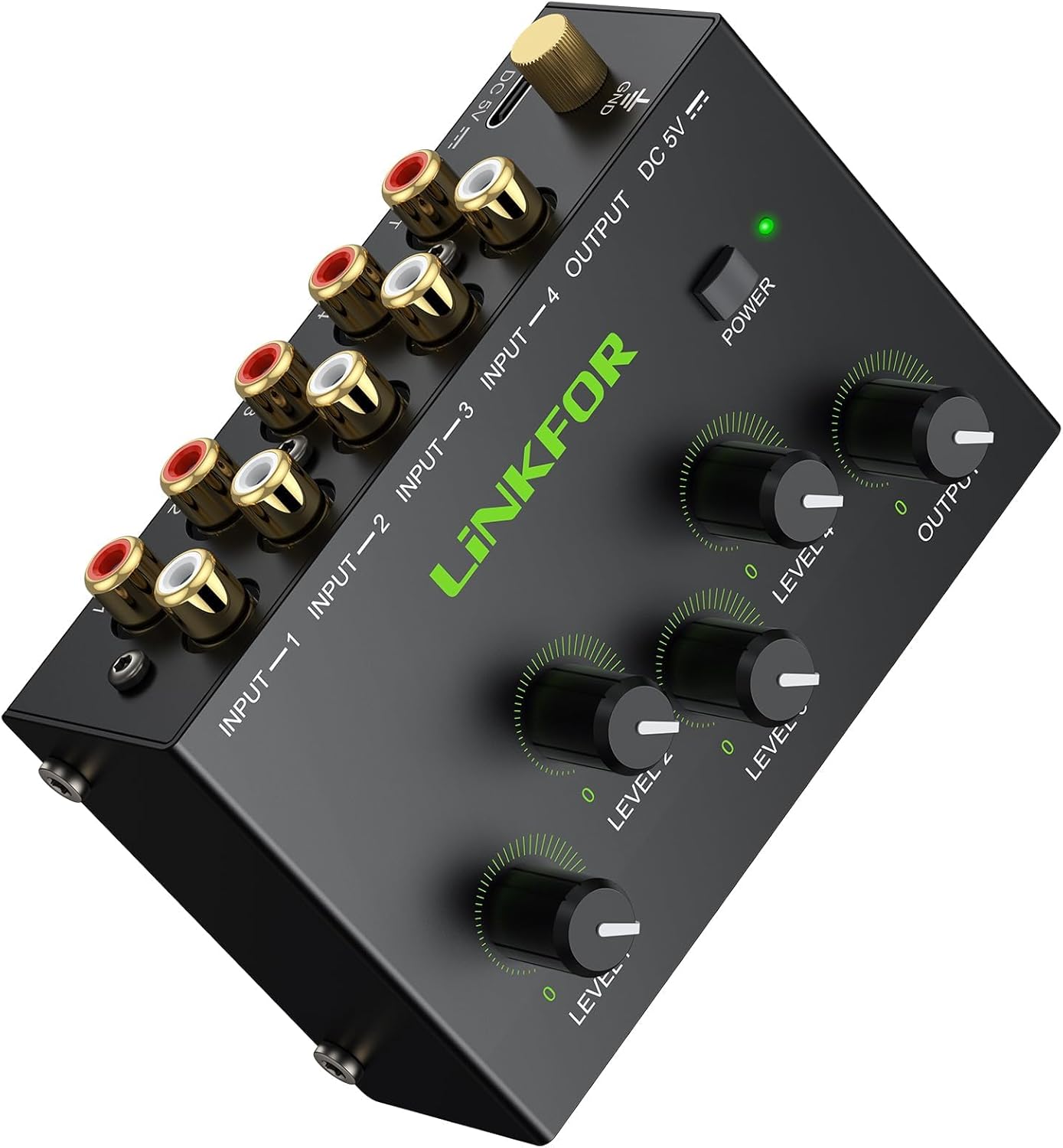
Figure 1: LiNKFOR CX400 4 Channel Stereo Audio Mixer, front view.
Product Features
- 4 Channel Audio Mixing: Effortlessly blend up to four stereo RCA audio sources (e.g., computers, tablets, players, synthesizers) into one stereo RCA output. Active amplification ensures optimal signal strength.
- Gold-Plated Studio Connections: Features 10 premium gold-plated RCA jacks for all inputs and outputs, providing superior oxidation resistance and lasting durability. These connections minimize signal loss and preserve audio purity.
- Master + 4 Independent Volume Controls: Each of the four input channels has a dedicated 100k ohmic potentiometer for precise level balancing. A separate master volume control allows for smooth overall output adjustment, ideal for professional fades and amplifier matching.
- Silent Pro Performance: Equipped with a high-quality active amplification circuit to prevent signal degradation and deliver robust output. Certified noise-free power supply and advanced circuitry ensure pure, uncolored sound without hum or interference.
- Professional Durability & Total Control: Constructed with a rugged metal casing for long-term reliability. The comprehensive volume controls make it suitable for home theaters, project studios, DJ setups, and multi-instrument configurations. Universally compatible with all RCA line-level audio equipment.
Setup
Follow these steps to set up your LiNKFOR CX400 audio mixer:
- Unpack the Mixer: Carefully remove the CX400 mixer and any included accessories from its packaging.
- Placement: Place the mixer on a stable, flat surface near your audio sources and output device. Ensure adequate ventilation around the unit.
- Connect Audio Sources: Connect your audio input devices (e.g., CD player, computer, tablet) to the RCA input jacks labeled IN 1 through IN 4 on the mixer. Each input consists of a red (right channel) and white (left channel) RCA jack.

Figure 2: Connection diagram for the LiNKFOR CX400 mixer. Note: This image is a small diagram; refer to the physical unit for detailed port identification.
- Connect Audio Output: Connect the mixer's OUTPUT RCA jacks (red for right, white for left) to your audio output device, such as an amplifier, powered speakers, or recording interface.
- Power Connection: The CX400 is an active mixer and requires power. Connect the appropriate power adapter (not specified in product description, assume standard DC adapter if not passive) to the mixer's power input.

Figure 3: Close-up view of the RCA input/output ports on the LiNKFOR CX400. Note: This image is a small diagram; refer to the physical unit for detailed port identification.
Operating Instructions
Once the mixer is set up, follow these steps to operate it:
- Power On: Ensure all connections are secure, then power on the mixer and your connected audio devices.
- Adjust Input Volumes: For each active audio source, use the corresponding IN 1 to IN 4 volume knobs to set the individual input levels. Start with the knobs at a low setting and gradually increase them to avoid sudden loud sounds.

Figure 4: Top view of the LiNKFOR CX400 showing input and master volume controls. Note: This image is a small diagram; refer to the physical unit for detailed control identification.
- Adjust Master Volume: Use the OUTPUT volume knob to control the overall output level of the mixed audio. Adjust this to a comfortable listening level on your output device.
- Mixing: Balance the individual input volumes (IN 1-4) and the master output volume to achieve your desired audio mix.
For a visual guide on connecting and operating the mixer, please watch the official product video:
Video 1: Official LiNKFOR CX400 4 Channel Stereo Audio Mixer overview and connection guide. This video demonstrates the product's features and basic setup.
Maintenance
To ensure the longevity and optimal performance of your LiNKFOR CX400 mixer, follow these maintenance guidelines:
- Cleaning: Use a soft, dry cloth to clean the exterior of the mixer. Avoid using liquid cleaners, solvents, or abrasive materials, as these can damage the finish or internal components.
- Storage: When not in use for extended periods, store the mixer in a cool, dry place away from direct sunlight, extreme temperatures, and high humidity.
- Handling: Handle the mixer with care. Avoid dropping it or subjecting it to strong impacts, which can damage the internal circuitry or external casing.
- Ventilation: Ensure that the mixer has adequate airflow around it to prevent overheating, especially during prolonged operation.
Troubleshooting
If you encounter issues with your LiNKFOR CX400 mixer, refer to the following troubleshooting tips:
| Problem | Possible Cause | Solution |
|---|---|---|
| No sound output |
|
|
| Distorted or noisy sound |
|
|
| Only one channel (left/right) has sound |
|
|
Specifications
The following are the technical specifications for the LiNKFOR CX400 4 Channel Stereo Audio Mixer:
- Input Impedance: 10K ohms to 47K ohms
- Output Impedance: 2.5K ohms to 10K ohms
- Gain: -12dB MAX
- Number of Channels: 4 Stereo Channels
- Connectivity Technology: Auxiliary (RCA)
- Power Source: Corded Electric
- Output Connector Type: RCA
- Audio Input: RCA
- Product Dimensions (D x W x H): 1.5" x 2.05" x 1.5" (approximately 38mm x 52mm x 38mm)
- Item Weight: 0.44 kg (0.97 lbs)
- Model Number: Active Audio Mixer - 4 Channel (XUNULK096eu)

Figure 5: Diagram illustrating the dimensions of the LiNKFOR CX400 mixer. Note: This image is a small diagram; refer to the specifications list for precise measurements.
Warranty
The LiNKFOR CX400 4 Channel Stereo Audio Mixer comes with an 18-month warranty. Please retain your proof of purchase for warranty claims. For specific terms and conditions, refer to the warranty information provided with your product packaging or contact customer support.
Support
For further assistance, technical support, or inquiries regarding your LiNKFOR CX400 mixer, please contact LiNKFOR customer service. You can often find support contact information on the official LiNKFOR website or through the retailer where you purchased the product.
You may also visit the official LiNKFOR store on Amazon for product information and updates: LiNKFOR Amazon Store