1. Introduction
Thank you for purchasing the BANDAI Kamen Rider Zeztz DX Zeztz Driver. This electronic role-play toy allows users to experience the transformation and attack sequences of Kamen Rider Zeztz through interactive light and sound features. Please read this manual thoroughly before use to ensure proper operation and to maximize your enjoyment of the product.
2. Safety Information
- Age Recommendation: This product is recommended for ages 15 to 20 years. It contains small parts that may pose a choking hazard for younger children.
- Battery Safety: Always follow battery safety guidelines. Do not mix old and new batteries, or different types of batteries. Insert batteries with correct polarity. Remove batteries if the product is not used for an extended period.
- Choking Hazard: Keep small parts, such as the Rider Capsules, away from young children.
- Eye Safety: Do not stare directly into the lights when activated, as they can be bright.
- Disposal: Dispose of batteries and electronic components according to local regulations.
3. Package Contents
Verify that all items are present in your package:
- DX Zeztz Driver Unit (Main belt unit)
- Impact Capsule (1 included)

Figure 3.1: Product packaging displaying the DX Zeztz Driver and included Impact Capsule.
4. Setup
4.1 Battery Installation
The DX Zeztz Driver requires batteries (not included). Locate the battery compartment on the back of the driver unit. Use a small Phillips head screwdriver to open the compartment. Insert the required batteries, ensuring correct polarity (+/-). Close the compartment and secure it with the screw.
4.2 Wearing the Driver
Attach the belt straps to the main driver unit. Adjust the belt to fit comfortably around your waist. Note that the belt has a limited extension, which may be more suitable for certain body types.

Figure 4.1: The DX Zeztz Driver in use, showing its illuminated state.
5. Operating Instructions
The DX Zeztz Driver features various light and sound effects activated by inserting Rider Capsules and manipulating the lever.
5.1 Basic Transformation (with Impact Capsule)
- Insert Impact Capsule: Place the included Impact Capsule into the designated slot on the Zeztz Driver. The lever will extend, and a standby sound with LED illumination will activate.
- Press the Lever: Press the lever once. The standby sound will change, and the LEDs will illuminate further, signaling the transformation.
- Rotate the Capsule: Rotate the Impact Capsule to trigger the transformation sound and super-bright LED effects. The graphic inside the capsule will appear to move.
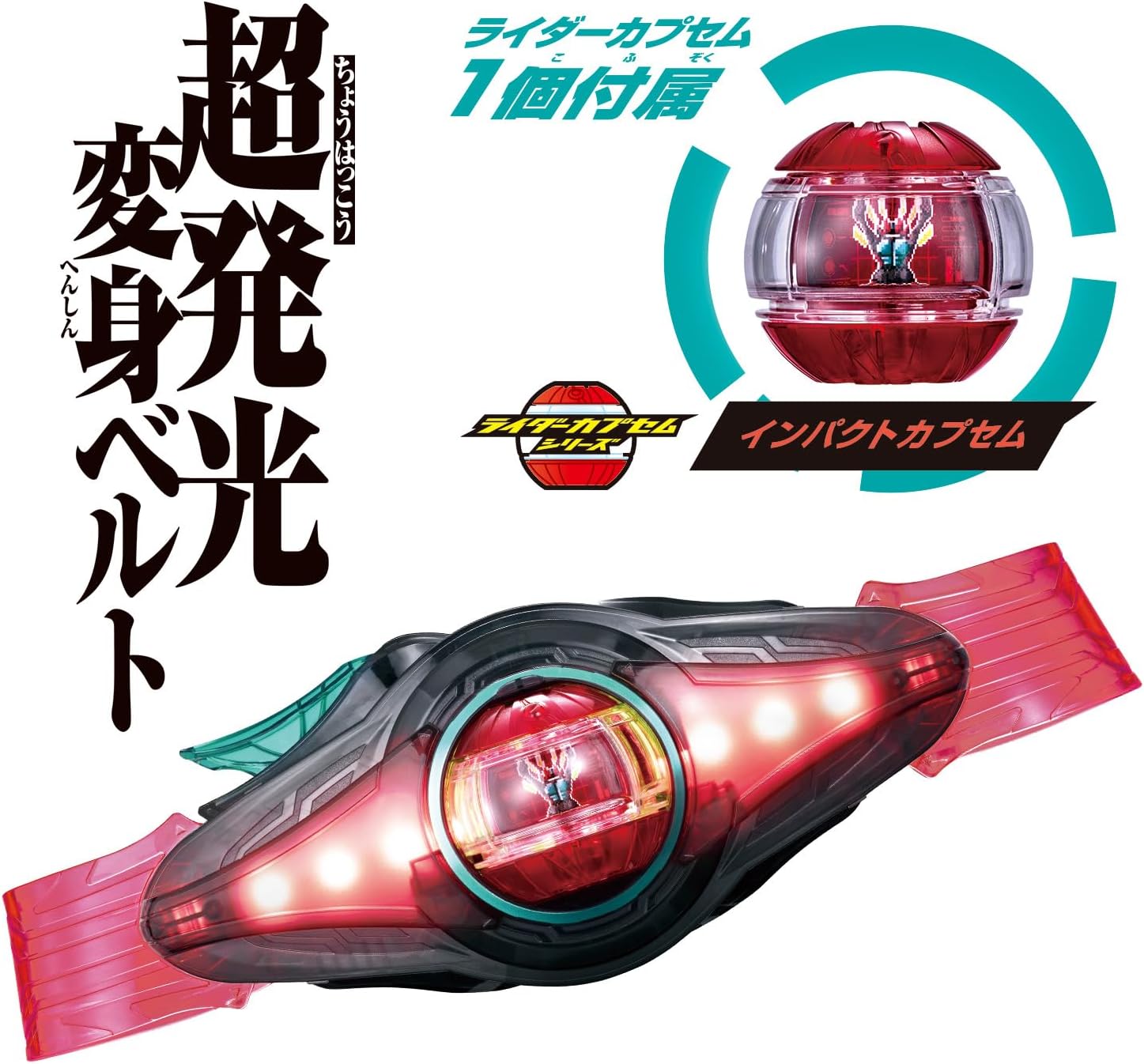
Figure 5.1: Step-by-step guide for activating the basic transformation with the Impact Capsule.
5.2 Activating Ability Techniques
After transformation, rotate the Rider Capsule to activate various ability techniques. Each rotation will trigger a unique sound effect.

Figure 5.2: Activating ability techniques by rotating the Rider Capsule.
5.3 Activating Finishing Moves
To activate finishing moves, press the lever multiple times after transformation:
- Finishing Move (Impact Vanish): Press the lever 3 times to activate the finishing move sound.
- Super Finishing Move (Impact Over Vanish): Press the lever 4 or more times to activate the super finishing move sound.

Figure 5.3: Activating finishing moves by pressing the lever multiple times.
5.4 Form Change (with Stream Capsule)
The DX Zeztz Driver supports different Rider Capsules for various form changes. For example, with a separately sold Stream Capsule:
- Insert Stream Capsule: Insert the Stream Capsule into the driver.
- Press the Lever: Press the lever.
- Rotate the Capsule: Rotate the Stream Capsule to trigger the transformation sound for the Techno Stream form.

Figure 5.4: Form change using a separately sold Stream Capsule.
6. Maintenance
- Cleaning: Wipe the driver unit and capsules with a dry, soft cloth. Do not use abrasive cleaners or solvents.
- Storage: Store the product in a cool, dry place away from direct sunlight and extreme temperatures.
- Battery Removal: If the product will not be used for an extended period, remove the batteries to prevent leakage.
7. Troubleshooting
| Problem | Possible Cause | Solution |
|---|---|---|
| No sound or lights | Batteries are dead or incorrectly installed. | Replace batteries with new ones, ensuring correct polarity. |
| Capsule not recognized | Capsule not fully inserted or dirty contacts. | Ensure the capsule is fully inserted. Clean the capsule and driver contacts with a dry cloth. |
| Sound is distorted or too low | Low battery power. | Replace batteries. |
8. Specifications
- Model Number: 4582769795664
- Product Dimensions: 1 x 1 x 1 inches
- Item Weight: 1.41 Pounds
- Manufacturer Recommended Age: 15 - 20 years
- Manufacturer: Bandai
- ASIN: B0FHPJDXB4
9. Warranty and Support
This product is covered by the standard manufacturer's warranty. For warranty claims, technical support, or inquiries regarding product operation, please contact BANDAI customer service. Refer to the packaging or the official BANDAI website for contact information specific to your region.