
Introduction
Thank you for choosing the Glownary Commercial Glass Door Display Refrigerator, Model GDC-69-HC. This 78.25-inch black merchandiser with three glass doors and LED lighting is designed to efficiently display and maintain the freshness of your beverages and pre-packaged foods. This manual provides essential information for the safe installation, operation, and maintenance of your new refrigerator. Please read it thoroughly before use and retain it for future reference.
Safety Information
Always follow basic safety precautions when using this appliance to reduce the risk of fire, electric shock, or injury. This unit operates on 115 Volts. Ensure the power outlet is properly grounded and rated for the appliance's electrical requirements. Do not operate the unit with a damaged power cord or plug. Keep ventilation openings clear of obstructions. Refer all servicing to qualified personnel.
Setup
1. Unpacking
- Carefully remove all packaging materials, including tape and protective film.
- Inspect the refrigerator for any shipping damage. Report any damage immediately to the carrier and supplier.
- Retain packaging materials for potential future shipping or returns.
2. Placement
- Place the unit on a strong, level surface capable of supporting its weight (approximately 480 pounds when empty, more when loaded).
- Ensure adequate air circulation around the unit. Maintain a minimum of 6 inches of clearance from walls or other obstructions on all sides and the top.
- Avoid direct sunlight, heat sources, or areas with high humidity.
3. Electrical Connection
- Before plugging in, allow the unit to stand upright for at least 2 hours to allow compressor oils to settle.
- Connect the refrigerator to a dedicated 115V, 60Hz, 15A grounded electrical outlet. Do not use extension cords or adapter plugs.
4. Shelf Installation
The unit comes with 8 adjustable plastic-coated steel shelves. Install them according to your display needs. Each shelf can support up to 88 lbs.
- Locate the shelf clips inside the cabinet.
- Insert the clips into the desired shelf support slots at equal heights for a level shelf.
- Place the shelves onto the installed clips.
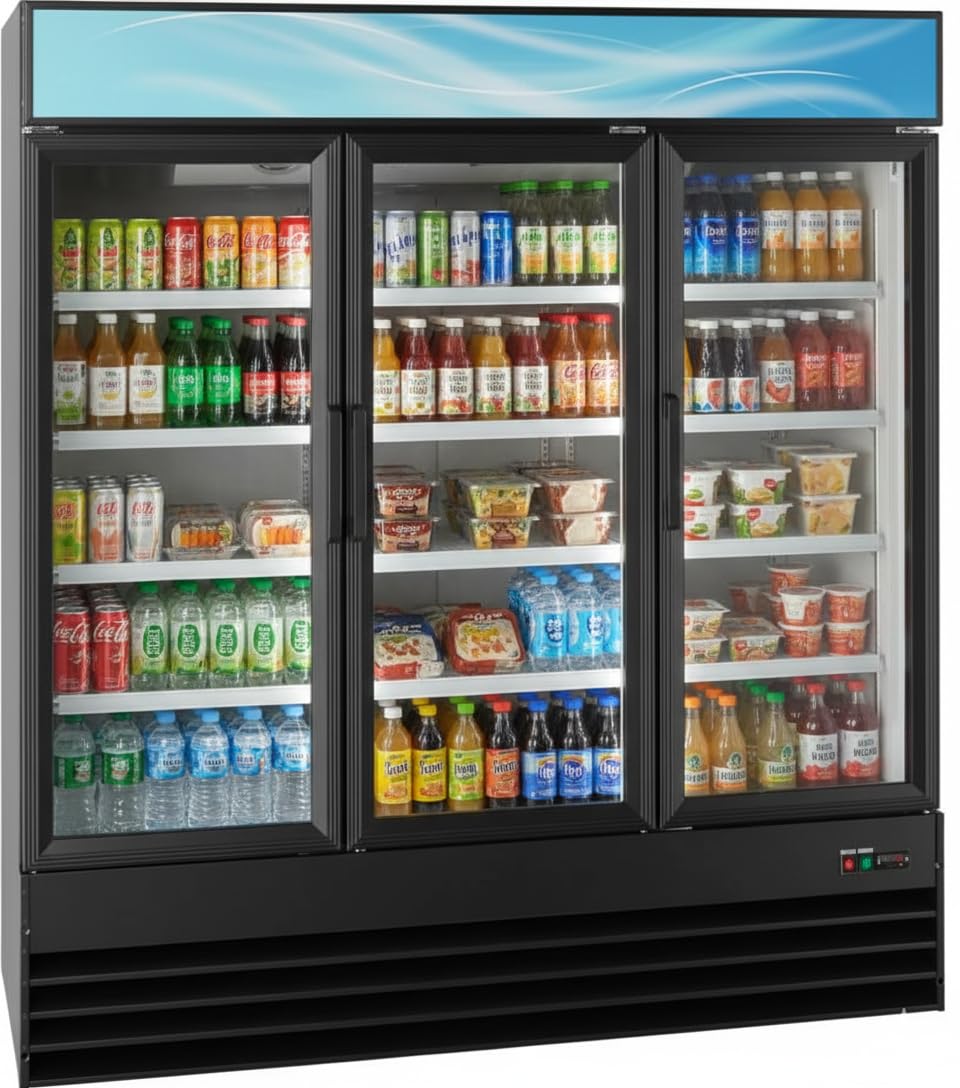
Image: Glownary Commercial Glass Door Display Refrigerator, Model GDC-69-HC, showcasing its three glass doors and adjustable shelves filled with various beverages. The unit features a black exterior and LED lighting.
5. Initial Cleaning
Before loading products, clean the interior and exterior of the refrigerator with a mild detergent and warm water. Rinse thoroughly and dry with a soft cloth.
Operating Instructions
1. Powering On/Off
- To power on, ensure the unit is plugged in and the main power switch (usually located near the compressor compartment) is in the 'ON' position.
- To power off, switch the main power switch to 'OFF' and unplug the unit from the electrical outlet.
2. Temperature Control
The unit features a user-friendly control panel with a digital display. The recommended operating temperature range is 33-40°F (0.5-4.4°C).
- Press the 'SET' button to view the current set temperature.
- Press 'SET' again, then use the 'UP' or 'DOWN' arrows to adjust the desired temperature.
- Press 'SET' once more to confirm the new setting.
3. LED Lighting
The interior LED lighting enhances product visibility. A separate lighting switch is provided, typically located on the control panel or near the top of the cabinet. Toggle the switch to turn the lights on or off as needed.
4. Loading Product
- Load products evenly on the shelves, ensuring not to block the internal air vents.
- The raised bottom shelf design facilitates easier loading and access to items.
- Avoid overloading shelves beyond the 88 lb capacity.
5. Door Operation
The three dual-pane tempered glass doors are equipped with self-closing magnetic gaskets to maintain temperature consistency. Ensure doors close completely after each use to prevent cold air loss.
Maintenance
1. Regular Cleaning
- Interior: Clean regularly with a mild, non-abrasive detergent and warm water. Rinse and dry thoroughly. Remove shelves for easier cleaning.
- Exterior: Wipe down the black steel exterior with a soft cloth and mild cleaner. Avoid abrasive cleaners that can scratch the finish.
- Glass Doors: Use a glass cleaner specifically designed for glass surfaces to maintain clarity and prevent streaks. The anti-fogging feature helps keep visibility optimal.
2. Condenser Coil Cleaning
The condenser coils, located in the bottom-mounted compressor compartment, should be cleaned every 1-3 months, depending on the operating environment. Dirty coils reduce efficiency and can lead to compressor failure.
- Disconnect Power: Always unplug the unit before cleaning.
- Access Coils: Remove the front grille panel to access the condenser coils.
- Clean: Use a stiff brush or vacuum cleaner with a brush attachment to remove dust and debris from the coils.
- Reassemble: Replace the grille panel and reconnect power.
3. Gasket Inspection
Regularly inspect the magnetic door gaskets for cracks, tears, or signs of wear. Damaged gaskets compromise temperature retention and increase energy consumption. Replace worn gaskets promptly.
4. Automatic Defrost System
This unit features an automatic defrost system. While manual defrosting is not typically required, ensure that the drain pan is clear and free of obstructions to allow proper water evaporation.
Troubleshooting
| Problem | Possible Cause | Solution |
|---|---|---|
| Refrigerator not cooling | Power supply issue; thermostat set too high; condenser coils dirty; door left open. | Check power connection and circuit breaker; adjust thermostat; clean condenser coils; ensure doors are closed. |
| Excessive noise | Unit not level; fan obstruction; loose components. | Level the unit; check for obstructions around fan blades; tighten any loose parts. |
| LED lights not working | Light switch off; bulb failure; electrical issue. | Check light switch; contact service for bulb replacement or electrical inspection. |
| Water on floor | Clogged drain line; drain pan overflow. | Clear drain line; ensure drain pan is correctly positioned and not overflowing. |
Specifications
| Feature | Detail |
|---|---|
| Model | GDC-69-HC |
| Brand | Glownary |
| Dimensions (D x W x H) | 32" x 53" x 83" (approx. 32 x 53 x 83 inches) |
| Item Weight | 480 pounds |
| Capacity | 49 Cubic Feet |
| Temperature Range | 33-40°F (0.5-4.4°C) |
| Compressor | 4/5 hp, Bottom-mounted |
| Voltage | 115 Volts |
| Refrigerant | R-290 |
| Number of Doors | 3 |
| Door Type | Dual-pane tempered glass, self-closing |
| Shelves | 8 adjustable plastic-coated steel shelves (88 lb capacity each) |
| Defrost System | Automatic |
| Special Features | LED Lighting, Customizable Top Panel |
| Certification | ETL, ETL US |
Warranty and Support
For warranty information, technical support, or service inquiries, please contact Glownary customer support. Refer to your purchase documentation for specific warranty terms and conditions. The seller offers 30-day easy returns and customer support for assistance.
You can visit the Glownary Store for more information or to contact support.