
1. Introduction and Overview
The Brataste Wireless Weather Station (Model 3378) is a comprehensive device designed to provide accurate and real-time weather information for your home. It features a vibrant color display, remote sensing capabilities, and essential timekeeping functions. This manual will guide you through the setup, operation, and maintenance of your new weather station.
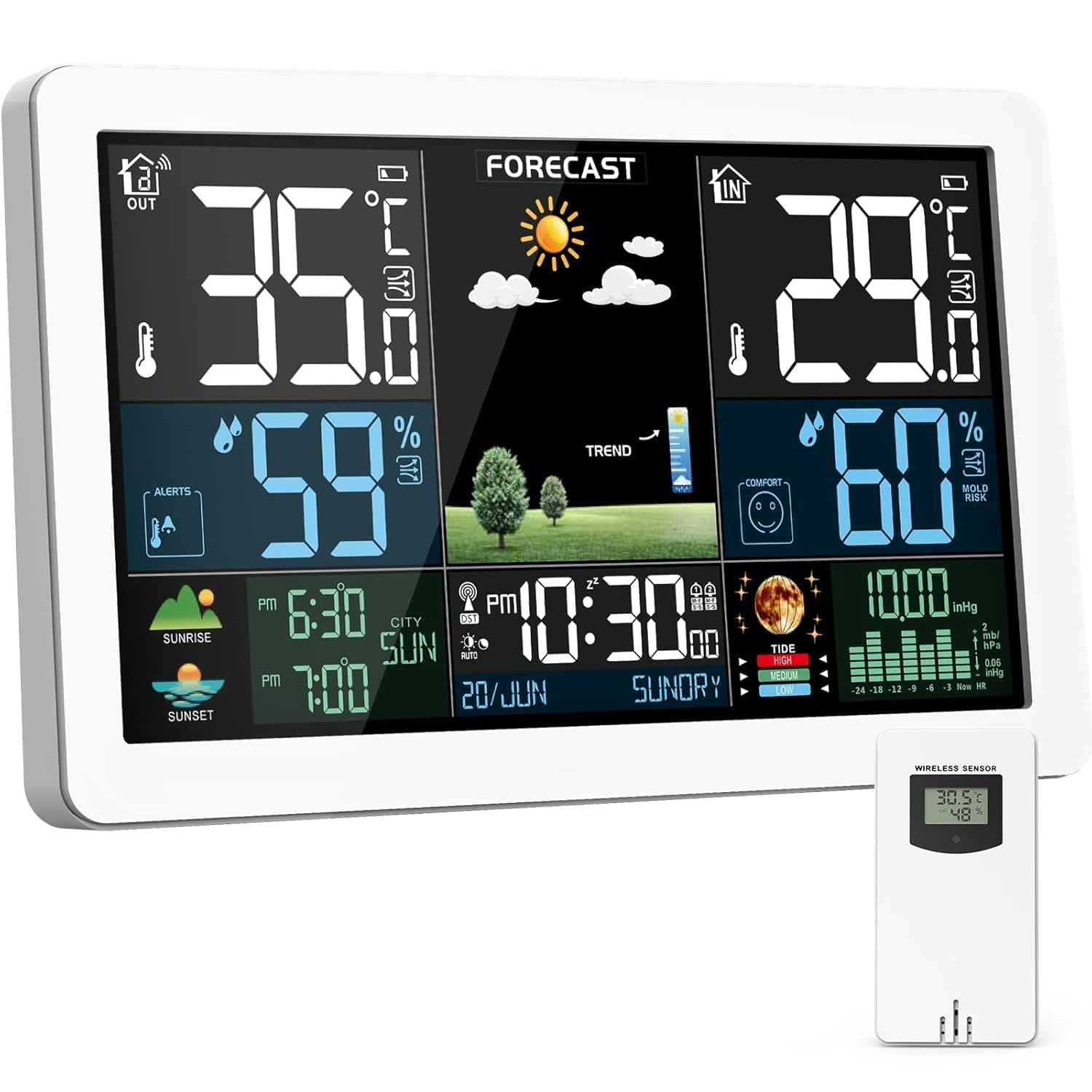
Image: Main display of the Brataste Wireless Weather Station.
2. Package Contents
Please check the package for the following items:
- 1 x Brataste Wireless Weather Station (Main Unit)
- 1 x External Wireless Remote Sensor
- 1 x AC/DC Power Adapter
- 1 x Instruction Manual
3. Product Features
- 7.5" LCD HD Color Screen: Provides a clear, multi-angle display of all information.
- Indoor/Outdoor Temperature & Humidity: Displays current, maximum, and minimum readings.
- 3-Channel Wireless Support: Connects with up to three remote sensors (one included).
- Weather Forecast: Predicts weather changes for the next 12-24 hours based on outdoor sensor data and barometric pressure.
- Atomic Time & Date: Automatically synchronizes with WWVB radio signal for precise timekeeping across seven North American time zones.
- Dual Alarms & Snooze: Features flexible alarm intervals (M-F, M-S, S-S) and a snooze function.
- Moon Phase & Tides Indicator: Provides additional environmental data.
- Indoor Mold Risk & Comfort Indicator: Helps monitor indoor air quality.
- Outdoor Temperature Alert & Frost Warning: Customizable alerts for critical outdoor conditions.
- Multiple Power Options: Main unit can be powered by AC adapter, USB cable (not included), or 2 AA batteries (not included). Remote sensor uses 2 AA batteries (not included).
- Mounting Options: Includes a table stand and wall-mount capability.

Image: Overview of the weather station's key features.
4. Setup
4.1. Powering the Remote Sensor
- Open the battery compartment on the back of the wireless remote sensor.
- Insert 2 x AA batteries (not included), observing correct polarity (+/-).
- Close the battery compartment.
4.2. Powering the Main Unit
- Connect the provided AC/DC power adapter to the main unit's power input port.
- Plug the adapter into a standard wall outlet.
- Alternatively, for backup or temporary use, insert 2 x AA batteries (not included) into the battery compartment on the back of the main unit. Note: When running on batteries, the LCD screen will only light up for 15 seconds after pressing the backlight button to conserve power.

Image: Power supply methods for the main unit.
4.3. Initial Synchronization
- Ensure both the main unit and the remote sensor are powered on.
- The main unit will automatically search for the remote sensor. This process may take a few minutes.
- Once connected, the outdoor temperature and humidity will appear on the main unit's display.
- The atomic clock will attempt to synchronize with the WWVB radio signal. This may take up to 7 minutes. During synchronization, the screen may temporarily turn off to avoid interference. Press the 'Light/Snooze' button to light it up or the 'Up' button to stop RCC (Radio-Controlled Clock) synchronization.
5. Operation
5.1. Basic Settings
Use the buttons on the side or back of the main unit to adjust settings:
- SET Button: Enter settings mode for time, date, alarm, and other parameters.
- UP/DOWN Buttons: Navigate through options and adjust values in settings mode.
- ALERT Button: Set and manage temperature alerts.
- LIGHT/SNOOZE Button: Adjust display brightness or activate snooze during an alarm.
5.2. Display Brightness
The display offers multiple brightness levels. Press the 'LIGHT/SNOOZE' button to cycle through the brightness options or turn off the backlight when powered by AC. In battery mode, this button activates the backlight for 15 seconds.
5.3. Alarm Settings
The weather station supports dual alarms. In normal time display mode, press the 'ALARM' button to view Alarm 1 or Alarm 2. Use the 'SET' button to enter alarm setting mode and the UP/DOWN buttons to adjust the alarm time and activation days (M-F, M-S, S-S).
6. Display Information
The 7.5" HD color screen provides a comprehensive overview of environmental data. Refer to the diagram below for a breakdown of each display area:
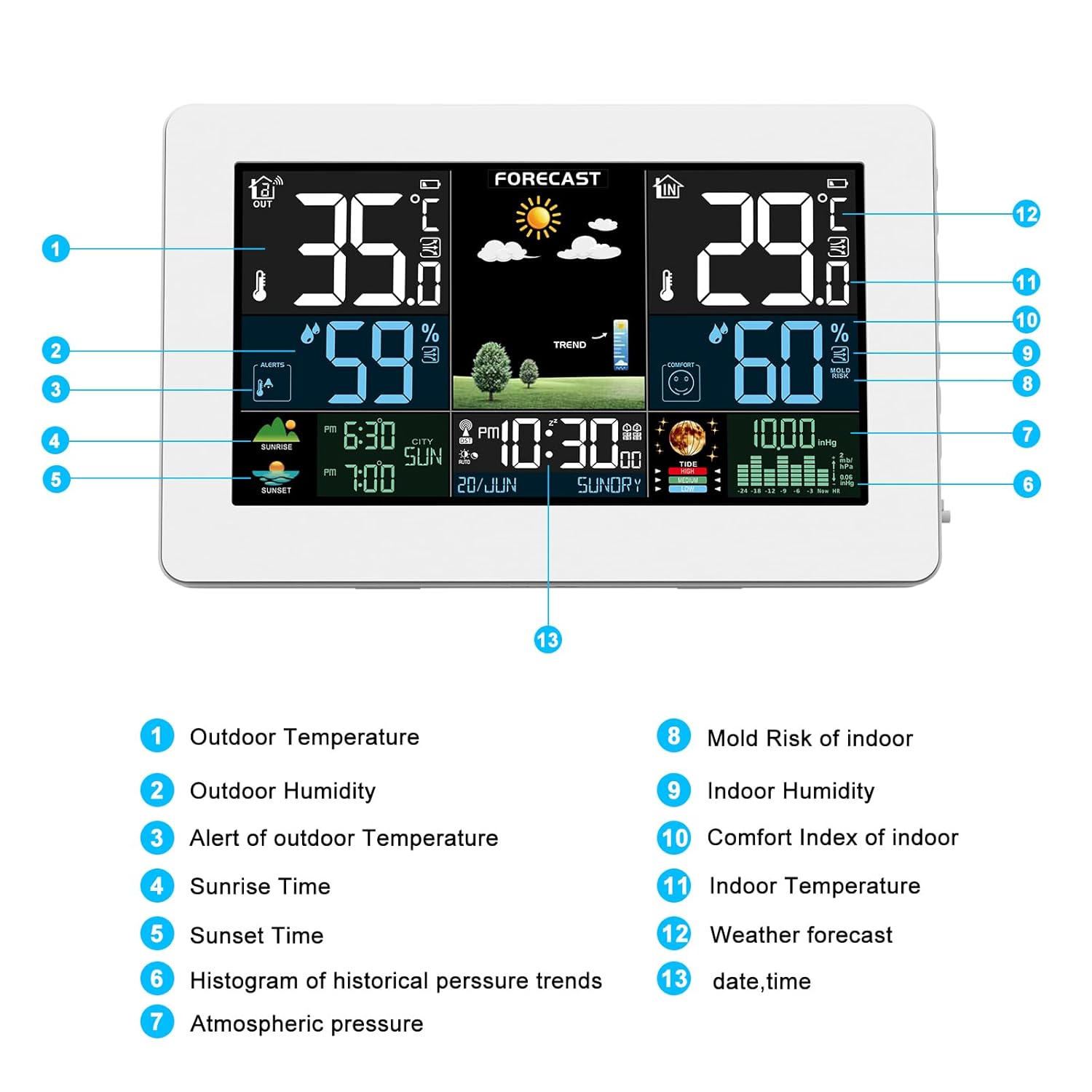
Image: Detailed breakdown of the weather station display.
- Outdoor Temperature: Current temperature detected by the remote sensor.
- Outdoor Humidity: Current humidity detected by the remote sensor.
- Alert of Outdoor Temperature: Indicates if an outdoor temperature alert is active.
- Sunrise Time: Local sunrise time.
- Sunset Time: Local sunset time.
- Histogram of Historical Pressure Trends: Visual representation of barometric pressure changes.
- Atmospheric Pressure: Current barometric pressure reading.
- Mold Risk of Indoor: Indicator for potential mold growth conditions indoors.
- Indoor Humidity: Current humidity detected by the main unit.
- Comfort Index of Indoor: Indicates indoor comfort level (e.g., dry, comfortable, wet).
- Indoor Temperature: Current temperature detected by the main unit.
- Weather Forecast: Graphical representation of the predicted weather (sunny, cloudy, rainy, snowy).
- Date and Time: Current time and date, synchronized via atomic clock.
7. Power Supply
The main unit offers flexible power options:
- AC/DC Adapter: For continuous display and full brightness.
- USB Cable (not included): Can be used as an alternative power source.
- 2 x AA Batteries (not included): For backup power or portable use. The display backlight will be temporary in battery mode.
The wireless remote sensor requires 2 x AA batteries (not included).
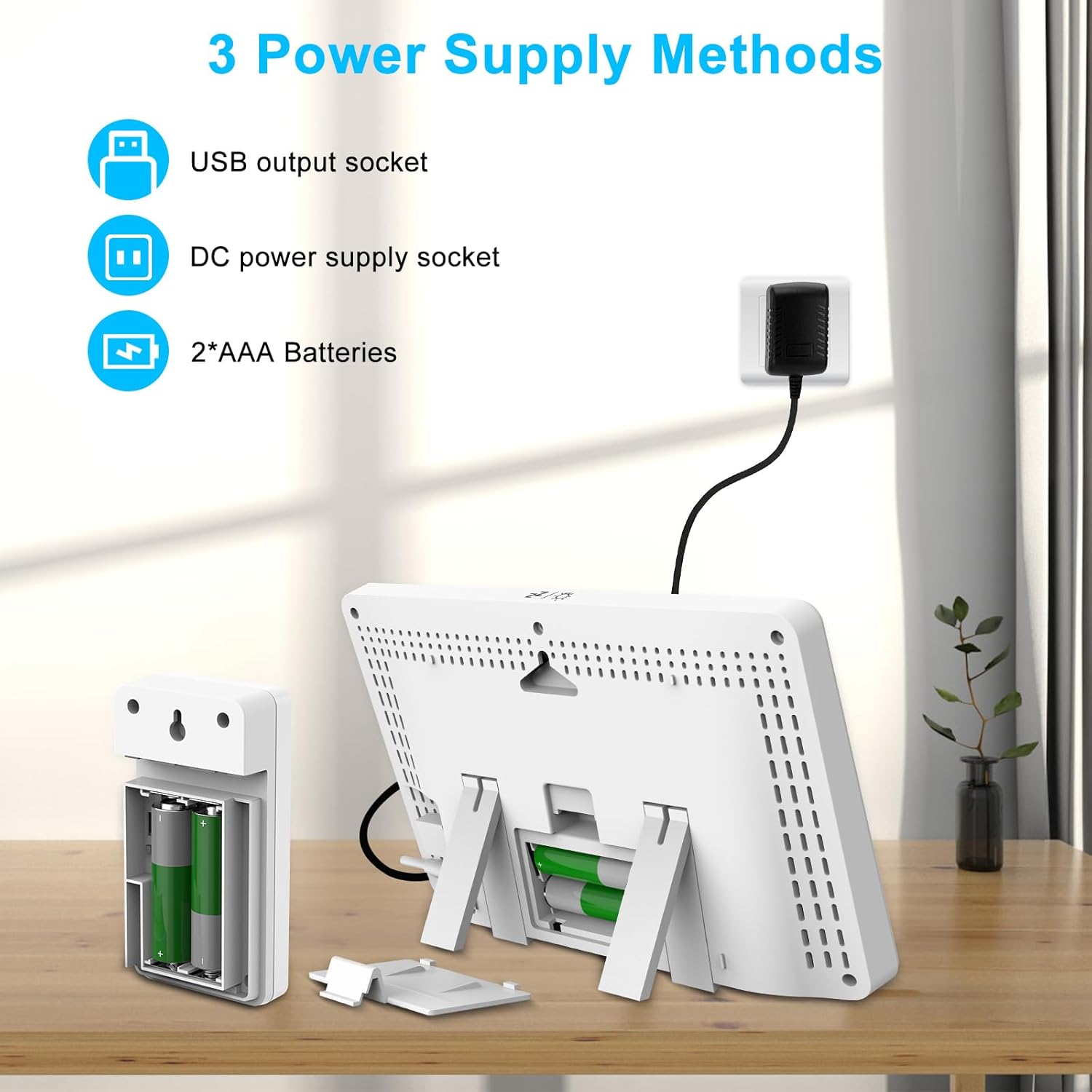
Image: Various power supply methods for the weather station components.
8. Sensor Placement
For optimal performance and accurate readings, consider the following guidelines for placing your wireless remote sensor:
- Transmission Range: The sensor has a transmission range of up to 60 meters (200 feet) in an open area. Avoid placing it near large metal objects, thick walls, or other electronic devices that may cause interference.
- Protection from Elements: While the sensor is splash-resistant, it is not waterproof. Place it in a shaded, dry location away from direct sunlight, rain, and extreme temperatures to ensure longevity and accuracy.
- Height: For accurate outdoor temperature readings, place the sensor at least 1.5 to 2 meters (5 to 6.5 feet) above the ground.
- Multiple Sensors: If using multiple remote sensors (up to 3 supported), ensure each is set to a different channel to avoid interference.

Image: Example placements for multiple remote sensors.
9. Maintenance
- Cleaning: Wipe the display and unit surfaces with a soft, damp cloth. Avoid abrasive cleaners or solvents.
- Battery Replacement: Replace batteries in both the main unit (if used) and the remote sensor when the low battery indicator appears on the display.
- Storage: If storing the device for an extended period, remove all batteries to prevent leakage.
10. Troubleshooting
- No Outdoor Reading: Ensure the remote sensor has fresh batteries and is within range of the main unit. Check that the sensor is set to the correct channel and the main unit is scanning for it.
- Inaccurate Readings: Allow at least 3 hours for the sensor to stabilize after initial setup. Ensure the remote sensor is placed in a shaded, well-ventilated area away from direct heat sources or moisture.
- Atomic Clock Not Synchronizing: Ensure the main unit is placed away from electronic interference. The synchronization process can take several minutes, especially during initial setup or after a power loss.
- Display Issues: If the display is dim or flickering, check the power connection or replace batteries.
11. Specifications
| Feature | Description |
|---|---|
| Brand | Brataste |
| Model Number | 3378 |
| Display Type | LCD Color Display |
| Screen Size | 7.5 inches |
| Power Source (Main Unit) | AC/DC Adapter, USB (not included), 2 x AA Batteries (not included) |
| Power Source (Remote Sensor) | 2 x AA Batteries (not included) |
| Connectivity Technology | Radio Frequency (RF) |
| Sensor Transmission Range | Up to 60m / 200ft (open area) |
| Temperature Accuracy | ±2 °C |
| Upper Temperature Rating | 70 Degrees Celsius |
| Material | Acrylonitrile Butadiene Styrene (ABS), Plastic |
| Product Dimensions | 8.07 x 5.12 x 1.18 inches |
| Item Weight | 1.19 pounds |
12. Warranty and Support
Brataste is committed to product quality and customer satisfaction. Your weather station comes with the following:
- 30-Day Money Back Guarantee: If you are not satisfied with your purchase.
- 24-Month Free Replacement/Repair Service: Covers manufacturing defects and malfunctions.
- 7*24-Hours Lifetime Support: Dedicated customer service available to assist you with any questions or issues.
For support, please refer to the contact information provided in your product packaging or visit the official Brataste website.