
Introduction
The COASTS CH1000R Headlamp is a powerful and versatile lighting solution designed for various applications, including outdoor activities, work, and emergency preparedness. This 3-pack set provides 1000 lumens of high-performance lighting with multiple adaptable modes. The headlamp features a Dual Optic system for both wide coverage and long-range precision, and is built with IPX7 waterproof-rated construction for durability in rugged environments. It supports Dual Power technology, allowing use with the included USB-C rechargeable batteries or standard AAA alkaline batteries.
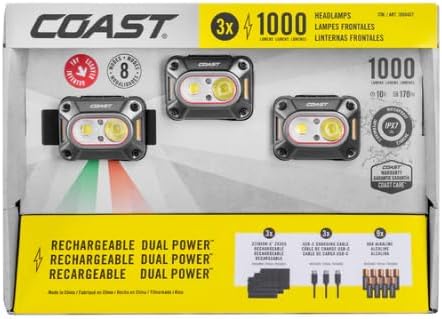
Image: The COASTS CH1000R Headlamp 3-pack in its retail packaging, showcasing the three headlamps and included accessories.
Key Features
- Battery Charging Level Indicator: Built-in indicator shows battery charge status (solid red for charging, solid green for fully charged).
- Battery Lockout: Prevents accidental activation when the headlamp is stowed, preserving battery life.
- Built-In USB-C Port: Allows convenient charging of the battery using a USB-C cord. Some models support charging both inside and outside the light.
- Dual Power Options: Flexibility to power the headlamp with USB-rechargeable batteries or standard AAA alkaline batteries.
- Dust Resistant: Designed to withstand dirty work environments.
- Tri-Color Beam: Offers white light for general use, red light for anti-glare and signaling, and green light for tracking.
- Waterproof: IPX7 rated, ensuring the headlamp remains fully functional even after submersion in water for extended periods.
What's in the Box
Each COASTS CH1000R Headlamp 3-pack includes the following components:
- 3 x CH1000R Headlamps
- 3 x ZX355 ZITHION-X Rechargeable Batteries
- 9 x USB-C Charging Cables

Image: A set of three COASTS CH1000R headlamps, each with an adjustable elastic strap, ready for use.
Setup
1. Battery Installation and Charging
The CH1000R headlamp can be powered by the included ZX355 ZITHION-X rechargeable battery or by standard AAA alkaline batteries (not included).
- Rechargeable Battery:
- Open the battery compartment.
- Insert the ZX355 ZITHION-X rechargeable battery, ensuring correct polarity.
- Close the compartment securely.
- To charge, connect one of the provided USB-C charging cables to the headlamp's USB-C port and the other end to a compatible USB power source. The battery indicator will show solid red during charging and solid green when fully charged.
- AAA Alkaline Batteries (Optional):
- Open the battery compartment.
- Insert three (3) AAA alkaline batteries, observing the correct polarity markings.
- Close the compartment securely.
2. Strap Adjustment
Adjust the silicone-lined comfort strap to ensure a secure and comfortable fit on your head or helmet. The strap is designed to prevent slipping during activity.

Image: A single COASTS CH1000R headlamp, showing its compact design and adjustable elastic strap.
Operating Instructions
Power On/Off and Mode Selection
The CH1000R headlamp features a single button for power control and cycling through its eight adaptable modes.
- To turn the headlamp ON, press the power button once.
- To cycle through the different lighting modes (e.g., Pure Beam Flood, Bulls-Eye Spot, various brightness levels, red beam, green beam), press the power button repeatedly.
- To turn the headlamp OFF, press and hold the power button for approximately 2 seconds, or cycle through all modes until the light turns off.
Power Lock-out Function
To prevent accidental activation and preserve battery life when the headlamp is stored, utilize the power lock-out function:
- With the headlamp OFF, press and hold the power button for approximately 5 seconds until the light flashes briefly, indicating it is locked.
- To unlock, press and hold the power button again for approximately 5 seconds until the light flashes, indicating it is unlocked and ready for use.
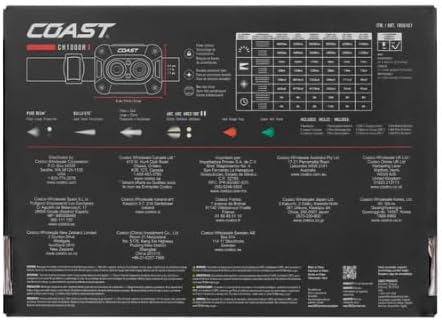
Image: A person wearing a COASTS headlamp, illuminating a large snowy area, demonstrating the headlamp's powerful beam in an outdoor setting.
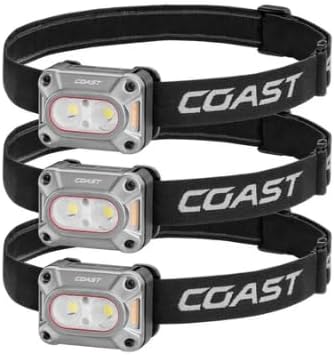
Image: A person wearing a COASTS headlamp, illuminating a large rock wall inside a dark cave, showcasing the headlamp's utility in low-light environments.
Maintenance
- Cleaning: Wipe the headlamp body with a soft, damp cloth. Do not use abrasive cleaners or solvents. Ensure the USB-C port cover is closed when cleaning.
- Battery Care:
- For rechargeable batteries, fully charge them before long-term storage.
- If using AAA alkaline batteries, remove them if the headlamp will not be used for an extended period to prevent leakage.
- Storage: Store the headlamp in a cool, dry place away from direct sunlight and extreme temperatures.
Troubleshooting
- Headlamp not turning on:
- Check battery charge level. Recharge the ZX355 battery or replace AAA batteries.
- Ensure batteries are inserted with correct polarity.
- Verify the power lock-out function is not engaged. Unlock if necessary.
- Light is dim or flickering:
- Battery charge is low. Recharge or replace batteries.
- Ensure battery contacts are clean and free of debris.
- Charging issue:
- Ensure the USB-C cable is securely connected to both the headlamp and the power source.
- Try a different USB-C cable or power adapter.
Specifications
| Feature | Detail |
|---|---|
| Model Number | CH1000R |
| Lumens | 1000 |
| Power Source | Battery Powered (USB-C Rechargeable or AAA Alkaline) |
| Light Source Type | LED (White, Red, Green) |
| Material | Plastic |
| Color | Gray |
| Special Features | Adjustable Strap, High Lumens, Lightweight, Rechargeable, Weatherproof, Dual Optic System, Tri-Color Beam, Battery Lockout, Battery Charging Level Indicator |
| Waterproof Rating | IPX7 (Submersible up to 1 meter) |
| Dust Resistance | Yes |
| Product Dimensions | 2.5"D x 12"W x 8.6"H |
| Manufacturer | Coasts |
| Date First Available | July 15, 2025 |

Image: The back of the COASTS CH1000R headlamp packaging, displaying detailed product specifications and features.
Warranty and Support
This COASTS CH1000R Headlamp product is covered by a manufacturer's warranty. For specific warranty terms, duration, and support inquiries, please refer to the documentation included with your product or visit the official COASTS website. Protection plans may also be available for extended coverage.