
SONGMICS LSD130WZ01
SONGMICS Electric Height Adjustable Desk 100 x 60 cm - User Manual LSD130WZ01
Model: LSD130WZ01
Introduction
Thank you for choosing the SONGMICS Electric Height Adjustable Desk. This manual provides detailed instructions for assembly, operation, and maintenance to ensure safe and efficient use of your new desk. Please read this manual thoroughly before beginning assembly or operation and retain it for future reference.
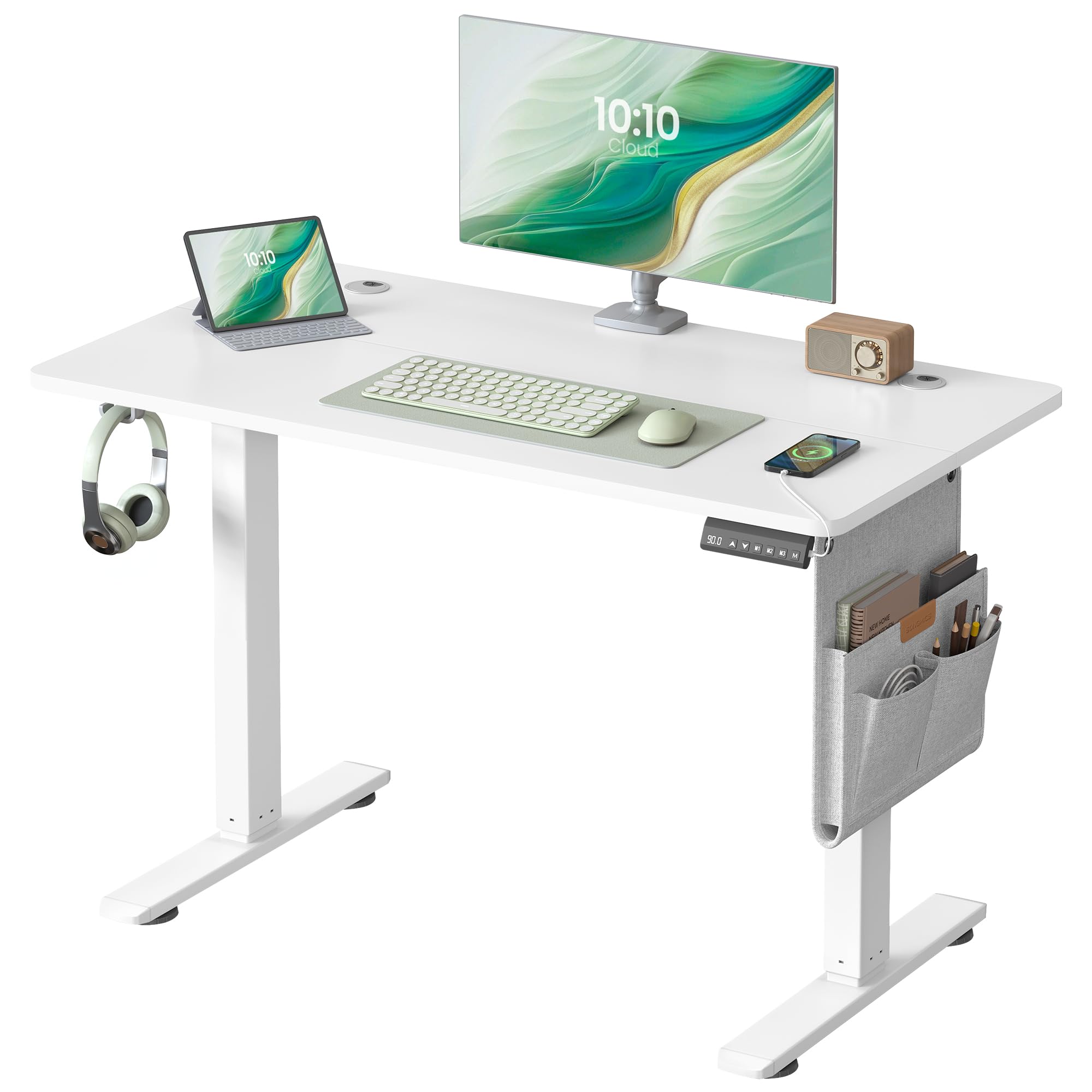
Figure 1: SONGMICS Electric Height Adjustable Desk in a modern office setting.
Safety Information
- This desk features electric height adjustment. Exercise caution when handling electrical components and ensure all connections are secure before use.
- The maximum load capacity of this desk is 70 kg. Do not exceed this weight limit to ensure stability and prevent damage. Avoid placing excessively heavy objects on the desk.
- Keep children and pets away from the desk during operation to prevent accidents.
- Ensure there are no obstructions in the desk's path during height adjustment.
- Do not sit or stand on the desk.
Package Contents
Before assembly, please verify that all components are present and undamaged. Refer to the included parts list in your packaging for a complete inventory. If any parts are missing or damaged, please contact customer support.
Setup & Assembly
The SONGMICS Electric Height Adjustable Desk is designed for straightforward assembly. Follow the detailed instructions and use the labeled parts provided in your package. An electric screwdriver is recommended for faster assembly.
- Important Note: The tabletop is constructed from four separate plates. Assemble them carefully according to the instructions to ensure a seamless surface.

Figure 2: Easy assembly steps for the desk.
Operating Instructions
Height Adjustment
The desk's height can be adjusted electrically between 72 cm and 120 cm, allowing for comfortable sitting and standing positions. Use the up and down arrows on the control panel to adjust the height.
Memory Function
The control panel allows you to save up to 4 preferred height settings for quick adjustment. To set a memory position:
- Adjust the desk to your desired height using the up/down arrows.
- Press the 'M' button, then press one of the memory buttons (M1, M2, M3, or M4) to save the current height.
- To recall a saved height, simply press the corresponding memory button (M1, M2, M3, or M4).
USB-C Charging Port
The control panel includes a USB-C port with 20W fast charging capability, ideal for charging mobile phones and tablets. For energy saving, the port automatically switches off after one minute of inactivity.
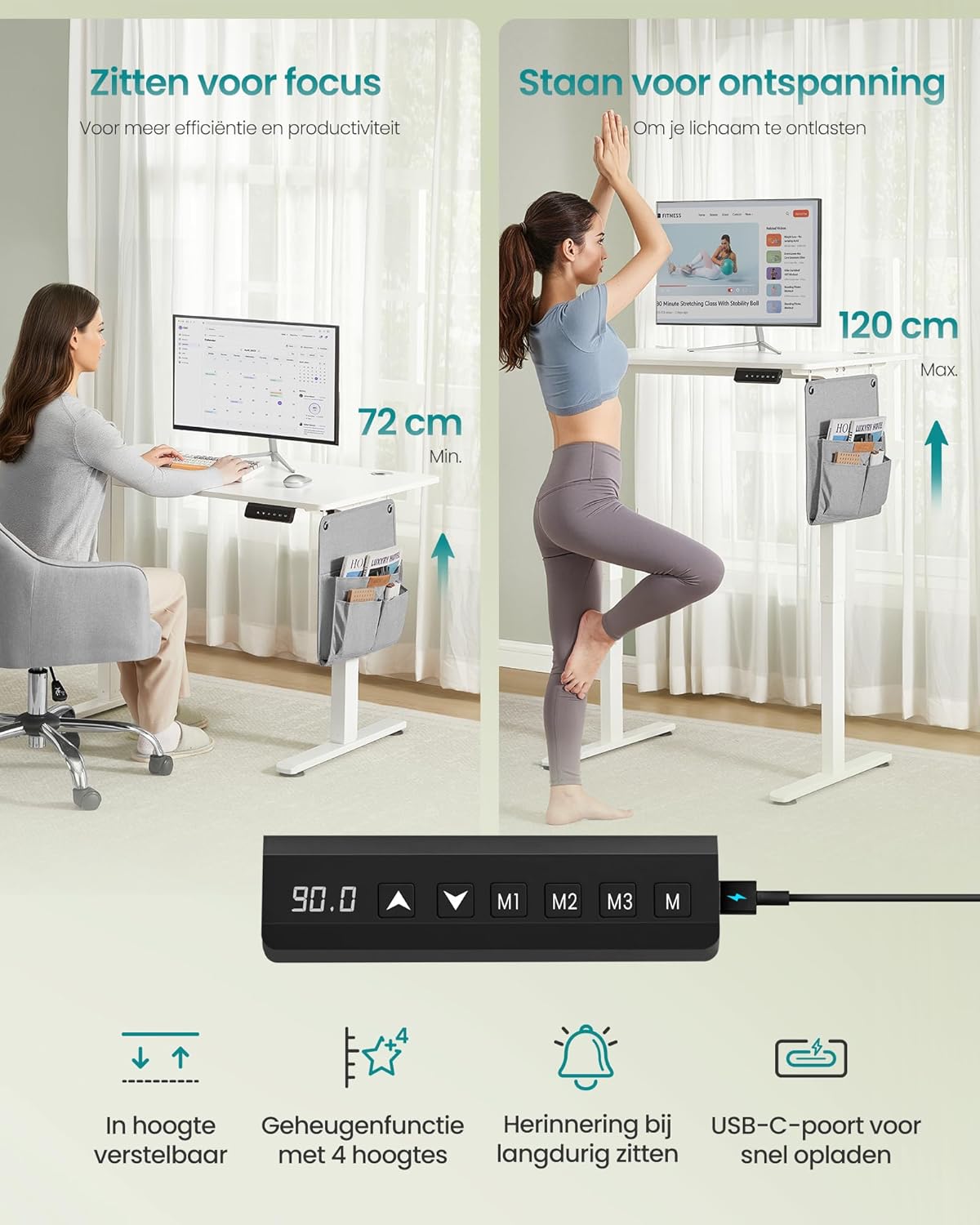
Figure 3: Sit/stand positions and control panel with memory and USB-C.

Figure 4: Fast charging function via USB-C port.
Quiet Operation
The desk's high-quality motor ensures smooth and quiet height adjustment, operating at less than 48 dB, comparable to a quiet library environment.

Figure 5: Desk underside showing motor, adjustment speed, and noise level.
Features
- Spacious Desktop: The 100 x 60 cm desktop provides ample space for monitors, keyboards, and other office essentials.
- Cable Management: Two integrated cable holes help keep your workspace tidy and organized.
- Fabric Organizer: A stylish fabric organizer is included for convenient storage of small items like notebooks, tablets, pens, and charging cables.
- Multifunctional Hook: A large hook is provided for hanging bags or headphones, freeing up desktop space.
- Sturdy Construction: Built with a robust steel frame and a thick tabletop, ensuring durability and stability.

Figure 6: Spacious desktop with organized accessories.

Figure 7: Detail of the practical organizer and multifunctional hook.

Figure 8: Cable management openings for a tidy workspace.
Maintenance
- Regularly check all screws and connections to ensure they are tight.
- Clean the desk surface with a soft, damp cloth. Avoid abrasive cleaners or harsh chemicals.
- Keep the motor and electrical components free from dust and moisture.
- Do not attempt to disassemble or repair the motor or control unit yourself. Contact qualified personnel for service.
Troubleshooting
If you encounter any issues with your desk, please refer to the following common solutions:
- Desk not adjusting height: Check if the power cable is securely connected. Ensure no obstructions are blocking the desk's movement.
- Unusual noise during adjustment: Verify that all assembly screws are tightened. Ensure the desk is on a level surface. If the noise persists, contact customer support.
- USB-C port not charging: Confirm the desk is powered on. Check the charging cable and device. Remember the port automatically switches off after one minute of inactivity.
For further assistance, please contact SONGMICS customer support.
Specifications
| Feature | Detail |
|---|---|
| Brand | SONGMICS |
| Model Number | LSD130WZ01 |
| Product Dimensions | 100 x 60 x 72-120 cm (D x W x H) |
| Weight | 18.3 kg |
| Max. Load Capacity | 70 kg |
| Height Adjustment Range | 72 cm to 120 cm |
| Desk Design | Standing Desk |
| Color | Cloud White |
| Base Material | Alloy Steel |
| Top Material Type | Engineered Wood |
| Finish Type | Varnished |
| Special Features | Electric, Adjustable, USB-C Port, High Load Capacity |

Figure 9: Desk dimensions and maximum load capacity.
Warranty & Support
For warranty information or technical support, please refer to the documentation included with your purchase or visit the official SONGMICS website. If you require assistance, please have your model number (LSD130WZ01) and purchase details ready when contacting support.