
HAOYUYAN BX17
HAOYUYAN BX17 Wireless Earbuds User Manual
Model: BX17 | Brand: HAOYUYAN
1. Introduction and Overview
Thank you for choosing the HAOYUYAN BX17 Wireless Earbuds. These sports Bluetooth headphones are designed to provide an immersive audio experience with exceptional comfort and durability. Featuring an impressive 80 hours of total playtime, an intuitive LED power display, and IPX7 waterproof rating, the BX17 earbuds are perfect for workouts, running, and daily use. This manual will guide you through the setup, operation, and maintenance of your new earbuds.

Image: HAOYUYAN BX17 Wireless Earbuds in Rose Gold, shown with their charging case open, displaying the earbuds and the digital battery indicator.
2. What's in the Box
Please check the package contents to ensure all items are present:
- Wireless Earbuds (L/R)
- Wireless Charging Case
- User Manual
- S, M, L Eartips (one set pre-installed)
- Type-C Charging Cable
3. Setup
3.1 Charging the Earbuds and Case
Before first use, fully charge the earbuds and the charging case. The case provides up to 8 additional full charges for the earbuds, extending total playtime to 80 hours.
- Place the earbuds into the charging case, ensuring they are correctly seated.
- Connect the Type-C charging cable to the charging port on the case and plug the other end into a USB power adapter (not included).
- The LED power display on the case will show the charging status and battery levels for both the case and individual earbuds.

Image: Visual representation of the BX17 earbuds' 80-hour battery life, showing 1.5 hours for fast charging, 15 hours per single earbud charge, and 60 hours from the charging case, with a Type-C port illustration.

Image: The charging case with earbuds inside, highlighting the LED digital display that shows the remaining battery percentage of the case and the charging status of each earbud.
3.2 Pairing with Your Device
The BX17 earbuds feature Hall switch technology for fast and effortless pairing.
- Open the charging case. The earbuds will automatically power on and enter pairing mode.
- On your device (smartphone, tablet, laptop), enable Bluetooth and search for available devices.
- Select "BX17" from the list of found devices to connect.
- Once connected, you will hear a confirmation tone, and the earbuds will be ready for use.
Note: After the initial pairing, the earbuds will automatically reconnect to the last paired device when the case is opened, provided Bluetooth is enabled on your device.

Image: Depiction of Bluetooth 5.3 technology and one-step pairing, showing the earbuds connecting to a smartphone with the "BX17" device name visible.
3.3 Achieving the Optimal Fit
For the best sound quality and secure fit, especially during sports, choose the correct ear tip size and adjust the ear hooks.
- Experiment with the S, M, and L ear tips to find the size that creates a comfortable seal in your ear canal.
- Gently place the earbud into your ear, then adjust the flexible ear hook over the top of your ear until it feels snug and secure.

Image: Illustrates the ergonomic design, flexible ear hooks, and three sizes of ear tips (L, M, S) for the BX17 earbuds, emphasizing their suitability for sports and IPX7 waterproof rating.
4. Operating Instructions
4.1 Touch Controls
The BX17 earbuds feature intuitive physical buttons for easy control of music playback, calls, and voice assistant.
| Function | Action (Left/Right Earbud) |
|---|---|
| Answer/End Call | One Tap |
| Reject Call | Long Press |
| Play/Pause Music | One Tap |
| Previous Track | Long Press (Left Earbud) |
| Next Track | Long Press (Right Earbud) |
| Volume + | One Tap (Right Earbud) |
| Volume - | One Tap (Left Earbud) |
| Voice Assistant | Long Press |

Image: Diagram illustrating the various functions controlled by the physical buttons on the BX17 earbuds, including answer/end call, voice assistant, track control, and volume adjustment.
4.2 Audio Quality and Noise Cancellation
The BX17 earbuds are equipped with powerful 14.3mm speaker drivers and an advanced acoustic design, delivering rich bass and clear treble for a high-fidelity stereo sound experience. The unique structure minimizes sound loss and provides Environmental Noise Cancellation (ENC) for clear voice detection, even in noisy environments.
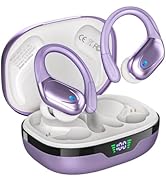
Image: An exploded view of the earbud's internal components, highlighting the 14.3mm graphene diaphragm and other elements contributing to Hi-Fi stereo sound.
5. Maintenance
5.1 Cleaning
- Regularly clean the earbuds and charging case with a soft, dry, lint-free cloth.
- Remove ear tips and clean them separately with mild soap and water if necessary, ensuring they are completely dry before reattaching.
- Use a cotton swab to gently clean the charging contacts on both the earbuds and inside the case.
5.2 Storage
- Always store the earbuds in their charging case when not in use to protect them and keep them charged.
- Store the case and earbuds in a cool, dry place, away from extreme temperatures and direct sunlight.
5.3 Water Resistance (IPX7)
The BX17 earbuds are IPX7 waterproof, meaning they can withstand splashes, sweat, and rain. They are suitable for sports and outdoor activities. However, they are not designed for swimming or submersion in water. Ensure the charging port is dry before charging.
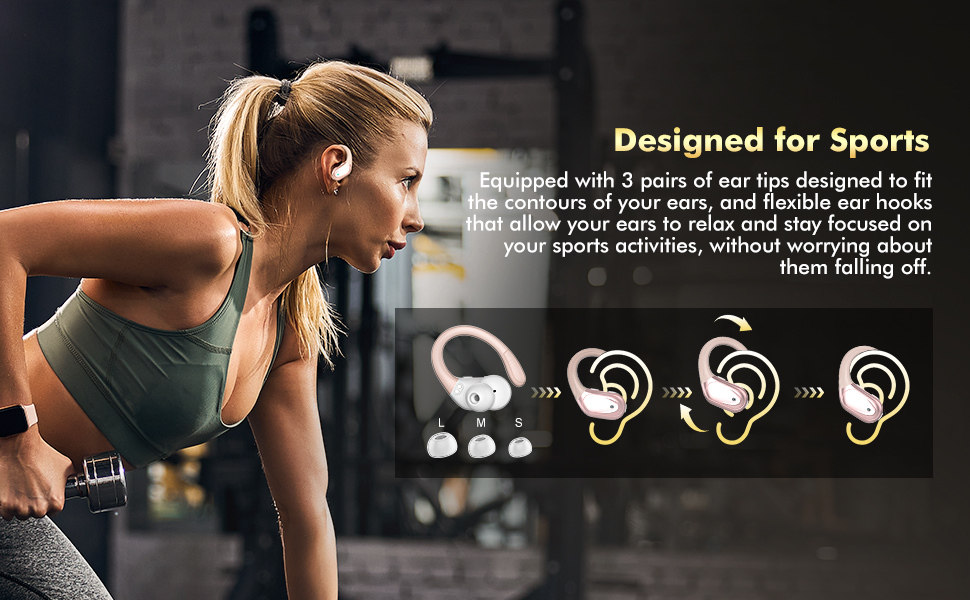
Image: The BX17 earbuds being splashed with water, illustrating their IPX7 waterproof and sweat-resistant capabilities.
6. Troubleshooting
- Earbuds not pairing/connecting:
- Ensure Bluetooth is enabled on your device and the earbuds are in pairing mode (open the case).
- Forget "BX17" from your device's Bluetooth list and try pairing again.
- Ensure the earbuds and case are charged.
- Try restarting your device.
- No sound from one earbud:
- Place both earbuds back into the charging case, close the lid, wait a few seconds, then open it again.
- Check if both earbuds are charged.
- Clean the charging contacts on both earbuds and inside the case.
- Earbuds not charging:
- Ensure the charging cable is securely connected to both the case and the power source.
- Check if the power adapter is working.
- Clean the charging contacts on the earbuds and inside the case.
- Ensure the earbuds are correctly seated in the case.
- Poor sound quality:
- Ensure the ear tips provide a good seal in your ear canal. Try different sizes.
- Clean the ear tips and earbud grilles.
- Move closer to your connected device to avoid interference.
7. Specifications
| Feature | Detail |
|---|---|
| Model Name | BX17 |
| Brand | HAOYUYAN |
| Connectivity Technology | Wireless (Bluetooth 5.3) |
| Bluetooth Range | 33 Feet (10 meters) |
| Battery Life (Single Charge) | Up to 15 Hours |
| Total Playtime (with Charging Case) | Up to 80 Hours |
| Charging Port | Type-C |
| Water Resistance Rating | IPX7 |
| Noise Control | Environmental Noise Cancellation (ENC) |
| Audio Driver Type | Dynamic Driver (14.3mm) |
| Control Type | Physical Button Control |
| Ear Placement | In Ear with Ear Hooks |
| Product Dimensions | 2 x 1 x 3 inches |
| Item Weight | 5.3 ounces |
8. Warranty and Support
HAOYUYAN products are manufactured to the highest quality standards. For information regarding warranty coverage, technical support, or customer service, please refer to the contact details provided on the product packaging or visit the official HAOYUYAN website. Please retain your proof of purchase for warranty claims.
Ask a question about this manual
Ask about setup, troubleshooting, compatibility, parts, safety, or missing instructions. Manuals+ will review the question and use this page’s manual context to help answer it.