
1. Introduction
The Brataste EM3378UC Weather Station is a comprehensive device designed to monitor indoor and outdoor environmental conditions. It features a large, high-definition VA screen for clear readability and offers various functionalities including accurate temperature and humidity readings, weather forecasting, and an atomic clock.

Figure 1.1: The Brataste Weather Station main display unit, showcasing its 7.5-inch HD VA screen with various weather data.
Key Features:
- 7.5'' Large HD VA Screen: Provides a clearer display with higher contrast and 5 adjustable brightness levels.
- Atomic Clock & DST Function: Automatically synchronizes with WWVB signal for accurate time, supporting 7 North American time zones and automatic Daylight Saving Time (DST) updates.
- Weather Forecast: Calculates a 12-hour weather prediction based on barometric pressure trends, requiring 7-10 days for calibration.
- Multi-Channel Wireless Sensors: Includes one outdoor sensor, with support for up to two additional sensors (sold separately) to monitor three locations simultaneously.
- Two Power Supply Modes: Operates via AC/DC adapter for continuous display or batteries for power-saving mode.
2. Setup
2.1 Powering the Main Unit
The main display unit can be powered by either the included AC/DC power adapter or 3x AAA batteries (not included). For continuous display illumination, use the power adapter. Batteries can serve as a backup to retain settings during power outages.
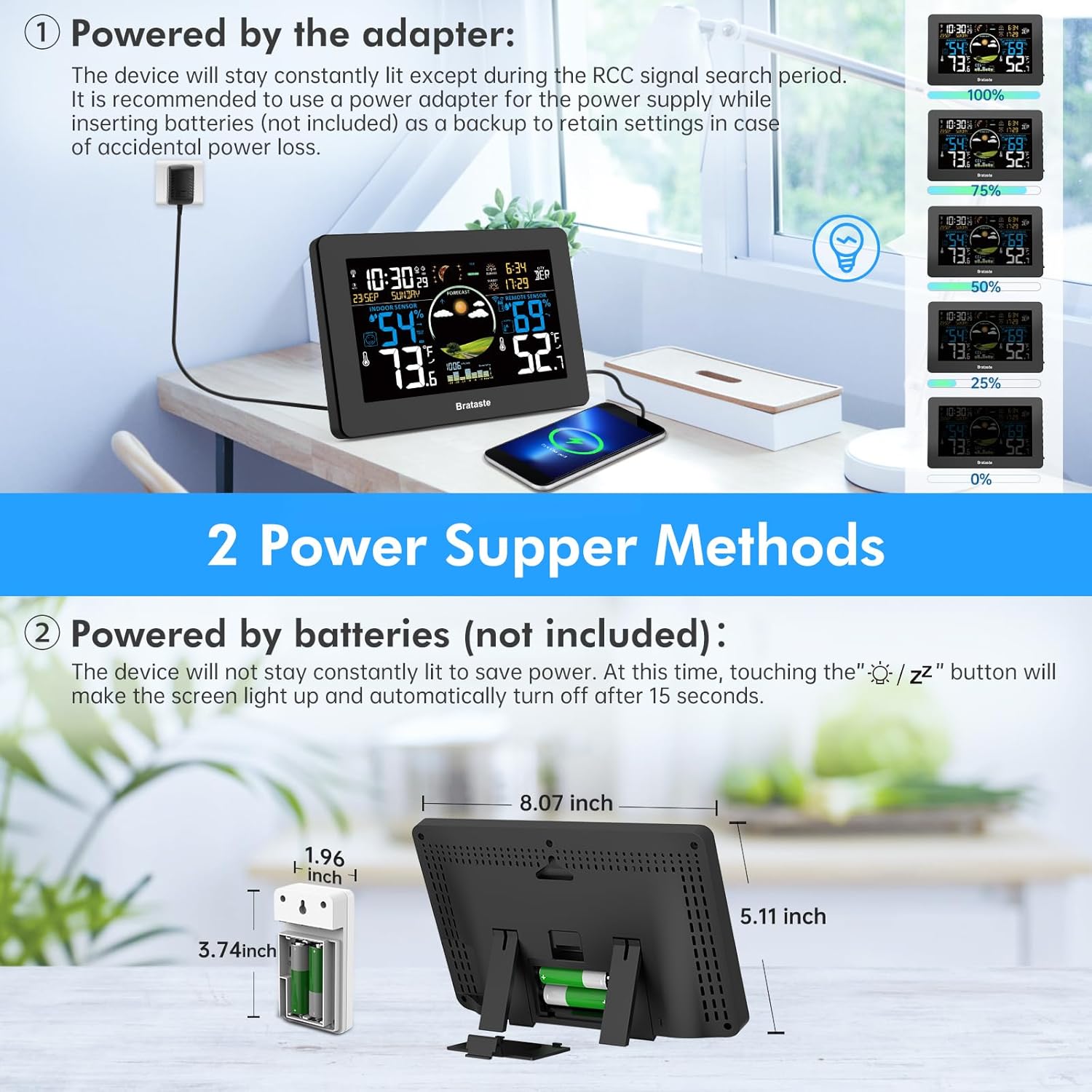
Figure 2.1: Illustration of the two power supply options for the main unit: AC adapter for constant display and batteries for intermittent display.
2.2 Installing Remote Sensor(s)
The outdoor sensor requires 2x AA batteries (not included). Ensure the sensor is placed in a location protected from direct sunlight and rain, but with good air circulation for accurate readings. The maximum transmission range is 328 feet in open areas.

Figure 2.2: The main unit can connect to up to three wireless outdoor sensors to monitor various locations.
2.3 Initial Synchronization (Atomic Clock)
When first plugged in, the device will automatically search for the WWVB signal. During this process, the screen may turn dark for approximately 7 minutes. The device will search for the WWVB signal automatically at 1:00 AM, 2:00 AM, and 3:00 AM daily. If the WWVB signal is weak in your area, you can manually set the time and date.
3. Operating Instructions
3.1 Display Overview
The 7.5-inch HD VA screen provides a clear and comprehensive overview of all data. It displays indoor/outdoor temperature and humidity, weather forecast, time, date, moon phase, and more.
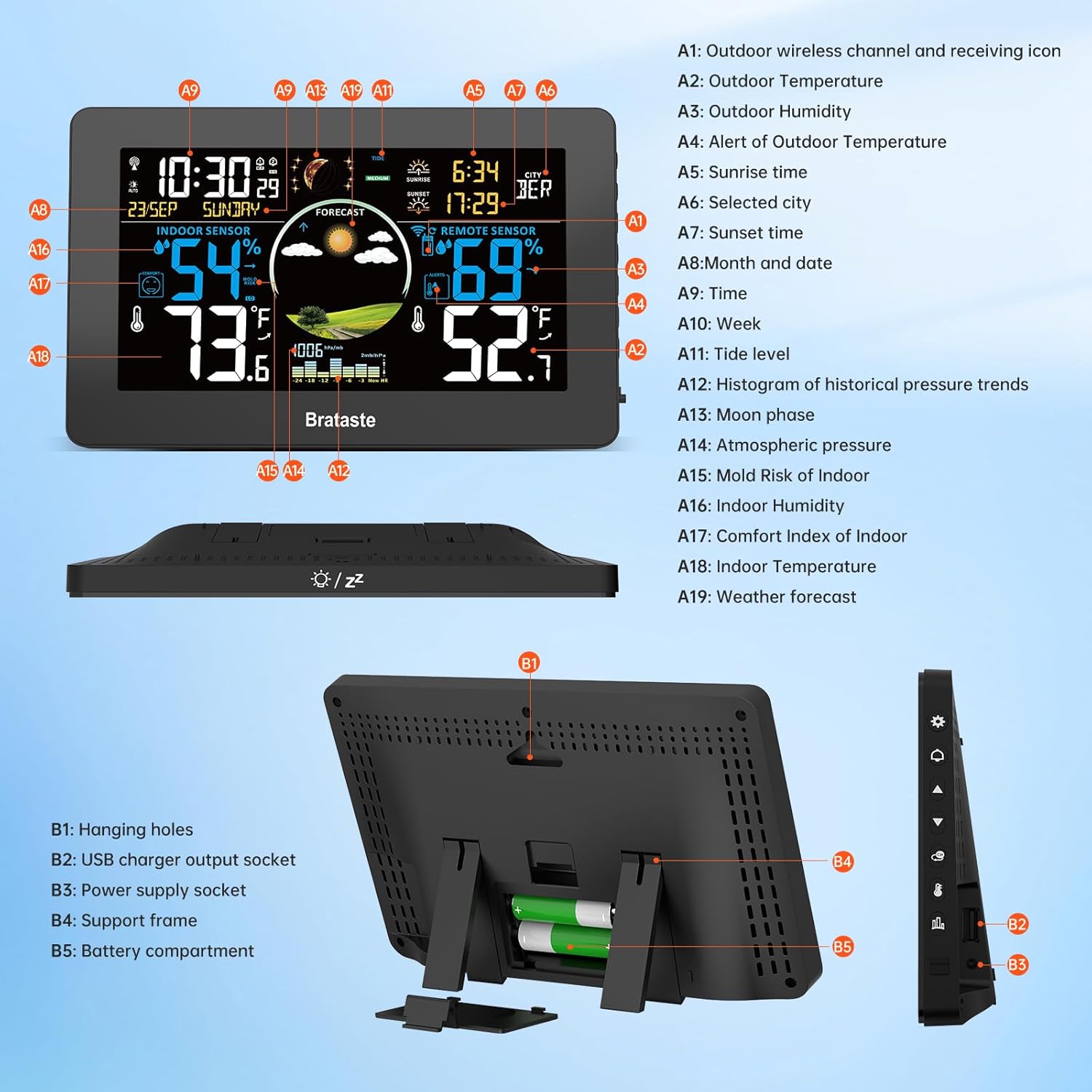
Figure 3.1: Detailed layout of the weather station display with labeled indicators.
3.2 Adjusting Brightness
The screen brightness can be adjusted to 5 different levels. This feature is primarily active when the unit is powered by the AC/DC adapter. When running on batteries, the screen will light up for 15 seconds after touching the top button to conserve power.
3.3 Setting Alarms
The weather station includes alarm clock functionality. Refer to the user manual for specific instructions on setting and managing alarms.
3.4 Weather Forecast and Barometric Pressure
The weather forecast is based on changes in barometric pressure. It provides a prediction for the next 12 hours within an 8 to 12-mile radius of your location. The accuracy improves after 7-10 days of continuous operation for barometric calibration.

Figure 3.2: The weather forecast feature, showing various weather icons and barometric pressure trends.
3.5 Moon Phases and Tide Indicator
The display includes icons for 12 different moon phases and a tide indicator, providing additional environmental information.
3.6 Indoor Comfort Indicator
The main unit displays a comfort indicator (e.g., happy, neutral, sad face) based on indoor temperature and humidity levels to help you maintain a comfortable indoor environment.
3.7 USB Output Charging
The main unit features a USB output port (5V/1A) for charging other devices.
4. Maintenance
- Cleaning: Wipe the display unit and sensors with a soft, dry cloth. Avoid abrasive cleaners or solvents.
- Battery Replacement: Replace batteries in the remote sensor when the low battery indicator appears on the main unit. For the main unit, replace AAA batteries as needed if not using the adapter.
- Sensor Placement: Periodically check the outdoor sensor's placement to ensure it remains protected from direct weather elements and has clear signal transmission to the main unit.
5. Troubleshooting
- No WWVB Signal / Incorrect Time: If the atomic clock does not set automatically, ensure the device is placed away from electronic interference. You may need to manually set the time and date if the signal is consistently weak.
- Display Not Constantly Lit: If the screen does not stay on, ensure the main unit is powered by the AC/DC adapter. When running on batteries, the display is designed to turn off after 15 seconds to save power.
- No Remote Sensor Readings: Check the remote sensor's batteries and ensure it is within the 328-foot transmission range of the main unit. Avoid thick walls or metal obstructions.
- Inaccurate Forecast: The weather forecast requires 7-10 days for barometric pressure calibration to become accurate for your specific location.
6. Specifications
| Feature | Detail |
|---|---|
| Brand | Brataste |
| Model Number | EM3378UC |
| Display Type | VA Screen |
| Screen Size | 7.5 inches |
| Power Source (Main Unit) | AC/DC Adapter or 3x AAA Batteries |
| Power Source (Remote Sensor) | 2x AA Batteries |
| Outdoor Temperature Range | -4°F to 158°F (-20°C to 70°C) |
| Indoor Temperature Range | 14°F to 122°F (-10°C to 50°C) |
| Humidity Range | 20% to 95% RH |
| Wireless Transmission Range | 328 feet (100 meters) in open area |
| Special Features | VA Screen, Adjustable Brightness, Alarm, Atomic Clock, Customizable Alert, Large Display, Weather Forecast |
7. Product Videos
Brataste Weather Station Wireless Indoor Outdoor
This video provides an overview of the Brataste Weather Station, highlighting its wireless indoor and outdoor monitoring capabilities.
8. Warranty and Support
For warranty information or technical support, please refer to the documentation included with your product or contact Brataste customer service. Contact details can typically be found in the user manual or on the manufacturer's website.
For additional remote sensors, search for product ID B0DHRR5T5L.