
1. Introduction
This manual provides detailed instructions for the safe and effective use of your Exnuor ABM790 No WiFi Baby Monitor. Please read this manual thoroughly before operating the device and retain it for future reference. This monitor is designed to provide a secure, private connection for monitoring your baby without relying on a WiFi network.
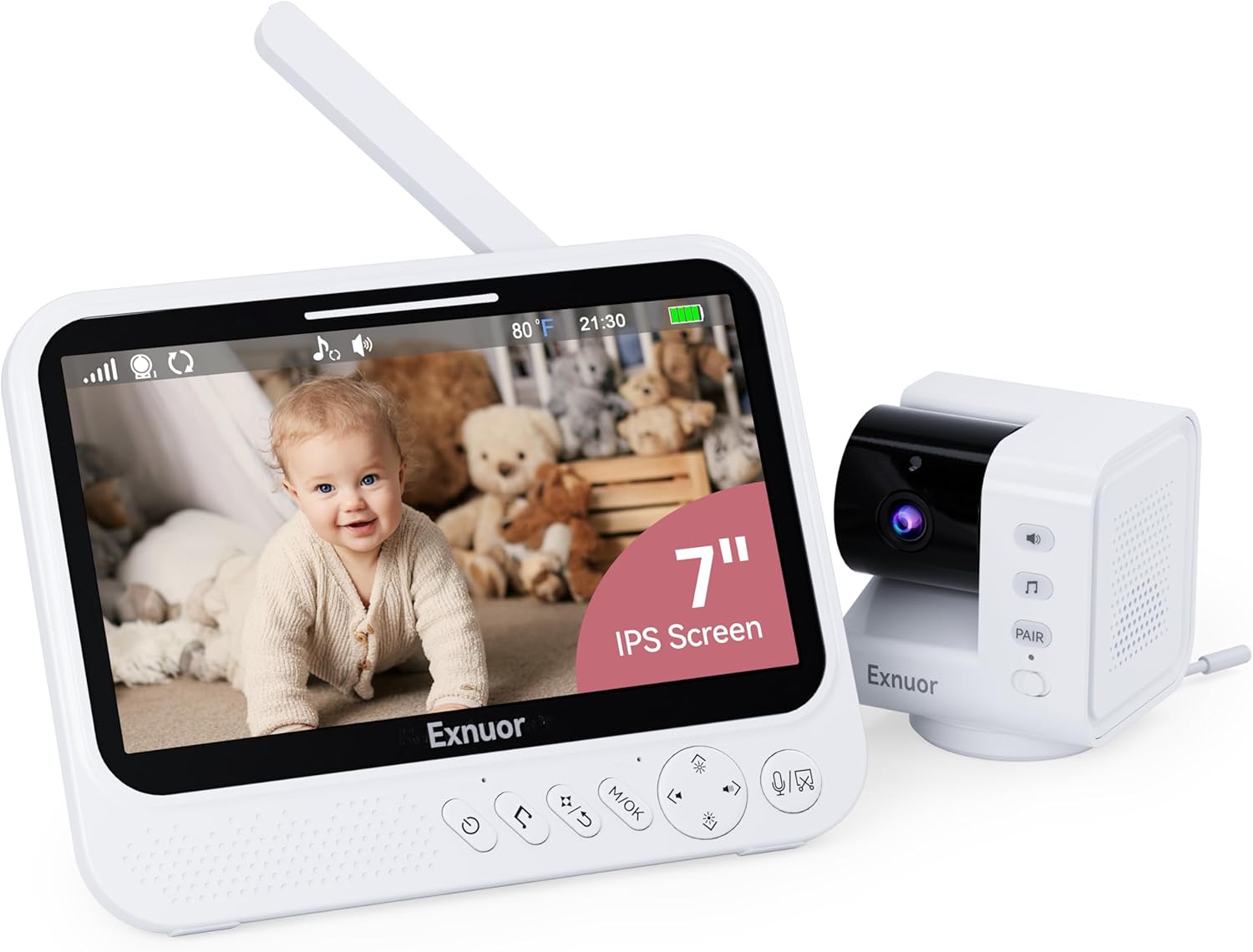
Image 1.1: The Exnuor ABM790 Baby Monitor system, showing the parent unit with a 7-inch IPS screen displaying a baby, and the camera unit.
2. Safety Information
- Strangulation Hazard: Keep the camera and adapter cords out of reach of children (at least 3 feet / 1 meter away). Never place the camera or cords in or near the crib or playpen.
- Choking Hazard: This product contains small parts. Keep out of reach of children.
- Heat Exposure: Do not place the monitor or camera near heat sources such as radiators, heat registers, stoves, or other heat-producing appliances.
- Water and Moisture: Do not expose the product to rain or moisture. Do not use near water (e.g., bathtub, sink).
- Power Source: Use only the AC power adapters provided. Using other adapters may damage the device and void your warranty.
- Ventilation: Ensure proper ventilation around the camera and monitor. Do not block any ventilation openings.
- Interference: Keep the monitor away from other electronic devices that may cause interference.
- Adult Supervision: This product is intended to be an aid. Constant adult supervision is required.
3. Package Contents
Verify that all items are present in your package:
- Camera Unit x 1
- Parent Unit (7" IPS Screen) x 1
- 1 m Cable (for Camera) x 1
- AC Power Adapter (for Monitor) x 1
- Power Adapter (for Camera) x 1
- Screw Pack x 1
- User Manual x 1

Image 3.1: Visual representation of all components included in the Exnuor ABM790 Baby Monitor package.
4. Product Overview
4.1 Parent Unit (Monitor)
The parent unit features a 7-inch IPS display for clear viewing. It includes controls for various functions such as volume, brightness, pan/tilt/zoom, two-way talk, and menu navigation.
4.2 Camera Unit
The camera unit is equipped with a 720p HD camera, infrared LEDs for night vision, a temperature sensor, a microphone, and a speaker for two-way audio. It also has local controls for volume and lullaby playback.
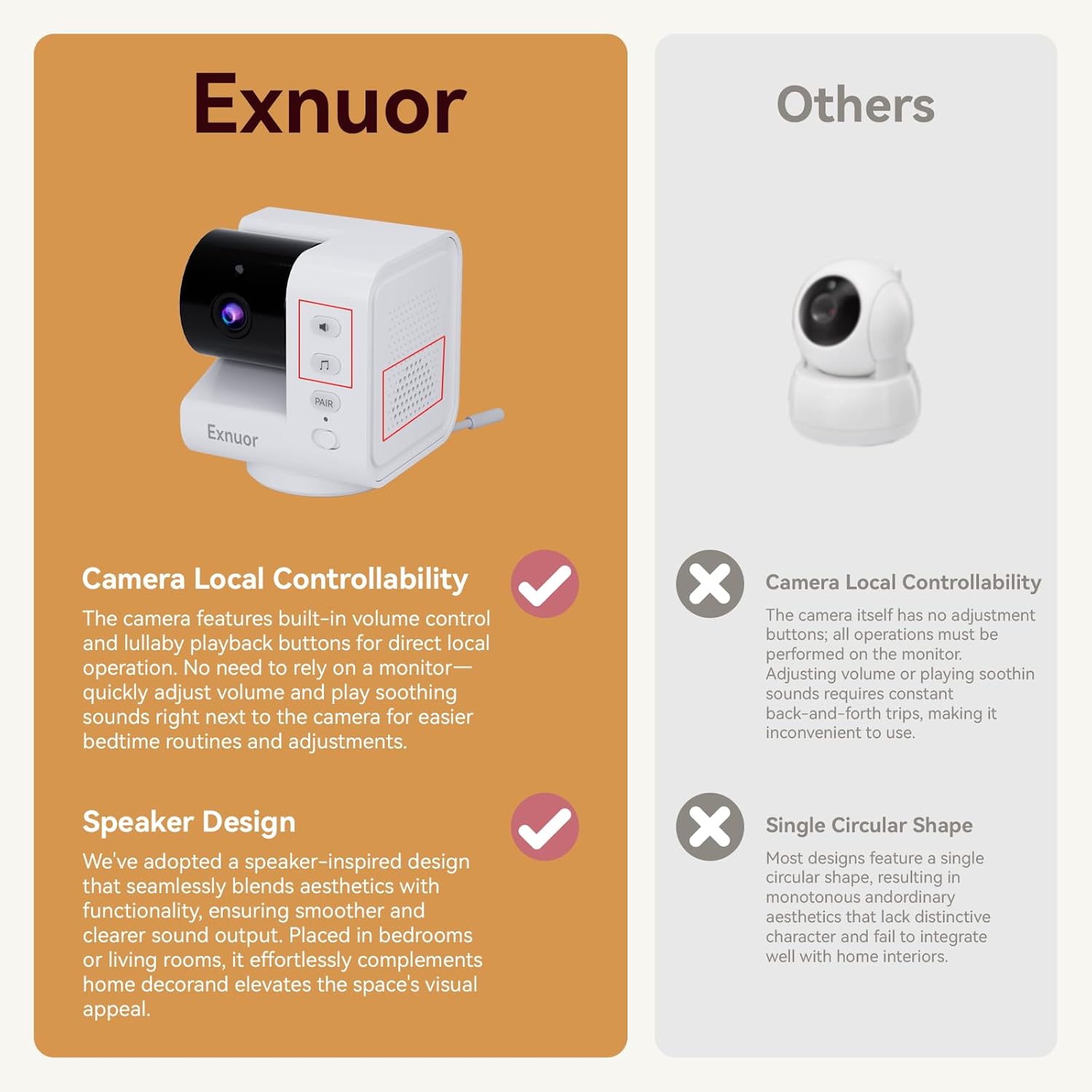
Image 4.1: The Exnuor ABM790 camera unit, highlighting its speaker design and local control buttons for volume and lullabies.
5. Setup
5.1 Charging the Parent Unit
- Connect the AC power adapter to the parent unit and a power outlet.
- Charge the parent unit for at least 4 hours before first use to ensure optimal battery performance. The battery indicator on the screen will show charging status.
5.2 Positioning the Camera Unit
- Place the camera unit on a flat surface, such as a dresser or shelf, at least 3 feet (1 meter) away from the baby's crib or playpen.
- Ensure the camera has a clear line of sight to the baby.
- Connect the camera unit to a power outlet using its dedicated AC power adapter.
5.3 Initial Pairing (Pre-paired from factory)
The camera and parent unit are pre-paired at the factory. Simply power on both units, and they should automatically connect. If connection issues occur, refer to the troubleshooting section for manual pairing instructions.

Image 5.1: Illustration of the Exnuor ABM790's 1000ft signal range, demonstrating its ability to maintain connection throughout a typical home.
6. Operating Instructions
6.1 Powering On/Off
- Parent Unit: Press and hold the power button until the screen turns on/off.
- Camera Unit: Connect to power to turn on. Disconnect from power to turn off.
6.2 Screen Display and Resolution
The 7-inch IPS screen provides a 720p HD resolution, offering clear and accurate color reproduction. Viewing angles remain consistent without color distortion or dimming.

Image 6.1: Visual comparison highlighting the larger viewing area of the 7-inch screen compared to a 5-inch screen.

Image 6.2: Demonstrates the enhanced clarity of 720p resolution compared to 480p, showing finer details in the baby's image.

Image 6.3: Illustrates the superior color accuracy and consistent viewing angles of an IPS screen compared to an LCD screen.
6.3 VOX Mode (Voice Operated Exchange)
In VOX mode, the monitor screen will automatically light up when sound is detected from the baby's room. This conserves battery life. You can adjust the VOX sensitivity level in the menu settings.

Image 6.4: Depicts the VOX mode functionality, where the monitor screen illuminates when the baby makes a sound.
6.4 Two-Way Talk
Press and hold the microphone button on the parent unit to speak to your baby through the camera's speaker. Release the button to listen.

Image 6.5: Illustrates the two-way audio function, allowing communication between the parent and the baby.
6.5 Pan, Tilt, and Zoom
Use the directional buttons on the parent unit to remotely pan the camera 355° horizontally and tilt it 90° vertically. Press the zoom button to activate 2X or 4X digital zoom.

Image 6.6: Shows the camera's ability to pan 355° and tilt 90° remotely, along with zoom options.
6.6 Lullabies and White Noise
The monitor includes 6 lullabies and 2 white noise options (including flowing water sounds) to help soothe your baby. Access these features through the menu on the parent unit or use the dedicated button on the camera unit.

Image 6.7: Illustrates the use of lullabies and white noise from the camera unit to help a baby sleep.

Image 6.8: Explains how the white noise feature aids sleep for infants and reduces parental anxiety by filtering sounds.
6.7 Temperature Sensor
The camera unit has a built-in temperature sensor that displays the room temperature on the parent unit. You can set temperature alarms to be notified if the room becomes too hot or too cold.

Image 6.9: Shows the temperature display on the parent unit and the location of the temperature sensor on the camera.
6.8 Night Vision
The camera automatically activates infrared night vision in low-light conditions, providing a clear black and white image of your baby.

Image 6.10: Demonstrates the automatic infrared night vision function, providing clear visibility of the baby in a dark room.
6.9 Feeding Reminders
Set up feeding reminders through the parent unit's menu to help maintain a consistent feeding schedule. There are 5 alarm reminders at different time periods to choose from.

Image 6.11: Shows the alarm reminder feature, useful for scheduling feeding times.
6.10 TF Card Storage
The monitor supports TF cards (up to 32GB, not included) for local storage of photos. This allows you to create a memory album of your baby's moments. (Video recording is not supported).
6.11 Battery Life
The parent unit is equipped with a 5000mAh rechargeable battery. It provides up to 36 hours of operation in VOX mode and up to 20 hours in normal screen-on mode.

Image 6.12: Displays the battery life performance, indicating 36 hours in VOX mode and 20 hours in screen-on mode.
7. Maintenance
- Cleaning: Use a soft, dry cloth to clean the surfaces of the parent unit and camera. Do not use cleaning sprays or liquid cleaners.
- Lens Care: Gently wipe the camera lens with a soft, lint-free cloth. Avoid touching the lens directly with fingers.
- Storage: If storing the device for an extended period, ensure both units are fully charged, then power them off. Store in a cool, dry place.
8. Troubleshooting
| Problem | Possible Cause | Solution |
|---|---|---|
| No image/sound on parent unit | Units are not powered on or not paired. | Ensure both units are powered on and charged. If still no connection, try manual pairing: Access the menu on the parent unit, navigate to 'Camera Management' or 'Pairing', and follow on-screen instructions to pair with the camera. |
| Poor image quality | Camera lens is dirty, or units are too far apart/have obstructions. | Clean the camera lens. Move the parent unit closer to the camera or remove obstructions between them. |
| Static or interference | Other electronic devices causing interference. | Move the monitor or camera away from other electronic devices (e.g., Wi-Fi routers, microwaves, cordless phones). |
| Parent unit battery drains quickly | Screen is constantly on, or battery is old. | Use VOX mode to conserve battery. Reduce screen brightness. Ensure the battery is fully charged before use. |
| Two-way talk not working | Microphone button not pressed, or volume too low. | Ensure you are pressing and holding the microphone button on the parent unit while speaking. Check volume settings on both units. |
9. Specifications
- Model Name: ABM790
- Screen Size: 7-inch IPS
- Video Capture Resolution: 720p
- Connectivity Technology: FHSS (Frequency Hopping Spread Spectrum)
- Wireless Range: Up to 1000ft (line of sight)
- Battery: 5000mAh (Parent Unit)
- Battery Life: Up to 36 hours (VOX mode), Up to 20 hours (Screen-on mode)
- Camera Pan/Tilt: 355° Pan, 90° Tilt
- Zoom: 2X/4X Digital Zoom
- Special Features: VOX Mode, Two-Way Talk, Night Vision, Temperature Sensor, Lullabies (6), White Noise (2), Feeding Reminders, TF Card Slot (Photo storage only)
- Power Source: Battery Powered (Parent Unit), AC Adapter (Camera Unit)
- Indoor/Outdoor Usage: Indoor
- Product Dimensions: 7.08 x 5.51 x 0.61 inches (Parent Unit)
- Item Weight: 1.94 pounds
10. Warranty and Support
For warranty information or technical support, please refer to the contact details provided with your purchase or visit the official Exnuor website. Keep your purchase receipt as proof of purchase for warranty claims.