
Introduction
The Psadhi AI Translation Earbuds Q81 AI are designed to facilitate seamless communication across language barriers, offer high-quality audio for music and calls, and provide comfortable wear with an open-ear design. This manual provides detailed instructions for setting up, operating, and maintaining your earbuds to ensure optimal performance.
Package Contents
- 2 x AI Translator Earbuds
- 1 x User Manual
- 1 x Charging Case
- 1 x USB-C Cable
Setup
1. App Download and Installation
To utilize the full translation capabilities of your Psadhi AI Translation Earbuds, download the 'Ear Dance' application. You can find the app on the Google Play Store for Android devices or the Apple App Store for iOS devices. Alternatively, scan the QR code provided in the included mini-manual to directly access the download link.

Image: Quick guide for app download and initial setup.
2. Bluetooth Pairing
- Ensure your earbuds are charged (refer to 'Charging and Battery Life' section).
- Open the charging case. The earbuds will automatically enter pairing mode.
- On your smartphone, navigate to Bluetooth settings.
- Select 'OWS-Q81' from the list of available devices to connect.
- Once connected, open the 'Ear Dance' app. The app should automatically detect and connect to the earbuds.
3. Wearing the Earbuds
The Q81 AI earbuds feature an open-ear design for comfort and situational awareness. To wear them correctly:
- Take out the earbuds from the charging case.
- Hang the end of the earphone over your ear bone.
- Turn the earphone and slide it behind your ear.
- Adjust the soft silicone ear hook for a secure and comfortable fit. The speaker should rest against your ear, not inside the ear canal.

Image: Visual guide for wearing the earbuds.
Operating Instructions
1. Translation Functions
The Q81 AI Translation Earbuds support real-time two-way translation in 144 languages and 164 accents through the 'Ear Dance' app. The app also includes advanced features like AI Assistant, AI Chat, and AI Image Generation.
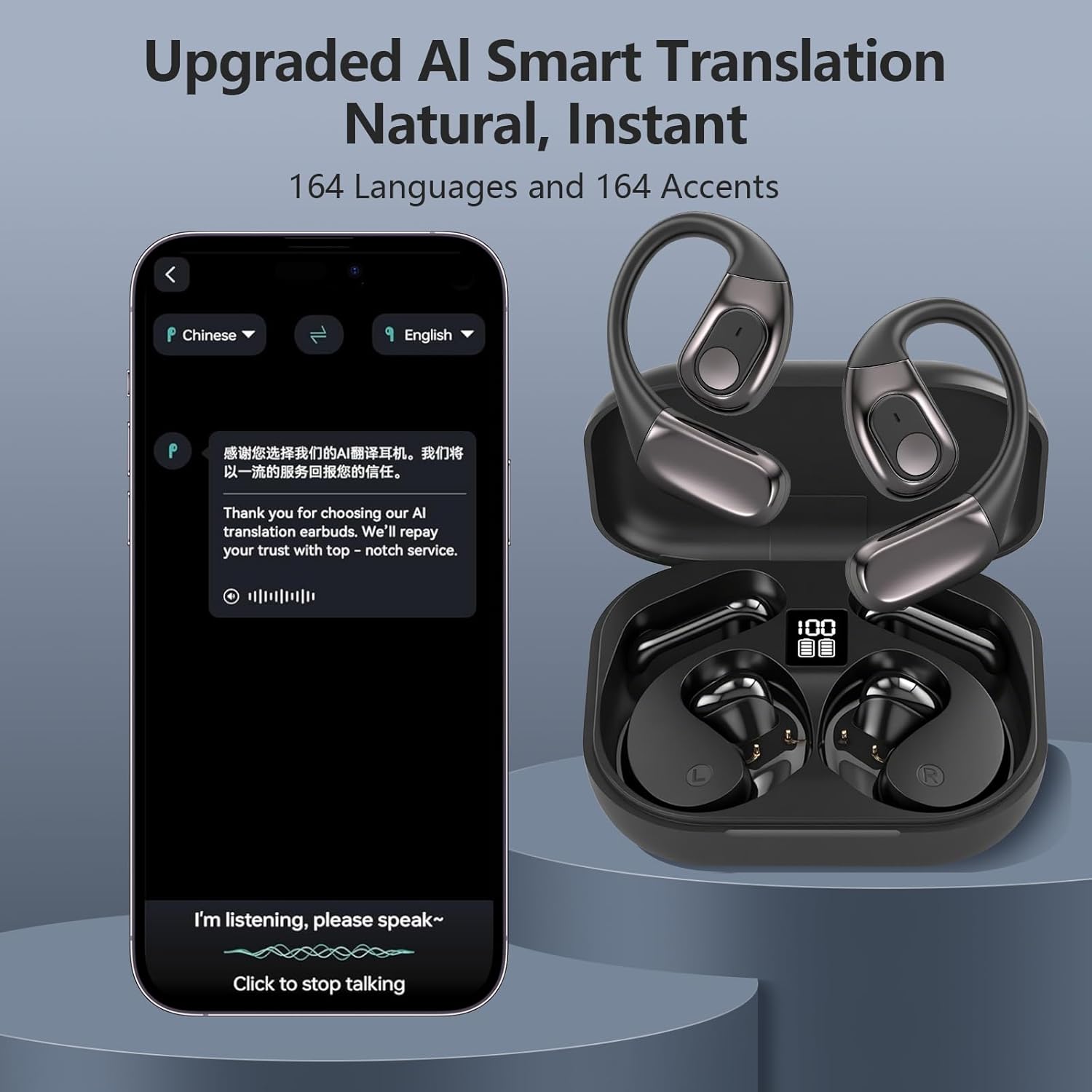
Image: Upgraded AI Smart Translation interface.
Available Translation Modes:
- Live Recording: Records and translates spoken content in real-time.
- Simultaneous Interpretation: Provides instant translation during conversations.
- Face-to-Face: Designed for direct conversations with another person, translating speech in real-time.
- Video Call Translation: Translates conversations during video calls.
- Voice Call Translation: Translates conversations during voice calls. The app generates an invitation link for seamless communication via a browser.
- Free Talk Mode: Allows two individuals, each wearing an earbud, to converse freely with real-time translation.

Image: Free Talk Mode for travel.
- Translation Machine Mode: Enables communication through the app's translation function without needing to wear the headset.

Image: Translation Machine Mode for business communication.
- Headphone + Phone Mode: One person wears the earbuds, while the other uses the phone. Tapping the earbud or phone initiates real-time translated conversations.

Image: Headphone + Phone Mode for interactive translation.
- Photo Translation: Use your phone's camera through the app to translate text from images, such as menus or signs.

Image: Photo Translation feature in action.
2. Music Playback and Phone Calls
The Q81 AI earbuds combine translation, music playback, and call functionality. They feature a 14.2mm diaphragm speaker and 4 high-precision microphones for clear audio quality during music listening and phone calls. The advanced microphone system ensures precise voice pickup and reduces background noise.

Image: 3-in-1 functionality for translation, music, and calls.
3. Smart Touch Controls
The earbuds are equipped with intuitive touch controls for easy management of music and calls. Refer to the 'Ear Dance' app or the mini-manual for specific tap gestures for various functions.
Charging and Battery Life
The Psadhi Q81 AI earbuds offer extended battery life. Each earbud provides up to 10 hours of uninterrupted playtime on a single charge. The portable charging case provides an additional 50 hours of power, totaling up to 60 hours of use. Rapid charging technology allows for approximately 1 hour of listening time with just 5 minutes of charging.
The charging case features a USB-C port for convenient charging. Connect the provided USB-C cable to the charging case and a compatible power source (e.g., USB wall adapter, computer USB port). The digital display on the case indicates the current battery level.

Image: Earbuds in charging case with battery indicator.
Maintenance and Care
The Q81 AI earbuds are IPX7 waterproof, providing protection against sweat and rain. This makes them suitable for sports, workouts, and daily activities. To maintain their condition:
- Wipe the earbuds with a soft, dry cloth after each use, especially after workouts.
- Avoid prolonged exposure to water or submersion.
- Store the earbuds in their charging case when not in use to protect them and keep them charged.
- Keep the charging contacts on both the earbuds and the case clean and dry.

Image: IPX7 waterproof feature.
Troubleshooting
- Earbuds not connecting/pairing: Ensure the protective film on the charging contacts of the earbuds has been removed. Verify Bluetooth is enabled on your device and 'OWS-Q81' is selected. Restart your device and try pairing again.
- No sound or poor audio quality: Check the earbud placement to ensure the speaker is correctly positioned against your ear. Verify the volume levels on both your device and the app. Ensure earbuds are fully charged.
- Translation not working: Confirm the 'Ear Dance' app is open and connected to the earbuds. Check your internet connection, as most translation features require online access. Ensure the correct source and target languages are selected in the app.
- Charging issues: Ensure the USB-C cable is securely connected to both the case and the power source. Check the charging contacts for any debris.
Specifications
- Model Number: Q81 AI
- Connectivity: Bluetooth 5.4
- Translation Languages: 144 languages, 164 accents
- Speaker Size: 14.2mm diaphragm
- Microphones: 4 high-precision microphones
- Waterproof Rating: IPX7
- Earbud Weight: 8g (each)
- Battery Life: Up to 10 hours (earbuds), up to 50 additional hours (charging case)
- Charging Port: USB-C
- Item Weight: 3.84 ounces
- Package Dimensions: 4.72 x 3.58 x 1.46 inches
Official Product Video
Video: A quick overview of the Psadhi AI Translation Earbuds Q81 AI, demonstrating key features and ease of use.
Warranty and Support
For warranty information or technical support, please refer to the contact details provided in your product packaging or visit the official Psadhi website. Keep your purchase receipt for any warranty claims.


