
1. Introduction
The Milwaukee Dual Range Voltage Detector (Model 2208-20) is a compact, cordless tool designed for non-contact detection of AC voltage. It features dual-range sensitivity to identify both standard and low-voltage electrical systems, making it suitable for a wide range of commercial and residential applications, including LED lighting, HVAC controls, fire suppression, and security systems. This detector automatically differentiates between voltage ranges, providing clear indications through colored LEDs and audible tones.
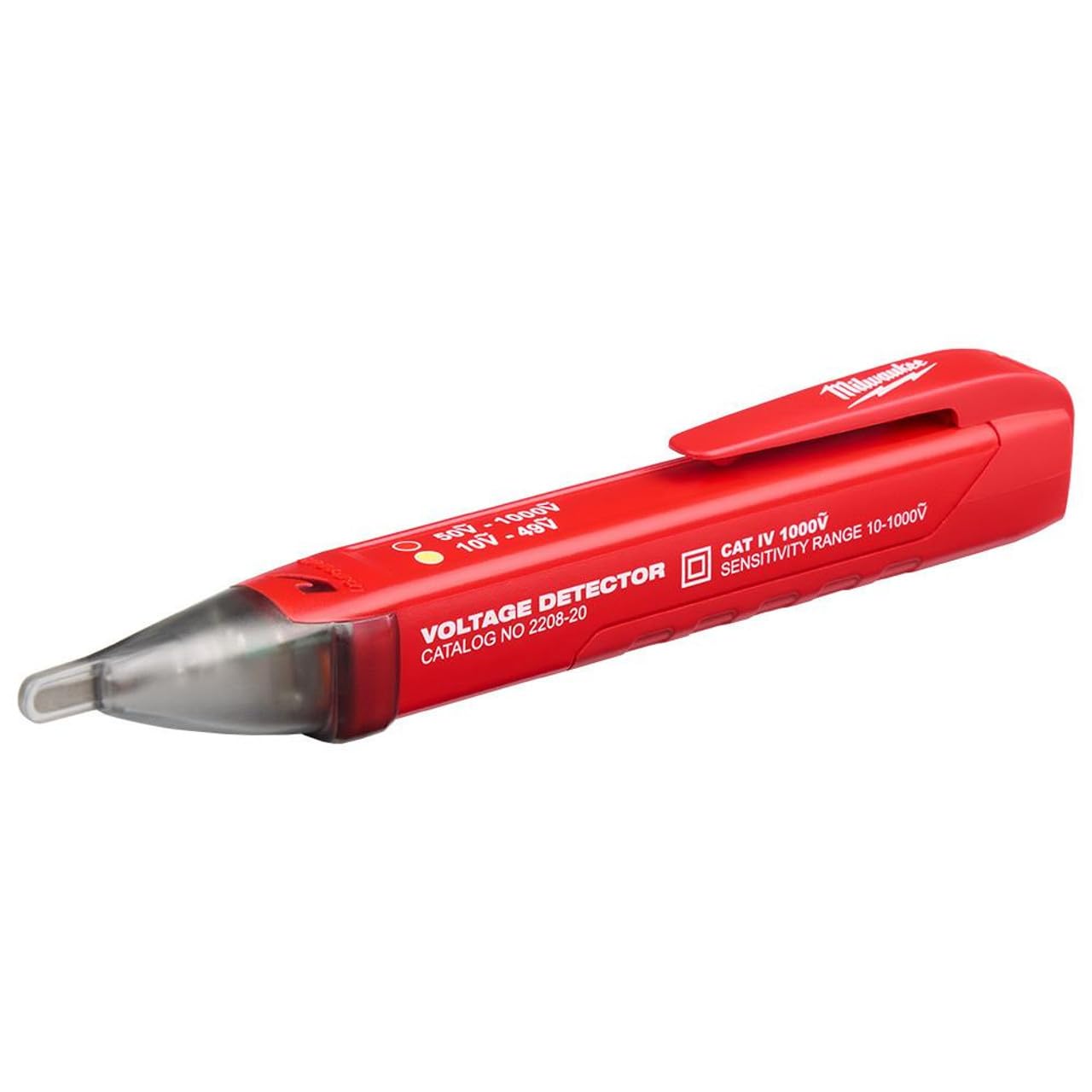
Image 1.1: The Milwaukee Dual Range Voltage Detector (Model 2208-20) showing its compact design and indicator lights.
2. Safety Information
WARNING: Always read and understand all safety instructions before using this voltage detector. Failure to follow these instructions may result in electric shock, fire, or serious injury.
- Personal Protective Equipment (PPE): Always wear appropriate personal protective equipment, such as safety glasses and insulated gloves, when working with electrical systems.
- Verify Operation: Before and after each use, test the voltage detector on a known live circuit to ensure it is functioning correctly.
- Assume Live Circuits: Always assume that any circuit is live until it has been safely tested and confirmed de-energized.
- Inspect Tool: Do not use the detector if it appears damaged or is not operating properly.
- Operating Environment: Use the detector only in dry conditions. Do not use in wet or damp environments.
- CAT IV 1000V Rating: This detector is rated for CAT IV 1000V, indicating its suitability for measurements at the source of the low-voltage installation, such as electricity meters and primary overcurrent protection devices. Adhere to all local electrical codes and safety standards.
3. Setup
3.1 Battery Installation
The Milwaukee Dual Range Voltage Detector requires two AAA batteries (not included) for operation.
- Locate the battery compartment cover on the rear of the detector.
- Slide or unclip the cover to open the compartment.
- Insert two AAA batteries, ensuring correct polarity (+ and -) as indicated inside the compartment.
- Replace the battery compartment cover, ensuring it is securely closed.
3.2 Initial Check
After installing batteries, press the power button to turn on the detector. The indicator light should illuminate, and a short beep may sound, confirming the unit is operational. Test on a known live circuit before first use.
4. Operating Instructions
4.1 Powering On/Off
- To turn on, press the power button. The detector will emit a short beep and the green LED will illuminate, indicating it is ready for use.
- To turn off, press and hold the power button until the LED turns off. The detector also features an auto-off function to conserve battery life after a period of inactivity.
4.2 Detecting AC Voltage
- Ensure the detector is powered on and functioning (test on a known live source).
- Place the tip of the detector near the conductor, outlet, or component you wish to test.
- The detector will automatically sense the voltage range.
- High Voltage Detection (50-1000V AC): If high AC voltage is detected, the red LED will flash rapidly, and a fast, continuous audible beep will sound.
- Low Voltage Detection (10-49V AC): If low AC voltage is detected (e.g., in LED lighting, HVAC, or security systems), the green LED will flash slowly, and a slower, intermittent audible beep will sound.
- Move the detector along the conductor to pinpoint the source of the voltage.
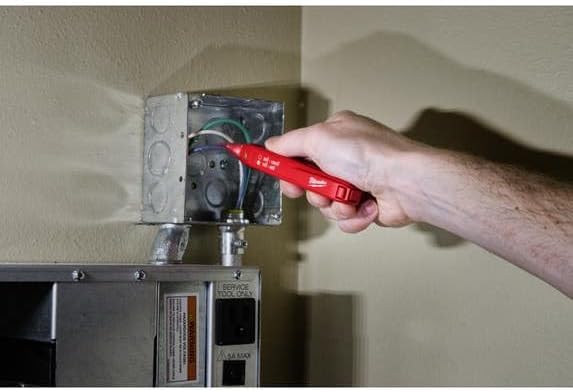
Image 4.1: A user demonstrating the application of the Milwaukee Voltage Detector to check for voltage in an electrical junction box.
5. Maintenance
5.1 Cleaning
Wipe the detector with a soft, damp cloth. Do not use abrasive cleaners or solvents. Ensure the detector is completely dry before storage or next use.
5.2 Battery Replacement
Replace batteries when the indicator lights dim or the detector fails to power on or respond consistently. Refer to Section 3.1 for battery installation instructions.
5.3 Storage
Store the detector in a cool, dry place, away from direct sunlight and extreme temperatures. If storing for extended periods, remove the batteries to prevent leakage.
6. Troubleshooting
- Detector does not power on: Check battery installation and ensure batteries are fresh.
- No detection on known live circuit: Verify batteries are installed correctly and have sufficient charge. Ensure the detector is powered on. The tip of the detector must be in close proximity to the AC voltage source.
- Inconsistent readings: Ensure the detector is clean and free from moisture. Avoid strong electromagnetic fields that could interfere with readings.
- False positives/negatives: Always re-test on a known live source before and after use. Environmental factors can sometimes influence non-contact detectors.
If issues persist, contact Milwaukee customer support or a qualified service technician.
7. Specifications
- Brand:
- Milwaukee
- Model:
- 2208-20
- Power Source:
- Battery Powered (2 x AAA)
- Voltage Measurement Range:
- 10-1000V AC (Dual Range: 10-49V AC, 50-1000V AC)
- Safety Rating:
- CAT IV 1000V
- Item Weight:
- 0.15 Pounds
- Item Dimensions:
- 10 x 5 x 3 inches
- UPC:
- 045242853526
- Included Components:
- Milwaukee Electric - DUAL RANGE VOLTAGE DETECTOR
8. Warranty and Support
This Milwaukee Dual Range Voltage Detector is covered by a Manufacturer Warranty. For specific details regarding warranty terms, duration, and how to make a claim, please refer to the documentation included with your product or visit the official Milwaukee website. For technical support or service inquiries, please contact Milwaukee customer service directly through their official channels.


