
1. Introduction
This manual provides essential instructions for the safe and effective use of your Fiteye Waterless Scent Diffuser Kit. Please read this manual thoroughly before operating the device and retain it for future reference.
2. Product Overview
The Fiteye Waterless Scent Diffuser utilizes advanced nano-atomization technology to disperse essential oils without water or heat, providing a pure and consistent fragrance experience. It features smart app and remote control for customizable operation, ultra-quiet performance, and a soothing 7-color mood light.

Image: The Fiteye Waterless Scent Diffuser Kit, showcasing the diffuser unit, five bottles of essential oils, a remote control, and a smartphone displaying the control application.
Package Contents:
- Fiteye Waterless Scent Diffuser (Model XXJ-black)
- 5 x 20ml Essential Oil Bottles
- Remote Control
- Charging Cable (implied by 'Batteries included' and 'Charging Base' feature)
3. Setup
3.1 Initial Charging
Before first use, ensure the diffuser's internal Lithium Polymer battery is fully charged. Connect the charging cable to the diffuser and a suitable power source. The charging indicator light will provide status.
3.2 Inserting Essential Oil

Image: A step-by-step visual guide demonstrating how to correctly insert an essential oil bottle into the diffuser unit.
- Step 1: Hold the body of the device firmly and pull out the diffuser head and the essential oil bottle upwards.
- Step 2: Rotate the essential oil bottle clockwise to remove it from the diffuser head.
- Step 3: Pour your desired essential oil into the empty bottle or use one of the included pre-filled bottles. Rotate the essential oil bottle counterclockwise to attach it to the diffuser head.
- Step 4: Align the designated lock position on the main unit and press down to ensure that the diffuser head with the oil bottle is firmly locked into place.
- Step 5: Long press the button on the diffuser. The blue light will turn on, indicating the device is starting operation.
Warm Reminder: Ensure the diffuser head and the diffuser body are properly connected and sealed. Improper connection may affect fragrance diffusion.
4. Operating Instructions
4.1 Power On/Off
To power on the diffuser, long press the main button on the device. The blue indicator light will illuminate. To power off, long press the button again until the light turns off.
4.2 Working Modes and Intensity
The diffuser offers three working modes (High, Medium, Low) to customize fragrance intensity and duration. These modes control the atomization cycle:

Image: A visual representation of the diffuser's three working modes (High, Medium, Low) and their corresponding atomization intervals, alongside the 7-color breathing light feature.
- High: Works for 30 seconds, stops for 90 seconds.
- Medium: Works for 30 seconds, stops for 120 seconds.
- Low: Works for 30 seconds, stops for 180 seconds.
You can cycle through these modes using the device button, remote control, or the smartphone application.
4.3 7-Color Soothing Mood Light
The diffuser includes a soft, 7-color cycling LED light. This feature can be turned on or off independently via the remote control or the smartphone application to suit your preference.
5. Smart App Control
The Fiteye Waterless Scent Diffuser can be controlled via a dedicated smartphone application, offering advanced customization options.
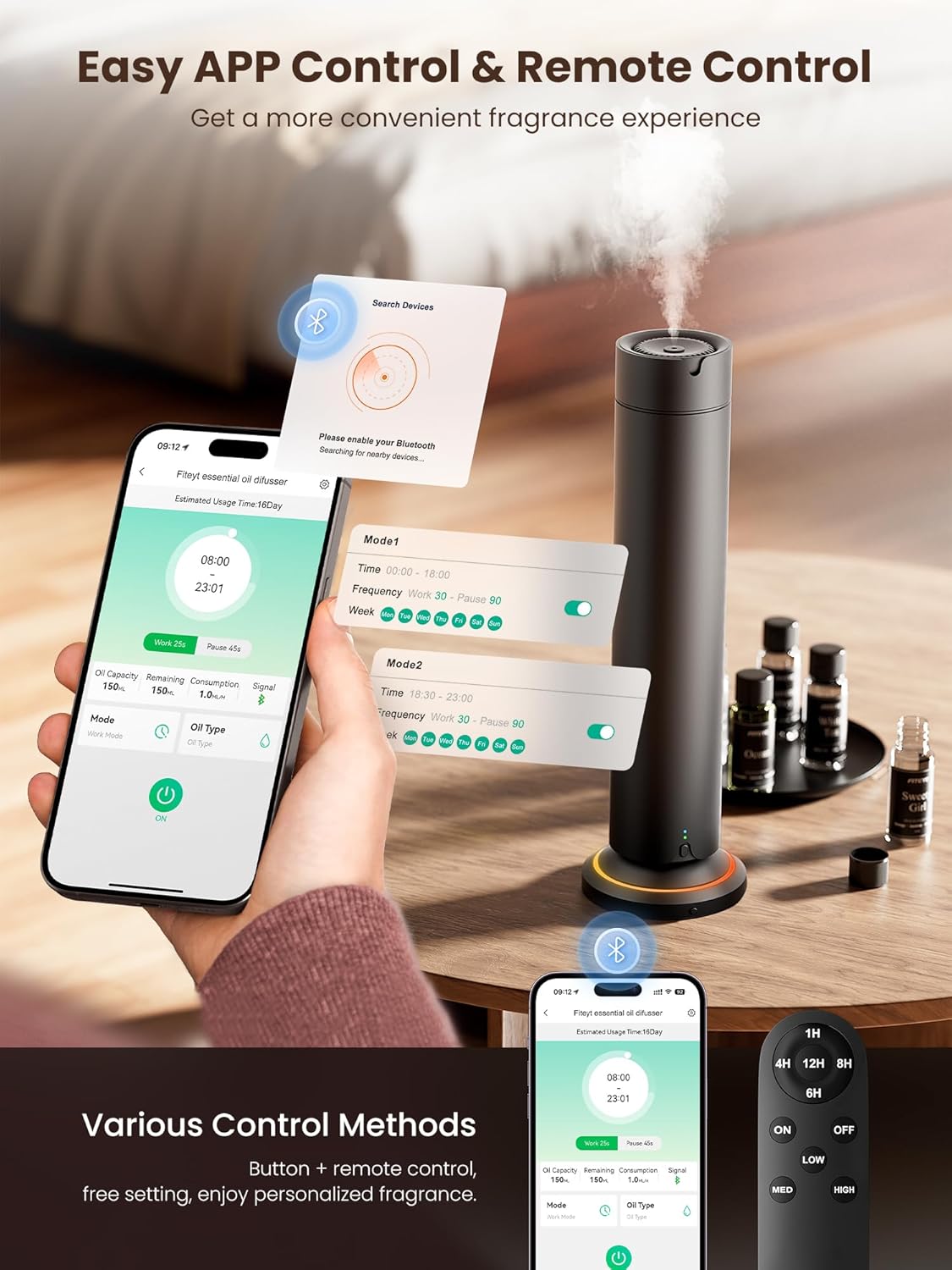
Image: A smartphone displaying the Fiteye diffuser's control application, showing scheduling and intensity settings, next to the physical remote control.
5.1 Connecting to the App
- Download the Fiteye essential oil diffuser app from your smartphone's app store.
- Ensure Bluetooth is enabled on your smartphone.
- Open the app and follow the on-screen instructions to connect to your diffuser.
5.2 App Features
Once connected, the app allows you to:
- Customize multiple advanced schedules, including specific run dates and times.
- Adjust atomization intensity (High, Medium, Low).
- Set working hours and rest periods.
- Control the 7-color mood light (on/off).
6. Remote Control
The included remote control provides convenient manual operation of the diffuser.
6.1 Remote Functions
- ON/OFF: Powers the diffuser on or off.
- LOW/MED/HIGH: Adjusts the atomization intensity.
- 1H/4H/6H/8H: Sets a timer for continuous operation.
7. Maintenance
7.1 Cleaning
To maintain optimal performance, regularly clean the diffuser. Disconnect the power before cleaning. Wipe the exterior with a soft, damp cloth. For the diffuser head and essential oil bottle, follow the removal steps (Section 3.2) and clean with a small amount of rubbing alcohol to remove any oil residue. Ensure all parts are completely dry before reassembly.
7.2 Essential Oil Replacement
When an essential oil bottle is empty, follow the steps in Section 3.2 to remove it and replace it with a new bottle of essential oil.
8. Troubleshooting
- No mist or weak fragrance: Check if the essential oil bottle is properly installed and sealed. Ensure there is sufficient essential oil in the bottle. Verify the diffuser head is clean and not clogged.
- Device not turning on: Ensure the battery is charged. Connect the diffuser to a power source and try again.
- App connection issues: Ensure Bluetooth is enabled on your phone and the diffuser is within range. Restart both the app and the diffuser if necessary.
9. Specifications
| Model Number | XXJ-black |
| Product Dimensions | 13.38 x 2.68 x 13.38 inches |
| Weight | 3.64 Pounds |
| Material | Aluminum |
| Power Source | 1 Lithium Polymer battery (included) |
| Coverage Area | Up to 1500 sq ft |
| Noise Level | <20dB |
| Special Features | APP Control, Remote Control, Long Lasting Aroma, Pet Friendly, Timer Setting, 7-Color Mood Light |
10. Safety Information
10.1 General Safety
- This diffuser operates without water or heat, making it safe for use around pets and children.
- Do not immerse the device in water or any other liquid.
- Use only essential oils recommended for diffusers.
- Keep out of reach of small children and pets when not in use.
- Do not block the mist outlet during operation.
10.2 Essential Oil Disclaimer
Statements regarding dietary supplements have not been evaluated by the FDA and are not intended to diagnose, treat, cure, or prevent any disease or health condition.
11. Warranty and Support
Warranty and specific support contact information are not available in the provided product data. Please refer to the product packaging or the manufacturer's official website for details regarding warranty coverage and customer support.