
voltretech VTR-M2-32A-ADJ-25FT-N1
Voltre M2 Level 1 & 2 EV Charger User Manual
Model: VTR-M2-32A-ADJ-25FT-N1
Introduction
Thank you for choosing the Voltre M2 Level 1 & 2 EV Charger. This portable electric vehicle charger is designed to provide efficient and reliable charging for a wide range of electric vehicles, including Tesla models (with an adapter) and other SAE J1772 compatible EVs. This manual provides essential information for safe and optimal use of your charger, covering setup, operation, maintenance, and troubleshooting.
Safety Information
Please read all safety instructions carefully before using the charger. Failure to follow these instructions may result in electric shock, fire, or serious injury.
- Electrical Safety: Always ensure the power outlet is properly grounded. Do not use extension cords or adapters that are not rated for the charger's power requirements.
- Environmental Conditions: The charger is designed with NEMA enclosures (IP65) for protection against dirt, rain, and snow. It operates optimally from -22 °F to 122 °F (-30 °C to 50 °C). Avoid submerging the charger in water.
- Cable Handling: Always handle the charging cable by the plug. Do not pull the cable to disconnect. Ensure the cable is not kinked, pinched, or run over by vehicles.
- Ventilation: Ensure adequate ventilation around the charger during operation to prevent overheating.
- Children and Pets: Keep the charger and cables out of reach of children and pets.

The Voltre M2 charger is built for extreme weather, with IP65 rated enclosures protecting components from dirt, rain, and snow, ensuring reliable operation in various conditions.
Package Contents
Verify that all items are present in your package:
- 1 x Voltre M2 EV Charger
- 1 x Organizer/Carrying Case
- 1 x NEMA 14-50 Plug
- 1 x NEMA 5-15 Adapter
- 1 x User Manual (this document)
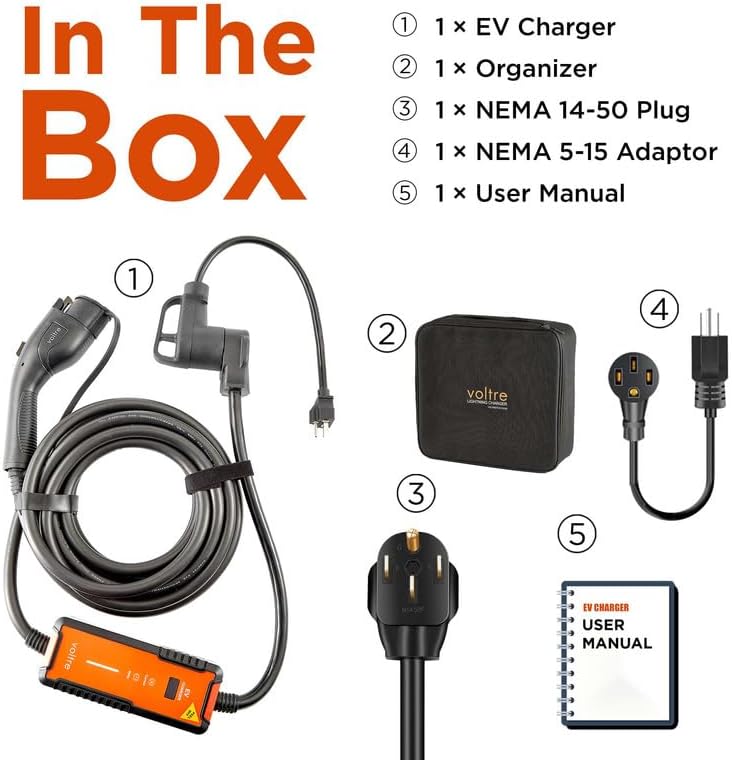
Illustration of the items included in the Voltre M2 EV Charger package.
Setup and Installation
The Voltre M2 charger is designed for portability and does not require complex installation. Follow these steps to set up your charger:
- Choose the Right Power Plug: Identify the appropriate power outlet for your charging needs. Use the NEMA 5-15 adapter for Level 1 (110V) charging or the NEMA 14-50 plug for Level 2 (240V) charging.
- Insert Power Plug: Securely insert the chosen power plug into a wall socket.
- Adjust Current and Charging Time (Optional): Before connecting to your vehicle, you can press the 'Current' button to cycle through available amperage settings (10/13/16/24/28/32A). Press the 'Delay' button to set a delayed start time (1-8 hours).
- Connect to EV: Insert the SAE J1772 charging plug into your electric vehicle's charging port. For Tesla vehicles, a J1772 to Tesla adapter (not included) is required.
- Verify Charging: Charging will start automatically. Monitor the indicator light and the display screen to confirm that charging is active.

Step-by-step guide for connecting the Voltre M2 charger to a power source and an EV.
Operating Instructions
The Voltre M2 charger offers flexible charging options and an intuitive display.
Charging Levels and Amperage
- Level 1 Charging: Utilizes the NEMA 5-15 adapter for 110V outlets, providing up to 13A (Max). Ideal for overnight charging or when Level 2 is unavailable.
- Level 2 Charging: Utilizes the NEMA 14-50 plug for 240V outlets, providing adjustable amperage from 10A to 32A (Max). This offers up to 7KW, significantly faster than Level 1 charging.
Adjusting Current and Delay
The charger features a simple interface for adjusting settings:
- Current Adjustment: Press the 'Current' button (labeled 'A') to cycle through available amperage settings (10A, 13A, 16A, 24A, 28A, 32A).
- Delay Charging: Press the 'Delay' button (labeled with a clock icon) to set a charging delay from 1 to 8 hours. This is useful for scheduling charging during off-peak electricity rates.
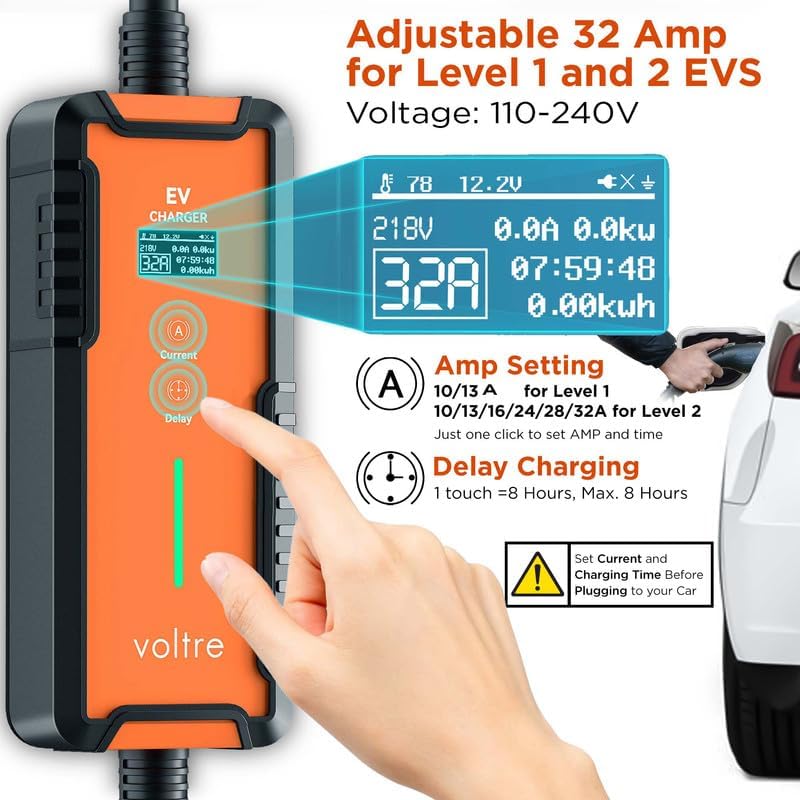
The charger's display allows for easy adjustment of current and setting a charging delay.
LED Indicator Lights
The charger features an LED indicator light to provide quick status updates:
- Red Light (Solid): Standby mode.
- Red Light (Flashing): Error detected. Refer to troubleshooting.
- Blue Light (Solid): Ready to charge (charger plugged into wall socket).
- Blue Light (Flashing): Ready to charge (charger connected to vehicle).
- Green Light (Solid): Fully charged.
- Green Light (Flashing): Charging in progress.
Understanding the LED indicator lights for quick status checks.
Features and Benefits
- Universal Compatibility: Compatible with Tesla vehicles (J1772 to Tesla adapter required, not included) and all SAE J1772 EVs.
- Enhanced Safety & Durability: Features UL Recognized Cables with superior 10 AWG copper, thicker than standard cables, ensuring safer and more efficient power transfer.
- Portable Design: Weighing only 13.2 lbs and including a compact carrying case, the charger offers full mobility for charging anywhere.
- Smart Display: The LED screen displays real-time charging status, including temperature, charging voltage, current, power, time, and energy consumed.

The Voltre M2 charger is universally compatible with most EV models.

Thicker MAX Cables ensure enhanced safety and durability.

The lightweight and portable design allows for full mobility.
Troubleshooting
If you encounter issues with your Voltre M2 charger, refer to the following common problems and solutions:
| Problem | Possible Cause | Solution |
|---|---|---|
| Charger not turning on / No display | No power from outlet, loose connection. | Ensure the power plug is fully inserted into a live wall socket. Check the circuit breaker. |
| Charging not starting | Vehicle not properly connected, delay timer set, vehicle battery full. | Ensure the J1772 plug is fully inserted into the vehicle. Check if a delay timer is active. Verify vehicle battery status. |
| Grounding Fault Issue (Red light flashes 4 times) | Improper grounding in the electrical system. | To Enter Grounding Mode: Long press the 'Current' button for 3 seconds. The display will indicate grounding mode. To Exit Grounding Mode: Long press the 'Delay' button for 3 seconds. If the issue persists, consult a qualified electrician. |
| Over Voltage Protection (Red light flashes 5 times) | Input voltage exceeds safe limits. | Unplug the charger immediately. Check the outlet voltage. Do not use if voltage is unstable or too high. |
| Over Current Protection (Red light flashes 6 times) | Current draw exceeds set limit or circuit capacity. | Reduce the amperage setting on the charger. Ensure the outlet and circuit can handle the selected current. |
| Leakage Protection (Red light flashes 7 times) | Electrical leakage detected. | Unplug the charger. Do not use if there is any sign of damage or moisture. Consult a qualified electrician. |
| Over Heating Protection (Red light flashes 8 times) | Charger or cable is overheating. | Disconnect the charger and allow it to cool down. Ensure adequate ventilation and no obstructions around the charger. |
Specific instructions for resolving grounding fault issues.
Specifications
| Feature | Detail |
|---|---|
| Model Number | VTR-M2-32A-ADJ-25FT-N1 |
| Input Voltage | 110-240 Volts AC |
| Max Amperage (Level 2) | 32A |
| Max Amperage (Level 1) | 13A |
| Max Power (Level 2) | 7KW |
| Max Power (Level 1) | 1.56KW |
| Cable Length | 25 Feet |
| Cable Gauge | 10 AWG Copper |
| Operating Temperature | -22 °F to 122 °F (-30 °C to 50 °C) |
| IP Rating | IP65 |
| Product Dimensions | 19 x 8 x 5 inches |
| Item Weight | 10.98 pounds |

Detailed specifications for Level 1 and Level 2 charging.
Warranty and Support
Voltretech is committed to providing high-quality products. For warranty information, technical support, or service inquiries, please refer to the contact information provided on the product packaging or visit the official Voltretech website. Keep your purchase receipt as proof of purchase for any warranty claims.
Ask a question about this manual
Ask about setup, troubleshooting, compatibility, parts, safety, or missing instructions. Manuals+ will review the question and use this page’s manual context to help answer it.