
Introduction
Thank you for choosing the TOURUA Commercial Grade Slush Machine, Model XR-300. This high-capacity frozen drink maker is designed for commercial use, offering efficient and consistent production of various frozen beverages. This manual provides essential information for the safe and effective setup, operation, maintenance, and troubleshooting of your machine. Please read it thoroughly before initial use and retain it for future reference.

Figure 1: TOURUA Commercial Grade Slush Machine XR-300. This image displays the dual-tank slush machine, highlighting its design and capacity.
Important Safety Information
Always follow basic safety precautions when using electrical appliances to reduce the risk of fire, electric shock, and injury. This machine is for commercial use only and should be operated by trained personnel.
- Ensure the power supply matches the machine's requirements (110 V).
- Do not immerse the machine, cord, or plug in water or other liquids.
- Keep hands and utensils out of the tanks during operation to prevent injury.
- Unplug the machine before cleaning or performing any maintenance.
- Place the machine on a stable, level surface with adequate ventilation.
- Do not operate the machine with a damaged cord or plug.
Setup Instructions
1. Unpacking
- Carefully remove the machine from its packaging.
- Inspect the machine for any shipping damage. Contact your supplier immediately if damage is found.
- Remove all packing materials, including any protective films or tapes.
2. Placement
- Place the machine on a sturdy, level countertop or table capable of supporting its weight (approximately 89 lbs when empty, more when filled).
- Ensure there is adequate space around the machine for ventilation, especially at the rear and sides where the compressor vents are located.
- Avoid placing the machine near heat sources or in direct sunlight.

Figure 2: Compact size and placement. The machine's dimensions (32"x19"x18.9") allow for placement on most commercial countertops.
3. Initial Cleaning
- Before first use, thoroughly clean all parts that will come into contact with beverages.
- Remove the tanks, lids, and dispensing handles. Wash them with warm, soapy water, rinse thoroughly, and dry.
- Wipe down the exterior of the machine with a damp cloth.
- Ensure all parts are completely dry before reassembling.
4. Power Connection
- Connect the power cord to a grounded 110V electrical outlet.
- Ensure the outlet is dedicated and can handle the machine's power requirements (1000W compressor).
Operating Instructions
1. Filling the Tanks
- Prepare your desired beverage mix according to its instructions. Ensure the mix is suitable for frozen drink machines.
- Open the easy-fill hatch on top of each tank.
- Pour the beverage mix into the tanks. Each tank has a 15 L (4 gal) capacity, totaling 30 L (8 gal) for both. Do not overfill past the maximum fill line.
- Close the hatches securely.

Figure 3: Easy-fill tanks. The machine features convenient top-fill hatches for adding beverage mixes.
2. Control Panel Overview
The central control panel allows you to manage the machine's settings and operating modes.
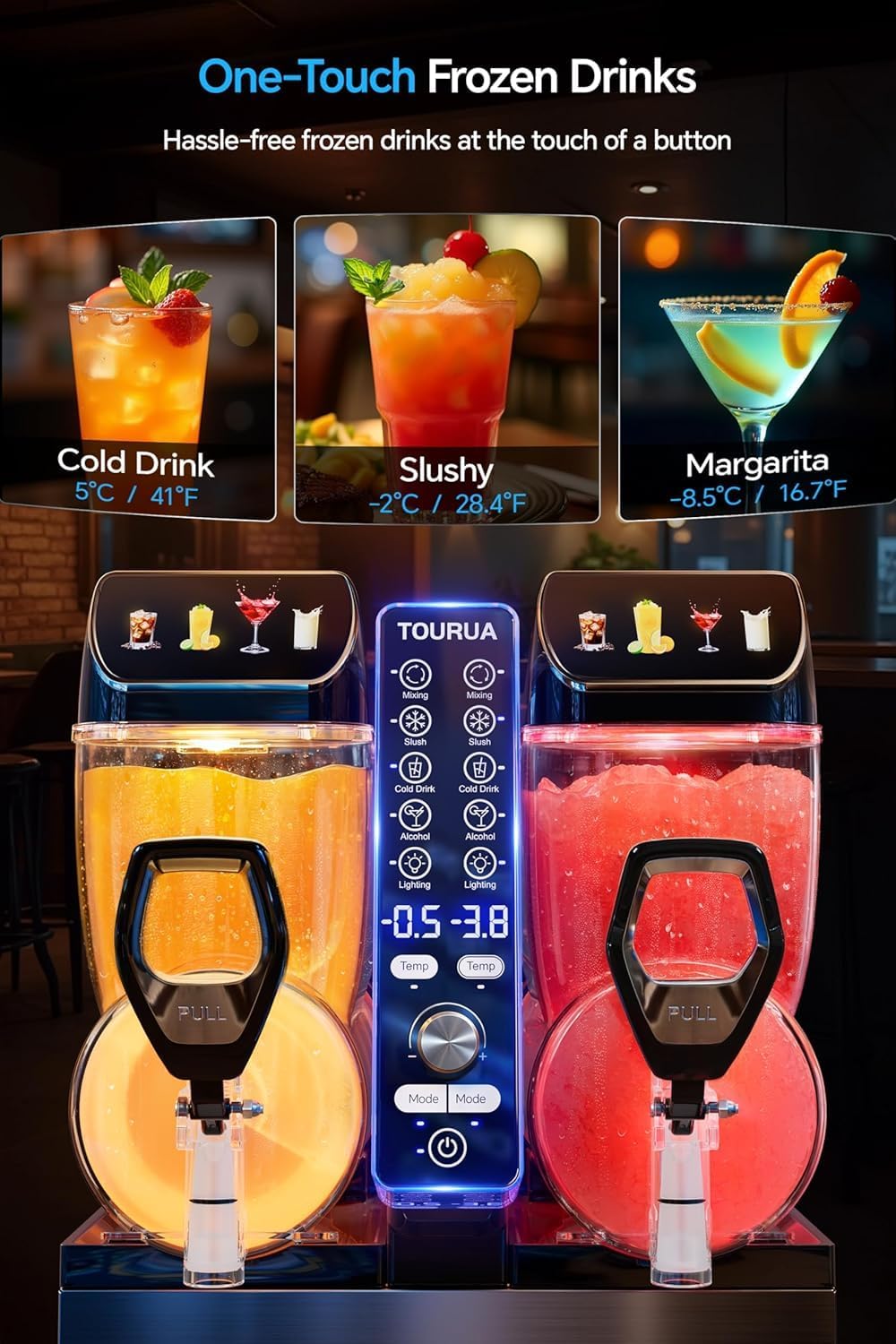
Figure 4: Control Panel. This image shows the digital display and buttons for mode selection and temperature control.
- Power Button: Turns the machine on/off.
- Mode Selection: Choose between SLUSH, FROZEN JUICE, or ALCOHOL SLUSH presets.
- Temperature Dial: Adjusts the freezing temperature for desired consistency.
- LED Light Control: Activates the 4-color LED lid lights.
- Digital Display: Shows current temperature and settings.
3. Selecting Operating Mode
The machine offers three preset programs for optimal results:
- SLUSH: Standard slush consistency.
- FROZEN JUICE: Slightly less frozen, ideal for fruit juices.
- ALCOHOL SLUSH: Optimized for alcoholic beverages, which freeze at lower temperatures.
Use the mode selection buttons on the control panel to choose the appropriate setting for your beverage. The temperature dial allows for fine-tuning the consistency.

Figure 5: No-Guess Texture Control. The temperature control knob and preset modes simplify achieving desired drink consistency.
4. Freezing Process
Once the mode is selected, the 1000W compressor and spiral auger will begin the freezing process. The machine is capable of rapid freezing, typically achieving desired consistency in approximately 30 minutes. The spiral auger ensures even freezing and maintains a silky texture throughout the day.

Figure 6: Powerful Air-Cooled Compressor. This illustration shows the internal components responsible for the rapid 30-minute freezing capability.
5. Dispensing Drinks
To dispense a drink, place a cup under the dispensing spout and pull the handle towards you. The large, comfortable handle and drip-free valve ensure a clean and easy pour.

Figure 7: Large Handle and Drip-Free Valve. This image demonstrates the ease of dispensing drinks with the ergonomic handle.
6. LED Light Lid
The machine features a 4-color LED light lid to enhance visibility and presentation of your frozen drinks. Use the control panel to select the desired color (Margarita, Slush, Cold Drink, Mixing) or to turn the lights off.

Figure 8: 4-Color LED Light Illumination. The LED lid lights enhance the visual appeal of the frozen beverages.
Maintenance and Cleaning
Regular cleaning and maintenance are crucial for the longevity and hygienic operation of your slush machine.
1. Daily Cleaning
- Empty Tanks: At the end of each day, or when tanks are empty, turn off and unplug the machine.
- One-Touch Cleaning: The machine features a "One-Touch Cleaning" function. Fill the tanks with warm water and a mild, food-safe cleaning solution. Activate the cleaning mode as per the control panel instructions.
- Disassemble and Wash: Remove the tanks, lids, augers, and dispensing handles. Wash all removable parts with warm, soapy water. Use a soft brush for hard-to-reach areas.
- Rinse Thoroughly: Rinse all parts with clean water to remove any soap residue.
- Sanitize: For commercial use, it is recommended to sanitize all food-contact surfaces with an approved food-grade sanitizer.
- Dry and Reassemble: Allow all parts to air dry completely before reassembling the machine. Ensure the drip tray is emptied and cleaned.

Figure 9: One-Touch Cleaning. This feature simplifies the daily cleaning process for the tanks and internal components.
2. Exterior Cleaning
- Wipe down the stainless-steel panels and other exterior surfaces with a damp cloth.
- Do not use abrasive cleaners or scouring pads, as they can damage the finish.
3. Air Filter Cleaning (Periodically)
- Locate the air filter on the side or rear of the machine.
- Carefully remove the filter and clean it with warm, soapy water.
- Rinse and allow to dry completely before reinserting. A clean air filter ensures efficient compressor operation.
Troubleshooting
This section addresses common issues you might encounter. For problems not listed here, please contact customer support.
| Problem | Possible Cause | Solution |
|---|---|---|
| Machine does not turn on. | No power supply; power cord not plugged in; circuit breaker tripped. | Ensure machine is plugged into a live 110V outlet. Check circuit breaker. |
| Drinks are not freezing or are too watery. | Incorrect mode selected; temperature setting too high; insufficient ventilation; mix ratio incorrect. | Select appropriate mode (e.g., SLUSH or ALCOHOL SLUSH). Lower temperature setting. Ensure adequate airflow around the machine. Verify beverage mix concentration. |
| Drinks are too thick or icy. | Temperature setting too low; mix ratio incorrect. | Raise temperature setting slightly. Verify beverage mix concentration. |
| Machine is making unusual noises. | Auger obstruction; machine not level; internal component issue. | Turn off and unplug. Check tanks for obstructions around the auger. Ensure machine is on a level surface. If noise persists, contact support. |
| Leaking from dispensing spout. | Dispensing valve not properly seated; worn seal. | Ensure the dispensing handle and valve components are correctly assembled and tightened. Inspect seals for wear and replace if necessary. |
Specifications
| Feature | Detail |
|---|---|
| Model Number | XR-300 |
| Brand | TOURUA |
| Capacity | 30 Liters (8 Gallons) total (2 x 15L tanks) |
| Power | 1000W Compressor, 110V |
| Rapid Freeze Time | Approximately 30 minutes |
| Dimensions (L x W x H) | 32" x 19" x 18.9" (Package Dimensions: 32.17 x 22.44 x 14.17 inches) |
| Item Weight | 89 pounds |
| Material | Stainless-steel panels, BPA-free tanks |
| Certifications | ETL certified |
| Features | 4-color LED light lid, 3 preset programs (SLUSH, FROZEN JUICE, ALCOHOL SLUSH), One-Touch Cleaning, Removable drip tray |
Warranty and Support
For warranty information, please refer to the documentation provided with your purchase or contact TOURUA customer support directly. The product typically includes a manufacturer's warranty covering defects in materials and workmanship.
For technical assistance, parts, or service inquiries, please contact Tourua Direct customer support. You can often find contact information on the product packaging or the seller's website.
- Customer Support: Refer to your purchase documentation or the seller's contact information for assistance.
- Returns: This product typically offers 30-day easy returns. Please check the specific return policy at the point of purchase.


