
1. Introduction
Thank you for choosing the TOMPROAD L10 Portable Bluetooth Speaker. This manual will guide you through the features, setup, and operation of your new speaker. Please read it carefully to ensure optimal performance and longevity of your device.
2. What's in the Box
- 1 x L10 Bluetooth Speaker
- 1 x AUX cable
- 1 x USB charge cable
- 1 x Dust-free wiping cloth
- 1 x User Manual

Image: All items included in the TOMPROAD L10 Portable Bluetooth Speaker package.
3. Product Features
- Powerful Audio: Equipped with a dual-driver system (1x1'' Tweeter + 1x3'' Woofer) delivering 40W (60W Peak) rich audio with deep bass, enhanced by built-in DSP Technology.
- Wireless & Wired Connectivity: Features advanced Bluetooth 5.3 for stable wireless transmission up to 100ft. Also supports wired connections via AUX cable for non-Bluetooth devices.
- Multi-function Playback: Supports TWS (True Wireless Stereo), AUX input, U-disk music playback, and TF card music playback.
- Long Battery Life: Built-in 5000mAh rechargeable battery provides 4-12 hours of playtime depending on volume.
- Portable Design: Features a hand-held pull belt for easy transport, ideal for various indoor and outdoor activities.
- Intuitive Controls & Display: User-friendly physical buttons and a precise volume knob, with a clear digital display showing playback mode and battery level.
- TWS Functionality: Pair two L10 speakers for 80W (120W Peak) powerful loud surround stereo sound.

Image: Internal audio components of the L10 speaker, illustrating the dual-driver system and DSP technology.

Image: Battery life and charging time details for the L10 speaker.

Image: The lightweight and portable design of the L10 speaker.
4. Controls and Ports
The TOMPROAD L10 speaker features an intuitive control panel and various ports for versatile connectivity.

Image: Detailed view of the speaker's control panel.
Control Panel Functions:
- Power ON/OFF: Turn the audio system on or off.
- Bass Volume Control Knob: Adjust the bass level.
- Treble Volume Control Knob: Adjust the treble level.
- Monitor Headphone Volume Control Knob: Adjust headphone volume.
- Short Press: Skips to the previous track.
- Long Press: Fast-rewinds.
- Short Press: Skips to the next track.
- Long Press: Fast-forwards.
- Mode Button: Switches between Bluetooth/USB/TF Card/AUX modes.
- Play/Pause Button: Short press to play or pause. Long press to pair TWS.
Rear Ports:
- USB Port: For U-disk music playback.
- TF Card Slot: For TF card music playback.
- DC IN (USB-C): Charging port for the speaker.
- AUX IN: 3.5mm audio jack for connecting external non-Bluetooth devices.
- Headphone Jack: For private listening.
Video: A detailed overview of the TOMPROAD L10 Portable Bluetooth Speaker, demonstrating its features, controls, and connectivity options.
5. Setup Instructions
5.1. Charging the Speaker
- Connect the provided USB charge cable to the DC IN (USB-C) port on the back of the speaker.
- Connect the other end of the USB cable to a compatible USB power adapter (not included) or a computer's USB port.
- The battery indicator on the display will show charging status. A full charge typically takes about 3-4 hours.
5.2. Powering On/Off
- To power on, press and hold the Power ON/OFF button on the top panel until the display lights up.
- To power off, press and hold the Power ON/OFF button again.
5.3. Bluetooth Pairing
- Ensure the speaker is powered on and in Bluetooth mode. The display will show "BLUE" and flash, indicating it's ready for pairing.
- On your mobile device (smartphone, tablet, laptop), enable Bluetooth.
- Search for available Bluetooth devices and select "L10" from the list.
- Once connected, the speaker will emit a confirmation sound, and "BLUE" on the display will stop flashing.
6. Operating Instructions
6.1. Basic Music Playback
- After successful pairing, you can play music from your connected device.
- Use the Play/Pause button on the speaker or your device to control playback.
- Adjust the master volume using the large knob on the front of the speaker.
- Use the Bass and Treble control knobs on the top panel to fine-tune the sound.
- Use the track navigation buttons (short press) for previous/next track.
6.2. TWS (True Wireless Stereo) Pairing
To achieve a broader and richer soundstage, you can pair two L10 speakers together.
- Ensure both L10 speakers are powered on and in Bluetooth mode, but not yet connected to any device.
- On one of the speakers (this will be your primary speaker), long press the Play/Pause button. It will enter TWS pairing mode.
- The two speakers will automatically connect to each other. A confirmation sound will indicate successful TWS pairing.
- Now, connect your mobile device to the primary speaker via Bluetooth as described in section 5.3.
- Enjoy synchronized stereo sound from both speakers.

Image: Two L10 speakers set up for TWS pairing, providing surround sound.
6.3. AUX/USB/TF Card Modes
To switch between different input sources, press the Mode button on the top panel.
- AUX Mode: Connect an external audio device using the 3.5mm AUX cable to the AUX IN port. The speaker will automatically switch to AUX mode or you can select it using the Mode button.
- USB Mode: Insert a U-disk with music files into the USB port. The speaker will automatically switch to USB mode or you can select it using the Mode button.
- TF Card Mode: Insert a TF card with music files into the TF Card slot. The speaker will automatically switch to TF Card mode or you can select it using the Mode button.
7. Maintenance
- Keep the speaker away from water, moisture, and extreme temperatures.
- Clean the speaker with the provided dust-free wiping cloth or a soft, dry cloth. Do not use abrasive cleaners or solvents.
- Avoid dropping the speaker or subjecting it to strong impacts.
- When not in use for extended periods, store the speaker in a cool, dry place and charge it periodically to maintain battery health.
8. Troubleshooting
| Problem | Possible Solution |
|---|---|
| Speaker does not power on. | Ensure the battery is charged. Connect the speaker to a power source using the USB-C cable. |
| Cannot pair via Bluetooth. | Ensure the speaker is in Bluetooth pairing mode (display shows flashing "BLUE"). Make sure your device's Bluetooth is enabled and within range (up to 100ft). Forget previous pairings on your device and try again. |
| No sound or low volume. | Check the volume levels on both the speaker and your connected device. Ensure the correct input mode (Bluetooth, AUX, USB, TF) is selected. |
| TWS pairing fails. | Ensure both speakers are not connected to any other Bluetooth device. Place them close to each other and try the TWS pairing process again. |
| Music playback from USB/TF card not working. | Ensure the USB drive or TF card is inserted correctly and contains compatible audio files. Select the correct mode using the Mode button. |
9. Specifications
| Feature | Detail |
|---|---|
| Model Name | Bluetooth Speaker L10 |
| Speaker Type | Portable Bluetooth Speaker |
| Mounting Type | Portable |
| Material | Acrylonitrile Butadiene Styrene (ABS) |
| Speaker Maximum Output Power | 60 Watts (Peak) |
| Subwoofer Diameter | 3 Inches |
| Tweeter Diameter | 1 Inches |
| Bluetooth Version | 5.3 |
| Bluetooth Range | 100 Feet |
| Battery Capacity | 5000 Milliamp Hours |
| Charging Time | 4 Hours |
| Play Time | 4-12 hours (depends on playing volume) |
| Connectivity Technology | Auxiliary, Bluetooth, USB |
| Audio Output Mode | Stereo |
| Signal-to-Noise Ratio | 80 dB |
| Product Dimensions | 3.94"D x 7.44"W x 7.48"H |
| Item Weight | 3.25 pounds |
| Water Resistance Level | Not Water Resistant |
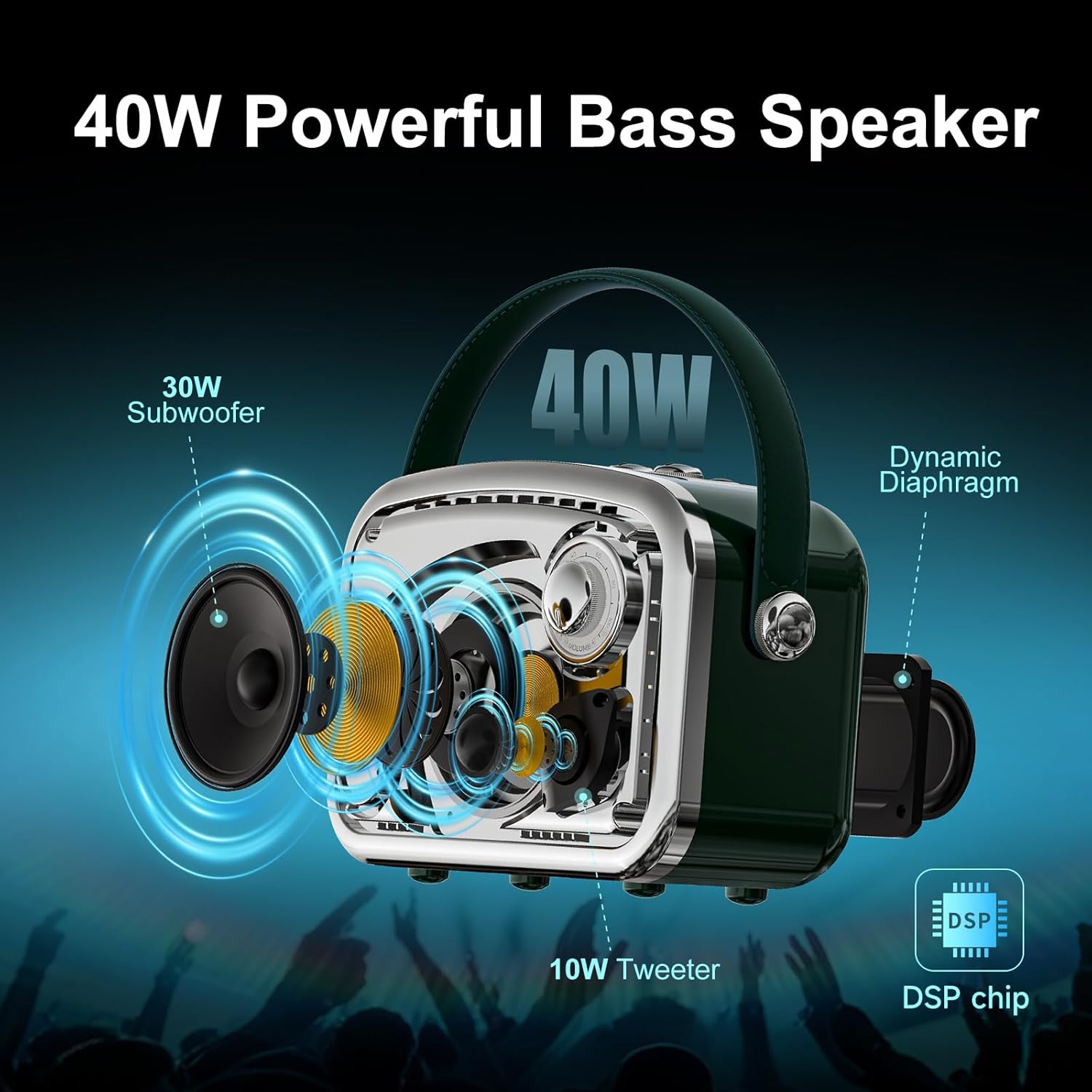
Image: Physical dimensions of the L10 speaker.
10. Warranty and Support
The TOMPROAD L10 Portable Bluetooth Speaker comes with a Limited Manufacturer Warranty. For any questions or assistance, please contact customer service. We aim to reply within 7-24 hours to provide you with the best support.