
1. Introduction
Thank you for purchasing the GOLON RX-M50BT Portable AM/FM/SW Radio Receiver. This device offers versatile audio entertainment with its multi-band radio tuner, USB and TF card playback capabilities, and portable design. Please read this manual carefully to ensure proper use and to maximize your listening experience.
2. Safety Instructions
- Do not expose the unit to rain or moisture to prevent fire or electric shock.
- Do not open the casing. Refer all servicing to qualified personnel.
- Avoid placing the unit near heat sources such as radiators, heat registers, stoves, or other apparatus (including amplifiers) that produce heat.
- Protect the power cord from being walked on or pinched, particularly at plugs, convenience receptacles, and the point where they exit from the apparatus.
- Unplug this apparatus during lightning storms or when unused for long periods of time.
- Use only attachments/accessories specified by the manufacturer.
- Dispose of batteries properly, following local regulations. Do not expose batteries to excessive heat.
3. Package Contents
Please check that all items are present:
- GOLON RX-M50BT Radio Receiver
- Power Adapter
- User Manual
4. Product Overview
Familiarize yourself with the main components of your GOLON RX-M50BT radio receiver.
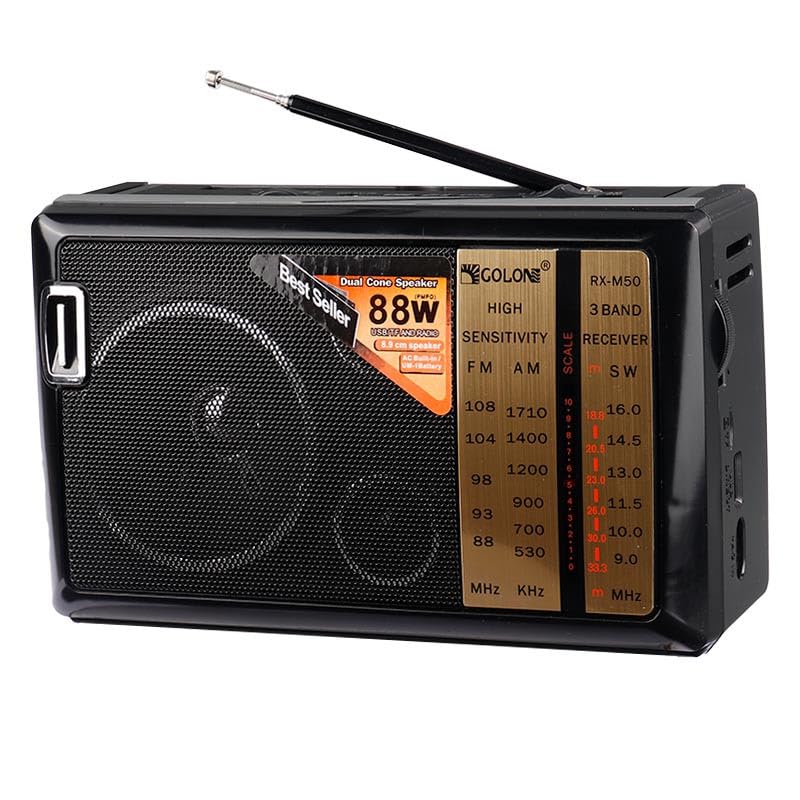
Figure 1: Front Panel Overview
This image displays the front of the GOLON RX-M50BT radio, highlighting the large speaker grille on the left, the frequency tuning dial and band indicators in the center, and various control buttons and switches on the right side of the main panel. The model number RX-M50 is visible on the tuning scale.
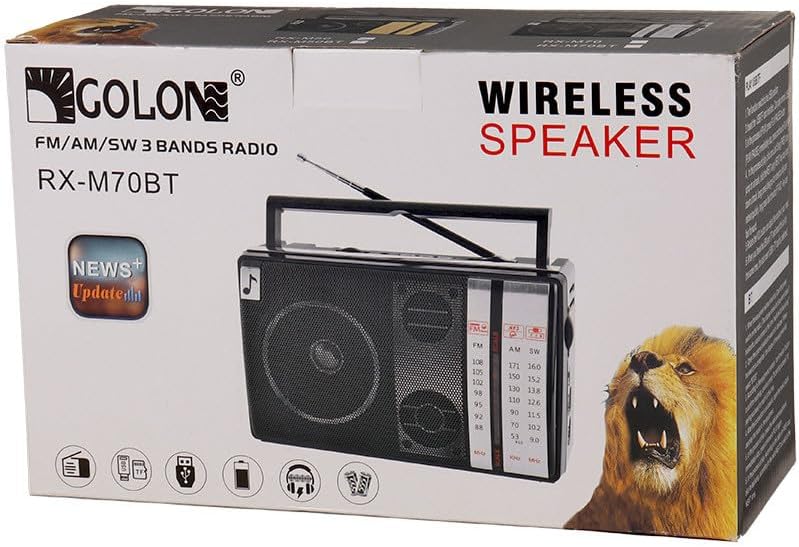
Figure 2: Top and Side Controls
This image provides a top-right perspective of the radio, showing the extendable antenna, the volume control knob, DC 5V IN port, and buttons for media playback (REW, PLAY, NEXT, PREV, PAUSE, F.FWD). Also visible are the USB and TF card slots, and a switch to select between FM, AM, and SW radio bands.
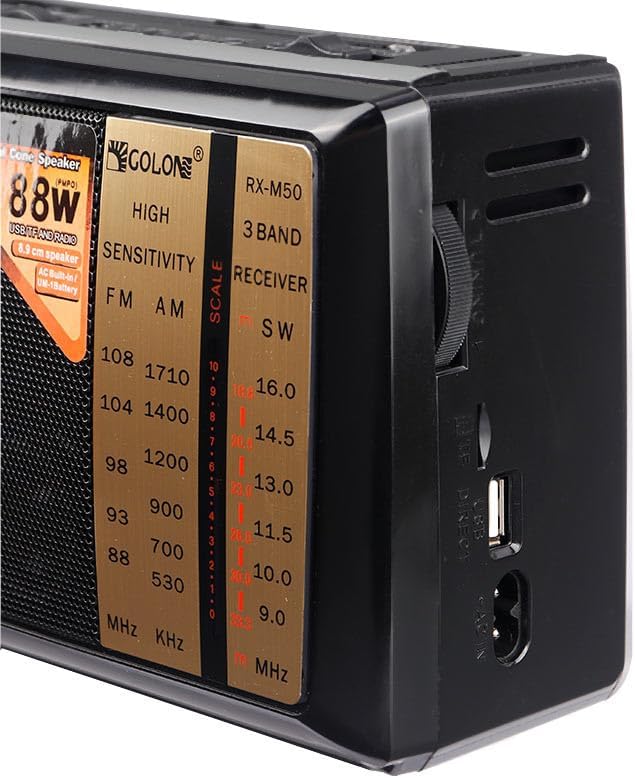
Figure 3: Right Side Panel
This image shows the right side of the radio, featuring the large tuning knob for radio frequency selection, a USB port, and the AC IN power input. The side also has ventilation slots.
5. Setup
5.1 Power Connection
The GOLON RX-M50BT can be powered in three ways:
- AC Power: Connect the provided power adapter to the "AC IN" port on the side of the radio (refer to Figure 3) and plug it into a 220V wall outlet.
- Built-in Rechargeable Battery: The radio has an internal rechargeable battery. When connected to AC power, the battery will charge automatically.
- External Batteries: For portable use without AC power, insert two UM-1 (D-type) batteries into the battery compartment (located on the back, not shown in images). Ensure correct polarity.
5.2 Antenna Adjustment
For optimal radio reception, extend the telescopic antenna fully. Adjust its direction for the best signal quality.
6. Operating Instructions
6.1 Power On/Off and Volume Control
- To turn the radio ON, rotate the VOLUME knob (refer to Figure 2) clockwise until you hear a click.
- To adjust the volume, continue rotating the VOLUME knob.
- To turn the radio OFF, rotate the VOLUME knob counter-clockwise until it clicks off.
6.2 Radio Operation (AM/FM/SW)
- Select Band: Use the band selector switch (refer to Figure 2) to choose between FM, AM, or SW (Shortwave) bands.
- Tune Station: Rotate the TUNING knob (refer to Figure 3) on the side of the radio to search for radio stations. The frequency scale on the front panel (refer to Figure 1) will indicate the selected frequency.
- Adjust Antenna: For best reception, extend and adjust the position of the telescopic antenna.
6.3 USB/TF Card Playback
The radio supports MP3 and WMA audio formats from USB drives and TF (Micro SD) cards.
- Insert Media: Insert a USB flash drive into the USB port or a TF card into the TF slot (refer to Figure 2). Ensure the card is inserted correctly.
- Select Mode: The radio should automatically switch to USB/TF playback mode. If not, use the mode switch (if available, otherwise it might be integrated with the band selector or auto-detect).
- Playback Controls: Use the playback buttons (PLAY/PAUSE, PREV, NEXT, REW, F.FWD) (refer to Figure 2) to control your music.
- Note: An SD to Micro SD adapter may be required for standard SD cards.
6.4 X-Bass Function
The radio features an X-Bass function for enhanced bass sound. This function is typically activated by a dedicated switch or button (location not specified in provided data, assume it's integrated or always on if no switch is visible).
7. Maintenance
- Cleaning: Wipe the unit with a soft, dry cloth. Do not use abrasive cleaners or solvents.
- Storage: If not using the radio for an extended period, remove external batteries to prevent leakage. Store in a cool, dry place.
- Battery Care: Recharge the built-in battery regularly to maintain its lifespan, even if not in frequent use.
8. Troubleshooting
| Problem | Possible Cause | Solution |
|---|---|---|
| No power | Power adapter not connected; built-in battery depleted; external batteries inserted incorrectly or depleted. | Check AC connection; charge built-in battery; replace or correctly insert external batteries. |
| Poor radio reception | Antenna not extended or poorly positioned; weak signal in the area. | Extend and adjust the telescopic antenna; try moving the radio to a different location. |
| USB/TF card not playing | Card inserted incorrectly; unsupported file format; corrupted files. | Reinsert card correctly; ensure files are MP3/WMA; try a different card or files. |
| No sound | Volume too low; Mute function active (if applicable); speaker malfunction. | Increase volume; check for a mute button; contact support if issue persists. |
9. Specifications
| Model | RX-M50BT |
| Brand | GOLON |
| Color | Black |
| Radio Bands | FM, AM, SW |
| Audio Playback | USB, TF Card (MP3, WMA formats) |
| Speaker Output | 88 Watts (P.M.P.O.) |
| Speaker Size | 8.9 cm (Dual Cone Speaker) |
| Power Source | AC 220V, Built-in Rechargeable Battery, 2 x UM-1 (D-type) Batteries |
| Included Components | Power Adapter |
| Dimensions (L x W x H) | 48mm x 136mm x 86mm |
Note: Specifications are subject to change without prior notice.
10. Warranty and Support
10.1 Warranty Information
The provided product information indicates that the warranty is "Non-applicable". Please refer to your point of purchase for any return or exchange policies.
10.2 Customer Support
For any questions or issues not covered in this manual, please contact your retailer or the manufacturer's customer service. Keep your purchase receipt for reference.