Introduction
This manual provides detailed instructions for the installation, operation, and maintenance of your APOTO Motion Sensor Outdoor Porch Light with GFCI Outlet. Please read this manual thoroughly before installation and use to ensure safe and proper functioning of the product.
The APOTO outdoor wall light is designed to provide illumination and convenient power access for your outdoor spaces. It features a motion sensor, dusk-to-dawn functionality, and two built-in GFCI outlets for enhanced safety and utility.
Safety Information
WARNING: Risk of electric shock. Turn off power at the circuit breaker or fuse box before installation or servicing. Improper installation can result in serious injury or death.
- Always consult a qualified electrician if you are unsure about the installation process.
- Ensure all wiring connections are secure and comply with local electrical codes.
- Do not exceed the maximum power rating of the GFCI outlets (14.5A, 1740W).
- This fixture is for outdoor use only.
- Use only E26 base incandescent or dimmable LED bulbs. Non-dimmable LED bulbs may cause flickering in motion sensor mode.
- The GFCI outlets are designed with a downward-facing orientation for improved rain protection.
What's in the Box
Verify that all components are present before beginning installation:
- APOTO Motion Sensor Outdoor Porch Light Fixture
- Mounting Hardware
- Instruction Manual (this document)
Note: Bulb is not included.
Setup and Installation
Installation is straightforward. Follow these steps carefully:
- Turn off Power: Before starting, ensure the power to the installation area is turned off at the circuit breaker.
- Prepare Mounting Surface: Ensure the wall surface is clean and suitable for mounting. The recommended installation height is approximately 6 feet for optimal motion detection.
- Mount the Fixture: Use the provided mounting hardware to securely attach the light fixture to the wall. The bottom opening design facilitates easy bulb installation and replacement.
- Wire Connections: Connect the fixture's wires to your household wiring according to standard electrical practices (typically black to black, white to white, and ground to ground). Ensure all connections are tight and insulated.
- Install Bulb: Insert a standard E26 incandescent or dimmable LED bulb (not included) into the ceramic socket.
- Activate GFCI Outlet: After installation and restoring power, press the "TEST" button on the GFCI outlet, then press the "RESET" button to activate the GFCI function.
- Restore Power: Turn the power back on at the circuit breaker.
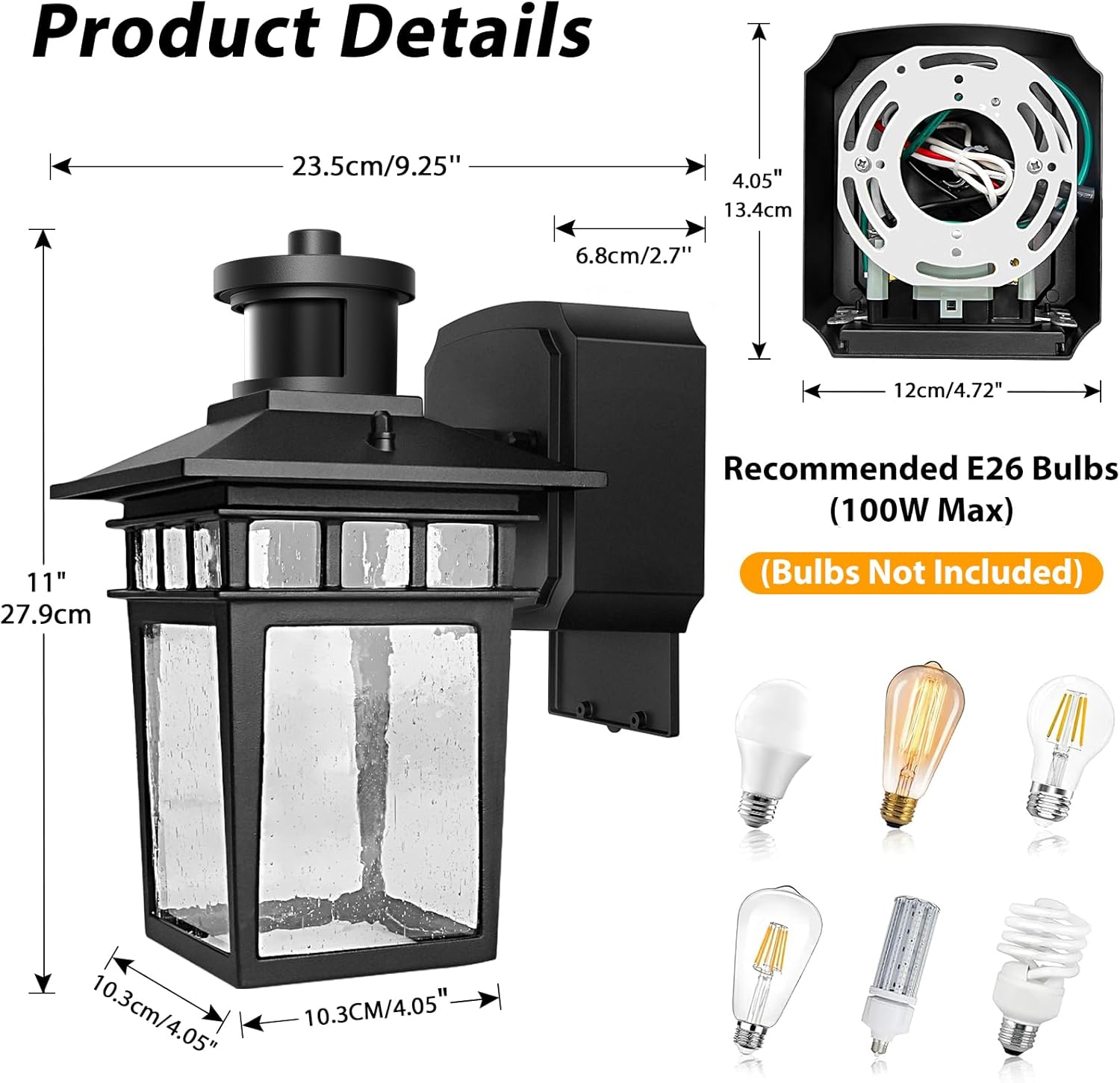
Image: Product dimensions and recommended E26 bulb types (bulbs not included). This image shows the physical dimensions of the light fixture and illustrates various compatible E26 bulb shapes.

Image: Close-up view of the GFCI outlet, highlighting the "TEST" and "RESET" buttons. This image demonstrates the location of the GFCI controls for activation and testing.
Operating Instructions
Your APOTO porch light offers three distinct lighting modes and customizable settings.
Lighting Modes
The light features a slide switch to select between modes:
- PC Mode (Photocell Mode): The light automatically turns on at night and turns off during the day. This mode provides continuous illumination from dusk till dawn.
- Auto Mode: The light remains off until motion is detected at dusk. Upon motion detection, the light illuminates at 100% brightness. It will turn off after a set duration (default 60 seconds) if no further motion is detected.
- Auto+ Mode: This mode combines motion sensing with a dim ambient light. When motion is detected, it brightens to 100%. When no motion is detected, it returns to a customizable dim brightness (0%-50%).

Image: Visual representation of the three lighting modes: PC Mode (Dusk to Dawn), Auto Mode (Motion Activated), and Auto+ Mode (Motion Activated with Dim Light). The image illustrates how the light behaves in different ambient light and motion conditions.
Customizable Settings
The advanced technology allows for personalized settings:
- Detection Range: Adjust the sensor's detection range from 0 to 40 feet. This helps prevent unwanted triggers from distant vehicles or animals.
- Illumination Duration: Set how long the light stays on after motion is detected, from 20 to 180 seconds.
- Dim Light Brightness (in Auto+ Mode): Customize the dim light brightness from 0% to 50% when no motion is detected.
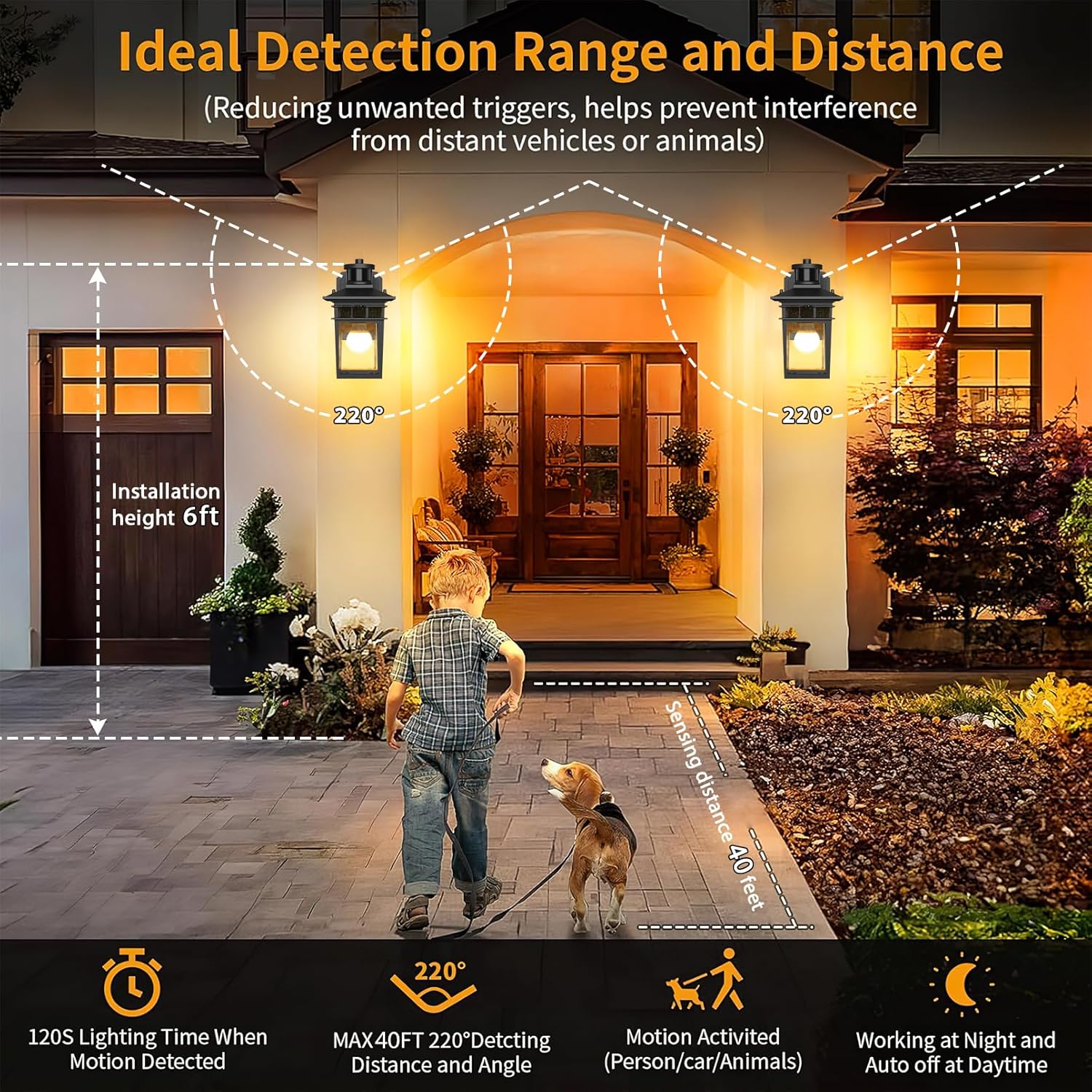
Image: Diagram showing the ideal detection range and distance for the motion sensor, indicating a maximum 40ft sensing distance and a 220-degree detection angle. It also shows the recommended installation height for optimal performance.
GFCI Outlet Usage
The two built-in GFCI outlets provide safe and convenient power:
- The outlets are compatible with both 2-prong and 3-prong plugs.
- They protect against power surges, short circuits, and electrical hazards.
- Maximum power capacity: 14.5A, 1740W.
- Regularly test the GFCI function by pressing the "TEST" button, then "RESET" to ensure proper operation.

Image: An outdoor patio scene at night, featuring the APOTO porch light illuminating the area and powering various devices like a lawnmower, security camera, leaf blower, and holiday lights through its GFCI outlets. This illustrates the dual functionality of light and power.
Maintenance
Proper maintenance ensures the longevity and optimal performance of your light fixture.
- Cleaning: Periodically clean the fixture with a soft, damp cloth. Do not use abrasive cleaners or solvents. Ensure power is off before cleaning.
- Bulb Replacement: Turn off power before replacing the bulb. Allow the bulb to cool completely. Unscrew the old bulb and screw in a new E26 base incandescent or dimmable LED bulb (max 100W).
- GFCI Testing: Test the GFCI outlets monthly by pressing the "TEST" button. The "RESET" button should pop out. Press "RESET" to restore power. If it does not reset, the GFCI may be faulty and should be replaced by a qualified electrician.
- Weather Resistance: The fixture is IP65 waterproof and designed to withstand extreme weather conditions (tested working temperature: -41℃ to 40℃). However, regular inspection for any damage after severe weather is recommended.
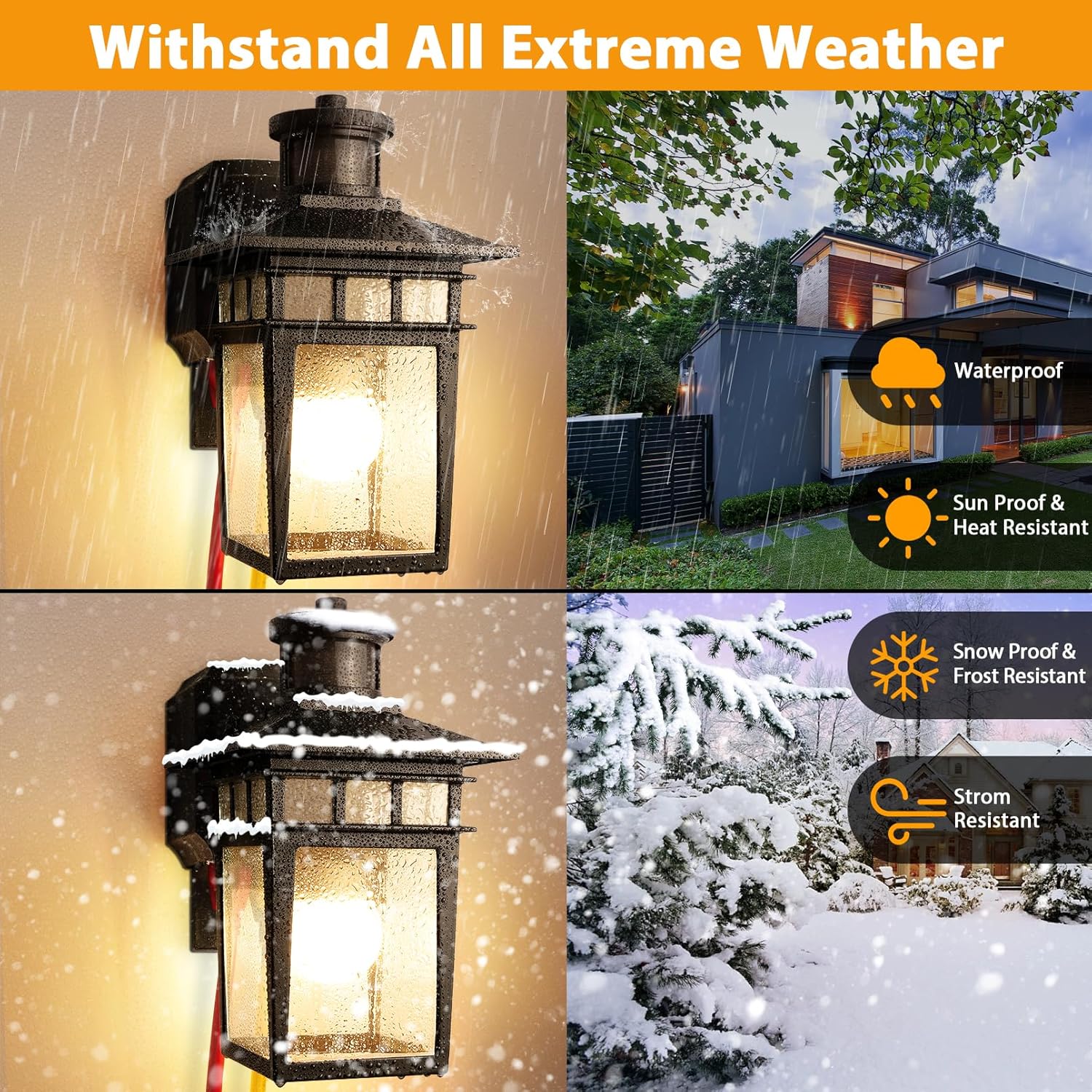
Image: A collage of images showing the light fixture enduring different weather conditions, including rain, sun, snow, and strong winds, highlighting its waterproof, sun-proof, heat-resistant, snow-proof, frost-resistant, and storm-resistant features.
Troubleshooting
If you encounter issues, refer to the following common problems and solutions:
| Problem | Possible Cause | Solution |
|---|---|---|
| Light does not turn on. |
|
|
| Light flickers. |
|
|
| Motion sensor not detecting or over-detecting. |
|
|
| GFCI outlet not working. |
|
|
Specifications
| Brand | APOTO |
| Model Name | APOTO-PorchLights-Black (0053-WD-SE-GF) |
| Color | Matt Black |
| Material | Aluminum, Glass |
| Product Dimensions | Approximately 1"L x 1"W x 1"H (Refer to product details image for exact measurements) |
| Installation Type | Wall Mount |
| Power Source | AC (120 Volts) |
| Light Source Type | LED (compatible with E26 bulbs) |
| Bulb Base | E26 (Max 100W) |
| Special Features | Dusk to Dawn Sensor, Motion Sensor, GFCI Outlet, Waterproof (IP65) |
| GFCI Outlet Max Power | 14.5A, 1740W |
| Motion Sensor Range | 0-40ft, 220° detection angle |
| Operating Temperature | -41℃ to 40℃ |
| Item Weight | 1 pound (approximately 16 ounces) |
Warranty and Support
APOTO products are manufactured with quality and durability in mind. For specific warranty details, please refer to the warranty card included with your purchase or contact APOTO customer support.
If you have any questions, require technical assistance, or need to report a problem, please contact our customer support team:
- Website: Visit the APOTO Store on Amazon
- Email: [Insert Manufacturer Support Email Here, if available]
- Phone: [Insert Manufacturer Support Phone Here, if available]
Please have your model number (APOTO-PorchLights-Black) and purchase date ready when contacting support.


